1. Entwodiksyon
This manual provides comprehensive instructions for the setup, operation, and maintenance of your ProtoArc KM310 Wireless Mechanical Keyboard and Mouse combo. This device offers versatile connectivity options, including 2.4G wireless and dual Bluetooth, designed for multi-device use across various operating systems.

Image 1.1: ProtoArc KM310 Wireless Mechanical Keyboard and Mouse Combo.
2. Pake kontni
Verifye ke tout atik yo prezan nan pakè a:
- ProtoArc KM310 Wireless Mechanical Keyboard
- ProtoArc Wireless Mouse
- USB-C Chaje Kab
- 2.4G USB Receiver (stored in the mouse)
- Manyèl Itilizatè (dokiman sa a)

Image 2.1: ProtoArc KM310 package contents including keyboard, mouse, USB-C cable, and user manual.
3. Pwodwi souview
3.1 Layout ak Karakteristik Klavye a
The KM310 keyboard features a full-size 108-key layout with low-profile mechanical red switches for a smooth and quiet typing experience. It includes a numeric keypad and dedicated media keys.
3.2 Mouse Components
The ergonomic mouse includes standard left/right click buttons, a scroll wheel, a DPI switch, and forward/backward side buttons. The 2.4G USB receiver is stored in a compartment on the underside of the mouse.

Imaj 3.1: Eksploze view illustrating the internal components and weight distribution of the ProtoArc wireless mouse.
4. Enstriksyon Enstalasyon
4.1 Chaje Aparèy yo
Both the keyboard and mouse are equipped with rechargeable batteries. Use the provided USB-C cable to charge them. A full charge typically takes 2-3 hours and provides up to 150 days of standby time.
- Connect the USB-C end of the cable to the charging port on the keyboard/mouse.
- Konekte bout USB-A a nan yon sous kouran (pa egzanp, yon pò USB òdinatè, yon adaptè USB nan miray).
- The charging indicator light will show charging status and turn off when fully charged.

Image 4.1: The keyboard and mouse being charged via USB-C cables.
4.2 Connecting via 2.4G USB Receiver
This method provides a stable wireless connection for your keyboard and mouse.
- Locate the 2.4G USB receiver in the compartment on the underside of the mouse.
- Ploge reseptè USB a nan yon pò USB ki disponib sou òdinatè w lan.
- Limen klavye a ak sourit la avèk bouton pouvwa respektif yo.
- Aparèy yo ta dwe konekte otomatikman ak òdinatè w la.
4.3 Konekte via Bluetooth
The KM310 supports dual Bluetooth connections, allowing you to pair with up to two Bluetooth-enabled devices.
- Limen klavye a ak sourit.
- Sou klavye a, peze epi kenbe bouton an BT1 or BT2 Peze kle a pou 3-5 segonn jiskaske limyè endikatè a flache, sa ki endike mòd koneksyon.
- On the mouse, press the channel switch button on the underside to select BT1 or BT2, then press and hold the button for 3-5 seconds until the indicator light flashes.
- On your device (computer, tablet, smartphone), go to Bluetooth settings and search for "ProtoArc KM310 Keyboard" and "ProtoArc KM310 Mouse".
- Select the devices to pair. Once connected, the indicator light will stop flashing.
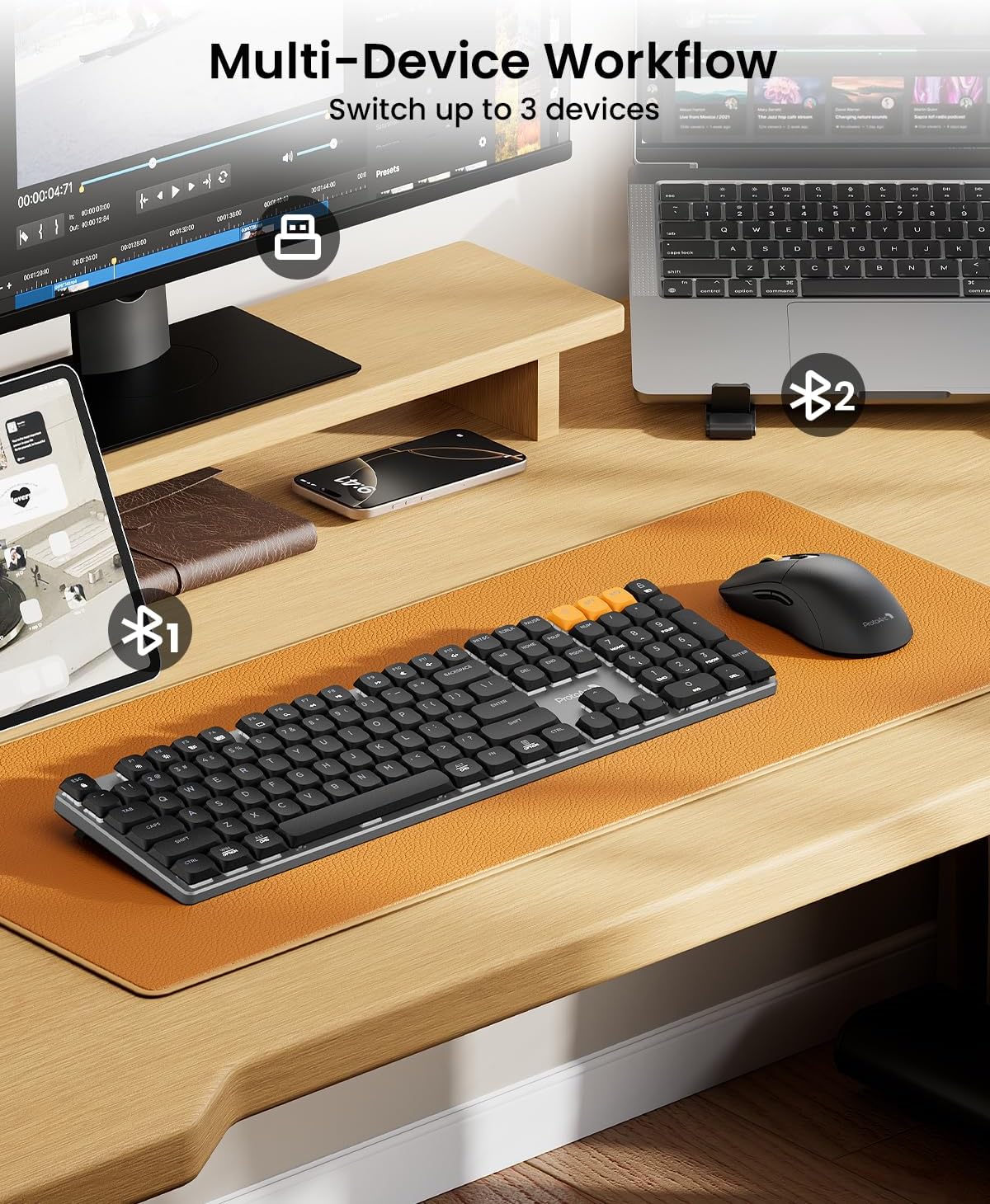
Image 4.2: The KM310 keyboard and mouse connected to a desktop PC via 2.4G, a laptop via Bluetooth 1, and a tablet via Bluetooth 2.
5. Operasyon Enstriksyon
5.1 Chanje ant Aparèy yo
Pou chanje ant aparèy konekte:
- Klavye: Peze a 2.4G, BT1, oswa BT2 key to instantly switch to the corresponding paired device.
- Sourit: Press the channel switch button on the underside of the mouse to cycle between 2.4G, BT1, ak BT2.
5.2 Fonksyon klavye
- Low-Profile Chanjman wouj: Designed for a smooth, linear, and quiet typing experience.
- Janm reglabl enklinezon: Extend the tilt legs on the underside of the keyboard to adjust the typing angle for ergonomic comfort (6° and 9° tilt options).
- Kle medya yo: Use the function keys (F1-F12) in combination with the Fn key for media control (e.g., volume, play/pause).
- OS konpatibilite: The keyboard is compatible with Windows and macOS. Specific key legends may vary slightly for different operating systems.

Image 5.1: Detail of the low-profile mechanical red switches on the ProtoArc keyboard, designed for fluid and responsive typing with low sound.

Image 5.2: The keyboard features adjustable tilt legs, offering 3°, 6°, and 9° angles for personalized comfort.
5.3 Fonksyon Sourit
- Ajisteman DPI: Peze a DPI button (located behind the scroll wheel) to cycle through 3 DPI levels (800/1200/1600). This adjusts cursor sensitivity.
- Konsepsyon ergonomique: The mouse is contoured for a natural grip, reducing hand fatigue during extended use.
- Klik an silans: The mouse features quiet click buttons, minimizing noise in shared environments.
- Bouton Avanse/Aryè: Sèvi ak bouton bò yo pou navigasyon rapid nan web navigatè ak file eksploratè.

Image 5.3: The mouse offers 3 adjustable DPI settings (800, 1200, 1600) and features a silent click design.

Image 5.4: The ProtoArc mouse features an ultra-lightweight design (63g) compared to traditional mice (approx. 100g), reducing hand fatigue.
6. Antretyen
6.1 Netwayaj
- Disconnect the keyboard and mouse from power and your devices before cleaning.
- Sèvi ak yon ti moso twal mou, ki san pèl dampened with water or a mild cleaning solution to wipe surfaces.
- For keyboard keys, use compressed air to remove dust and debris from between the keycaps.
- Evite itilize pwodui chimik ki fò, pwodui netwayaj abrazif, oubyen flite likid dirèkteman sou aparèy yo.
6.2 Depo
When not in use for extended periods, store the keyboard and mouse in a cool, dry place away from direct sunlight and extreme temperatures. Ensure they are fully charged before long-term storage to preserve battery health.
NAN. Depanaj
| Pwoblèm | Solisyon |
|---|---|
| Keyboard/Mouse not connecting via 2.4G |
|
| Keyboard/Mouse not connecting via Bluetooth |
|
| Koneksyon ki ralanti oswa ki pa ale souvan |
|
| Keys or mouse buttons unresponsive |
|
| Kisè sourit la pa deplase oswa li pa deplase |
|
8. Espesifikasyon
| Karakteristik | Detay |
|---|---|
| Modèl | KM310 |
| Koneksyon | 2.4G san fil, Bluetooth (BT1, BT2) |
| Kalite klavye | Mechanical, Low-Profile Switch wouj yo |
| Layout klavye | Full-size 108-key |
| Nivo DPI Sourit | 800 / 1200 / 1600 |
| Sourit Tracking | Optik |
| Kalite batri | Rechargeable (USB-C) |
| Tan pou chaje | Apeprè. 2-3 èdtan |
| Tan sibstiti | Jiska 150 jou |
| Konpatibilite | Fenèt 7/8/10, Mac OS X 10.12+, Android 4.3+ |
| Dimansyon klavye | 43 cm x 16.9 cm x 2.6 cm (16.9 pous x 6.7 pous x 1.0 pous) |
| Pwa klavye | 1.06 kg (2.34 liv) |
| Dimansyon sourit | 12.5 cm x 6.4 cm x 3.9 cm (4.9 pous x 2.5 pous x 1.5 pous) |
| Pwa sourit | 63 g (0.14 lbs) |

Image 8.1: Dimensions of the ProtoArc KM310 keyboard and mouse.
9. Garanti ak sipò
ProtoArc products are designed for reliability and performance. For information regarding warranty coverage, technical support, or service inquiries, please refer to the warranty card included in your package or visit the official ProtoArc websit. Kenbe resi acha ou pou reklamasyon garanti.


