1. Entwodiksyon
This manual provides essential information for the installation, operation, and maintenance of your YARBO M1 Robot Lawn Mower Module. This module is designed to integrate with the YARBO Core (sold separately) to provide automated lawn care with advanced features like rain detection. Please read this manual thoroughly before use to ensure safe and efficient operation.
2. Enfòmasyon sou Sekirite
Always prioritize safety when handling or operating the YARBO M1 Robot Lawn Mower Module. Failure to follow safety instructions may result in injury or damage to the product.
- Read all instructions in this manual and the YARBO Core manual before operating.
- Ensure the YARBO Core is powered off and disconnected from its power source before attaching, detaching, or performing any maintenance on the M1 module.
- Keep hands, feet, and loose clothing away from moving parts, especially the cutting blades, during operation.
- Do not operate the module in conditions other than those specified in this manual.
- Keep children and pets away from the operating area while the robot is active.
- Never attempt to modify the module or its components. Use only genuine YARBO replacement parts.
3. Pwodwi souview
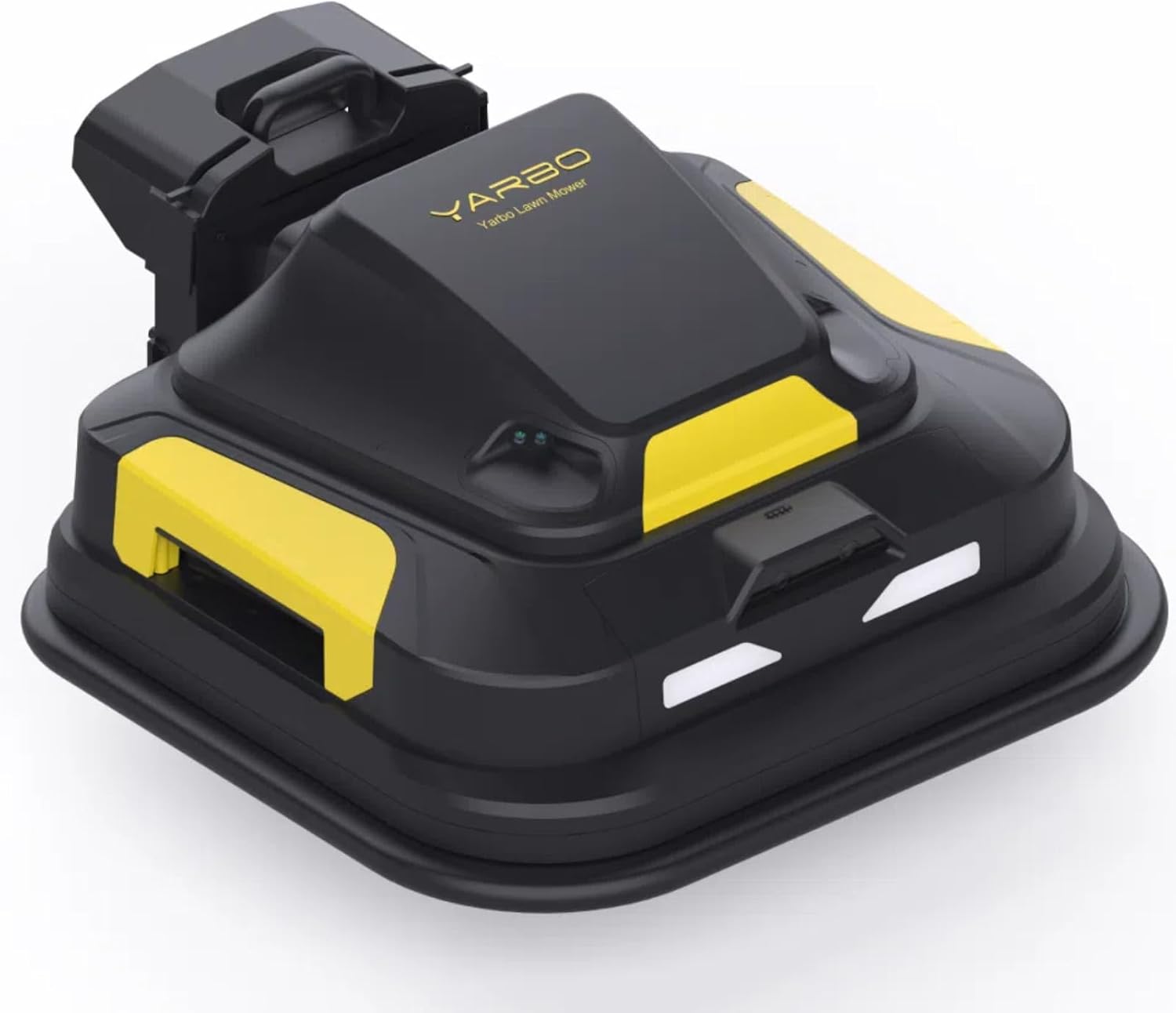
The YARBO M1 Robot Lawn Mower Module is an essential accessory for the YARBO Core, designed to provide efficient and automated lawn mowing. It features a robust cutting system and intelligent rain detection.
Karakteristik kle
- Rain Detection System: Automatically returns the YARBO Core to its charging station when rain is detected, protecting the module and ensuring optimal performance.
- Dual Cutting Discs: Equipped with two independent cutting discs, each featuring 5 blades, for thorough and efficient grass cutting.
- Wotè Koupe Reglabl: Offers a versatile cutting height range from 1.2 inches to 4 inches to suit various grass types and preferences.
- 20-inch Cutting Width: Provides a wide cutting path for faster lawn coverage.
- Konsepsyon modilè: Seamlessly integrates with the YARBO Core, allowing for easy attachment and detachment.


4. Enstalasyon
4.1 Debake
- Ak anpil atansyon retire tout eleman nan anbalaj la.
- Verify that all parts are present and undamaged.
- Retain the packaging for future transport or storage of the module.
4.2 Attaching the M1 Module to the YARBO Core
- Ensure the YARBO Core is powered off and securely parked on a flat, stable surface.
- Align the M1 module with the designated attachment points on the YARBO Core.
- Gently push the module into place until it clicks or locks securely. Refer to the YARBO Core manual for specific attachment instructions.
- Confirm that the module is firmly attached and does not wobble before proceeding.
4.3 Initial Configuration (via YARBO App)
The YARBO M1 module's operational settings, including mowing schedules and zone management, are configured through the YARBO mobile application.
- Download the YARBO app from your smartphone's app store (available for iOS and Android).
- Follow the in-app instructions to connect to your YARBO Core and M1 module.
- Use the app to define mowing zones, set no-go areas, and establish mowing schedules according to your lawn's requirements.

5. Operasyon Enstriksyon
5.1 Kòmanse yon travay koupe gazon
- Ensure the M1 module is correctly attached to the YARBO Core and the Core's battery is sufficiently charged.
- Open the YARBO app on your smartphone.
- Select the desired mowing zone and initiate the mowing task through the app interface. The robot will then proceed to mow the designated area according to its programmed schedule or immediate command.
5.2 Rain Detection System
The M1 module is equipped with an integrated rain detection system. Upon detecting precipitation, the module will automatically cease its current operation and guide the YARBO Core back to its charging station. This feature helps protect the module from water damage and ensures optimal performance by avoiding mowing wet grass.
5.3 Ajisteman wotè koupe a
The cutting height of the M1 module can be adjusted electronically via the YARBO app settings. The available cutting heights range from 1.2 inches to 4 inches, allowing you to customize the lawn finish.


6. Antretyen
Regular maintenance ensures the longevity and optimal performance of your YARBO M1 Robot Lawn Mower Module.
6.1 Netwayaj
- After each mowing session, or as needed, clean the cutting deck and blades to remove grass clippings, dirt, and debris.
- Use a stiff brush, cloth, or compressed air. Avoid using high-pressure water directly on the module, especially near electronic components.
- Ensure the module is completely dry before storage or next use.
6.2 Enspeksyon ak Ranplasman Lam
- Inspect the cutting blades for sharpness, wear, and damage before each use. Dull or damaged blades can lead to poor cutting quality and increased power consumption.
- Replace blades as necessary. Always use genuine YARBO replacement blades. Refer to the YARBO Core manual for detailed instructions on safe blade replacement.
6.3 Depo
- When not in use for extended periods, especially during off-season, store the M1 module in a dry, protected area, away from direct sunlight and extreme temperatures.
- Ensure the YARBO Core's battery is fully charged before long-term storage to maintain battery health.
NAN. Depanaj
This section provides solutions to common issues you might encounter with your YARBO M1 Robot Lawn Mower Module.
| Pwoblèm | Kòz posib | Solisyon |
|---|---|---|
| Module not starting | Module not properly attached to YARBO Core. | Ensure the M1 module is securely connected to the YARBO Core. |
| Module not starting | YARBO Core battery is low or depleted. | Charge the YARBO Core battery. |
| Poor cutting quality | Dull or damaged cutting blades. | Inspect and replace cutting blades as needed. |
| Module not returning to base in rain | Rain sensor obstructed or faulty. | Clean the rain sensor. If the issue persists, contact YARBO support. |
| Pwoblèm koneksyon aplikasyon an | Wi-Fi or Bluetooth interference, or app malfunction. | Check your network connection, restart the YARBO app, and restart the YARBO Core. |
8. Espesifikasyon
- Mak: YARBO
- Modèl: M1 modil
- Sous pouvwa: Battery Powered (via YARBO Core)
- Materyèl: Plastik
- Koulè: Nwa
- Style: Lawn Mower Module
- Pwa atik: 66 liv
- Koupe Lajè: 20 pous
- Mòd operasyon: Otomatik
- Dimansyon pwodwi: 50"D x 27"W x 20"H
- Wotè Koupe Maksimòm Reglabl: 4 pous
- Wotè Koupe Minimòm Reglabl: 1.2 pous
- Manifakti: Yarbo
9. Garanti ak sipò
For detailed warranty information and technical support regarding your YARBO M1 Robot Lawn Mower Module, please refer to the documentation provided with your YARBO Core or visit the official YARBO websit.
Ou ka vizite tou YARBO Store on Amazon for additional product information, accessories, and customer service contacts.


