1. Entwodiksyon
Thank you for choosing the KOIOS H13 True HEPA Air Purifier. This manual provides important information for the proper setup, operation, and maintenance of your air purifier. Please read it thoroughly before use and keep it for future reference. This air purifier is designed to improve indoor air quality by capturing various airborne particles and odors, creating a healthier environment for you and your family.
2. Enfòmasyon sou Sekirite
- Always unplug the air purifier before moving it, opening the casing, or performing any maintenance.
- Pa opere aparèy la ak yon kòd oswa ploge ki domaje.
- Keep the air purifier away from water or wet areas.
- Asire w ke gen bon vantilasyon toutotou aparèy la; pa bloke antre oswa sòti lè yo.
- Aparèy sa a pa fèt pou itilize pa moun (ki gen ladan timoun) ki gen kapasite fizik, sansoryèl oswa mantal redwi, oswa ki pa gen eksperyans ak konesans, sof si yo te ba yo sipèvizyon oswa enstriksyon konsènan itilizasyon aparèy la pa yon moun ki responsab sekirite yo.
- Pa mete okenn objè nan vantilasyon yo.
- Use only genuine KOIOS replacement filters to ensure optimal performance and avoid damage.
3. Pwodwi souview
The KOIOS H13 True HEPA Air Purifier (Model BK08) is a compact and efficient air purification system. It features a 360° air intake and a multi-layer filtration system to effectively clean the air in your home.
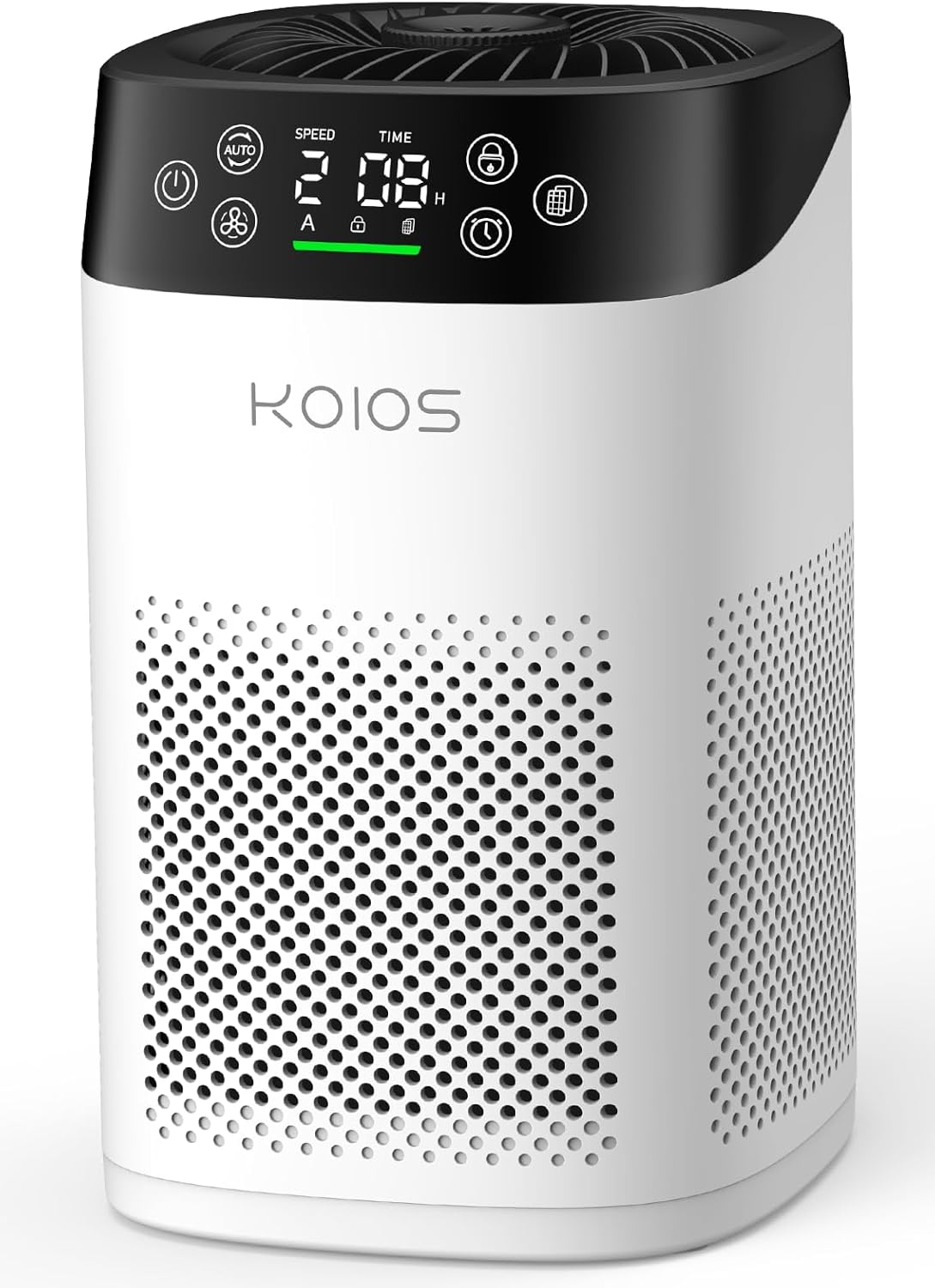
Figure 3.1: KOIOS H13 True HEPA Air Purifier (Model BK08)
Karakteristik kle:
- H13 Vrè Filtè HEPA: Captures 99.97% of airborne particles as small as 0.3 microns, including smoke, pollen, dander, and pet hair.
- Capteur Kalite lè: Built-in sensor detects air quality levels and displays them on the screen in real-time.
- All-in-One LED Touch Screen: Intuitive display for PM2.5 levels, fan speed, child lock, filter replacement reminder, and timer settings.
- Operasyon ultra-trankil: Operates as low as 15dB in sleep mode, ensuring a peaceful environment.
- Aroma Fragrance Function: Includes an aroma sponge for adding essential oils to disperse a gentle fragrance.
- Timoun-Lock: Anpeche chanjman aksidantèl nan paramèt pa timoun oswa bèt kay.
- Konsepsyon kontra enfòmèl ant: Dimensions of 6.3" L x 6.9" W x 10.3" H, suitable for various spaces.
Kontwòl Panel Plis paseview:
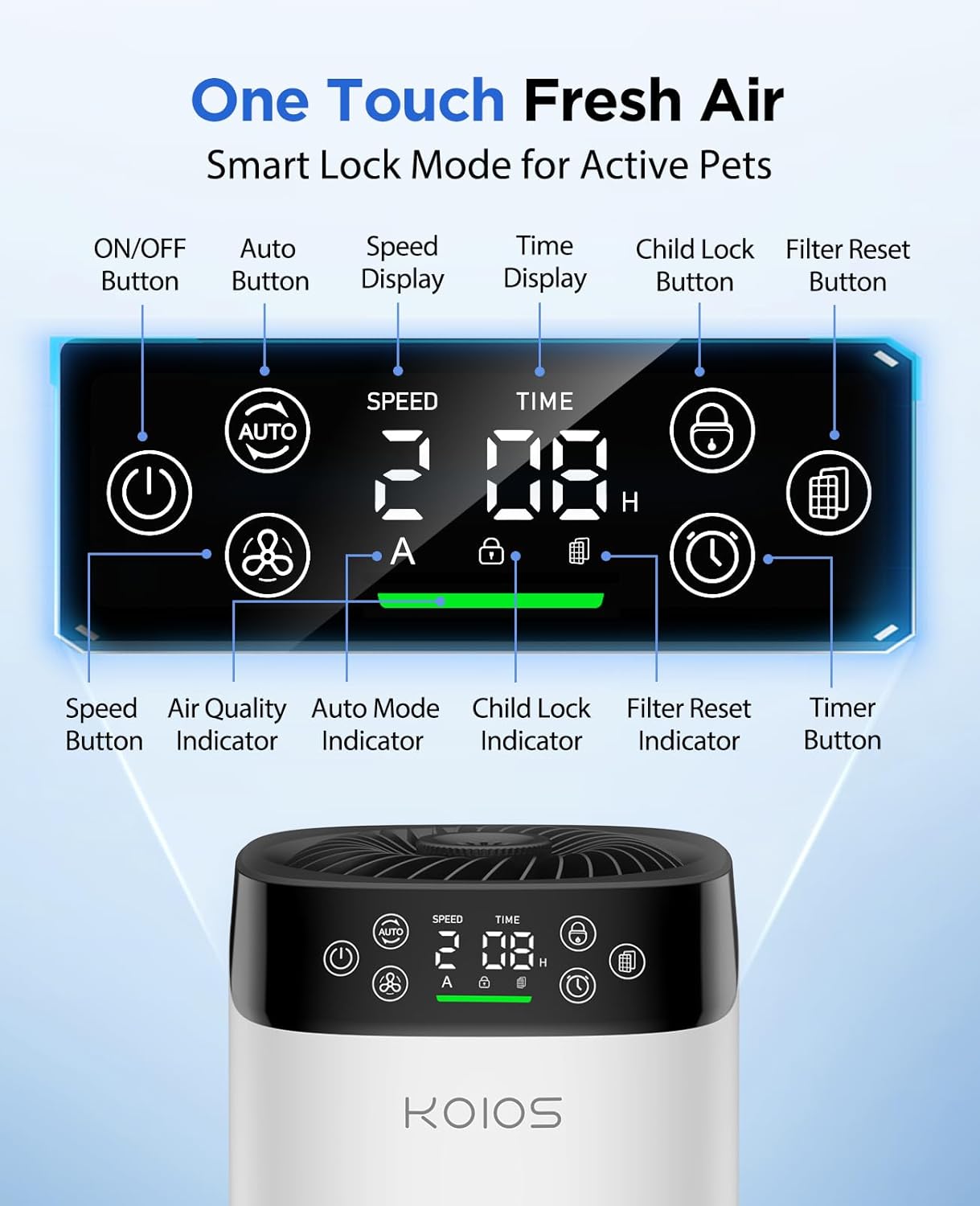
Figi 3.2: Detaye view of the LED Touch Screen Control Panel
- Bouton ON/OFF: Limen oswa etenn inite a.
- Bouton Auto: Activates automatic mode, adjusting fan speed based on air quality.
- Bouton vitès: Cycles through fan speeds (Low, Mid, High).
- Bouton pou fèmen timoun: Press and hold for 3 seconds to activate/deactivate child lock.
- Bouton Reset filtè: Press and hold for 3 seconds after replacing the filter to reset the reminder.
- Bouton revèy: Sets the operating timer (1-12 hours).
- Endikatè Kalite Air: Displays air quality via color (Green: Excellent, Yellow: Good, Orange: Moderate, Red: Poor).
4. Enstalasyon
Before first use, ensure to remove the protective plastic from the filter.
- Vire pirifikatè lè a tèt anba.
- Twist the base counter-clockwise to unlock and remove it.
- Carefully pull out the filter. It will be enclosed in a plastic bag.
- Retire anbalaj an plastik nan filtè a.
- Insert the filter back into the air purifier.
- Replace the base and twist clockwise to lock it securely.
- Plug the power adapter into the port at the back of the unit, then into a power outlet.

Figure 4.1: Filter removal and installation process
The filter features three layers for enhanced purification: a washable pre-filter, an H13 True HEPA filter, and an activated carbon filter.

Figure 4.2: Close-up of the three-layer filter
5. Operasyon Enstriksyon
Limen/Etenyen:
Peze a ON/OFF bouton ki sou panèl kontwòl la pou limen oswa etenn aparèy la.
Ajiste vitès fanatik:
Peze a Vitès button to cycle through Low, Mid, and High fan speeds. Higher speeds provide faster air purification.
Mòd otomatik:
Peze a Oto button to enable automatic mode. The air purifier will automatically adjust its fan speed based on the detected air quality.
Fonksyon Lock Timoun:
Pou aktive sekirite timoun nan, peze epi kenbe bouton an Timoun Lock button for 3 seconds. The lock icon will appear on the display. To deactivate, press and hold the button again for 3 seconds.
Mete revèy la:
Peze a Revèy button to set the desired operating time from 1 to 12 hours. The unit will automatically turn off after the set time.
Endikatè Kalite Air:
The air quality indicator light on the display changes color to reflect the current air quality:
- Vèt: Excellent Air Quality (0-50 ug/m³)
- Papye jòn: Good Air Quality (50-100 ug/m³)
- Orange: Moderate Air Quality (100-150 ug/m³)
- Wouj: Poor Air Quality (>150 ug/m³)
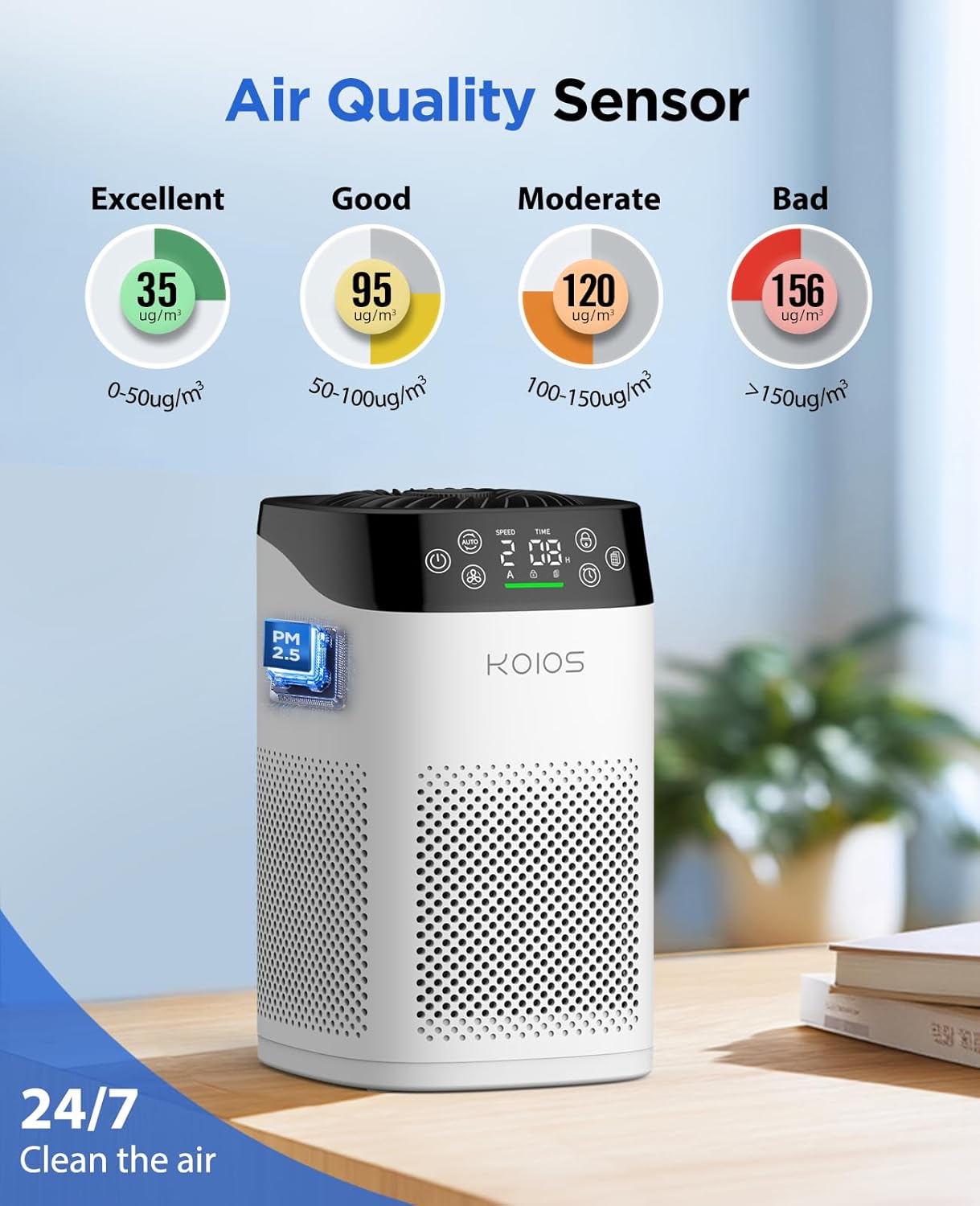
Figure 5.1: Air Quality Sensor and Display
Fonksyon aromaterapi:
To use the aromatherapy function, locate the aroma sponge compartment on the top of the unit. Add a few drops of your favorite essential oil to the aroma pad. Close the compartment. The air purifier will then disperse a gentle fragrance along with the purified air.
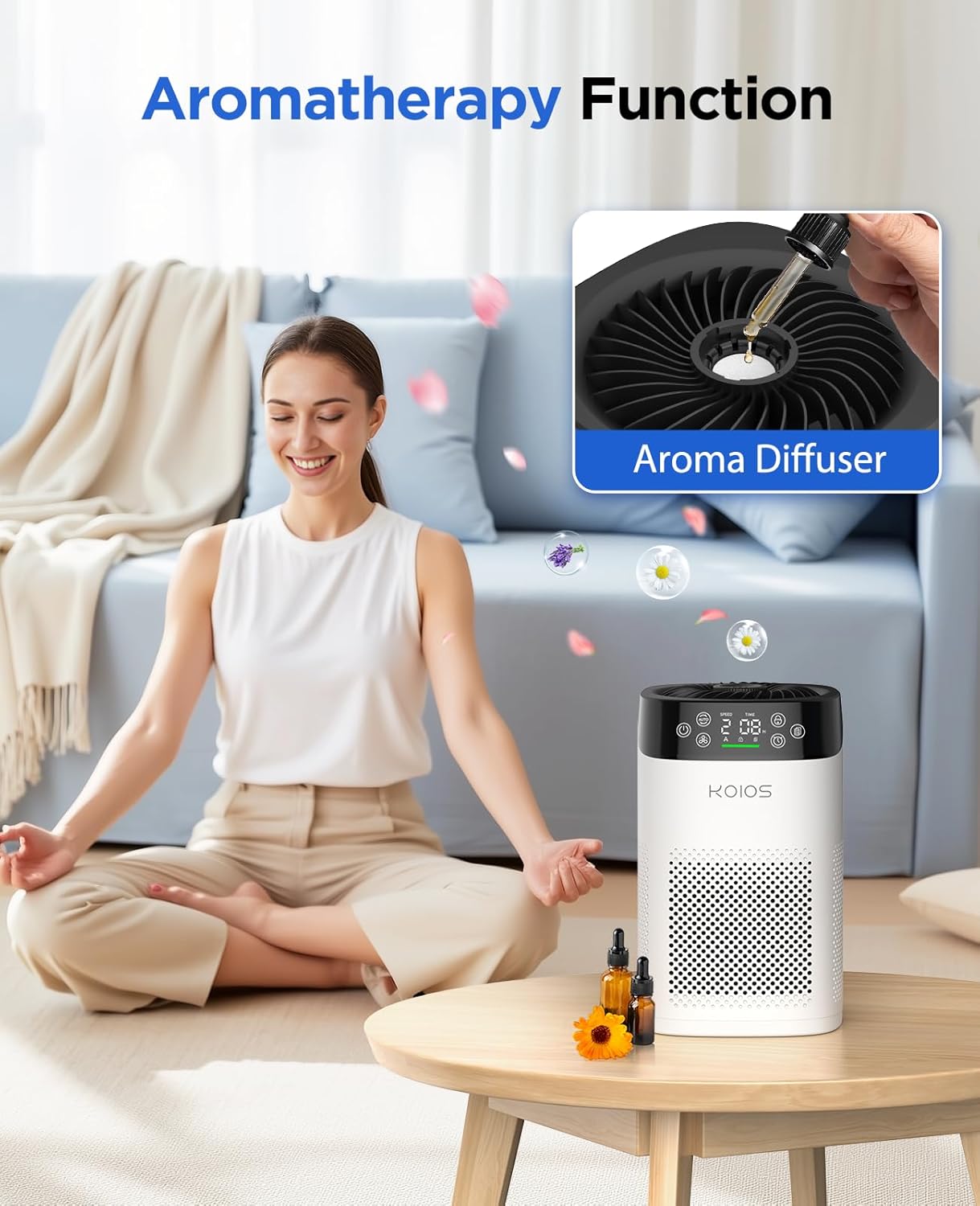
Figure 5.2: Adding essential oils for aromatherapy
6. Antretyen
Ranplasman filtè:
The air purifier is equipped with a filter replacement reminder function. When the filter needs to be replaced, the filter icon on the display will start flashing. For optimal performance, it is recommended to replace the filter every 3-6 months, depending on usage and environment. Use only genuine KOIOS BK08 replacement filters (ASIN: B0F42QRPC1).

Figure 6.1: Steps for checking, replacing, and resetting the filter reminder
- Check the filter indicator: The helpful indicator lets you know when to replace the filter.
- Replace the filter: Unplug the air purifier and remove the front cover. Remove the old filter and install a new filter.
- Reset it: Press and hold the filter icon for 3 seconds to reset.
Netwaye inite a:
Wipe the exterior of the air purifier with a soft, dry cloth. Do not use abrasive cleaners or solvents. The pre-filter layer of the main filter can be washed, but ensure it is completely dry before re-inserting.
NAN. Depanaj
| Pwoblèm | Kòz posib | Solisyon |
|---|---|---|
| Inite pa limen | Pa branche; Kouran koupetage; Kòd kouran domaje. | Ensure unit is properly plugged in; Check power outlet; Contact support if cord is damaged. |
| Airflow fèb | Filter is dirty or clogged; Air inlets/outlets are blocked. | Replace the filter; Ensure no obstructions around the unit. |
| Bri etranj | Filter not installed correctly; Foreign object inside. | Reinstall filter correctly; Unplug and check for foreign objects. |
| Odè a pèsiste | Filter needs replacement; Strong odor source. | Replace the filter; Identify and remove strong odor sources. |
| Endikatè kalite lè a toujou wouj/zoranj | High pollutant levels; Sensor needs cleaning. | Allow time for purification; Clean the sensor area with a dry cotton swab. |
8. Espesifikasyon
| Spesifikasyon | Detay |
|---|---|
| Nimewo Modèl | BK08 |
| Mak | KOIOS |
| Dimansyon pwodwi | 6.3"D x 6.9"W x 10.3"H |
| Pwa | 2.05 liv |
| Kouvèti zòn etaj | Jiska 1200 pye kare |
| Kalite filtre | H13 True HEPA (3-stage filtrasyon) |
| Nivo bri | Jiska 15dB (Mòd Dòmi) |
| Wattage | 6 wat |
| Sètifikasyon | CARB, ETL, DOE, FCC Certified |
| Koulè | Blan |
9. Garanti ak sipò
KOIOS products are built with high-quality and durable materials. For any product-related inquiries, technical support, or warranty claims, please contact KOIOS customer service. Refer to the product packaging or the official KOIOS websit la pou jwenn enfòmasyon kontak ki pi ajou yo.
Protection plans are available for purchase separately to extend coverage beyond the manufacturer's warranty. These include 3-Year and 4-Year Protection Plans, as well as a Complete Protect plan.


