1. Entwodiksyon
This manual provides essential instructions for the safe and effective use of your AGM H6 Rugged Smartphone. The AGM H6 is designed for durability, featuring IP68/IP69K waterproofing, 1.8m drop resistance, and 360° dust protection. It operates on Android 13 and is equipped with an Octa-Core T606 processor, 16GB RAM, 256GB ROM, and a 6.56-inch 90Hz HD+ touchscreen.

Image 1.1: Front, side, and rear view of the AGM H6 Rugged Smartphone.
2. Pake kontni
Verifye ke tout atik yo prezan nan pake pwodwi ou a:
- AGM H6 Smart Phone
- Adaptè pouvwa
- USB kab
3. Aparèy souview
Familiarize yourself with the physical components of your AGM H6 smartphone.

Imaj 3.1: Plis paseview of AGM H6 key features and specifications.
3.1. Bouton fizik ak pò yo
- Bouton pouvwa: Located on the side, used to power on/off or wake/sleep the screen.
- Bouton Volim: Ajiste volim medya a ak volim sonri a.
- Bouton personnalisable: A dedicated button that can be programmed for quick access to specific applications or functions.
- USB-C pò: Pou chaje ak transfè done.
- Plas pou kat SIM/MicroSD: Located on the side, for inserting SIM cards and a MicroSD card.
3.2. Sistèm Kamera
- Kamera dèyè: 50MP primary lens with a 2MP macro lens.
- Kamera devan: 8MP pou selfie ak apèl videyo.

Imaj 3.2: Detaye view of the AGM H6 camera specifications.
4. Inisyal Enstalasyon
4.1. Installing SIM and MicroSD Cards
- Locate the SIM/MicroSD card slot on the side of the phone.
- Sèvi ak zouti ejèksyon SIM ki vini ak li a pou ouvri plato a.
- Carefully place your Nano-SIM cards and/or MicroSD card into the designated slots on the tray. Ensure correct orientation.
- Dousman pouse plato a tounen nan telefòn nan jiskaske li kole ak kò aparèy la.

Image 4.1: The 3-card slot for dual SIM and MicroSD expansion.
4.2. Chaje Aparèy la
Before first use, fully charge your AGM H6. Connect the USB cable to the phone's USB-C port and the power adapter, then plug the adapter into a wall outlet.
4.3. Limen ak Inisyal Konfigirasyon
- Press and hold the Power button until the AGM logo appears.
- Swiv enstriksyon yo sou ekran an pou chwazi lang ou, konekte ak yon rezo Wi-Fi, epi konfigire kont Google ou.
- Configure fingerprint and face unlock for secure and swift access.
5. Operasyon Enstriksyon
5.1. Navigasyon debaz
- Manyen: Tape ikòn yo pou ouvri aplikasyon oswa chwazi atik.
- Glise: Deplase dwèt ou sou ekran an pou defile oswa navige ant ekran yo.
- Zongle: Sèvi ak de dwèt pou agrandi oswa diminye foto yo epi web paj.
5.2. Limen/Etenn/Rekòmanse
- Pouvwa sou: Peze epi kenbe bouton pouvwa a.
- Etenn/Rekòmanse: Press and hold the Power button until the power menu appears, then select 'Power off' or 'Restart'.
5.3. Screen Lock and Unlock
The AGM H6 supports fingerprint and face recognition for secure unlocking.
- Degaje anprent: Anrejistre anprent dwèt ou yo nan Anviwònman > Sekirite > Anprent.
- Debloke figi: Konfigire rekonesans vizaj nan Anviwònman > Sekirite > Deblokaj vizaj.
5.4. Koneksyon
- Wi-Fi: Ale nan Anviwònman > Rezo ak entènèt > Wi-Fi pou konekte ak rezo ki disponib yo.
- Bluetooth: Enable Bluetooth in Settings > Connected devices to pair with other devices.
- NFC: Pou peman san kontak ak koneksyon rapid, aktive NFC nan Anviwònman > Aparèy konekte > Preferans koneksyon > NFC.
- GPS: Sèvis lokalizasyon yo aktive pa default pou navigasyon ak aplikasyon ki baze sou lokalizasyon.
5.5. Itilizasyon kamera
Open the Camera app to capture photos and videos.
- Tape bouton deklanchè a pou pran yon foto.
- Switch between photo, video, and macro modes.
- Use the front camera for selfies.
5.6. Customizable bouton
The dedicated customizable button can be configured in Settings to launch a specific app or perform a quick action. Refer to the phone's settings for customization options.
6. Antretyen
6.1. Netwaye Aparèy Ou a
Use a soft, lint-free cloth to clean the screen and body of the phone. Avoid harsh chemicals or abrasive materials. For waterproof cleaning, rinse with fresh water and dry thoroughly.
6.2. Water and Dust Resistance (IP68/IP69K)
The AGM H6 is rated IP68/IP69K for water and dust resistance. This means it can withstand immersion in water up to 1.5 meters for 30 minutes and is protected against high-pressure, high-temperature water jets and dust ingress. Ensure all ports are securely closed before exposing the phone to water or dust.
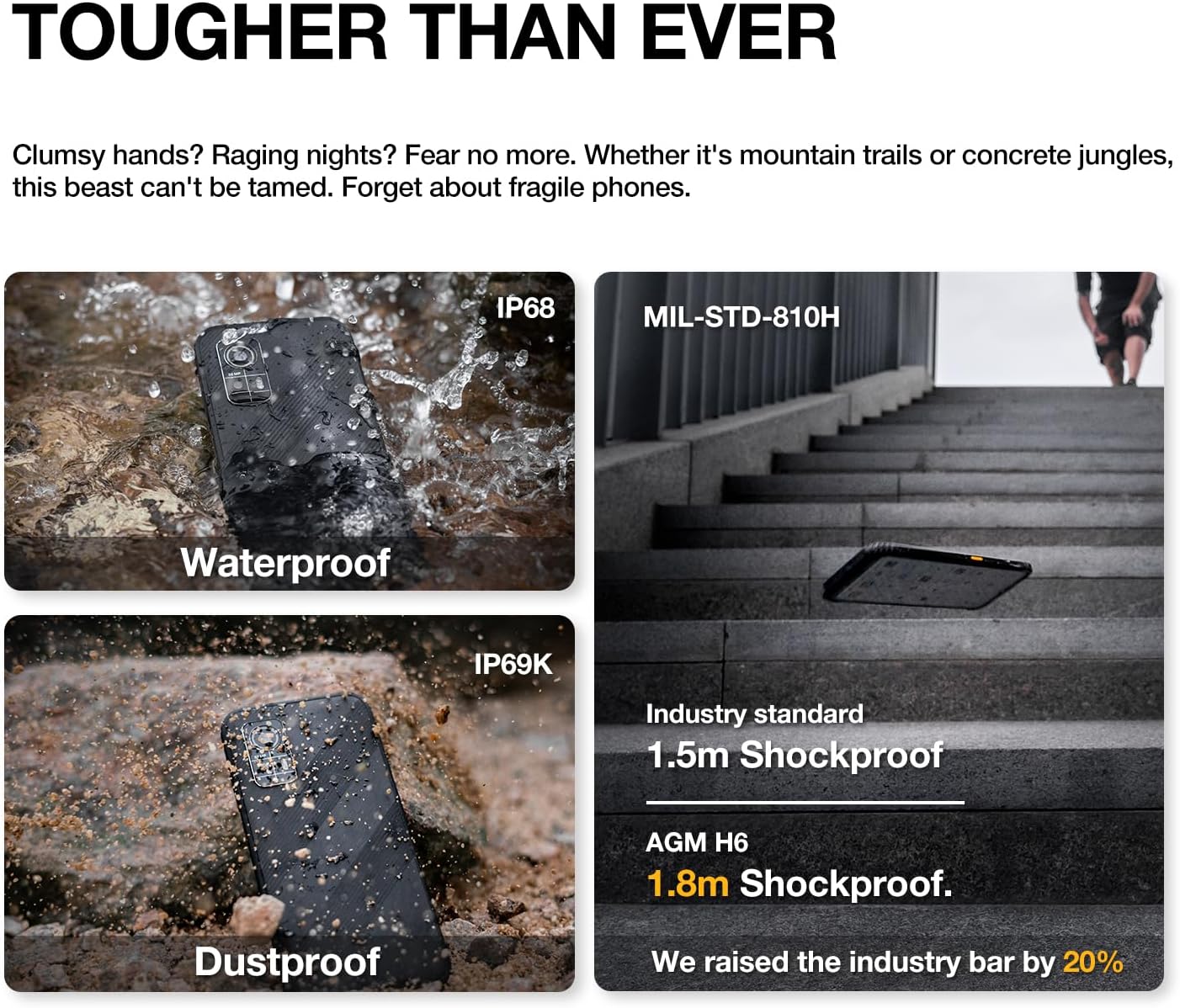
Image 6.1: The AGM H6's rugged features, including waterproof, dustproof, and shockproof ratings.
6.3. Rezistans kont gout
The phone is designed to withstand drops up to 1.8 meters. While rugged, extreme impacts can still cause damage. Handle with care.
6.4. Swen batri
- Evite ekspoze telefòn nan nan tanperati ekstrèm.
- Sèvi sèlman ak plato ak kab ki vini ak aparèy la.
- Pa dechaje batri a nèt regilyèman.

Image 6.2: Battery performance metrics for the 4900mAh battery.
6.5. Mizajou lojisyèl
Tcheke epi enstale mizajou lojisyèl regilyèman pou asire pèfòmans ak sekirite optimal. Ale nan Anviwònman > Sistèm > Mizajou sistèm.
NAN. Depanaj
If you encounter issues with your AGM H6, refer to the following common solutions:
- Telefòn nan pa limen: Asire w batri a chaje. Konekte l nan plato a pou omwen 15 minit, epi eseye limen l ankò.
- Aplikasyon yo ap plante oswa bloke: Restart the phone. If the issue persists, clear the app's cache (Settings > Apps > [App Name] > Storage & cache > Clear cache).
- Pwoblèm rezo (pa gen siyal/apèl): Check if SIM card is properly inserted. Verify network settings in Settings > Network & internet > Mobile network. Contact your carrier if issues persist.
- Pèfòmans ralanti: Close unused apps, clear cache, or consider a factory reset if performance significantly degrades over time (back up data first).
- Ekran taktil la pa reponn: Restart the phone. If unresponsive, force restart by holding the power button for an extended period (usually 10-15 seconds).
7.1. Reset faktori
A factory reset will erase all data from your phone and restore it to its original factory settings. This can resolve persistent software issues. Fè yon kopi tout done enpòtan yo anvan ou kontinye.
- Ale nan Anviwònman > Sistèm > Opsyon Reyajiste.
- Chwazi 'Efase tout done yo (reyajiste nan paramèt faktori)'.
- Konfime desizyon w lan epi antre PIN/modpas ou si yo mande w.
8. Espesifikasyon
Detailed technical specifications for the AGM H6 Rugged Smartphone:
| Karakteristik | Spesifikasyon |
|---|---|
| Non modèl | H6 |
| Sistèm operasyon | Android 13.0 |
| Modèl CPU | Unisoc T606 Okta-nwayo (1.6 GHz) |
| Gwosè memwa RAM enstale | 16 GB (8GB + 8GB Adaptive) |
| Kapasite Depo memwa | 256 GB |
| Kanpe Screen Display Size | 6.56 Inches IPS HD+ |
| Rafrechisman pousantaj | 90 Hz |
| Kamera dèyè | 50MP Primary + 2MP Macro |
| Kamera devan | 8MP |
| Evalyasyon pouvwa batri | 4900 Miliamp Orè |
| Koneksyon teknoloji | Bluetooth, NFC, Wi-Fi, 4G Dual SIM |
| Karakteristik espesyal | Dual SIM, Expandable Memory, Rugged Body, Water Resistant, GPS, Fingerprint/Face Unlock, Customizable Button |
| Evalyasyon Durabilite | IP68/IP69K Waterproof & Dustproof, 1.8m Drop Resistance (MIL-STD-810H compliant) |
| Pwa atik | 8 ons (240 gram) |
| Dimansyon pake | 6.7 x 3.1 x 0.4 pous |
| Konpatibilite Operatè San Fil | T-Mobile (GSM network) |

Image 8.1: Display features of the AGM H6.
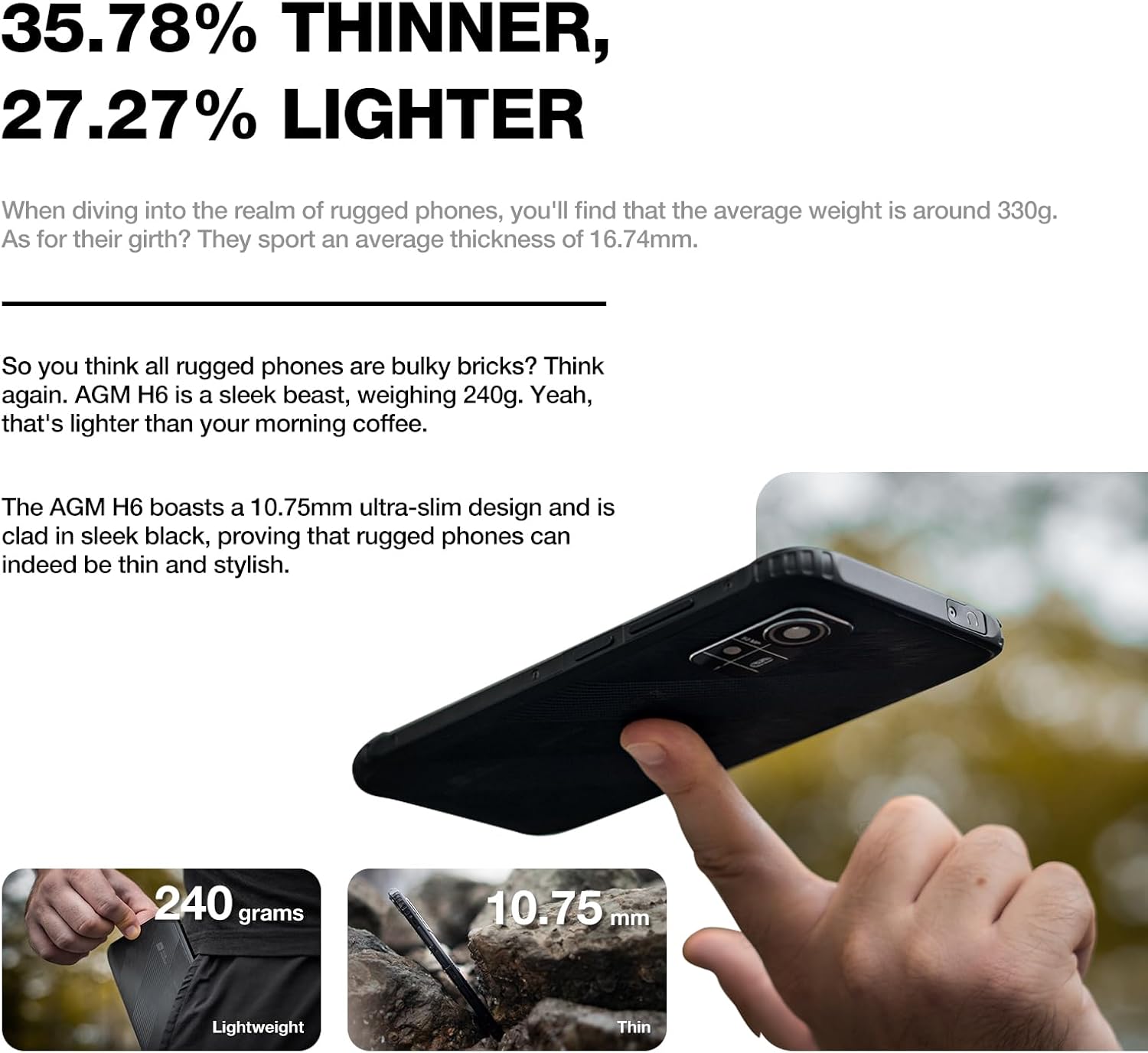
Image 8.2: Physical dimensions and weight comparison.
9. Garanti ak sipò
Your AGM H6 smartphone is covered by a manufacturer's warranty. Please refer to the warranty card included in your package for specific terms and conditions.
For technical support, warranty claims, or further assistance, please visit the official AGM website or contact AGM customer service. You can find more information and support resources on the AGM Store on Amazon.


