1. Entwodiksyon
Thank you for choosing the DAHUA DHI-LM32-E230CN-A5-V1 32-inch Curved VA165 Hz Monitor. This manual provides essential information for the safe and efficient use of your new monitor. Please read it thoroughly before installation and operation, and retain it for future reference.
This monitor is designed to deliver a high-quality visual experience with its 1920 x 1080p resolution, 1500R curvature for immersive viewing, and a fast 165 Hz refresh rate. It features a 1ms response time to minimize motion blur and supports a wide color gamut (99% sRGB, 85% NTSC, 85% DCI-P3, 85% Adobe RGB) for accurate color reproduction. Connectivity options include DisplayPort 1.4 and HDMI 2.0, and adaptive sync technology is integrated for tear-free gaming and smooth video playback.
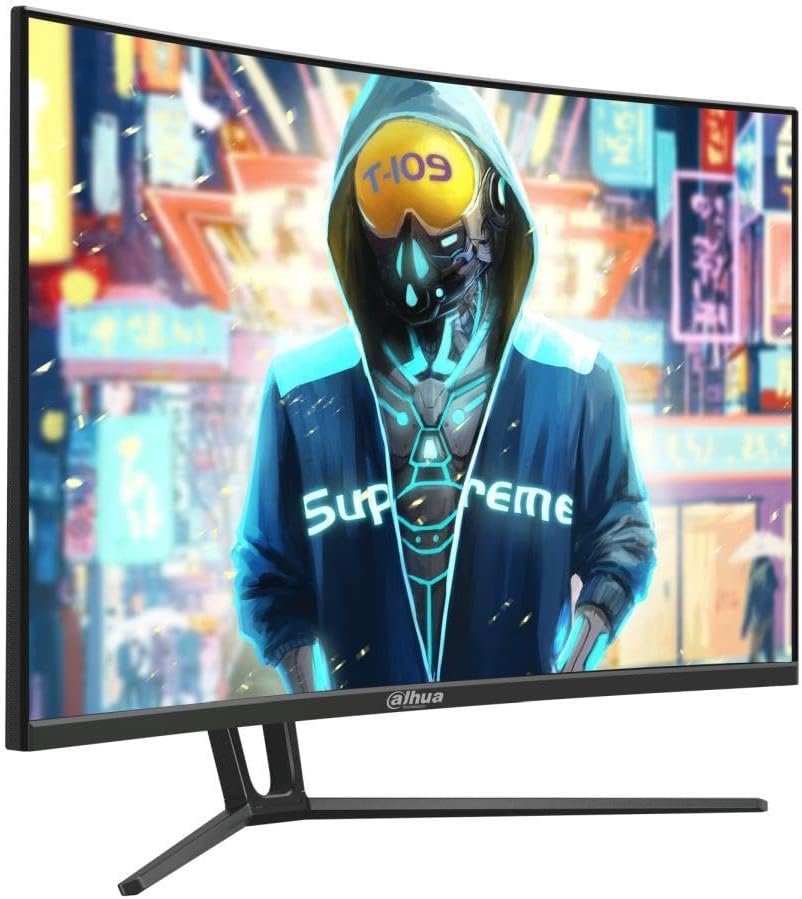
Figi 1: Devan view of the DAHUA DHI-LM32-E230CN-A5-V1 monitor.
2. Enfòmasyon sou Sekirite
Please observe the following safety precautions to ensure safe operation and prolong the life of your monitor:
- Pa ekspoze monitè a anba lapli, imidite, oswa tanperati ekstrèm.
- Asire w ke gen bon vantilasyon toutotou monitè a. Pa bloke ouvèti vantilasyon yo.
- Sèvi sèlman ak adaptè kouran ak kab manifakti a bay oswa rekòmande.
- Disconnect the power cable from the outlet if the monitor will not be used for an extended period.
- Pa eseye fè antretyen monitè a tèt ou. Konfye tout antretyen bay pèsonèl kalifye.
- Evite mete objè lou sou kòd kouran an oswa sou monitè a.
- Clean the monitor screen with a soft, lint-free cloth. Do not use liquid cleaners directly on the screen.
3. Pake kontni
Tanpri verifye sa ki nan pake a lè w ap debale l. Si gen nenpòt atik ki manke oswa ki domaje, kontakte machann ou an.
- DAHUA DHI-LM32-E230CN-A5-V1 Monitor
- Sipò Monitè (Baz ak Kou)
- Pouvwa kab
- DisplayPort kab
- Manyèl Itilizatè (dokiman sa a)
4. Enstalasyon
4.1 Asanble kanpe la
- Retire monitè a nan anbalaj li avèk prekosyon, epi kenbe l pwoteje sou yon sifas ki mou.
- Attach the stand neck to the monitor panel. Ensure it clicks securely into place or is fastened with screws if applicable (refer to specific diagrams in the physical manual).
- Tache baz sipò a nan kou sipò a, epi sekirize l ak vis ki vini ak li a.
- Mete monitè a ki fin rasanble a sou yon sifas ki plat e ki estab.
4.2 Konekte kab
Asire w ke monitè a ak òdinatè w la etenn anvan ou fè nenpòt koneksyon.
- Koneksyon pouvwa: Konekte kab kouran an nan antre kouran monitè a, answit branche lòt bout la nan yon priz elektrik ki gen tè.
- Koneksyon videyo: Connect one end of the DisplayPort cable to the DisplayPort output on your computer's graphics card and the other end to the DisplayPort input on the monitor. Alternatively, use an HDMI cable to connect to the HDMI 2.0 input.
- Odyo (Si ou vle): If your monitor has an audio output, you can connect external speakers or headphones.

Figi 2: Dèyè view nan monitè a ak pò antre yo.
4.3 Limen
After connecting all necessary cables, power on your computer, then press the power button on the monitor. The monitor should automatically detect the input signal.
5. Operasyon Enstriksyon
5.1 Meni OSD (On-Screen Display).
The OSD menu allows you to adjust various monitor settings. Typically, buttons are located on the back or bottom edge of the monitor.
- Peze a Menu bouton pou ouvri OSD a.
- Sèvi ak bouton navigasyon yo (anjeneral flèch direksyon yo) pou deplase nan opsyon meni yo.
- Peze a Antre or OK bouton an pou chwazi yon opsyon oubyen konfime yon paramèt.
- Peze a Sòti button to close the OSD or go back to the previous menu.
5.2 Anviwònman ekspozisyon
- Rezolisyon: The native resolution is 1920 x 1080p. For optimal image quality, set your computer's display resolution to this setting.
- Pousantaj rafrechisman: This monitor supports up to 165 Hz. Ensure your graphics card and operating system are configured to use the highest refresh rate for the smoothest experience.
- Adaptive Sync: This feature synchronizes the monitor's refresh rate with your graphics card's frame rate to eliminate screen tearing and stuttering. Enable this feature in the OSD menu and your graphics card control panel.
- Gamme koulè: The monitor supports 99% sRGB, 85% NTSC, 85% DCI-P3, and 85% Adobe RGB. Adjust color settings in the OSD or through your graphics card software to match your preferences or professional requirements.
- Tan repons: The monitor features a fast 1ms response time. This setting is usually optimized by default but can sometimes be adjusted in the OSD for specific use cases.

Figi 3: Side view nan monitè a.
6. Antretyen
6.1 Netwaye monitè a
Pou netwaye monitè w la, swiv etap sa yo:
- Etenn monitè a epi deploge fil elektrik la.
- Use a soft, lint-free cloth (e.g., microfiber cloth) to gently wipe the screen and exterior surfaces.
- Pou mak ki difisil pou retire, pase yon ti krasampRense twal la avèk dlo oswa yon pwodui netwayaj ekran ki pa abrazif. Pa flite likid dirèkteman sou ekran an.
- Allow the monitor to dry completely before plugging it back in and powering it on.
Atansyon: Pa sèvi ak alkòl, pwodui netwayaj ki gen amonyak, oswa materyèl abrazif, paske sa yo ka domaje sifas ekran an.
NAN. Depanaj
If you encounter issues with your monitor, refer to the following troubleshooting guide:
| Pwoblèm | Kòz posib | Solisyon |
|---|---|---|
| Pa gen pouvwa | Kab kouran an pa konekte; Priz kouran an gen pwoblèm; Bouton kouran monitè a etenn. | Check power cable connections; Test outlet with another device; Press monitor power button. |
| Pa gen siyal | Kab videyo a pa konekte; Sous antre ki pa kòrèk la chwazi; Odinatè a pa limen. | Check video cable connections; Select correct input source via OSD; Ensure computer is on. |
| Imaj la ap tranble oswa li defòme | Incorrect resolution/refresh rate; Faulty video cable; Graphics driver issue. | Set to native resolution (1920x1080p) and 165Hz; Try a different video cable; Update graphics drivers. |
| Koulè parèt kòrèk | Color settings misconfigured; Faulty video cable. | Ajiste paramèt koulè yo nan OSD a; Eseye yon lòt kab videyo. |
8. Espesifikasyon
| Karakteristik | Spesifikasyon |
|---|---|
| Mak | Dahua |
| Nimewo Modèl | DHI-LM32-E230CN-A5-V1 |
| Gwosè ekran | 31.5 pous |
| Rezolisyon | 1920 x 1080p |
| Kalite Panel | VA |
| Rafrechisman pousantaj | 165 Hz |
| Koubti | 1500R |
| Tan repons | 1 ms |
| Gamut koulè | 99% sRGB, 85% NTSC, 85% DCI-P3, 85% Adobe RGB |
| Viewing Ang | 178° (H) / 178° (V) |
| Antre Videyo | 1 pò DisplayPort 1.4, 1 pò HDMI 2.0 |
| Adaptive Sync | Sipòte |
| Manifakti | DAHUA |
9. Garanti ak sipò
Pou enfòmasyon sou garanti a, tanpri gade kat garanti ki vini ak pwodwi w la oswa vizite sit entènèt ofisyèl DAHUA a. website. If you require technical support or have questions not covered in this manual, please contact DAHUA customer service or your authorized retailer.
Please have your monitor model number (DHI-LM32-E230CN-A5-V1) and serial number ready when contacting support.


