Entwodiksyon
This user manual provides important information for the safe and efficient operation of your Technaxx TX-315 10000mAh 3-in-1 Wireless Fast Charging Power Bank. Please read this manual thoroughly before using the device and keep it for future reference.
Enstriksyon Sekirite
- Pa ekspoze bank pouvwa a nan tanperati ekstrèm, limyè solèy dirèk, oswa dife.
- Pa demonte, repare, oswa modifye aparèy la tèt ou. Konfye tout antretyen bay pèsonèl kalifye.
- Kenbe bank pouvwa a lwen dlo ak lòt likid.
- Do not drop, hit, or subject the device to strong impacts.
- Asire w ke gen bon vantilasyon lè w ap chaje oswa dechaje.
- Kenbe soti nan atenn timoun yo.
- Jete bank pouvwa a dapre règleman lokal yo pou dechè elektwonik.
Pwodwi souview
Familiarize yourself with the components of your Technaxx TX-315 power bank:
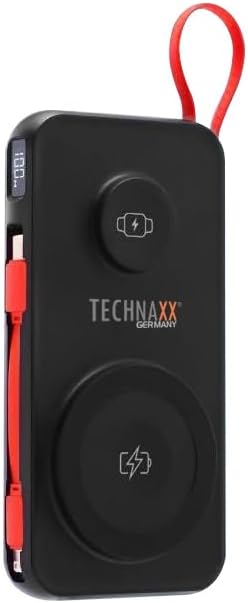
Image: The Technaxx TX-315 power bank, a black rectangular device with a red lanyard. It features a digital display on the side, a USB-C port, a USB-A port, a built-in red USB-C cable, a magnetic wireless charging pad for smartphones, and a smaller wireless charging pad for smartwatches. The Technaxx logo is visible on the front.
- Ekspozisyon dijital: Montre percen batritage.
- Magnetic Wireless Charging Pad (15W): Pou smartphones konpatib.
- Smartwatch Wireless Charging Pad (3W): For compatible smartwatches.
- USB-A Output Port (22.5W): For wired charging of various devices.
- USB-C Input/Output Port (20W PD): For charging the power bank or wired charging of devices.
- Kab USB-C entegre: Pratik pou chaje aparèy.
- Bouton pouvwa: Activates the display and charging functions.
Enstalasyon
Chaje Power Bank la
- Connect the power bank to a USB wall charger (not included) using the built-in USB-C cable or a separate USB-C to USB-C cable via the USB-C port.
- Ekran dijital la ap montre pwogrè chaj la, li endike pousantaj batri a.tage.
- The power bank is fully charged when the display shows "100%".
Opere
Charging Smartphones Wirelessly (15W)
- Peze bouton pouvwa a pou aktive bank pouvwa a.
- Place your MagSafe-compatible or Qi-enabled smartphone onto the larger magnetic wireless charging pad. Ensure proper alignment for optimal charging.
- The phone's charging indicator will confirm charging has begun.
Charging Smartwatches Wirelessly (3W)
- Peze bouton pouvwa a pou aktive bank pouvwa a.
- Place your compatible smartwatch onto the smaller wireless charging pad.
- The smartwatch's display will indicate that it is charging.
Wired Charging via USB-A or USB-C Ports
- Peze bouton pouvwa a pou aktive bank pouvwa a.
- Connect your device to the USB-A port or the USB-C port using an appropriate charging cable.
- Bank pouvwa a ap kòmanse chaje aparèy ou an otomatikman.
- The built-in USB-C cable can also be used for convenient wired charging.
Konprann Ekspozisyon Dijital la
Ekran dijital la montre pousantaj batri aktyèl latage of the power bank. This allows you to monitor the remaining power and know when to recharge the unit.
Antretyen
- Netwaye bank pouvwa a avèk yon twal mou epi sèk. Pa sèvi ak pwodui netwayaj abrazif oswa solvan.
- Sere bank pouvwa a nan yon kote ki fre epi sèk, lwen limyè solèy dirèk ak tanperati ekstrèm.
- Si ou pa itilize bank ekstèn lan pou yon bon bout tan, chaje l omwen yon fwa chak twa mwa pou kenbe batri a an bon eta.
Depanaj
| Pwoblèm | Kòz posib | Solisyon |
|---|---|---|
| Batri pouvwa a pa chaje. | Cable not connected properly; charger not working; power bank battery depleted. | Check cable connections; try a different charger; allow power bank to charge for a few minutes. |
| Aparèy la pa chaje ak bank pouvwa a. | Power bank not activated; device not compatible; cable faulty; power bank battery low. | Press power button; ensure device supports wireless/wired charging; try a different cable; recharge power bank. |
| Wireless charging is slow or intermittent. | Misalignment of device; thick phone case; foreign objects between device and pad. | Realign device on charging pad; remove thick phone case; remove any metal objects or cards. |
| Ekspozisyon dijital la pa fonksyone. | Power bank battery depleted; internal fault. | Recharge power bank; if issue persists, contact support. |
Espesifikasyon
- Non modèl: TX-315
- Kapasite batri: 10000mAh
- Konpozisyon selil batri: Lityòm Polymère
- Wireless Charging (Smartphone): 15W (Magnetic)
- Wireless Charging (Smartwatch): 3W
- USB-A Sòti: 22.5W
- USB-C Antre / Sòti: 20W pouvwa livrezon (PD)
- Dimansyon pwodwi: 144 x 73 x 16 mm (approx. 7.2L x 2W x 14Th centimetres)
- Pwa atik: 250g (approx. 0.56 Pounds)
- Manifakti: Technaxx
- Peyi orijin: Lachin
Garanti ak sipò
Your Technaxx TX-315 Power Bank comes with a standard manufacturer's warranty. For detailed warranty information, please refer to the warranty card included in the product packaging or visit the official Technaxx website. If you encounter any issues or require technical assistance, please contact Technaxx customer support or your retailer.
The product package includes the Powerbank 10000mAh TX-315 and this user manual.


