1. Entwodiksyon
Thank you for choosing the XJ-HOME H01 All-in-One Vinyl Record Player. This manual provides essential information for the proper setup, operation, and maintenance of your new turntable. Please read it thoroughly before use and retain it for future reference.
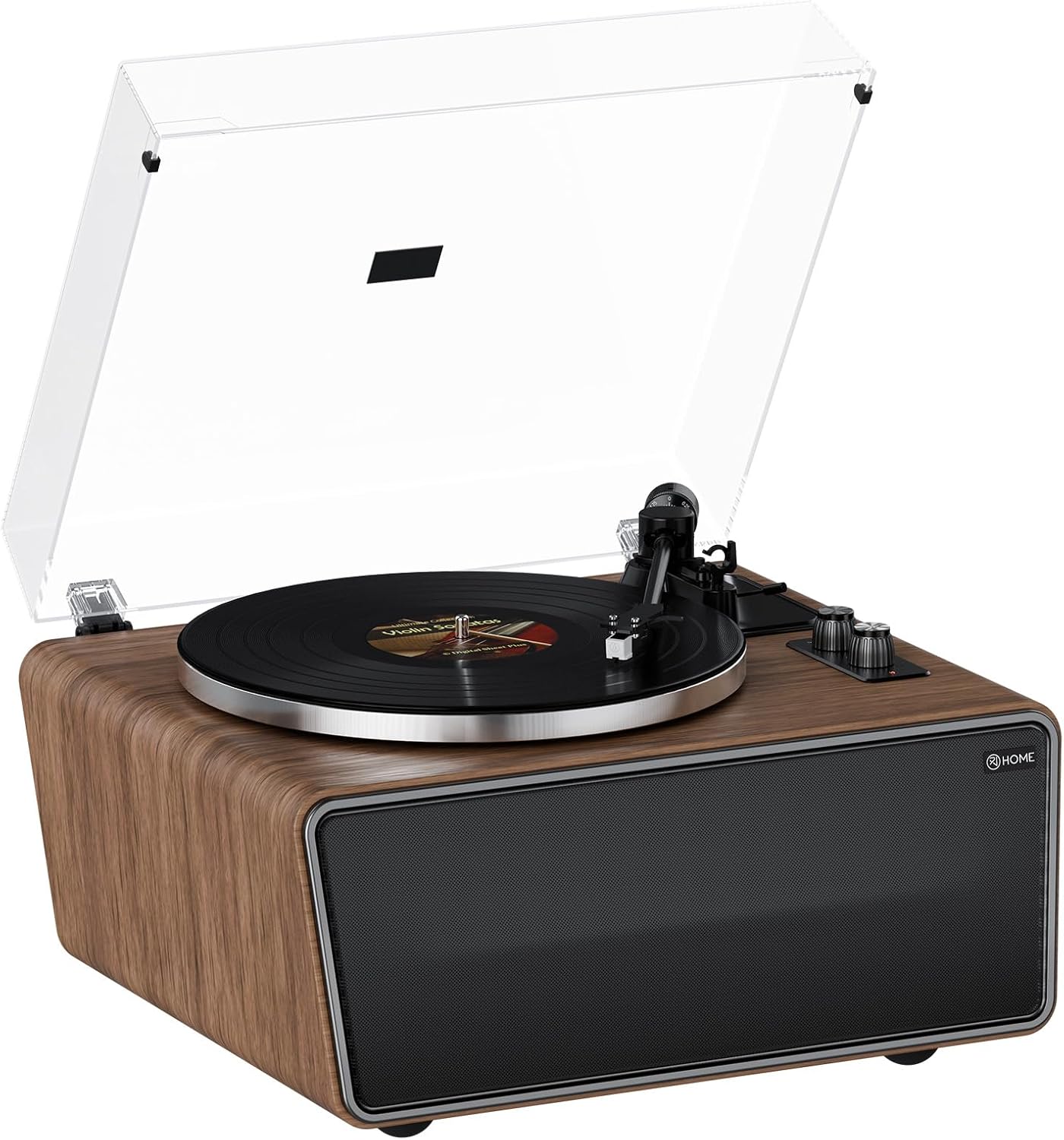
Figure 1: XJ-HOME H01 All-in-One Vinyl Record Player
Pwodwi souview Videyo
Videyo 1: Jeneral finiview and demonstration of the XJ-HOME H01 Vinyl Record Player's features and design.
2. Enstriksyon Sekirite
- Li tout enstriksyon yo ak anpil atansyon anvan ou itilize aparèy la.
- Kenbe manyèl la pou referans nan lavni.
- Pa sèvi ak aparèy sa a toupre dlo.
- Netwaye sèlman ak yon twal sèk.
- Pa bloke okenn ouvèti vantilasyon. Enstale li dapre enstriksyon manifakti a.
- Pa enstale tou pre okenn sous chalè tankou radyatè, rejis chalè, recho, oswa lòt aparèy (tankou amplifiers) ki pwodui chalè.
- Pwoteje kòd elektrik la pou yo pa mache oswa kwense, sitou nan priz, resipyan konvenyans, ak pwen kote yo sòti nan aparèy la.
- Itilize sèlman atachman/akseswa manifakti a espesifye.
- Deploge aparèy sa a pandan tanpèt zèklè oswa lè li pa itilize pou yon peryòd tan ki long.
- Refere tout sèvis yo bay pèsonèl sèvis kalifye. Reparasyon nesesè lè aparèy la domaje nenpòt fason, tankou kòd kouran oswa ploge domaje, likid koule oswa objè tonbe nan aparèy la, aparèy la te ekspoze a lapli oswa imidite, li pa fonksyone nòmalman. , oswa li te tonbe.
3. Pake kontni
Ensure all items listed below are present in the packaging:
- XJ-HOME H01 Vinyl Record Player
- Adaptè pouvwa
- USB-to-PC Cable
- Kouvèti Pousyè
- Manyèl Enstriksyon (dokiman sa a)
4. Pwodwi souview
The XJ-HOME H01 is an all-in-one vinyl record player designed for high-fidelity audio playback and modern connectivity. Key features include:
- 2-Speed Belt Drive: Supports 33 and 45 RPM records.
- Built-in 4 Stereo Speakers: Two 4" bass speakers (4Ω 30W) and two 2" treble speakers (8Ω 10W) for rich, warm audio.
- Magnetic Cartridge Stylus (AT-3600L MM): Provides precise tracking for high-definition sound. Universal headshell allows for easy stylus changes.
- Adjustable Counterweight: Ensures optimal tracking force, reducing noise and distortion.
- Bluetooth 5.0: Wirelessly stream music from compatible devices.
- USB-to-PC Recording: Convert vinyl audio to MP3 files for digital storage.
- Phono and Line Outputs: Connect to external speakers or audio systems via RCA.
- Pò AUX-in: Connect other audio devices.
- Kouvèti pousyè detachable: Protects the turntable from dust.
Idantifikasyon konpozan

Figi 2: Top view of the turntable with key components labeled.

Figi 3: Close-up views of the AT-3600L cartridge, control panel, tonearm balance, and rear output connections.

Figure 4: Rear panel showing Power switch, USB-PC port, DC IN 15V, PHONO/LINE OUT switch, AUX IN, and RCA AUX OUT ports.

Figure 5: Anti-vibration feet for enhanced sound stability.
5. Enstalasyon
Follow these steps to set up your XJ-HOME H01 Vinyl Record Player:
- Dekonpoze: Ak anpil atansyon retire tout eleman nan anbalaj la.
- Place the Platter: Gently place the aluminum platter onto the turntable spindle.
- Install the Belt:

Figure 6: Installation steps 1-6 for the belt and felt pad.
- Wrap the belt around the raised circle on the back of the master platter.
- Tear off the tape and remove the red belt.
- Put the red belt between the belt and the master, and pull up the belt.
- Align the master with the center axis of the record player and install it, using the red belt to pull up the belt and put the belt on the gold pulley.
- Place the Felt Pad: Put the felt pad on the platter.
- Enstale Kouvèti Pousyè a: Attach the clear dust cover to the hinges at the back of the turntable.
- Konekte pouvwa: Plug the power adapter into the DC IN 15V port on the rear panel and then into a wall outlet.

Figure 7: Installation steps 7-12 for power connection, stylus cover removal, and tonearm operation.
- Remove Stylus Protective Cover: Carefully remove the clear protective cover from the stylus.
- Adjust Counterweight: The counterweight scale should be adjusted to 3.5g for best results. Rotate the counterweight until the tonearm is balanced, then set the tracking force to 3.5g using the numbered dial.

Figure 8: Adjustable counterweight for precise tracking.
6. Operasyon Enstriksyon
6.1 Jwe Disk Vinil
- Pouvwa sou: Flip the POWER switch on the rear panel to the 'ON' position.
- Chwazi mòd: Turn the Function Knob to select the desired speed (33 or 45 RPM). The indicator light will turn red for record playback mode.
- Dosye Kote: Place a vinyl record on the platter. The turntable supports 7", 10", and 12" records.

Figure 9: Turntable supporting various record sizes and speeds.
- Unlock Tonearm: Lage seri a tonearm.
- Pozisyon bra a: Leve bra a dousman avèk levye repè a epi pozisyone stylus la sou tras ou vle a nan disk la.
- Bra anba: Slowly lower the tonearm using the cueing lever. The stylus will descend onto the record, and playback will begin.
- Ajiste Volim: Sèvi ak bouton Volim pou ajiste pwodiksyon odyo a.
- Fen Lekti a: At the end of the record, lift the tonearm using the cueing lever and return it to the tonearm rest. Secure the tonearm lock.
6.2 Difizyon Bluetooth
The XJ-HOME H01 can receive audio wirelessly from your Bluetooth-enabled devices.
- Pouvwa sou: Ensure the record player is powered on.
- Chwazi mòd Bluetooth: Turn the Function Knob to the Bluetooth position. The indicator light will turn blue and flash, indicating it's ready for pairing.
- Pè aparèy: On your smartphone, tablet, or other Bluetooth device, search for "XJ-HOME H01" in the Bluetooth settings and select it to pair. Once connected, the blue indicator light will stop flashing and remain solid.
- Jwe Mizik: Start playing music on your paired device. The audio will stream through the record player's built-in speakers.

Figure 10: Bluetooth 5.0 connectivity for wireless audio streaming.
- Ajiste Volim: Control the volume using both your device and the record player's Volume knob.
6.3 USB-to-PC Recording
Convert your vinyl records to digital MP3 files using the USB-to-PC cable.
- Konekte ak PC: Connect one end of the USB-to-PC cable to the USB-PC port on the rear of the record player and the other end to an available USB port on your computer.
- Lojisyèl: You will need third-party audio recording software (not included) on your computer to capture the audio. Follow the software's instructions for recording.
- Kòmanse Lekti: Begin playing your vinyl record as described in section 6.1.
- Dosye: Use your computer's recording software to capture the audio playback.
6.4 External Audio Connections
- AUX NAN: Connect external audio sources (e.g., CD player, MP3 player) to the AUX IN port using a 3.5mm audio cable.
- RCA AUX OUT: Connect the record player to an external amplifier or powered speakers using RCA cables. Use the PHONO/LINE OUT switch on the rear panel to select the appropriate output level (PHONO for phono input on an amplifier, LINE for line-level input).
7. Antretyen
- Netwaye Kouvèti Pousyè a: Sèvi ak yon twal mou epi sèk pou siye kouvèti pousyè a. Pou mak ki difisil pou retire, sèvi ak yon twal yon ti kras mou.amp twal epi seche byen. Evite pwodui chimik ki agresif.
- Netwaye Stylus la: Use a soft brush designed for stylus cleaning, brushing gently from back to front. Replace the stylus approximately every 300-500 hours of playback or if sound quality deteriorates.
- Netwaye kabinè a: Wipe the wooden cabinet with a soft, dry cloth. Avoid using liquid cleaners or polishes directly on the surface.
- Swen Dosye: Kenbe disk ou yo pwòp epi san pousyè. Sere yo vètikalman nan manch yo pou anpeche yo defòme.
NAN. Depanaj
| Pwoblèm | Kòz posib | Solisyon |
|---|---|---|
| Pa gen pouvwa | Power adapter not connected; Power switch off | Ensure power adapter is securely connected and switch is ON. |
| Pa gen son ki soti nan moun kap pale | Volume too low; Incorrect mode selected; Stylus not on record | Increase volume; Select correct mode (Record or Bluetooth); Ensure stylus is properly placed on record. |
| Bluetooth pa konekte | Not in Bluetooth mode; Device too far; Device already paired elsewhere | Ensure turntable is in Bluetooth mode (blue light flashing); Move device closer; Disconnect from other Bluetooth devices. |
| Skipping or distorted sound during vinyl playback | Record dirty/damaged; Stylus worn/dirty; Incorrect counterweight setting; Turntable not level | Clean record; Clean or replace stylus; Adjust counterweight to 3.5g; Place turntable on a stable, level surface. |
| Record speed incorrect | Move vitès chwazi | Ensure 33 RPM or 45 RPM is selected according to the record. |
9. Espesifikasyon
| Karakteristik | Detay |
|---|---|
| Non modèl | XJ-HOME H01 Vinyl Record Player |
| Dimansyon pwodwi | 13.78 x 17.72 x 9.45 pous |
| Pwa atik | 23.9 liv |
| Mak | XJ-HOME |
| Maksimòm vitès wotasyon | 45 RPM (supports 33 RPM also) |
| Konpozan ki enkli | Dust Cover, Instruction Manual, Power Adapter, USB-to-PC Cable, Vinyl Record Player |
| Karakteristik espesyal | AUX Input, Adjustable Counterweight, Adjustable Speed, Adjustable Tone Control, Anti-Resonance, Automatic Belt Drive Design, Built-In Preamp, Built-In Speaker, Built-In Bluetooth Receiver, Built-In Cartridge, Detachable Headshell, Die-Cast Aluminum Platter, Digital Recorder, Dust Cover, RCA Output, Volume Control |
| Materyèl | Aluminum, Plastic, Wood |
| Koulè | Walnut Wood |
| Kalite motè | DC motè |

Figi 11: Dimansyon pwodwi an santimèt ak pous.
10. Garanti ak sipò
XJ-HOME provides a three-year quality guarantee and lifetime parts support for this product. For any technical assistance, troubleshooting beyond this manual, or warranty claims, please contact XJ-HOME customer service. Details for contacting support can typically be found on the product packaging or the official XJ-HOME websit.


