1. Entwodiksyon
Thank you for choosing the ZUMIMALL Dual Lens 2K Wireless Outdoor Security Camera. This manual provides detailed instructions for setting up, operating, and maintaining your camera to ensure optimal performance and security for your home or property. Please read this manual thoroughly before use and retain it for future reference.
2. Enfòmasyon sou Sekirite
- Ensure the camera is installed in a location where it is protected from extreme weather conditions beyond its IP65 rating.
- Use only the specified power adapter or solar panel for charging.
- Pa demonte oswa eseye repare aparèy la tèt ou. Kontakte sipò kliyan pou asistans.
- Kenbe kamera a ak akseswa li yo lwen timoun yo.
- Avoid placing the camera near strong magnetic fields or sources of interference.
- Jete pwodwi a ak batri a yon fason responsab dapre règleman lokal yo.
3. Pake kontni
Tanpri verifye ke tout konpozan yo prezan epi yo an bon kondisyon:
- ZUMIMALL Dual Lens 2K Wireless Outdoor Security Camera
- 5W Panèl Solè
- Mounting Support ak Vis
- USB Chaje Kab
- Manyèl itilizatè
4. Pwodwi souview
The ZUMIMALL Dual Lens 2K Wireless Outdoor Security Camera offers advanced surveillance features with a focus on wide-area coverage and intelligent detection.

Image: The ZUMIMALL Dual Lens 2K Wireless Outdoor Security Camera, featuring a main PTZ camera unit, a separate smaller camera, and a solar panel for continuous power.
Karakteristik kle:
- Sistèm doub lantiy: Combines a fixed lens and a rotating lens for simultaneous viewing of two different areas.
- Rezolisyon 2K HD: Provides clear and detailed images and videos (3MP+3MP for a total of 6MP effective resolution).
- Wide Angle & PTZ: Offers a 220° ultra-wide-angle view from the fixed lens and 360° pan/tilt/zoom (PTZ) capabilities for comprehensive coverage.
- Vizyon lannwit tout koulè: Equipped with white and infrared lamps, offering full-color, infrared, or smart night vision modes.
- Solè Powered: Includes a 5W solar panel and a built-in 10000mAh battery for continuous, uninterrupted operation.
- Deteksyon AI entelijan: Advanced AI can identify people, vehicles, pets, and packages, reducing false alerts.
- Pale nan de-fason: Mikwofòn ak oratè entegre pèmèt kominikasyon an tan reyèl.
- Koneksyon WiFi 2.4GHz: Ensures a stable and reliable wireless connection.
- Rezistans move tan IP65: Ki fèt pou reziste divès kondisyon metewolojik deyò.
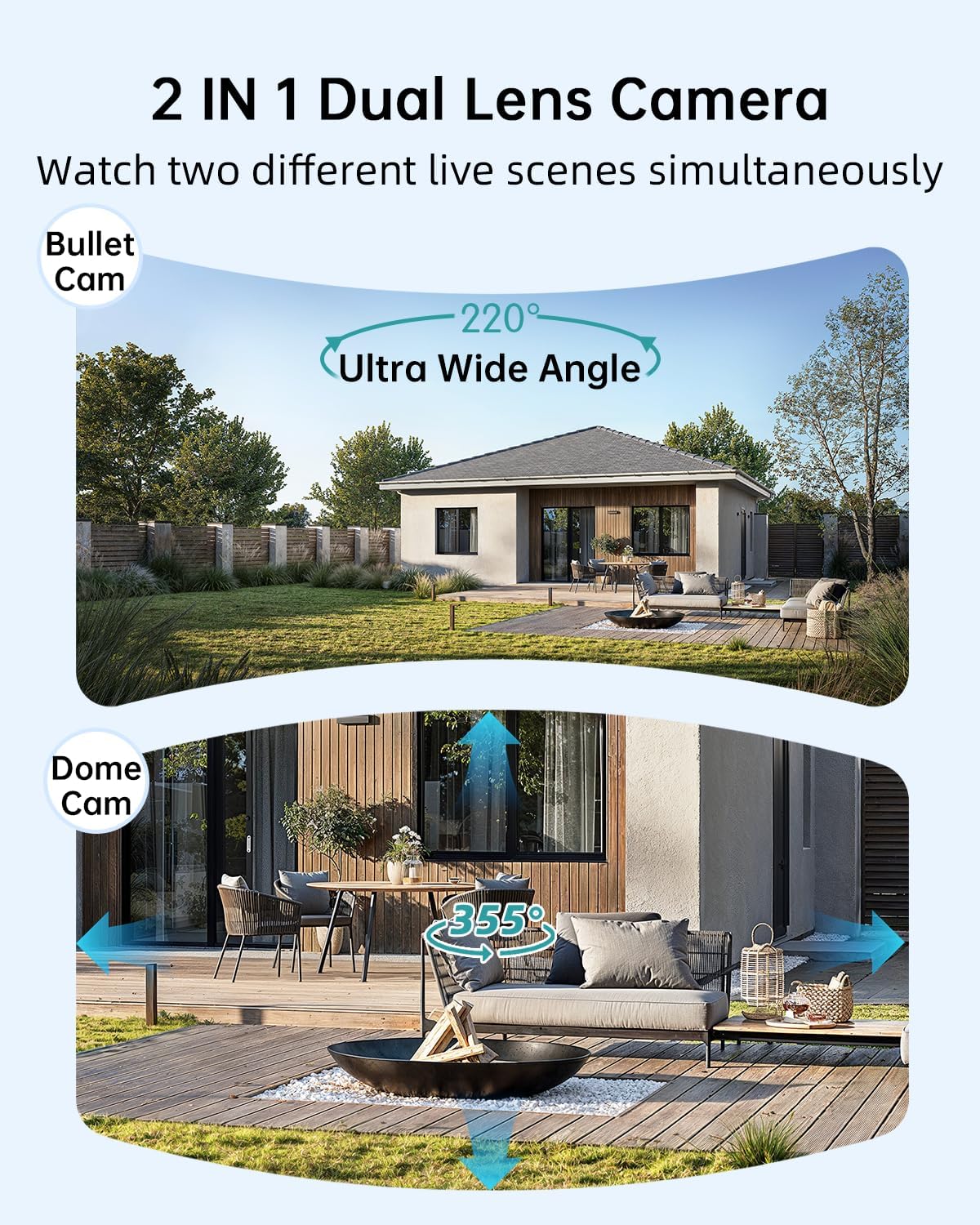
Image: Illustration of the dual-lens functionality, displaying a wide-angle 'Bullet Cam' view and a pan-tilt-zoom 'Dome Cam' view an menm tan.

Image: The ZUMIMALL camera connected to its 5W solar panel, highlighting its non-stop solar power capability and IP66 water resistance (note: product specification is IP65).

Image: A demonstration of the 2K ultra-colorful image quality, showing a clear view of a car's license plate at night, with indicators for 3MP FHD Image, 4X Digital Zoom, and 55FT Night Vision Range.

Image: The ZUMIMALL camera shown enduring heavy rain and snow, illustrating its IP65 waterproof rating and suitability for outdoor use in various weather conditions.
5. Enstalasyon
5.1 Premye chaj
Before first use, fully charge the camera's built-in 10000mAh battery using the provided USB cable and a 5V/2A power adapter (not included). A full charge typically takes several hours.
5.2 Telechaje Aplikasyon an ak Enskripsyon Kont
- Scan the QR code on the packaging or search for 'ZUMIMALL' in your mobile app store (iOS or Android).
- Download and install the ZUMIMALL app.
- Louvri aplikasyon an epi kreye yon nouvo kont oubyen konekte si ou deja genyen youn.
5.3 Konekte ak Wi-Fi
- Asire w ke telefòn entelijan ou an konekte ak yon rezo Wi-Fi 2.4GHz. Kamera a pa sipòte Wi-Fi 5GHz.
- In the ZUMIMALL app, tap '+' to add a new device.
- Follow the on-screen instructions to power on the camera and enter Wi-Fi configuration mode.
- Scan the QR code displayed on your phone screen with the camera lens.
- Wait for the camera to connect to your Wi-Fi network. Once connected, you will hear a confirmation sound.
5.4 Enstalasyon Kamera a ak Panèl Solè a
The camera offers flexible installation options, including magnetic support and bracket support.

Image: Demonstrates two installation methods for the ZUMIMALL camera: a compact magnetic mount for easy placement and a more robust bracket mount for secure, permanent installation.
- Chwazi yon kote: Chwazi yon kote ki bay sa ou vle a viewing angle, is within Wi-Fi range, and receives amplimyè solèy dirèk pou panèl solè a.
- Enstale bracket la: Use the provided screws to securely attach the mounting bracket to a wall or ceiling.
- Tache kamera a: Secure the camera to the bracket. For magnetic support, simply attach the camera to the magnetic base.
- Pozisyon panèl solè a: Mount the 5W solar panel in a location that receives maximum direct sunlight throughout the day. Connect the solar panel cable to the camera's charging port.
- Ajiste ang: Ajiste ang kamera a pou kouvri zòn siveyans ou vle a.
6. Operasyon Enstriksyon
6.1 Viv View ak Kontwòl Doub Lantiy
Open the ZUMIMALL app and select your camera to access the live view. The app will display two video feeds simultaneously from the fixed and PTZ lenses. You can switch between views or control the PTZ lens by swiping on the screen or using the directional controls within the app.
6.2 Mòd Vizyon Lannwit
The camera offers three night vision modes, configurable in the app settings:
- Vizyon lannwit tout koulè: Utilizes the built-in white light to provide color images in low-light conditions.
- Vizyon lannwit enfrawouj: Uses infrared LEDs for black and white images in complete darkness.
- Smart Night Vision: Automatically switches between infrared and full-color based on detected motion or ambient light.

Image: A comparison of night vision modes, showing a scene with a spotlight on (color night vision) and a spotlight off (infrared night vision), demonstrating the camera's ability to capture clear images in various low-light conditions.
6.3 Deteksyon entelijan IA
Configure AI detection settings in the app to receive alerts for specific events.

Image: An illustration of the camera's Intelligent AI Analysis feature, highlighting its capability to detect and differentiate between humans, packages, vehicles, and pets within the surveillance area.
- Kalite deteksyon: The camera can identify humans, vehicles, pets, and packages.
- Avètisman: When motion is detected, an alert notification will be sent to your smartphone.
- Sansiblite: Ajiste sansiblite deteksyon mouvman an pou minimize fo alam yo.
6.4 Pale Bidireksyonèl
Use the two-way talk feature to communicate with visitors or deter intruders.

Image: Depicts scenarios where the two-way voice intercom is used, showing a user communicating with a delivery person at the door and a parent speaking to a child playing outside.
- Nan viv la view, tape ikòn mikwofòn nan pou pale nan oratè kamera a.
- Lage ikòn nan pou koute.
6.5 Anrejistreman ak Lektur
The camera records events triggered by motion detection. Recordings are stored on a local SD card (not included) or in cloud storage (subscription may be required).
- Lektur: Access recorded videos through the 'Playback' section in the ZUMIMALL app.
- Telechaje: Download important video clips to your phone.
7. Antretyen
- Netwayaj: Netwaye lantiy kamera a ak panèl solè a detanzantan avèk yon twal mou.amp cloth to ensure clear images and efficient solar charging. Do not use harsh chemicals.
- Swen batri: For optimal battery life, avoid prolonged exposure to extreme temperatures. Ensure the solar panel is free from obstructions to maintain consistent charging.
- Mizajou mikrolojisyèl: Check the ZUMIMALL app regularly for firmware updates. Keeping your camera's firmware updated ensures the latest features and security enhancements.
NAN. Depanaj
8.1 Kamera a pa konekte ak Wi-Fi a
- Asire w ke rezo Wi-Fi ou a se 2.4GHz.
- Tcheke fòs siyal Wi-Fi a kote kamera a ye a.
- Verifye ke modpas Wi-Fi ou te antre a kòrèk.
- Rekòmanse routeur ou a ak kamera a.
8.2 Batri a ap dechaje byen vit
- Ensure the solar panel is receiving direct sunlight for several hours daily.
- Reduce motion detection sensitivity or frequency of recordings.
- Check for excessive live view streaming, which consumes battery.
8.3 Kalite imaj pòv
- Netwaye lantiy kamera a.
- Asire w pa gen okenn obstak nan chan reyon kamera a view.
- Tcheke vitès koneksyon Wi-Fi ou a.
8.4 Alèt Mouvman Fo
- Ajiste sansiblite deteksyon mouvman an nan aplikasyon an.
- Utilize AI detection filters (human, vehicle, pet, package) to ignore irrelevant motion.
- Ensure the camera is not pointing at busy public areas or moving foliage.
9. Espesifikasyon
| Karakteristik | Spesifikasyon |
|---|---|
| Modèl | B0F189QLFH |
| Rezolisyon | 2K (3MP + 3MP Dual Lens) |
| Jaden nan View | 220° Ultra Wide Angle (fixed lens), 360° PTZ (rotating lens) |
| Kapasite batri | 10000mAh |
| Solè panèl pouvwa | 5W |
| Koneksyon Wi-Fi | 2.4GHz (IEEE 802.11b/g/n) |
| Rezistans move tan | IP65 |
| Vizyon lannwit | Full-Color, Infrared, Smart |
| Deteksyon | Smart AI (Human, Vehicle, Pet, Package) |
| Odyo | De-fason Pale |
| Manifakti | ZUMIMALL |
| Premye Dat ki disponib | 12 mas 2025 |
10. Enfòmasyon sou Garanti
ZUMIMALL products are covered by a limited warranty from the date of purchase. Please refer to the warranty card included with your product or visit the official ZUMIMALL websit la pou wè tèm ak kondisyon garanti detaye yo.
11. Sipò pou Kliyan
If you encounter any issues or have questions regarding your ZUMIMALL camera, please contact our customer support team:
- Imèl: support@zumimall.com (Example)
- Websit: ZUMIMALL Official Store
Please have your model number (B0F189QLFH) and purchase information ready when contacting support.


