Entwodiksyon
Welcome and thank you for choosing the HTC Wireless Earbuds TWS6 5.3. This manual provides detailed instructions to help you set up, operate, and maintain your earbuds for optimal performance. Please read this manual thoroughly before using your device.
Kontni pake
Tanpri verifye ke tout atik yo prezan nan pakè ou a:
- 2 x HTC Earbuds
- 1 x USB-C chaje kab
- 1 x ka chaje
- 2 Pairs x Rubber Eartips (S/L)
- 1 x Quick Start Guide (physical document)

Pwodwi souview
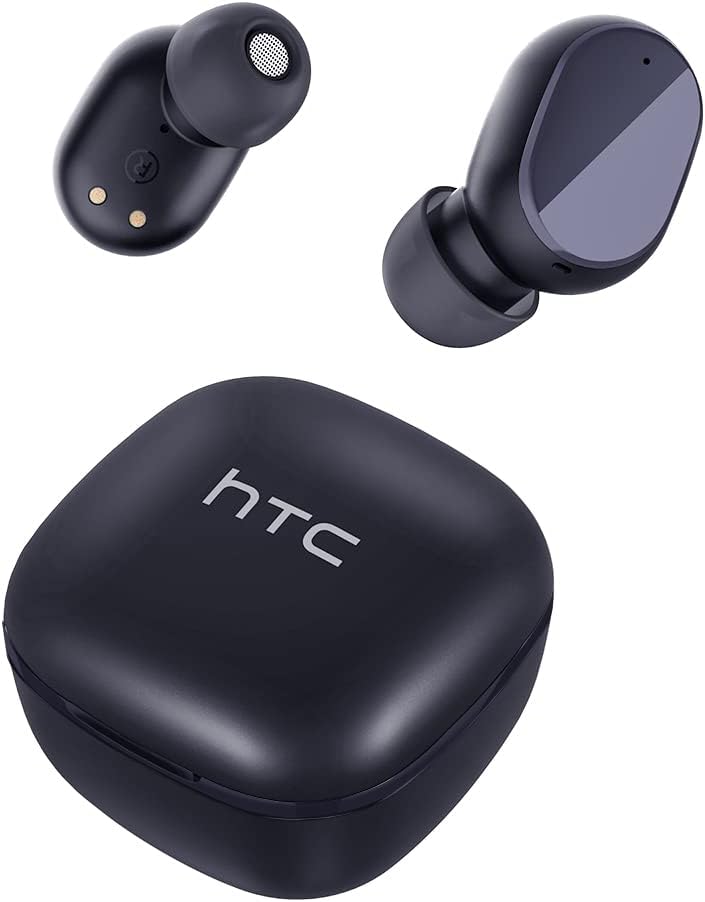
Familiarize yourself with the components of your HTC TWS6 earbuds.

Enstalasyon
Chaje ekoutè yo ak ka
Anvan premye itilizasyon an, chaje ekoutè yo ak bwat chaje a nèt.
- Mete ekoutè yo nan ka chaje a.
- Konekte kab USB-C a nan pò chaje ki sou bwat la ak yon sous kouran.
- Limyè endikatè ki sou bwat la ap montre eta chaj la.
- A full charge provides approximately 5 hours of playback for earbuds and up to 22 hours with the charging case.

Pè Bluetooth
Swiv etap sa yo pou konekte ekoutè ou yo ak aparèy ou an:
- Louvri bwat chaje a. Ekoutè yo ap antre otomatikman nan mòd koneksyon.
- Sou aparèy ou an (telefòn entelijan, tablèt, elatriye), aktive Bluetooth.
- Chèche pou "HTC TWS6" in the list of available Bluetooth devices.
- Select "HTC TWS6" to connect. A voice prompt will confirm successful pairing.

Mete ekoutè yo
For optimal sound quality and comfort, choose the correct eartip size and wear the earbuds properly.
- Chwazi bout zòrèy ou yo (S, M, L) ki pi byen adapte ak zòrèy ou yo.
- Mete chak ekoutè dousman nan kanal zòrèy ou.
- Rotate slightly to ensure a secure and comfortable fit.
Enstriksyon Operasyon
Kontwòl Smart Touch
The HTC TWS6 earbuds feature intuitive touch controls:
- Jwe/Poz Mizik: Tape yon sèl sou chak ekoutè.
- Pwochen Track: Tape de fwa sou ekoutè dwat la.
- Track Previous: Tape de fwa sou ekoutè gòch la.
- Volim moute: Tape twa fwa sou ekoutè dwat la.
- Volim desann: Tape twa fwa sou ekoutè gòch la.
- Reponn/Fen Apèl: Tape yon sèl sou chak ekoutè.
- Rejte apèl: Peze epi kenbe swa ekoutè pou 2 segonn.
- Aktive Asistan Vwa: Peze epi kenbe swa ekoutè pou 3 segonn.

Power On/Off
Ekoutè yo limen otomatikman lè yo retire yo nan bwat chaje a epi yo etenn lè yo remete yo nan bwat la epi kouvèti a fèmen.
To manually power on, press and hold the touch area for 3 seconds. To manually power off, press and hold the touch area for 5 seconds.
Antretyen ak Swen
Netwayaj
Netwaye ekoutè ou yo ak bwat chaje ou yo regilyèman pou asire pèfòmans ak ijyèn optimal.
- Sèvi ak yon twal mou, sèk, ki pa gen pousyè pou siye ekoutè yo ak bwat chaje a.
- Retire bout zòrèy yo epi netwaye yo avèk savon dou ak dlo, apresa seche yo byen anvan ou mete yo ankò.
- Pa sèvi ak pwodui netwayaj abrazif oswa solvang.
Rezistans dlo (IPX5)
The HTC TWS6 earbuds are IPX5 sweatproof, meaning they are resistant to splashes and sweat.
Nòt: They are not designed for submersion in water. Avoid exposing them to heavy rain, showering, or swimming. Ensure the charging port is dry before charging.

Depo
Lè w pa ap itilize ekoutè yo, sere yo nan bwat chaje yo pou pwoteje yo epi kenbe yo chaje.
Sere nan yon kote ki fre epi sèk, lwen tanperati ekstrèm.
Depanaj
| Pwoblèm | Solisyon |
|---|---|
| Ekoutè pa asosye | Ensure earbuds are charged. Turn off and on Bluetooth on your device. Forget "HTC TWS6" from your device's Bluetooth list and re-pair. |
| Se yon sèl ekoutè k ap travay | Place both earbuds back into the charging case, close the lid, then open it again. Ensure both earbuds are charged. |
| Volim ki ba oswa kalite son ki pa bon | Adjust volume on your device. Clean eartips and earbud mesh. Try different eartip sizes for a better seal. |
| Pwoblèm chaje | Check USB-C cable and power adapter. Ensure charging contacts on earbuds and case are clean and dry. |
| Ekoutè yo dekonekte souvan | Ensure your device is within the Bluetooth range (approx. 10 meters/33 feet) and there are no significant obstructions. |
Si pwoblèm yo pèsiste, tanpri kontakte sèvis kliyan.
Espesifikasyon
| Karakteristik | Detay |
|---|---|
| Non modèl | TWS6 |
| Bluetooth vèsyon | 5.3 |
| Koneksyon Teknoloji | San fil |
| Teknoloji kominikasyon san fil | Bluetooth |
| Dire batri (ekoutè) | 5 èdtan |
| Tan total pou jwe (ak bwat) | 22 èdtan |
| Tan chaje (Ka) | Apeprè 5 èdtan |
| Nivo rezistans dlo | IPX5 (Rezistan a swè) |
| Metòd kontwòl | Manyen |
| Mikwofòn | Yes (with ENC) |
| Aparèy konpatib | Android and iOS Smartphones, Gaming Devices |
| Materyèl | Plastik |
| Pwa atik | 3.17 ons |
| UPC | 734257974554 |
| Kontwòl bri | Adaptive Anile Bri |
| Kalite chofè odyo | Chofè dinamik |
| Enpedans | 199.99 Ohm |
Garanti ak sipò
HTC provides a 360-day warranty extension for this product, as detailed in the product information.
For technical assistance, warranty claims, or any inquiries, please contact HTC customer support.
Sipò Kliyan: Refer to the contact information provided in your product packaging or visit the official HTC website for the most up-to-date support options.


