1. Entwodiksyon
The KLIM K7 is a versatile portable cassette player designed for both playback of audio cassettes and conversion of cassette audio to digital MP3 format. It features a built-in microphone for recording, an integrated speaker, and a rechargeable battery for on-the-go use. This manual provides detailed instructions for setting up, operating, and maintaining your KLIM K7 device.

Imaj: Plis paseview of KLIM K7 features including cassette to MP3 conversion, tape playback, built-in microphone, earphone jack, speaker, and compact size.
2. Pake kontni
Tanpri verifye ke tout atik ki nan lis anba a yo enkli nan pakè ou a:
- KLIM K7 Portable Cassette Player and Converter
- KLIM Fusion ekoutè
- 32GB Micro SD Kat
- Micro SD Card Reader (USB adapter)
- Kalite-C USB Chaje Kab
- Manyèl Itilizatè (dokiman sa a)

Image: A visual representation of all items included in the KLIM K7 package: the cassette player, Type-C USB cable, 32GB Micro SD card, SD card reader, and Fusion earphones.
3. Pwodwi souview
Familiarize yourself with the various parts and controls of your KLIM K7 device.

Imaj: Devan view of the KLIM K7 cassette player, showing the cassette compartment, control buttons, built-in speaker, display, and included earphones, SD card, and USB adapter.
Kontwòl ak pò:
- Konpatiman kasèt: Insert your audio cassettes here.
- Ekspozisyon ekran: Shows track time, SD card status, and recording indicator.
- Bouton jwe/poz: Starts or pauses cassette playback/MP3 playback.
- Bouton Stop: Sispann lekti oswa anrejistreman.
- Bouton avanse/remonte rapid: Navigates through cassette tape or MP3 tracks.
- Bouton dosye: Initiates recording from cassette or microphone to SD card.
- bouton mòd: Switches between cassette playback, MP3 playback, and recording modes.
- Kontwòl Volim: Ajiste nivo pwodiksyon odyo a.
- 3.5mm Jack ekoutè: Connect included earphones or other standard headphones.
- Mikwofòn: Built-in microphone for voice recording.
- Plas kat SD: Insert the provided 32GB Micro SD card for storage.
- Pò USB Kalite-C: Pou chaje aparèy la.
- Bouton pouvwa (ON/OFF): Limen oswa etenn aparèy la.
4. Enstalasyon
4.1 Chaje Aparèy la
The KLIM K7 is equipped with a 1000mAh rechargeable battery. Before first use, or when the battery is low, charge the device using the provided Type-C USB cable.
- Connect the Type-C end of the USB cable to the charging port on the KLIM K7.
- Connect the standard USB-A end of the cable to a USB power adapter (not included) or a computer's USB port.
- The charging indicator on the device will illuminate. A full charge typically takes approximately 2 hours.
- Yon fwa konplètman chaje, dekonekte kab la.

Image: The KLIM K7 device shown with its Type-C USB charging cable, illustrating the rechargeable battery feature.
4.2 Mete Micro SD Kat la
The included 32GB Micro SD card is essential for converting cassettes to MP3 and for recording audio. Ensure it is properly inserted before use.
- Locate the Micro SD card slot on the side of the KLIM K7.
- Gently insert the 32GB Micro SD card into the slot with the gold contacts facing down, until it clicks into place.
- Pou retire li, pouse kat la dousman anndan jiskaske li fè yon klik, apresa lage l, epi li pral soti.

Image: The KLIM K7 with its cassette compartment open, illustrating the insertion of the 32GB Micro SD card into its designated slot.
4.3 Inserting an Audio Cassette
- Louvri pòt konpatiman kasèt la.
- Insert your audio cassette with the open edge facing the playback head.
- Fèmen pòt konpatiman kasèt la byen fèm jiskaske li fè yon klik.
5. Operasyon Enstriksyon
5.1 Limen/Etenyen
Slide the Power Switch (ON/OFF) located on the side of the device to the 'ON' position to power on. Slide it to 'OFF' to power off.
5.2 Playing a Cassette Tape
- Ensure a cassette tape is inserted and the device is powered on.
- Peze a Jwe bouton (►). The tape will begin to play.
- Ajiste volim nan lè l sèvi avèk kontwòl volim.
- Pou fè yon poz, peze la Jwe/Poz bouton ankò.
- Pou sispann, peze la Sispann bouton (■).
- Sèvi ak la Vit Avant (►►) ak Remonte (◄◄) bouton pou navige sou kasèt la.
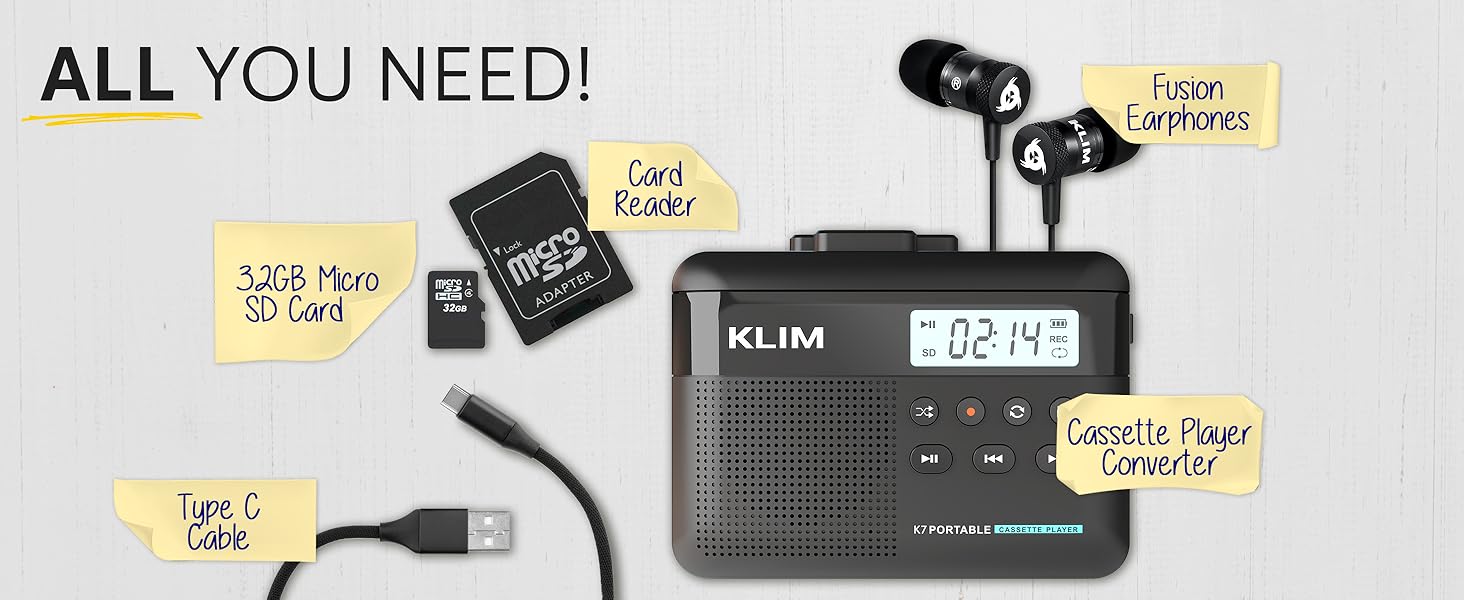
Image: A mother and child sharing earphones connected to the KLIM K7, demonstrating the device's use for listening to cassette tapes.
5.3 Converting Cassette to MP3
The KLIM K7 allows you to convert your cassette tapes directly to MP3 files on the inserted Micro SD card without needing a computer.
- Ensure a cassette tape is inserted and the 32GB Micro SD card is in its slot.
- Pouvwa sou aparèy la.
- Peze a Jwe bouton (►) to start playing the cassette.
- Long peze la Dosye bouton (●) to begin recording. The display will show a recording indicator.
- The device will convert the audio from the cassette to an MP3 file on the SD card. Each side of the tape will typically be saved as one MP3 file.
- Pou sispann anrejistreman, peze la Dosye bouton (●) ankò.
- After recording, you can remove the SD card and use the provided USB adapter to transfer the MP3 files to a computer or other device.

Image: A five-step visual guide demonstrating how to convert cassette audio to MP3 files on the Micro SD card using the KLIM K7.
5.4 Using the Built-in Microphone for Recording
The KLIM K7 allows you to record external audio using its built-in microphone directly to the Micro SD card.
- Ensure the 32GB Micro SD card is inserted.
- Pouvwa sou aparèy la.
- Peze a Mode button until the device is in microphone recording mode (indicated on the display).
- Peze a Dosye bouton (●) to start recording.
- Speak clearly towards the built-in microphone.
- Pou sispann anrejistreman, peze la Dosye bouton (●) ankò.
Note: The KLIM K7 does not support recording onto cassette tapes.

Image: A woman singing into a microphone, with the KLIM K7 and its SD card slot visible, illustrating the high-quality sound recording capability to the SD card.
5.5 Jwe MP3 Files from SD Card
The KLIM K7 can also function as an MP3 player, playing fileyo estoke sou kat Micro SD la.
- Ensure the Micro SD card with MP3 files mete.
- Pouvwa sou aparèy la.
- Peze a Mode button until the device is in MP3 playback mode.
- Peze a Jwe bouton (►) to start playing the first MP3 file.
- Sèvi ak la Vit Avant (►►) ak Remonte (◄◄) bouton yo pou sote mizik yo.
- Ajiste volim nan lè l sèvi avèk kontwòl volim.
5.6 Using Earphones and Speaker
The KLIM K7 offers flexible listening options:
- Ekoutè: For private listening, plug the included KLIM Fusion earphones into the 3.5mm earphone jack. The built-in speaker will automatically mute.
- Oratè entegre: For shared listening, ensure no earphones are plugged in. The audio will play through the integrated speaker.

Image: A man wearing earphones, connected to the KLIM K7, highlighting the universal 3.5mm jack port for personal listening.
6. Antretyen
Proper care and maintenance will ensure the longevity and optimal performance of your KLIM K7.
- Netwayaj: Use a soft, dry cloth to clean the exterior of the device. Do not use liquid cleaners or abrasive materials. For the playback head and pinch rollers, use a specialized cassette head cleaner if necessary, following its instructions.
- Depo: Lè w pa itilize, sere aparèy la nan yon kote ki fre, sèk, lwen limyè solèy la dirèk ak tanperati ekstrèm.
- Swen batri: Pou pwolonje lavi batri a, evite dechaje batri a nèt souvan. Chaje aparèy la regilyèman, menm si w pa itilize l tout tan.
- Cassette Tapes: Use clean, well-maintained cassette tapes to prevent damage to the playback head and ensure good audio quality.
NAN. Depanaj
If you encounter issues with your KLIM K7, refer to the following common problems and solutions:
| Pwoblèm | Kòz posib | Solisyon |
|---|---|---|
| Aparèy pa limen. | Batri ki fèb oswa ki vid. | Chaje aparèy la lè l sèvi avèk kab USB-C yo bay la. |
| No sound during cassette playback. | Volume too low; earphones not properly connected; dirty playback head. | Increase volume; ensure earphones are fully plugged in or removed for speaker; clean playback head. |
| Cassette to MP3 conversion not working. | SD card not inserted or full; cassette not playing. | Ensure SD card is correctly inserted and has free space; verify cassette playback is active before recording. |
| Poor audio quality during playback or recording. | Dirty playback head/pinch rollers; damaged cassette tape; low battery. | Clean playback head and pinch rollers; try a different cassette; ensure device is charged. |
| MP3 files not visible on computer after transfer. | SD card not properly read by computer/adapter. | Ensure SD card is fully inserted into the card reader; try a different USB port on your computer. |
8. Espesifikasyon
| Karakteristik | Detay |
|---|---|
| Dimansyon pwodwi | 4.76 x 3.61 x 1.56 pous |
| Pwa atik | 7.7 ons |
| Manifakti | KLIM |
| Nimewo Modèl | K7 |
| Batri | 1000mAh Lithium Ion (rechargeable, included) |
| Port chaje | Kalite-C USB |
| Depo | 32GB Mikwo SD Kat (enkli) |
| Sòti odyo | Built-in Speaker, 3.5mm Earphone Jack |
| Fonksyon anrejistreman | Cassette to MP3, Built-in Microphone to MP3 (to SD card) |

Image: The KLIM K7 device with its compact dimensions (4.7" x 3.5" x 1.4") and weight (8 oz), highlighting its portability.
9. Garanti ak sipò
KLIM is committed to producing quality electronics. The KLIM K7 comes with a 5-year assurance against manufacturing defects. If you encounter any problems with your device, please contact KLIM customer support for assistance.
Pou plis sipò, anrejistreman pwodwi, oubyen pou view frequently asked questions, please visit the official KLIM websit:
10. Enfòmasyon sou Sekirite
- Pa ekspoze aparèy la nan dlo, imidite, oswa tanperati ekstrèm.
- Evite jete oswa sibi aparèy la nan gwo enpak.
- Pa eseye demonte oswa repare aparèy la tèt ou. Konsilte pèsonèl sèvis kalifye.
- Kenbe soti nan atenn timoun yo.
- Jete aparèy la ak batri li yon fason responsab dapre règleman lokal yo.


