1. Entwodiksyon
This manual provides essential information for the safe and effective use of your boAt Aavante Bar Quake 2.1 Channel Soundbar with Wired Subwoofer. Please read this manual thoroughly before operating the device and retain it for future reference. The boAt Aavante Bar Quake is designed to enhance your audio experience with its 200W RMS output and versatile connectivity options.
Karakteristik kle yo enkli:
- 200W RMS boAt Signature Sound: Bay yon odyo pwisan ak klè.
- 2.1 Channel Soundbar with Wired Subwoofer: Provides immersive sound with enhanced bass.
- Multichannel Connectivity: Supports Bluetooth v5.3, AUX, USB, Optical, and HDMI-ARC.
- Mòd EQ: Offers tailored audio profiles for Movies, Music, News, and 3D content.
- Kontwòl Bas ak Treble: Pèmèt ajisteman odyo pèsonalize.
2. Enfòmasyon enpòtan sou sekirite
Pou asire yon operasyon an sekirite epi pou anpeche domaj, tanpri obsève prekosyon sa yo:
- Pa ekspoze aparèy la anba lapli, imidite, oswa tanperati ekstrèm.
- Pa ouvri c laasing. Konfye tout antretyen bay pèsonèl kalifye.
- Asire w ke ou gen bon vantilasyon toutotou ba son an ak subwoofer la.
- Sèvi ak adaptè pouvwa a sèlman ak inite a.
- Kenbe aparèy la lwen sous chalè ak limyè solèy la dirèk.
- Avoid placing heavy objects on the soundbar or subwoofer.
- Dekonekte ploge kouran an pandan tanpèt zèklè oswa lè ou pa itilize li pou yon bon bout tan.
3. Pake kontni
Verifye ke tout atik yo prezan nan pakè a:
- boAt Aavante Bar Quake Soundbar
- Filè Subwoofer
- Remote Control (with 2 x 12V Alkaline batteries included)
- Manyèl Itilizatè (dokiman sa a)
- Kat Garanti
- Adaptè pouvwa
4. Pwodwi souview
Familiarize yourself with the components of your boAt Aavante Bar Quake sound system.
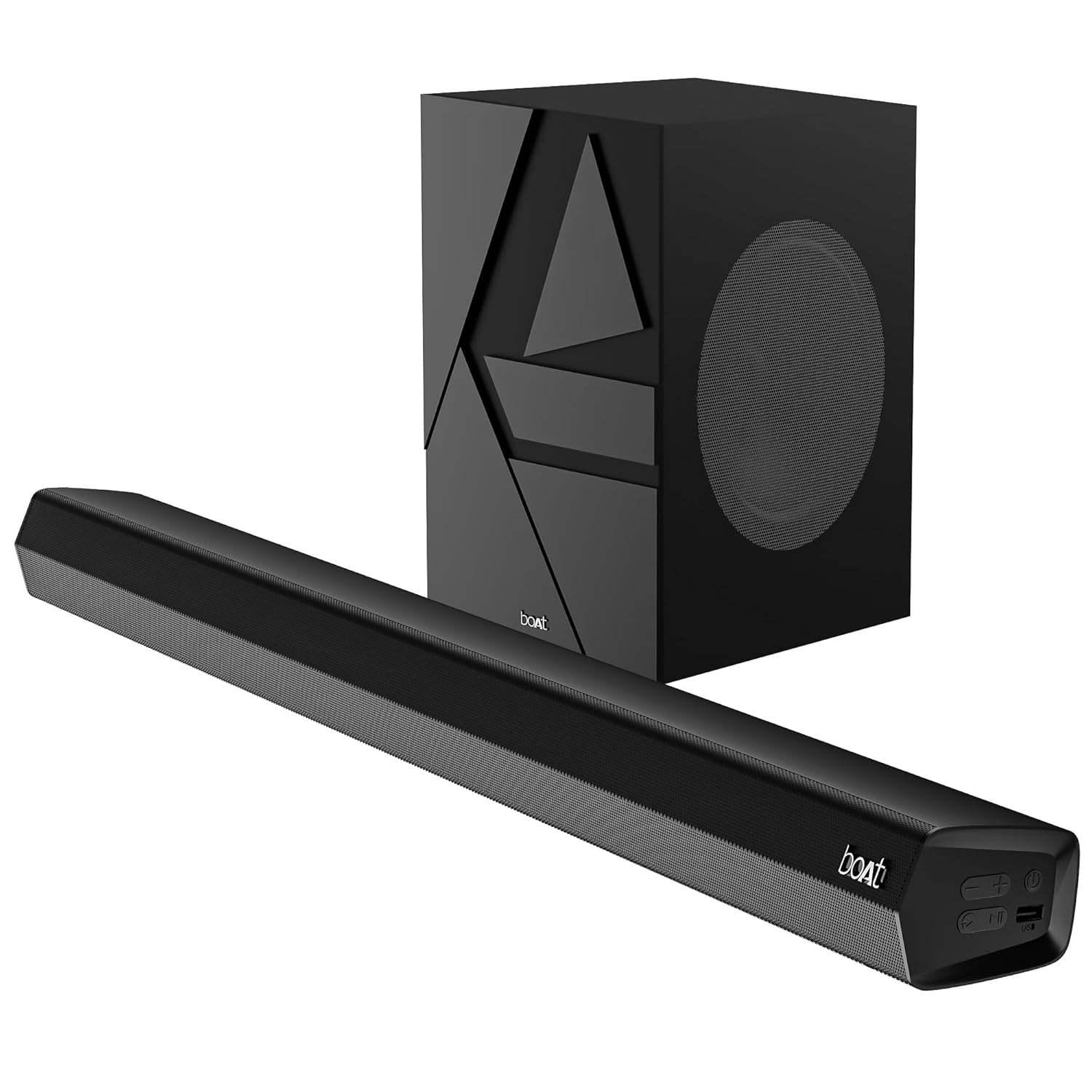
Image 1: The boAt Aavante Bar Quake soundbar and its accompanying wired subwoofer, showcasing konsepsyon yo ak gwosè relatif yo.
4.1 Soundbar Features

Imaj 2: Yon gwo plan view of the boAt Aavante Bar Quake soundbar, highlighting its sleek design and the '200W RMS boAt Signature Sound' feature.
The soundbar houses the main speakers and control interface. It delivers 200W RMS boAt Signature Sound for a powerful audio experience.
4.2 Filè Subwoofer

Image 3: An illustration showing the boAt Aavante Bar Quake soundbar and its wired subwoofer integrated into a home entertainment setup, emphasizing the 2.1 channel configuration.
The wired subwoofer provides deep, rich bass, complementing the soundbar for a full-range audio output.
4.3 Pò koneksyon

Imaj 4: Yon imaj detaye view of the rear panel of the boAt Aavante Bar Quake soundbar, clearly showing the various input ports including USB, HDMI (ARC), AUX, and Optical, along with Bluetooth connectivity.
The soundbar features multiple input options for connecting various devices:
- Pò USB: For playing audio from USB drives.
- HDMI (ARC) Port: For high-quality audio connection to compatible TVs.
- Bluetooth: Pou difizyon odyo san fil soti nan aparèy mobil.
- Antre AUX: Pou konekte aparèy atravè yon kab odyo 3.5mm.
- Antre optik: For digital audio connection from TVs or other sources.
4.4 Kontwòl Remote

Image 5: The master remote control for the boAt Aavante Bar Quake, illustrating buttons for power, mute, input selection, volume, playback, EQ modes (Music, Movies, News, 3D), and dedicated bass and treble controls.
The included remote control allows full command over the soundbar's functions, including power, volume, input selection, EQ modes, and bass/treble adjustments.
5. Enstalasyon
5.1 Plasman
- Ba son: Place the soundbar on a stable, flat surface directly in front of your television, or mount it on the wall below your TV. Ensure there are no obstructions in front of the soundbar.
- Subwoofers: Position the subwoofer on the floor, preferably in a corner or near a wall, to enhance bass response. Ensure it is within reach of the soundbar for the wired connection.
5.2 Konekte Subwoofer la
Connect the wired subwoofer to the dedicated subwoofer output port on the soundbar using the integrated cable.
5.3 Koneksyon pouvwa
- Konekte adaptè kouran an nan pò DC IN ki sou ba son an.
- Ploge lòt bout adaptè pouvwa a nan yon priz miray.
- Ensure the subwoofer is also connected to a power source if it has a separate power cable (for this model, it's wired to the soundbar).
5.4 Koneksyon Audio
Chwazi youn nan metòd sa yo pou konekte sous odyo ou a:
- HDMI ARC (Rekòmande): Connect an HDMI cable from the HDMI ARC port on your TV to the HDMI ARC port on the soundbar. This allows audio to be sent from the TV to the soundbar and often enables TV remote control of the soundbar volume.
- Optik: Connect an optical cable from your TV's optical output to the OPTICAL IN port on the soundbar.
- AUX: Connect a 3.5mm audio cable from your device's audio output to the AUX IN port on the soundbar.
- USB: Insert a USB drive into the USB port on the soundbar to play audio files dirèkteman.
- Bluetooth: Gade Seksyon 6.2 pou enstriksyon sou koneksyon Bluetooth la.
6. Operasyon Enstriksyon
6.1 Power On/Off
Peze a Pouvwa bouton ki sou ba son an oswa sou kontwòl remote la pou limen oswa etenn aparèy la.
6.2 Bluetooth Pairing
- Limen ba son an epi chwazi mòd Bluetooth la avèk bouton an. Antre button on the remote or soundbar. The LED indicator will flash.
- Aktive Bluetooth sou aparèy mobil ou epi chèche aparèy ki disponib.
- Select "boAt Aavante Bar Quake" from the list.
- Yon fwa li konekte, endikatè LED la ap sispann flache epi li ap rete fiks.
6.3 Chwazi Sous Antre
Peze a Antre button on the remote control or soundbar repeatedly to cycle through the available input sources: Bluetooth, AUX, Optical, HDMI ARC, and USB.
6.4 Kontwòl Volim
Sèvi ak la Volim + epi Volim - buttons on the remote control or soundbar to adjust the volume level.
6.5 mòd EQ
The soundbar offers four preset equalizer modes to optimize audio for different content types. Press the corresponding button on the remote control to select:
- Sinema: Enhances dialogue and cinematic effects.
- Mizik: Bay yon pwofesyonèl odyo balansefile pou lekti mizik.
- Nouvèl: Optimizes vocal clarity for news and spoken content.
- 3D: Creates a wider, more immersive soundstage.
6.6 Bass & Treble Controls
Sèvi ak la BASS+ / BASS- epi TREB+ / TREB- buttons on the remote control to fine-tune the bass and treble levels according to your preference.
7. Antretyen
7.1 Netwayaj
- Wipe the surfaces of the soundbar and subwoofer with a soft, dry cloth.
- Do not use liquid cleaners, aerosols, or abrasive chemicals, as these may damage the finish.
- Asire w ke aparèy la dekonekte anvan w netwaye.
7.2 Depo
Si w ap sere aparèy la pou yon bon bout tan, debranche l nan priz kouran an epi sere l nan yon kote ki fre epi sèk, lwen limyè solèy dirèk ak tanperati ekstrèm.
NAN. Depanaj
| Pwoblèm | Kòz posib | Solisyon |
|---|---|---|
| Pa gen pouvwa | Kab kouran an pa konekte; Priz kouran an pa aktif | Asire w ke kab kouran an byen konekte; Eseye yon lòt priz kouran |
| Pa gen son | Incorrect input source; Volume too low; Mute activated; Incorrect cable connection | Select correct input source; Increase volume; Deactivate mute; Check audio cable connections |
| Aparèy Bluetooth echwe | Ba son an pa nan mòd koneksyon; Aparèy la twò lwen; Entèferans | Ensure soundbar is in Bluetooth pairing mode; Move device closer; Avoid interference from other devices |
| Remote kontwòl pa travay | Pil yo fin itilize; Gen yon obstak ant telekòmand lan ak ba son an | Replace remote control batteries; Remove any obstructions |
9. Espesifikasyon
| Non modèl | Aavante Bar Quake |
| Kalite Oratè | Ba son |
| Konfigirasyon chanèl son antoure | 2.1 |
| Oratè maksimòm pwodiksyon pouvwa | 200 Watt RMS |
| Koneksyon Teknoloji | Bluetooth v5.3, AUX, USB, Optical, HDMI-ARC |
| Repons Frekans | 40 Hz |
| Audio Sòti Mode | Stereo, Movies, Music, News, 3D |
| Metòd kontwòl | Remote |
| Kalite aliye | Table & Wall |
| Dimansyon pwodwi | 90.3P x 6.5W x 8.6H santimèt |
| Pwa atik | 6.5 kg |
| Konpozan ki enkli | User Manual, Warranty Card, Soundbar, Wired Subwoofer, Remote Control |
| Sous pouvwa | Fil elektrik |
| Batri obligatwa | Yes (2 x 12V Alkaline for remote, included) |
| Manifakti | Imajine Maketing Limited |
10. Garanti ak sipò
10.1 Enfòmasyon sou Garanti
The boAt Aavante Bar Quake comes with a 1-ane garanti limite from the date of purchase. This warranty covers manufacturing defects. Please retain your purchase receipt and warranty card for any warranty claims.
10.2 Sipò pou Kliyan
For technical assistance, troubleshooting, or warranty claims, please contact boAt customer support. Refer to the contact information provided on your warranty card or visit the official boAt website for the latest support details.


