Entwodiksyon
Welcome to the user manual for your AYANEO Pocket S Android Handheld Gaming Device. This manual provides essential information for setting up, operating, maintaining, and troubleshooting your device to ensure optimal performance and longevity. Please read this manual thoroughly before using your device.
Enfòmasyon sou Sekirite
To prevent damage to your device or injury to yourself or others, please observe the following precautions:
- Pa ekspoze aparèy la nan tanperati ekstrèm, limyè solèy dirèk, oswa imidite ki wo.
- Evite lage aparèy la oswa soumèt li a gwo chòk.
- Sèvi ak sèlman chajè ak akseswa ki apwouve.
- Pa eseye demonte oswa repare aparèy la tèt ou. Konsilte pèsonèl sèvis kalifye.
- Kenbe aparèy la lwen dlo ak lòt likid.
Konpozan aparèy
Familiarize yourself with the various parts of your AYANEO Pocket S.
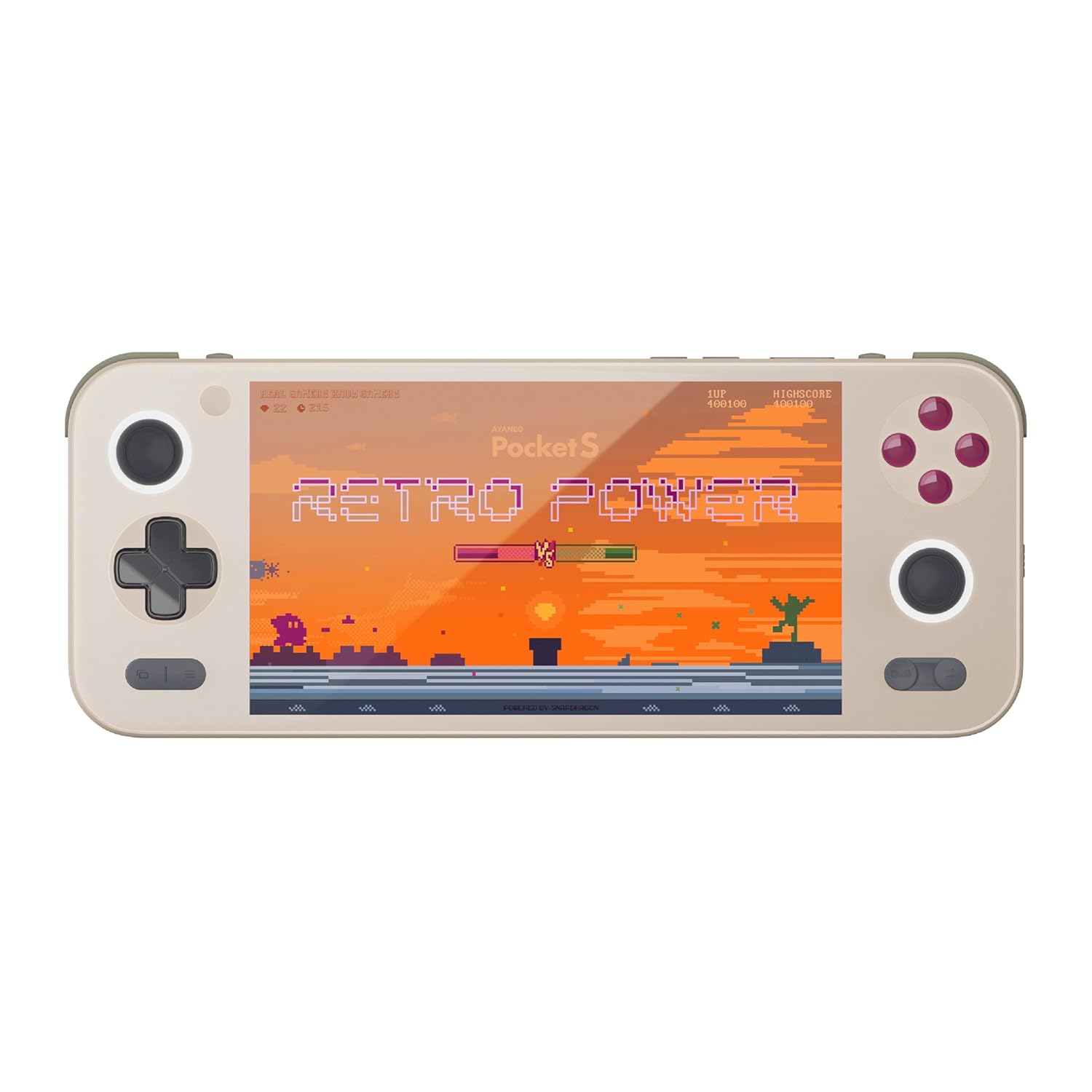
Figi 1: Devan view of the AYANEO Pocket S, showing the screen, joysticks, D-pad, and action buttons.

Figure 2: Close-up of the Master Controller, highlighting the RGB Hall joysticks, Hall triggers, and crystal-textured keys.

Figure 3: Illustration of the internal VC thermal plate and active cooling system, along with the "Fishbone" biomimetic heat dissipation design on the side.

Figure 4: The AYANEO Pocket S displaying the AYASpace and AYAHOME Launcher interface, showing various game icons.
Karakteristik kle:
- Ekspozisyon: 6-inch 2K Borderless IPS Screen (490 PPI, 120% sRGB, 85% DCI-P3)
- Processeur: Snapdragon G3x Gen 2 Gaming Platform
- Memwa ak Depo: Up to 16GB RAM, up to 1TB Storage (This model: 12GB RAM, 128GB Storage)
- Refwadisman: Large VC Heat Sink, Active Cooling System, "Fishbone" Cooling Vents
- Kontwòl: Master Controller with RGB Hall Joysticks, Linear Hall Triggers, X-axis Vibration
- Sistèm operasyon: Android 13
Gid Enstalasyon
1. Premye Chajman
Before first use, fully charge your AYANEO Pocket S. Connect the provided USB-C cable to the device's charging port and the other end to a compatible power adapter. The charging indicator will illuminate.
2. Powering On / Off
- Pou limen: Press and hold the Power button located on the top edge of the device until the AYANEO logo appears on the screen.
- Pou etenn: Press and hold the Power button until the power options menu appears. Select "Power Off" and confirm.
- Pou rekòmanse: Nan meni opsyon pouvwa a, chwazi "Rekòmanse".
3. Konfigirasyon Sistèm Inisyal la
Upon first power-on, you will be guided through the initial Android setup process. This includes:
- Chwazi lang ou.
- Konekte nan yon rezo Wi-Fi.
- Konekte ak kont Google ou a (opsyonèl, men rekòmande pou telechaje aplikasyon).
- Setting up screen lock and other security features.
4. Mizajou lojisyèl
It is recommended to check for and install any available system updates after initial setup to ensure you have the latest features and security patches. Navigate to Anviwònman > Sistèm > Mizajou sistèm.
Opere aparèy ou an
Navigasyon ak Kontwòl
The AYANEO Pocket S features both touchscreen input and physical controller input for navigation and gameplay.
- Ekran tactile: Use familiar Android gestures such as tap, swipe, pinch-to-zoom.
- Joysticks: Analog input for movement and camera control in games.
- D-Pad: Digital input for menu navigation and directional controls.
- Action Buttons (A/B/X/Y): Primary input for in-game actions.
- Shoulder/Trigger Buttons (L1/L2/R1/R2): Additional input for various game functions.
- Bouton Fonksyon: Dedicated buttons for system functions, such as Home, Back, and Menu.
Mòd Pèfòmans
The device offers multiple performance modes to optimize for either maximum performance or extended battery life.
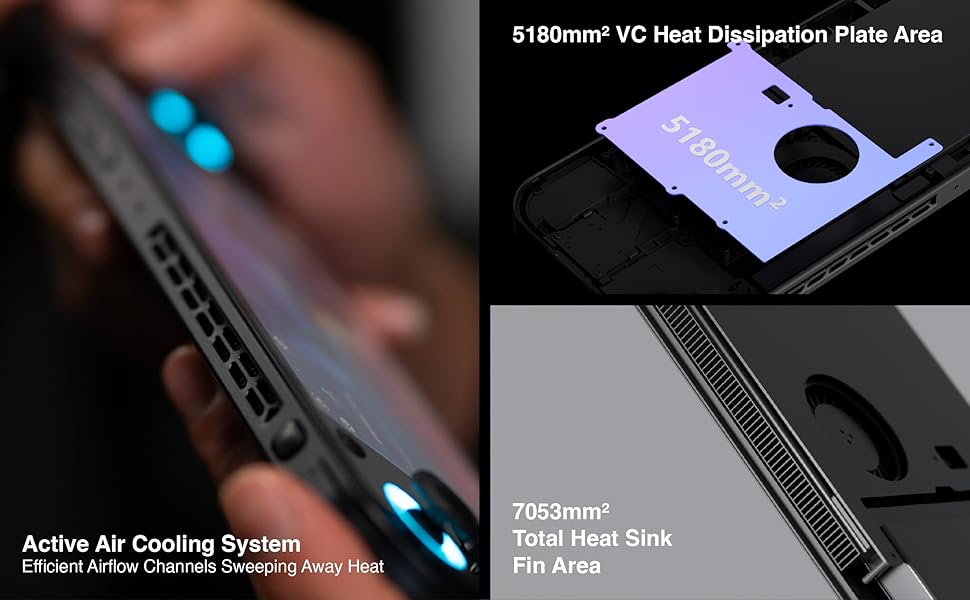
Figure 5: Diagram illustrating the three performance modes: Performance Turbo Mode, Balanced Mode, and Power-Saving Long Battery Life Mode.
- Performance Turbo Mode: Maximizes CPU, GPU, and fan speed for demanding games.
- Mòd Balanse: Provides a good balance between performance and battery life for most games.
- Power-Saving Long Battery Life Mode: Optimizes for extended usage, suitable for less demanding applications or when battery conservation is critical.
You can switch between these modes via the AYASpace application or quick settings menu.
AYASpace and AYAHOME Launcher
The AYASpace application and AYAHOME Launcher provide a customized Android experience for gaming handhelds.
- Jesyon Jwèt: Organize and launch your games.
- Kat jeyografik kle: Customize button assignments for mobile games that do not natively support physical controllers.
- Anviwònman sistèm: Access performance mode settings, controller calibration, and other device-specific configurations.
Antretyen
Netwaye Aparèy la
- Use a soft, lint-free cloth to wipe the screen and body of the device.
- Pou tach ki difisil pou retire, yon ti kras dampSiye twal la avèk dlo oswa yon pwodui netwayaj ekran.
- Do not use harsh chemicals, abrasive cleaners, or aerosol sprays.
- Ensure all ports are free of dust and debris. Use a soft brush or compressed air if necessary, holding the can upright.
Swen batri
- Evite dechaje batri a nèt souvan.
- Pa kite aparèy la san chaj pou yon peryòd tan pwolonje.
- Store the device in a cool, dry place if not used for a long time, with the battery charged to around 50%.
Antretyen lojisyèl
- Regularly check for and install system updates.
- Keep your applications updated through the Google Play Store or AYASpace.
- Vide kach la regilyèman ak sa ki pa nesesè yo files pou kenbe pèfòmans sistèm nan.
Depanaj
| Pwoblèm | Kòz posib | Solisyon |
|---|---|---|
| Aparèy pa limen. | Batri fèb; Sistèm nan kraze. | Chaje aparèy la pou omwen 30 minit. Fè yon rekòmanse fòse lè w kenbe bouton Pouvwa a pou 10-15 segonn. |
| Ekran an pa reponn. | Software glitch; Screen damage. | Rekòmanse aparèy la. Si pwoblèm nan pèsiste, kontakte sèvis kliyan. |
| Games are lagging or performing poorly. | Incorrect performance mode; Background apps; Overheating. | Switch to Performance Turbo Mode. Close unnecessary background applications. Ensure cooling vents are not blocked. |
| Pwoblèm koneksyon Wi-Fi. | Incorrect password; Router issue; Device Wi-Fi module error. | Verify Wi-Fi password. Restart your router. Toggle Wi-Fi off and on on the device. |
If you encounter issues not listed here or if the suggested solutions do not resolve the problem, please contact AYANEO customer support.
Espesifikasyon
| Karakteristik | Detay |
|---|---|
| Modèl | Pòch S |
| Processeur | Snapdragon G3x Gen 2 Gaming Platform |
| Ekspozisyon | 6-inch 2K Borderless IPS Display (2560*1440 resolution, 490 PPI, 120% sRGB, 85% DCI-P3) |
| RAM | 12GB (as per current model) |
| Depo | 128GB (as per current model) |
| Sistèm operasyon | Android 13 |
| Sistèm refwadisman | Large VC Heat Sink, Active Cooling System, "Fishbone" Vents |
| Batri | 1 batri ityòm Ion (enkli) |
| Dimansyon | Apeprè 8.42 x 3.35 x 0.55 pous |
| Pwa | Apeprè 1.59 liv (0.72 kg) |
Enfòmasyon sou Garanti
AYANEO products typically come with a limited manufacturer's warranty. Please refer to the warranty card included in your product packaging or visit the official AYANEO websit la pou plis detay sou tèm ak kondisyon garanti a. Kenbe prèv acha ou pou reklamasyon garanti.
Note: Protection plans may be available for purchase separately. These plans are offered by third parties and are not part of the standard manufacturer's warranty.
Sipò pou Kliyan
For technical assistance, troubleshooting, or warranty inquiries, please contact AYANEO customer support through their official channels:
- Ofisyèl Websit: www.ayaneo.com (Check for support section or contact page)
- Sipò Imèl: Gade ofisyèl la websit la pou jwenn adrès imel sipò ki pi resan an.
- Kominote/Fowòm sou Entènèt: AYANEO may host online communities where users can find answers and share experiences.
When contacting support, please have your device model (Pocket S) and serial number ready.


