Memorex MX-PS802 Rechargeable Party Speaker User Manual
Modèl: MX-PS802
1. Entwodiksyon
Mèsi pou acha aasing the Memorex MX-PS802 Rechargeable Party Speaker. This manual provides essential information for the safe and efficient operation of your device. Please read it thoroughly before use and retain it for future reference.
2. Enfòmasyon sou Sekirite
- Pa ekspoze oratè a nan dlo, imidite, oswa tanperati ekstrèm.
- Evite mete oratè a toupre sous chalè oswa anba limyè solèy dirèk.
- Pa eseye demonte oswa modifye oratè a. Konfye tout antretyen bay pèsonèl kalifye.
- Sèvi sèlman ak kab chaje ak adaptè ki vini ak aparèy la.
- Kenbe oratè a lwen timoun ak bèt kay.
- Asire w ke gen bon vantilasyon toutotou oratè a pandan w ap itilize li.
3. Pake kontni
Verifye ke tout atik yo prezan nan pakè ou a:
- Memorex MX-PS802 Party Speaker
- Chaje kab
- Manyèl Itilizatè (dokiman sa a)
4. Pwodwi souview
The Memorex MX-PS802 is an 8-inch rechargeable party speaker featuring Bluetooth 5.3, LED flame lighting, TWS pairing, and multiple input options.
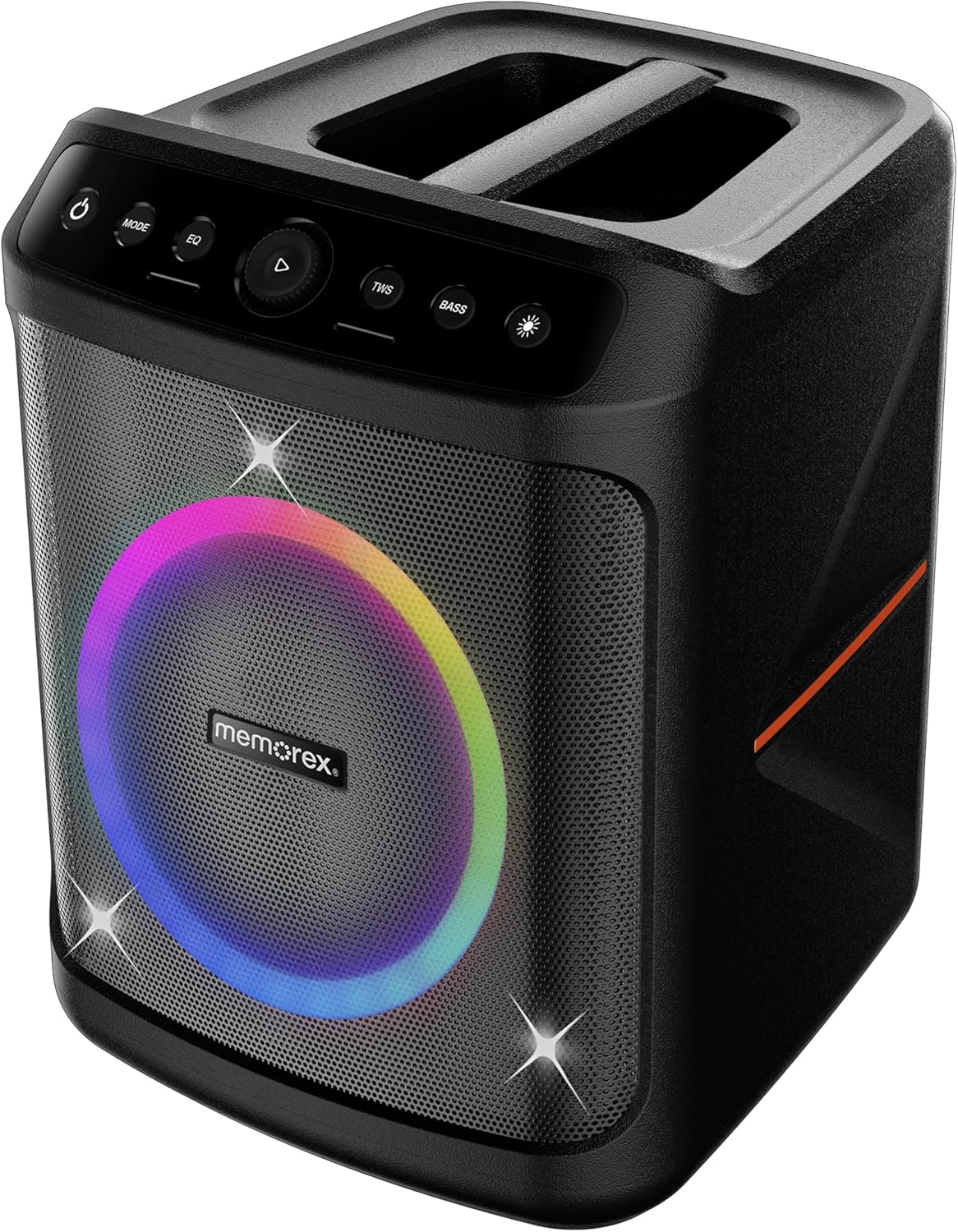
Devan view of the Memorex MX-PS802 speaker, showcasing the illuminated woofer and the top-mounted control panel.
Fonksyon Panel Kontwòl
- Bouton pouvwa (⏻): Peze epi kenbe pou limen/etenn oratè a.
- Bouton MODE: Short press to switch between input modes (Bluetooth, USB, SD).
- EQ bouton: Short press to cycle through equalizer presets.
- Play/Pause/Volume Knob (▶): Press to play or pause audio. Rotate to adjust volume.
- Bouton TWS: Peze pou kòmanse koneksyon Stereo san fil vre a.
- Bouton BASS: Peze pou aktive oswa dezaktive amplificasyon bas la.
- Light Mode Button (☀): Press to cycle through LED lighting modes or turn lights ON/OFF.
5. Enstalasyon
5.1 Chaje Oratè a
- Konekte kab chaje a nan pò chaje oratè a.
- Plug the other end of the cable into a suitable power outlet.
- The charging indicator will illuminate. Allow the speaker to fully charge before first use (approximately 3-4 hours).
- The indicator will change or turn off once charging is complete.
5.2 Limen/Etenyen
- To power ON, press and hold the Bouton pouvwa (⏻) for 2-3 seconds.
- To power OFF, press and hold the Bouton pouvwa (⏻) again for 2-3 seconds.
6. Operasyon Enstriksyon
6.1 Bluetooth Pairing
- Limen oratè a. Li pral antre otomatikman nan mòd koneksyon Bluetooth, sa ap parèt ak yon LED k ap flache.
- Sou aparèy mobil ou, aktive Bluetooth epi chèche aparèy ki disponib.
- Chwazi "Memorex MX-PS802"nan lis la.
- Yon fwa li konekte, oratè a ap emèt yon son konfimasyon, epi LED la ap sispann flache.
6.2 Lekti Kat USB/SD
- Insert a USB flash drive or SD card (with MP3 files) into the corresponding port.
- The speaker will automatically switch to USB/SD mode and begin playback. If not, press the MÒD bouton an pou chwazi antre ki kòrèk la.
- Use the Play/Pause/Volume knob to control playback and volume.
6.3 Vrèman san fil stereo (TWS) koneksyon
To pair two MX-PS802 speakers for stereo sound:
- Ensure both MX-PS802 speakers are powered on and in Bluetooth mode, but not connected to any device.
- Sou yon oratè (sa a pral oratè prensipal la), peze bouton an TWS button. It will emit a pairing tone.
- The two speakers will automatically connect to each other. A confirmation tone will sound once paired.
- Kounye a, konekte aparèy mobil ou a ak oratè prensipal la atravè Bluetooth jan sa dekri nan seksyon 6.1.
6.4 Antre Mikwofòn ak Gita
- Connect a microphone or guitar to the respective input jacks on the speaker.
- Adjust the volume of the connected instrument/microphone using its own controls or the speaker's main volume knob.
6.5 LED Flame Lighting
- Peze a Limyè Mode bouton (☀) to cycle through various LED lighting effects.
- Kontinye peze pou etenn limyè yo.
6.6 EQ and Bass Boost
- Peze a EQ button to select different equalizer presets for optimized sound.
- Peze a BASS button to toggle the bass boost feature ON or OFF.
7. Antretyen
- Netwayaj: Sèvi ak yon twal mou epi sèk pou netwaye deyò oratè a. Pa sèvi ak pwodui netwayaj abrazif oswa solvan.
- Depo: Sere oratè a nan yon kote ki fre epi sèk, lwen limyè solèy dirèk lè w pa itilize li pou yon bon bout tan.
- Swen batri: Pou pwolonje lavi batri a, chaje oratè a nèt anvan ou sere l pou yon bon bout tan epi rechaje l chak 3-6 mwa.
NAN. Depanaj
- Pa gen pouvwa: Asire w ke oratè a chaje. Konekte l nan yon sous kouran epi eseye ankò.
- Pa gen son: Tcheke nivo volim nan tou de sou oratè a ak aparèy ki konekte a. Asire w ke ou chwazi mòd antre ki kòrèk la.
- Bluetooth pa konekte: Ensure the speaker is in pairing mode. Turn off and on Bluetooth on your device. Forget the speaker from your device's Bluetooth list and try pairing again. Ensure no other devices are connected to the speaker.
- Echèk koneksyon TWS: Ensure both speakers are MX-PS802 models and are not connected to any other Bluetooth device before initiating TWS pairing.
- Son defòme: Reduce the volume on both the speaker and your device. Check for interference from other electronic devices.
9. Espesifikasyon
| Karakteristik | Spesifikasyon |
|---|---|
| Non modèl | MX-PS802 |
| Kalite Oratè | Mono (can be paired for Stereo via TWS) |
| Gwosè Oratè | 8 pous |
| Oratè maksimòm pwodiksyon pouvwa | 800 Watts PMPO (80W RMS) |
| Teknoloji kominikasyon san fil | Bluetooth 5.3 |
| Sous pouvwa | Mache ak pil (rechargeable Li-ion) |
| Dimansyon pwodwi | 11.33 x 10.78 x 16.57 pous |
| Pwa atik | 12.12 liv |
| Konpozan ki enkli | Pati Oratè |
10. Garanti ak sipò
The Memorex MX-PS802 Party Speaker comes with a Garanti limite. Please refer to the warranty card included in your package for specific terms and conditions. For technical support or service inquiries, please contact Memorex customer service through their official websit la oswa enfòmasyon kontak yo bay ak dokiman acha ou a.


