1. Entwodiksyon
This manual provides detailed instructions for the safe and efficient operation of your Memorex MX-TT700 7-in-1 Nostalgic Wooden Music Center. Please read this manual thoroughly before using the device and retain it for future reference.
1.1 Pwodwi souview
The Memorex MX-TT700 is a versatile audio system combining vintage aesthetics with modern functionality. It features a 3-speed turntable, CD/MP3 player, USB playback, Bluetooth streaming, AM/FM radio, and an AUX-in port. It also supports recording audio from various sources directly to a USB drive.
1.2 Sa ki nan bwat la
- Memorex MX-TT700 Music Center
- AC adaptè
- 45 rpm adaptè
- Aux-nan kab
- Instruction Manual (IM)
2. Enfòmasyon enpòtan sou sekirite
Please observe the following safety precautions to prevent electric shock, fire, or damage to the unit.
- Sous pouvwa: Use only the specified AC adapter. Ensure the voltage matche ak ekipman pou kouran lokal ou a.
- Vantilasyon: Pa bloke ouvèti vantilasyon yo. Kite ase espas otou aparèy la pou yon bon sikilasyon lè.
- Dlo ak imidite: Do not expose the unit to rain, moisture, or dripping/splashing liquids. Keep objects filled with liquids, such as vases, away from the unit.
- Chalè: Pa mete aparèy la toupre sous chalè tankou radyatè, recho, recho, oswa lòt aparèy (ki gen ladan amplifiers) ki pwodui chalè.
- Netwayaj: Debranche aparèy la nan priz miray la anvan ou netwaye li. Sèvi ak yon twal sèk sèlman.
- Sèvis: Pa eseye fè sèvis pwodui sa a tèt ou. Refere tout sèvis yo bay pèsonèl sèvis kalifye.
- Plasman: Place the unit on a stable, flat surface. Avoid placing it in direct sunlight or areas with excessive dust or vibration.
3. Pwodwi souviewKonpozan ak Kontwòl
Familiarize yourself with the various parts and controls of your music center.
3.1 Kontwòl Panel Front

Imaj: Devan view of the Memorex MX-TT700, highlighting the control panel with LCD display, buttons, and knobs.
- Ekspozisyon LCD: Montre mòd aktyèl la, enfòmasyon sou tras la, frekans radyo a, elatriye.
- Bouton Pouvwa/Mòd: Turns the unit on/off and selects input mode (Phono, CD, USB, Bluetooth, AM, FM, AUX).
- Volim bouton: Ajiste nivo volim prensipal la.
- Pò USB: Pou lekti ak anrejistreman USB.
- Plato CD: Pou mete CD odyo.
- Repeat/Random Button: Controls playback modes for CD/USB.
- Bouton Sote/Rechèch (<< / >>): Navigates tracks/stations.
- Bouton jwe/poz: Kontwole lèktur.
- Bouton Stop: Sispann lekti.
- Bouton Ouvri/Fèmen: Ouvri epi fèmen plato CD a.
- Bouton dosye: Kòmanse anrejistreman sou USB.
- Program/Memory Button: Programs CD tracks or saves radio presets.
- FM Antenna (Pigtail): For FM radio reception (located at the back).
- Jack AUX-in: Konekte aparèy odyo ekstèn yo.
- Kas ekoutè Jack: Pou koute prive.
3.2 konpozan platin
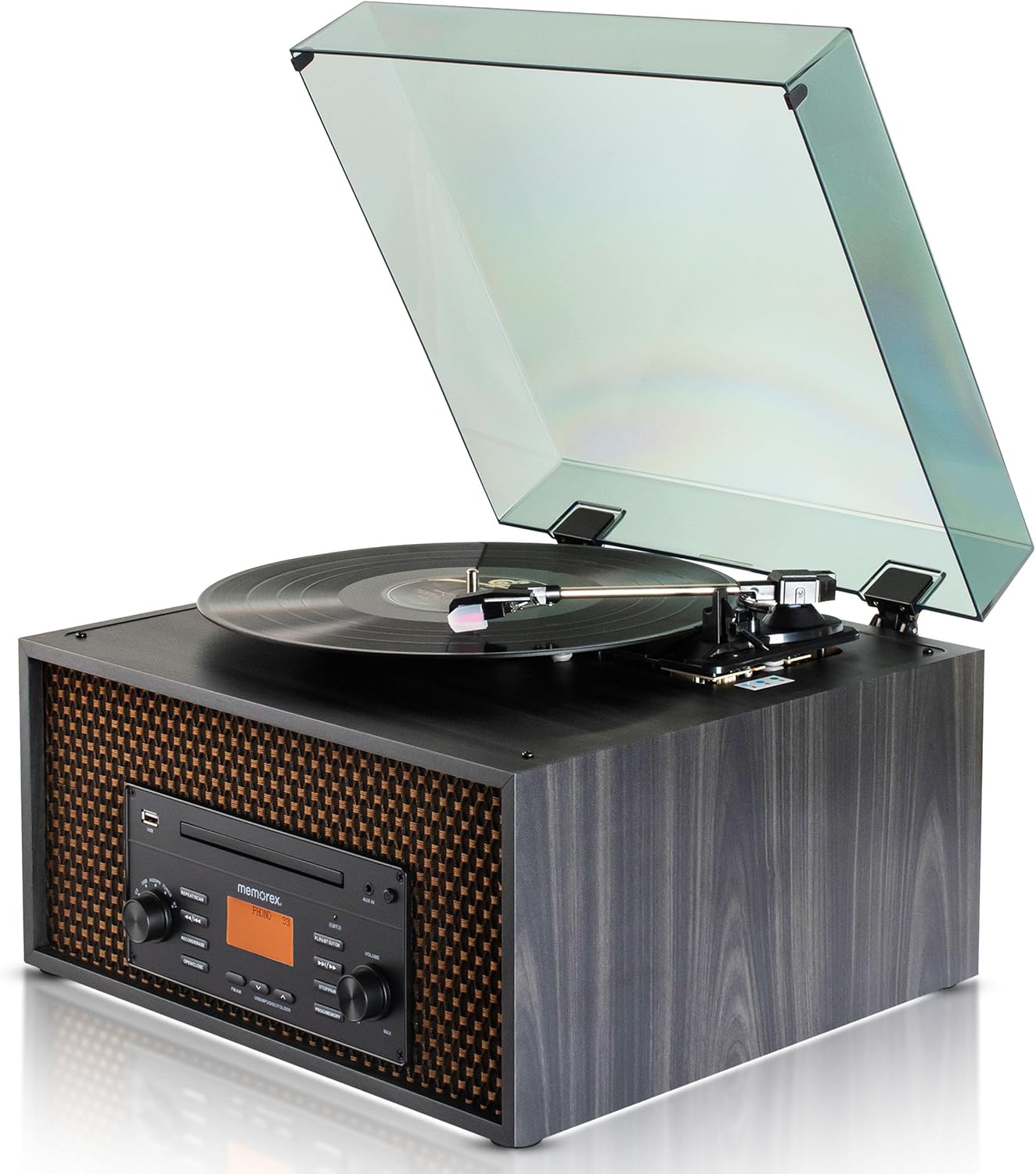
Imaj: Anlè view of the Memorex MX-TT700, showing the turntable platter, tonearm, stylus, and open dust cover.
- Plato platin: Kote yo mete dosye yo.
- Tonbra: Li kenbe stylus la epi li swiv siyon yo sou disk la.
- Stylus (Zegwi): Reads the record grooves.
- Adaptè 45 RPM: Used for playing 7-inch records with large center holes.
- Chanjman Seleksyon Vitès: Adjusts turntable speed (33 1/3, 45, 78 RPM).
- Kouvèti pousyè: Protects the turntable from dust.
4. Gid Enstalasyon
4.1 Debalaj ak plasman
- Ak anpil atansyon retire inite a nan anbalaj li yo.
- Place the music center on a flat, stable surface, away from direct sunlight, heat sources, and excessive dust or vibration.
- Asire w ke gen ase vantilasyon toutotou inite a.
- Remove any protective materials from the turntable, including the stylus protector.
4.2 Koneksyon pouvwa
- Connect the supplied AC adapter to the DC IN jack on the back of the unit.
- Ploge adaptè AC a nan yon priz estanda miray.
4.3 Antenna Connection (FM)
Extend the FM pigtail antenna located at the back of the unit for optimal FM radio reception. Adjust its position if reception is poor.
5. Operasyon
Turn the Power/Mode knob to switch on the unit. The LCD display will illuminate. Rotate the knob to select your desired audio source.
5.1 Operasyon Platin Tounè

Image: Detail of the turntable area, illustrating the 3-speed selector switch (33 1/3, 45, 78 RPM).
- Turn the Power/Mode knob to select "PHONO" mode.
- Leve kouvèti pousyè tè a.
- Place a record on the turntable platter. If playing a 7-inch record with a large center hole, place the 45 RPM adapter on the spindle first.
- Set the speed selector switch to the correct speed for your record (33 1/3, 45, or 78 RPM).
- Leve bra a dousman avèk levye repè a epi pozisyone stylus la sou tras ou vle a nan disk la.
- Desann bra a dousman sou disk la avèk levye repè a. Disk la ap kòmanse jwe.
- Ajiste volim nan lè l sèvi avèk bouton Volim lan.
- To stop playback, lift the tonearm, return it to the tonearm rest, and secure it.
5.2 Lekti CD/MP3
- Turn the Power/Mode knob to select "CD" mode.
- Press the "OPEN/CLOSE" button to open the CD tray.
- Place a CD (audio CD or MP3 CD) with the label side facing up into the tray.
- Press the "OPEN/CLOSE" button again to close the tray. The unit will read the disc.
- Press the "PLAY/PAUSE" button to start playback.
- Use the "<< / >>" buttons to skip tracks. Press and hold to fast forward/rewind.
- Press the "REPEAT/RANDOM" button to cycle through repeat modes (e.g., repeat one, repeat all, random).
- Press the "STOP" button to stop playback.
5.3 Lekti USB

Image: The music center with a USB drive inserted, illustrating its capability for USB playback and recording.
- Mete yon kle USB nan pò USB a.
- Turn the Power/Mode knob to select "USB" mode. The unit will automatically detect and begin playing compatible audio files (MP3).
- Use the "<< / >>" buttons to skip tracks. Press and hold to fast forward/rewind.
- Press the "REPEAT/RANDOM" button to cycle through repeat modes.
- Press the "STOP" button to stop playback.
5.4 Difizyon Bluetooth

Image: The music center paired with a smartphone via Bluetooth, demonstrating wireless audio streaming.
- Turn the Power/Mode knob to select "BLUETOOTH" mode. The LCD display will show "BLUETOOTH" and flash, indicating it's in pairing mode.
- Sou aparèy ou an ki gen Bluetooth (telefòn entelijan, tablèt), aktive Bluetooth epi chèche aparèy ki disponib yo.
- Select "MX-TT700" from the list of devices. Once paired, the display will stop flashing and show "BLUETOOTH".
- Start playing music on your connected device. The audio will stream through the music center.
- Adjust volume on both the music center and your connected device.
5.5 Operasyon Radyo AM/FM

Image: The music center displaying various FM radio frequencies, indicating its radio capabilities.
- Turn the Power/Mode knob to select "AM" or "FM" mode.
- Use the "<< / >>" buttons to manually tune to a station. Press and hold to auto-scan for the next available station.
- Pou sove yon predefinisyon: When on a desired station, press the "PROGRAM/MEMORY" button. The preset number will flash. Use "<< / >>" to select a preset number (1-20), then press "PROGRAM/MEMORY" again to confirm.
- Pou Raple yon Prereglaj: In AM or FM mode, press the "PROGRAM/MEMORY" button repeatedly to cycle through saved presets.
- Adjust the FM pigtail antenna for best reception.
5.6 AUX-in Operation
- Connect an external audio device (e.g., smartphone, MP3 player) to the AUX-in jack on the front panel using the supplied 3.5mm aux-in cable.
- Turn the Power/Mode knob to select "AUX" mode.
- Start playing audio on your connected external device.
- Adjust the volume on both the music center and your external device.
5.7 Recording to USB
The MX-TT700 allows you to record audio from the Turntable, CD, or AUX-in directly to a USB flash drive in MP3 format.
- Insert a USB flash drive into the USB port. Ensure it has sufficient free space.
- Select the desired source you wish to record from (PHONO, CD, or AUX).
- Start playback on the source (e.g., begin playing a record, CD, or audio from an AUX-connected device).
- Press the "RECORD" button. The display will indicate recording is in progress.
- To stop recording, press the "RECORD" button again or the "STOP" button. The recorded file yo pral sove sou kondwi USB a.
6. Antretyen
6.1 Netwaye inite a
- Toujou deploge aparèy la anvan w netwaye.
- Sèvi ak yon twal mou epi sèk pou siye sifas ekstèn yo. Pa sèvi ak pwodui netwayaj abrazif, sir, oswa solvan.
- For the dust cover, use a soft cloth and a mild detergent solution.
6.2 Turntable and Stylus Care
- Keep the dust cover closed when the turntable is not in use to prevent dust accumulation.
- Netwaye stylus la detanzantan avèk yon bwòs mou, fwote dousman soti dèyè pou rive devan.
- Replace the stylus when you notice a degradation in sound quality or visible wear.
6.3 CD/USB Care
- Handle CDs by their edges. Clean them with a soft, lint-free cloth, wiping from the center outwards.
- Ensure USB drives are free of dust and debris before insertion.
NAN. Depanaj
If you encounter issues with your music center, refer to the following table for common problems and solutions.
| Pwoblèm | Kòz posib | Solisyon |
|---|---|---|
| Pa gen pouvwa | AC adapter not connected properly; Power outlet not working. | Asire w adaptè AC a byen branche nan aparèy la ak nan yon priz miray ki fonksyone. |
| Pa gen son | Volim twò ba; Mòd ki pa kòrèk la chwazi; Kas ekoutè konekte. | Increase volume. Select correct input mode. Disconnect headphones. |
| Turntable not spinning or playing | Incorrect speed selected; Stylus protector still on; Tonearm not lowered. | Set correct speed. Remove stylus protector. Lower tonearm onto record. |
| CD a pa ap jwe | CD inserted incorrectly; Disc is dirty or scratched; Incorrect mode. | Insert CD label-side up. Clean or replace CD. Select "CD" mode. |
| Aparèy Bluetooth echwe | Device too far; Bluetooth not enabled on external device; Unit not in pairing mode. | Ensure device is within 30 feet. Enable Bluetooth. Select "BLUETOOTH" mode on unit. |
| Resepsyon radyo pòv | FM antenna not extended or positioned correctly. | Extend and adjust the FM pigtail antenna for better signal. |
| Anrejistreman USB a pa fonksyone | USB drive full or incompatible; Source not playing. | Use a compatible USB drive with sufficient space. Ensure source audio is playing. |
8. Espesifikasyon
| Modèl | MX-TT700 |
| Sous pouvwa | AC Adapter (Input: 100-240V ~ 50/60Hz) |
| Vitès platin | 33 1/3, 45, 78 RPM |
| Bluetooth vèsyon | (Not specified in JSON, assuming standard) |
| Gamme Bluetooth | Jiska 30 pye (10 mèt) |
| Frekans Radyo | AM / FM PLL Radio (20 preset stations) |
| Sòti Oratè | 2 x 2W (Total 4W) |
| Fòma anrejistreman USB | MP3 |
| Dimansyon pwodwi (L x W x H) | 18.47" x 12.26" x 16.51" (46.91 santimèt x 31.14 santimèt x 41.94 santimèt) |
| Pwa atik | 3 liv (1.36 kg) |
| Materyèl | Bwa |
| Konpozan ki enkli | AC Adapter, 45 RPM Adapter, Aux-in Cable, Instruction Manual |
9. Garanti ak sipò
Memorex products are designed for reliability and performance. For warranty information or technical support, please refer to the warranty card included with your product or visit the official Memorex websit.
Manifakti: Memorex
Websit: www.memorex.com (Nòt: Sa a se yon espas rezève URL, tanpri al gade dokimantasyon pwodwi ou a pou sipò ofisyèl la websit.)


