1. Entwodiksyon
The ATTACK SHARK X65 HE is a high-performance 65% mechanical gaming keyboard designed for competitive play and extensive customization. Featuring advanced Hall Effect magnetic switches, rapid trigger technology, and an 8000Hz polling rate, it delivers unparalleled speed and precision. This manual provides comprehensive instructions for setting up, operating, customizing, and maintaining your keyboard to ensure optimal performance.

Image: The ATTACK SHARK X65 HE keyboard, highlighting its magnetic switch and rapid trigger capabilities.
2. Karakteristik kle
- Hyper-fast Speed All-Area Magnetic Switches: Utilizes self-developed pre-lubed magnetic switches for leading response speed, precise control, and ultra-stable typing. Supports polling rates of up to 8000Hz and a 128K ultra-high scan rate, reducing latency to an impressive 0.125ms (theoretical value).
- Rapid Trigger (RT) with Adjustable Actuation: Advanced rapid trigger technology offers an adjustable actuation distance from 0.1mm to 3.4mm with 0.01mm precision. Keys reset instantly for fast, uninterrupted inputs, providing lightning-fast response times crucial for FPS, RTS, and MOBA games.
- Programmable NKRO ANSI Keyboard: Sèvi ak web driver (qmk.top) to remap key functions, set Rapid Trigger (RT), SOCD (Snap Tap), MT/TGL, macros, and hotkeys. Adjust light modes and DIY custom light effects, enabling up to 4 actions for one keypress.
- 65% Hot-swappable Design: Compact 67-key layout with ergonomic structure, colorblock theme PBT keycaps, and separate arrow keys. Features non-slip mat, adjustable bracket, full key anti-ghosting, FN key combinations, and seamless Win/Mac switching. Equipped with a hot-swappable PCB supporting north-pole-down magnetic switches.
- South-facing LEDs & Top Mounted Structure: 16.8 million-color RGB lighting with various adjustable custom backlit modes. Top-mount structure with aluminum alloy plate and three-layer filling (PORON foam + EPDM foam + Silicone) for quiet, stable, and smooth typing.

Image: Visual representation of the keyboard's 8000Hz polling rate and 0.125ms response time.
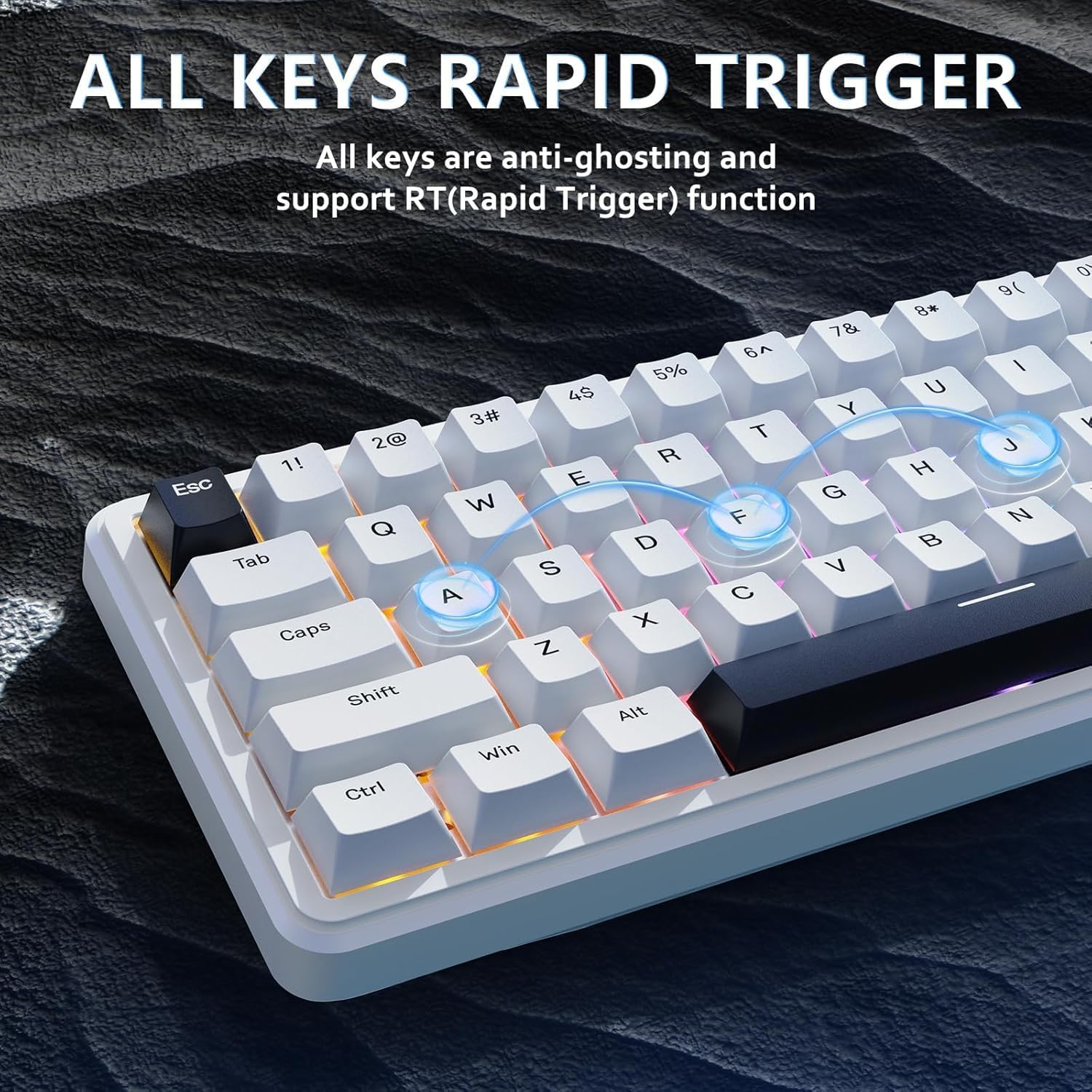
Image: The keyboard illustrating the rapid trigger function across all keys.

Imaj: Yon gwo plan view of a magnetic switch, emphasizing its 0.01mm rapid trigger accuracy and zero dead zone.

Image: The keyboard alongside its web driver interface, showcasing opsyon pèsonalizasyon.

Imaj: Eksploze view diagram illustrating the internal layers of the keyboard's top-mounted structure.
3. Ki sa ki nan bwat la
- ATTACK SHARK X65 HE Mechanical Gaming Keyboard
- USB-C to USB-A Cable (Standard)
- Braided USB-C Cable with Detachable Aviator Connector
- Magnetic Wrist Rest (with storage compartment)
- Manyèl itilizatè
4. Enstalasyon
4.1 Koneksyon Inisyal
Your ATTACK SHARK X65 HE keyboard supports multiple connection modes: wired, 2.4G wireless, and Bluetooth. Ensure the keyboard is charged before initial wireless use.
- Koneksyon filaire: Connect the USB-C end of the provided cable to the keyboard's USB-C port and the USB-A end to your computer's USB port. The keyboard will automatically be recognized.
- 2.4G Wireless Koneksyon: Locate the 2.4G USB receiver (dongle) on the keyboard's rear. Insert the receiver into an available USB port on your computer. Slide the mode switch on the keyboard's rear to the '2.4G' position. The keyboard should connect automatically.
- Koneksyon Bluetooth: Slide the mode switch on the keyboard's rear to the 'BT' position. On your computer or device, search for Bluetooth devices and select 'ATTACK SHARK X65 HE' to pair.
4.2 Enstalasyon chofè
For full customization and advanced features, download the official web chofè soti nan qmk.top. Follow the on-screen instructions to install the necessary drivers and access the customization software.
Video: An official product video demonstrating the setup and features of the ATTACK SHARK X65 HE keyboard.
5. Operasyon Modes
The X65 HE keyboard offers versatile connectivity options to suit your needs:
- Branche Mode: Provides the most stable and lowest latency connection, ideal for competitive gaming where every millisecond counts. Simply connect the USB-C cable to your device.
- 2.4G Wireless Mode: Offers a high-speed, low-latency wireless experience via the dedicated USB receiver. Perfect for gaming without cable clutter.
- Mòd Bluetooth: Convenient for connecting to multiple devices (e.g., PC, laptop, tablet) without needing a dongle. Ideal for general use and productivity.
Switch between modes using the physical switch located on the rear edge of the keyboard. Ensure the correct mode is selected for your desired connection type.
Videyo: Yon prezantasyon videyo pwodwi ofisyèlasing the magnetic switch technology and various features of the ATTACK SHARK X65 HE keyboard.
6. Customization Software (QMK.top)
The ATTACK SHARK X65 HE keyboard is fully programmable via its intuitive webchofè ki baze nan qmk.top. This software allows for deep customization of key functions, actuation, and lighting.
6.1 Anviwònman kle
- Remape kle: Assign any key to a different function, including standard keys, key combinations (Ctrl, Alt, Shift, Win), macros, media controls (play/pause, stop, prev, next), and mouse functions (left/right/middle click, forward/back).
- Multiple Layers: The keyboard supports multiple layers of key configurations, allowing you to switch between different layouts for gaming, productivity, or specific applications.
6.2 Stroke Setting (Actuation & Rapid Trigger)
This section allows precise control over the magnetic switches:
- Adjustable Actuation Distance: Set the trigger point for each key from 0.1mm to 3.4mm with 0.01mm precision.
- Deklanchman Rapid (RT): Enable instant key reset upon release, allowing for extremely fast repeated inputs.
- Dead Zone Setting: Configure dead zones to prevent accidental key presses or to fine-tune responsiveness.
6.3 Anviwònman avanse
Unlock advanced functionalities for competitive advantage:
- Frap klavye dinamik (DKS): Assign up to four different actions to a single key based on the depth of the press and release.
- Anrejistreman makro: Create and manage complex macro sequences with precise timing.
- MT/TGL & Snap Key: Further fine-tune key behavior for specific gaming scenarios.
6.4 Light Setting (RGB)
Customize the keyboard's vibrant RGB lighting:
- Mòd limyè: Choose from a variety of pre-set lighting effects (e.g., Dynamic Breathing, Spectrum Cycle, Drift, Waves Ripple, Stars Twinkle, Steady Stream, Shadowing, Peaks Rise, Sine Wave, Sky Spring, Flowers Blooming, Laser, Peak Turn, Colorful Vertical & Horizontal, Snow, Meteor, Through the Snow, Music Follow).
- Ekleraj Custom: Design your own per-key RGB lighting patterns and save them as custom layers.
- Klète ak Vitès: Adjust the intensity and animation speed of lighting effects.
7. Antretyen
Bon antretyen asire lonjevite ak pèfòmans klavye ou a:
- Netwayaj kle yo: Sèvi ak yon mou, damp cloth with mild soap and water to clean the PBT keycaps. Avoid harsh chemicals. For deeper cleaning, keycaps can be carefully removed.
- Cleaning Chassis: Wipe the keyboard chassis with a dry or slightly damp microfiber cloth. Do not use excessive moisture.
- Switch mayetik: The pre-lubed magnetic switches require minimal maintenance. Avoid disassembling the switches unless you are experienced, as this may void the warranty.
- Swen kab: Store cables neatly to prevent kinks or damage. The braided cable with the aviator connector is designed for durability.
NAN. Depanaj
- Klavye a pa reponn:
- Ensure the cable is securely connected in wired mode.
- Check the mode switch on the rear of the keyboard (Wired, 2.4G, BT).
- For wireless modes, ensure the keyboard is charged.
- Eseye konekte nan yon pò USB diferan sou òdinatè w lan.
- 2.4G Wireless Issues:
- Ensure the USB receiver is properly inserted and the keyboard is in 2.4G mode.
- Move the keyboard closer to the receiver to reduce interference.
- Pwoblèm Bluetooth Pairing:
- Asire w ke klavye a nan mòd appariement Bluetooth.
- Retire klavye a nan lis Bluetooth aparèy ou an epi eseye konekte li ankò.
- Asire w ke Bluetooth aparèy ou an aktive epi ou ka dekouvri li.
- RGB Lighting Not Working/Customizing:
- Ensure the keyboard is connected and the web driver is running.
- Check lighting settings within the QMK.top software.
- Lojisyèl la pa detekte klavye a:
- Ensure the keyboard is connected via USB-C cable.
- Restart the QMK.top web driver application or your computer.
- Check for firmware updates for the keyboard via the software.
9. Espesifikasyon
| Karakteristik | Deskripsyon |
|---|---|
| Mak | ATAK REKEN |
| Modèl | X65 LI |
| Koneksyon Teknoloji | USB-C (Wired), 2.4G Wireless, Bluetooth |
| Deskripsyon klavye | Adjustable Actuation Distance Rapid Trigger Magnetic Switch Gaming Keyboard |
| Chanje Kalite | Magnetic Hall Effect Switches (North-pole-down compatible) |
| Pousantaj biwo vòt | 8000Hz |
| Pousantaj eskane | 128K Ultra-High Scan Rate |
| Latansi | 0.125ms (Theoretical Value) |
| Distans aksyon | 0.1mm to 3.4mm (0.01mm precision) |
| Keycaps | PBT Keycaps |
| Layout | 65% (67-key) ANSI with separate arrow keys |
| Ekleraj | RGB (16.8 million colors, South-facing LEDs) |
| Estrikti | Top Mounted with Aluminum Alloy Plate and 3-layer filling (PORON foam + EPDM foam + Silicone) |
| Aparèy konpatib | PC, Mac (Dual-system switchable) |
| Pwa atik | 1.87 liv |
| Dimansyon pake | 14.06 x 6.5 x 2.05 pous |
10. Garanti ak sipò
Your ATTACK SHARK X65 HE keyboard comes with a manufacturer's warranty covering defects in materials and workmanship. For specific warranty terms and conditions, please refer to the warranty card included in your product packaging or visit the official ATTACK SHARK websit.
For technical support, troubleshooting assistance, or any product-related inquiries, please contact ATTACK SHARK customer service through their official channels. Contact information can typically be found on the product packaging or the brand's websit.


