1. Entwodiksyon
This manual provides essential information for the proper setup, operation, and maintenance of your ZEISS DTI 6/20 Thermal Imaging Camera. Please read these instructions carefully before using the device to ensure optimal performance and longevity.
2. Ki sa ki nan bwat la
Verifye ke tout konpozan sa yo enkli nan pake ou a:
- Kamera D tèmik
- Lens (20 mm)
- Neoprene braslè
- Carrying case including shoulder strap
- USB kab
- Optik netwayaj twal
- Batri ityòm-ion
- Gid rapid
- Nòt sekirite
- Kat garanti
- Dokiman EULA
3. Pwodwi souview
The ZEISS DTI 6/20 is a high-resolution thermal imaging monocular designed for detailed observation in low-light conditions. It features advanced image processing and ergonomic design for ease of use.

Figi 1: Angle view of the ZEISS DTI 6/20 Thermal Imaging Camera. This image displays the overall design, including the objective lens, eyepiece, and the ZEISS branding on the side.
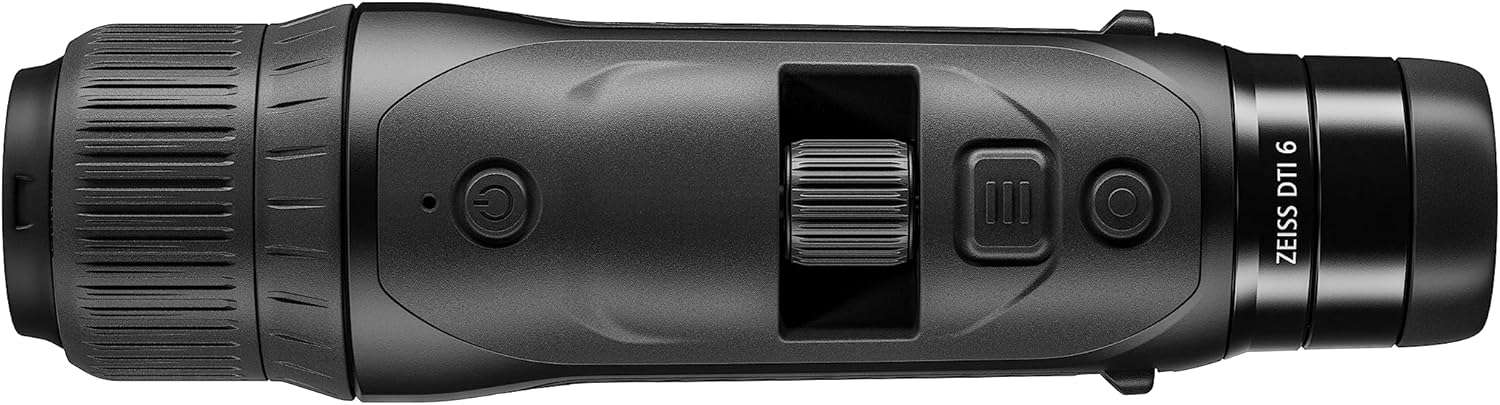
Figi 2: Top view of the ZEISS DTI 6/20, highlighting the power button, scroll wheel for magnification control, and other operational buttons. The ergonomic placement of controls is visible.
Karakteristik kle:
- ZSIP Pro Image Technology: Delivers sharp, high-contrast thermal images.
- Ekspozisyon segondè rezolisyon: AMOLED display with 1024x768 resolution, paired with a 640x480 sensor and 12µm pixel pitch.
- Agrandisman: 1.5x optical magnification with up to 10x digital zoom, controlled by a scroll wheel.
- Pèsonalizasyon: 4 preset scene modes and up to 5 user-created layouts. Adjustable zoom settings, display brightness, and color palettes.
- Depo Entèn: 16GB for capturing images and videos.
- Lavi batri: Up to 6.5 hours of continuous operation with a removable lithium-ion battery.
- Konsepsyon ergonomique: Suitable for both left and right-handed users, with controls positioned for natural access even with gloves.
- Koneksyon aplikasyon: Seamless data transfer and live streaming to smartphones via the ZEISS Hunting App using Bluetooth, USB, or WLAN.
4. Enstalasyon
4.1 Enstalasyon batri
- Jwenn lòj batri a sou aparèy la.
- Louvri kouvèti lòj la.
- Insert the provided lithium-ion battery, ensuring correct polarity.
- Fèmen kouvèti lòj batri a byen.
4.2 Premye pouvwa sou
- Press and hold the power button (refer to Figure 2) until the ZEISS logo appears on the display.
- Allow the device to initialize. This may take a few seconds.
- Adjust the diopter on the eyepiece for clear focus according to your vision.
5. Operasyon Enstriksyon
5.1 Power On/Off
- Pou limen: Peze epi kenbe bouton pouvwa a.
- Pou etenn: Press and hold the power button until the shutdown sequence initiates.
5.2 Magnification Control
Use the scroll wheel located on the top of the device (refer to Figure 2) to adjust the digital zoom level. Rotate the wheel forward to increase magnification and backward to decrease it.
5.3 mòd sèn
The DTI 6/20 offers 4 preset scene modes optimized for different observation conditions. Access these modes through the device's menu to enhance image clarity based on your environment.
5.4 Personnalisation
The device allows for extensive personalization:
- User Layouts: Create and save up to 5 custom display layouts.
- Montre Anviwònman: Adjust display brightness to suit ambient light conditions.
- Palèt koulè: Select from various color palettes to optimize thermal contrast and target identification.
5.5 App Connectivity (ZEISS Hunting App)
Enhance your experience by connecting the DTI 6/20 to the ZEISS Hunting App on your smartphone.

Figi 3: A user operating the ZEISS DTI 6/20 thermal imaging camera in an outdoor environment, demonstrating its ergonomic handling and practical application.
- Transfè Done: Transfer images and videos from the device's 16GB internal storage to your smartphone via Bluetooth, USB, or WLAN.
- Difizyon an dirèk: Stream live thermal footage directly to your smartphone for shared viewing oswa anrejistreman.
- Further Customization: The app provides additional options for device settings and management.
6. Antretyen
6.1 Netwayaj
- Use the provided optics cleaning cloth to gently wipe the lenses. Avoid abrasive materials.
- For the device body, use a soft, damp twal. Pa sèvi ak pwodwi chimik piman bouk oswa solvang.
- Asire w ke aparèy la etenn anvan ou netwaye li.
6.2 Swen Batri
- Chaje batri a konplètman anvan premye itilize.
- Sere aparèy la ak batri a nan yon kote ki fre epi sèk lè w pa itilize li pou yon bon bout tan.
- Evite ekspoze batri a nan tanperati ekstrèm.
NAN. Depanaj
7.1 Aparèy la pa limen
- Asire w ke batri a kòrèkteman enstale ak konplètman chaje.
- Try charging the battery for at least 30 minutes before attempting to power on again.
7.2 Image Appears Blurry
- Adjust the diopter on the eyepiece for your vision.
- Ensure the objective lens is clean and free from smudges or debris.
- Check the focus of the thermal image using the manual focus ring if available.
7.3 Connectivity Issues with ZEISS Hunting App
- Ensure Bluetooth or WLAN is enabled on both the device and your smartphone.
- Verify that the ZEISS Hunting App is updated to the latest version.
- Restart both the thermal camera and your smartphone.
8. Espesifikasyon
| Karakteristik | Spesifikasyon |
|---|---|
| Dimansyon pwodwi | 9.06 x 2.44 x 2.68 pous |
| Pwa atik | 1.52 liv (24.33 ons) |
| Nimewo Modèl Atik | 527020-9911-000 |
| Mak | ZEISS |
| Non modèl | DTI 6/20 |
| Deskripsyon lantiy moso je | Plössl |
| Kalite Konsantre | Konsantre manyèl |
| Sous pouvwa | Mache ak pil (ityòm-ion) |
| Aparèy konpatib | Smartphone |
| Focal Longè Deskripsyon | 300mm |
| Jaden nan View | 10 Degre |
| Zoom Pwopòsyon | 3x Optical, up to 10x Digital |
| Rezolisyon Sensor | 640 x 480 with 12 micron pixel pitch |
| Rezolisyon ekspozisyon | 1024 x 768 HD AMOLED |
| Depo Entèn | 16GB |
| Tan kouri batri | 6.5 èdtan (kontinyèl) |
9. Garanti ak sipò
The ZEISS DTI 6/20 Thermal Imaging Camera is manufactured by ZEISS. For detailed warranty information, please refer to the included warranty card or visit the official ZEISS website. For technical support, service, or inquiries, please contact ZEISS customer service through their official channels.
Manifakti: ZEISS


