1. Entwodiksyon
Thank you for choosing the LAMAX W10.2 Outdoor Action Camera. This manual provides detailed instructions on how to set up, operate, and maintain your camera to ensure optimal performance and longevity. The LAMAX W10.2 is designed for capturing high-quality video and photos in various environments, featuring true 4K/60FPS recording, advanced MAXsmooth 2.0 stabilization, and robust waterproofing.
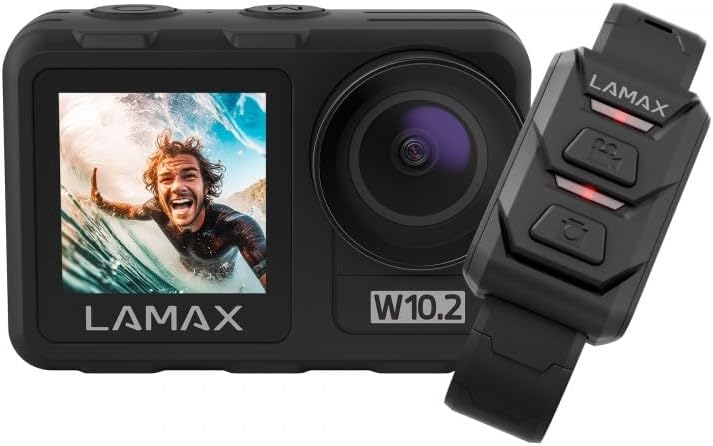
Image 1.1: The LAMAX W10.2 Action Camera shown with its accompanying remote control. The camera features a front display and a main lens, while the remote control has three buttons for easy operation.
2. Ki sa ki nan bwat la
Upon unboxing your LAMAX W10.2, please verify that all the following components are included:
- Kamera aksyon LAMAX W10.2
- Waterproof Housing (for depths up to 40 meters)
- Kontwòl Remote
- Mini tripod
- Clear Filter (for lens protection)
- USB Chaje Kab
- Mounting Accessories (various mounts and adhesive pads)
- Netwaye twal
- Battery (C batteries required, included)

Imaj 2.1: Yon konplè view of all items included in the LAMAX W10.2 package, including the camera, waterproof case, remote, various mounts, cables, and cleaning cloth.
3. Pwodwi souview
Familiarize yourself with the key components and features of your LAMAX W10.2 camera:
- Doub ekspozisyon: Features both a main rear touchscreen and a front display for easy framing and monitoring.
- Touch Control and Buttons: The touchscreen provides intuitive control, while physical buttons offer practical operation, especially underwater.
- Lantiy: High-quality lens for capturing sharp images and videos.
- Mikwofòn: Mikwofòn entegre pou anrejistreman odyo.
- Oratè: Pou lekti odyo.
- Pò USB: Pou chaje ak transfè done.
- HDMI Port: Pou konekte ak ekran ekstèn.
- Lòj batri: Sitiye anba a pou mete pil.
- MicroSD Kat plas: For memory card insertion (card not included).

Imaj 3.1: Detaye view of the LAMAX W10.2 camera highlighting its 2-inch touchscreen, mode setting/display switch, record ON/OFF button, camera and WLAN power button, and tripod thread for direct attachment.
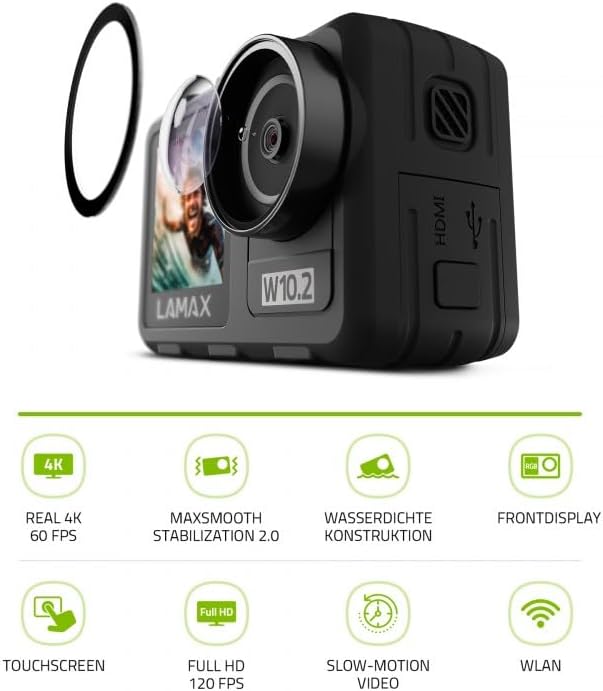
Image 3.2: The LAMAX W10.2 camera accompanied by icons representing its key features: Real 4K 60 FPS, MAXsmooth Stabilization 2.0, Waterproof Construction, Front Display, Touchscreen, Full HD 120 FPS, Slow-Motion Video, and WLAN (Wi-Fi).
4. Enstalasyon
4.1. Chaje batri a
- Louvri kouvèti lòj batri a.
- Insert the included battery, ensuring correct polarity.
- Connect the camera to a USB power source using the provided USB cable. The charging indicator light will illuminate.
- Once fully charged, the indicator light will change or turn off.
4.2. Mete yon Kat MicroSD
A MicroSD card (not included) is required to store videos and photos. Use a Class 10 or higher MicroSD card with a maximum capacity of 128GB.
- Jwenn fant kat MicroSD a sou bò kamera a.
- Mete kat MicroSD a ak kontak lò yo fè fas dèyè kamera a jiskaske li fè yon klik.
- Pou retire li, pouse kat la dousman jiskaske li soti.
4.3. Powering On / Off
- Pou limen: Peze epi kenbe bouton Pouvwa a (anjeneral li sitiye anlè oswa sou kote) pandan kèk segonn jiskaske ekran an limen.
- Pou etenn: Press and hold the Power button again until the camera shuts down.
5. Operasyon Enstriksyon
5.1. Operasyon debaz
- Chanje mòd: Use the Mode button or touchscreen gestures to switch between video, photo, and playback modes.
- Recording/Shutter: Press the Shutter/Record button (usually on top) to start/stop video recording or take a photo.
- Navigasyon: Use the touchscreen or physical navigation buttons to browse menus and settings.
5.2. Anrejistreman Videyo
The LAMAX W10.2 supports true 4K video recording at 60 frames per second (FPS) for incredibly detailed footage.
- Anviwònman Rezolisyon: Access video settings to select resolutions such as 4K/60FPS, 2.7K, 1080p, and 720p.
- Ralanti: Capture dynamic slow-motion footage at up to 4x in Full HD (1080p).
- MAXsmooth 2.0 Stabilization: This advanced electronic stabilization ensures smooth, shake-free video, even during intense action. It is automatically enabled for optimal performance.
5.3. Pran Foto
Capture high-resolution still images with various settings:
- Mòd Foto: Standard photo, burst mode, time-lapse photo.
- Anviwònman: Adjust exposure, white balance, and ISO for different lighting conditions.
5.4. Enpèmeyabilite
The LAMAX W10.2 is designed for aquatic adventures:
- Without Housing: The camera is waterproof up to 12 meters (approximately 40 feet) without the need for additional housing.
- With Included Housing: When placed in the provided waterproof housing, the camera can be submerged up to 40 meters (approximately 130 feet).
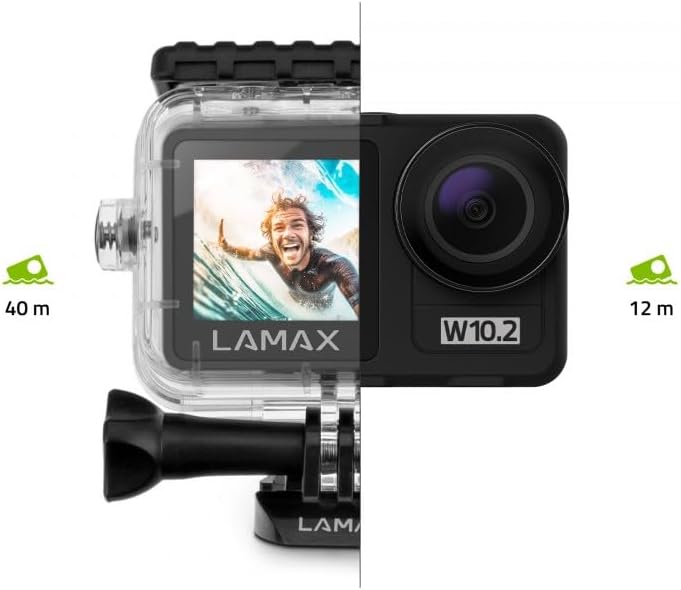
Image 5.1: Visual representation of the LAMAX W10.2's waterproofing capabilities, showing it can go to 12 meters without a case and 40 meters with the included waterproof housing.
5.5. Wi-Fi and Mobile App
Connect your camera to your smartphone via Wi-Fi for remote control, live preview, epi fasil file transfè.
- Download the official LAMAX mobile app from your device's app store.
- Enable Wi-Fi on your camera through the settings menu.
- On your smartphone, connect to the camera's Wi-Fi network (SSID and password will be displayed on the camera screen).
- Open the LAMAX app to control the camera, view footage, epi telechaje files san fil.
5.6. Kontwòl Remote
Kontwòl remote enkli pèmèt pou operasyon pratik nan yon distans.
- Peyaj: Follow the instructions in the camera's settings menu to pair the remote control.
- Fonksyon: Typically, the remote allows you to start/stop recording and take photos without touching the camera.
6. Antretyen
Proper maintenance ensures the longevity and performance of your LAMAX W10.2 camera.
- Netwayaj: Use the provided cleaning cloth to gently wipe the lens and screen. For stubborn smudges, use a lens cleaning solution designed for optics. Do not use abrasive materials.
- Swen Lojman ki Enpèmeyab: After use in water, rinse the waterproof housing with fresh water and allow it to air dry. Inspect the O-ring seal for any debris or damage before each use.
- Depo: Sere kamera a nan yon kote ki fre epi sèk, lwen limyè solèy dirèk ak tanperati ekstrèm. Retire pil la si w ap sere l pou yon bon bout tan.
- Swen batri: Avoid fully discharging the battery frequently. Charge the battery regularly, even if not in use, to maintain its health.
NAN. Depanaj
If you encounter issues with your LAMAX W10.2, refer to the following common problems and solutions:
| Pwoblèm | Kòz posib | Solisyon |
|---|---|---|
| Kamera a pa limen. | Low battery; battery incorrectly inserted; camera frozen. | Charge the battery; reinsert battery correctly; perform a hard reset (refer to manual for specific button combination). |
| Video footage ap tranble. | MAXsmooth 2.0 stabilization is off; extreme vibrations. | Ensure MAXsmooth 2.0 is enabled in settings; use appropriate mounts to minimize vibration. |
| Pa ka konekte ak Wi-Fi. | Wi-Fi not enabled on camera; incorrect password; app issue. | Enable Wi-Fi on camera; double-check password; restart camera and app. |
| Camera is not waterproof. | Waterproof housing not properly sealed; O-ring damaged or dirty. | Ensure housing is securely latched; clean and inspect O-ring for damage before each use. |
| Erè kat MicroSD. | Incompatible card; card full; card corrupted. | Use a recommended Class 10 or higher card; format the card (this will erase data); try a different card. |
8. Espesifikasyon
Detailed technical specifications for the LAMAX W10.2 Action Camera:
| Karakteristik | Detay |
|---|---|
| Mak | LAMAX |
| Nimewo Modèl | 10.2 |
| Dimansyon pwodwi | 3.2 x 6.4 x 4.2cm; 127g |
| Photosensor Technology | CMOS |
| Rezolisyon Capture Videyo | 4K |
| Max Fokal Longè | 5.03 Milimèt |
| Fòma Capture Videyo | MP4 |
| Gwosè ekran | 2 pous |
| Koneksyon Teknoloji | HDMI, Wi-Fi |
| Koulè | Gri nwa |
| Karakteristik espesyal | Remote Control, Shockproof, Slow Motion, Timer, Touchscreen |
| Kalite Camcorder | Kamera Aksyon |
| Batri | C batteries required (included) |
| Premye Dat ki disponib | 10 janvye 2025 |
9. Garanti & Sipò
LAMAX products are designed for reliability and performance. For information regarding warranty coverage, technical support, or service, please refer to the official LAMAX websit la oubyen kontakte sèvis kliyan yo dirèkteman.
- Sipò sou entènèt: Visit the LAMAX official website for FAQs, software updates, and digital manuals.
- Sèvis Kliyan: Contact details for customer support can typically be found on the LAMAX website's 'Support' or 'Contact Us' section.


