Entwodiksyon
This manual provides comprehensive instructions for the safe and effective use of your CYCPLUS Bike Pump AS2PRO and GPS Bike Computer M1. This package includes a bike pump and a GPS bike computer, designed for cycling enthusiasts.
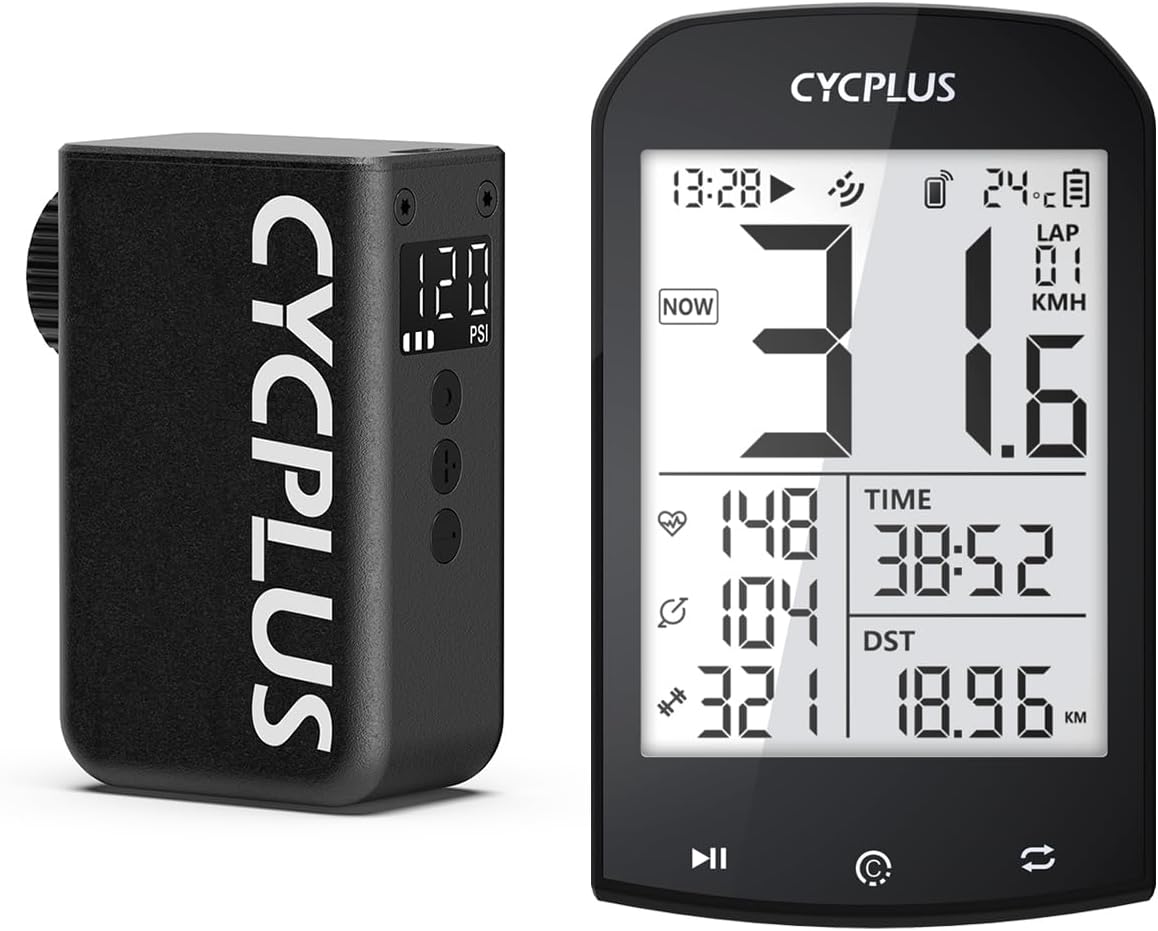
Image: The CYCPLUS AS2PRO Bike Pump and M1 GPS Bike Computer.
Pwodwi souview
CYCPLUS AS2PRO Bike Pump
The AS2PRO pump is a compact and portable electric mini pump, weighing 4.23 oz (120g) and measuring 2.75 x 1.10 x 1.92 inches. It features a maximum air pressure of 120 PSI, an LED screen with pressure gauge, and an auto shut-off function. It is suitable for E-Bike, Mountain Bike, City Bike, and Road Bike tires.

Image: The AS2PRO pump displaying pressure measurement with battery level and pressure unit options (BAR & PSI).
CYCPLUS M1 GPS Bike Computer
The M1 GPS Bike Computer offers dynamic GPS positioning with high sensitivity and accuracy. It supports simultaneous recording of various data such as speed, cadence, heart rate, power, route traveled, and altitude. Data can be synchronized with the XOSS app and Strava.

Image: The M1 GPS Bike Computer showing time, temperature, lap, speed, heart rate, cadence, and distance.
Enstalasyon
Charging the AS2PRO Pump
Before first use, fully charge the AS2PRO pump. It charges quickly, typically within 30 minutes for a full charge. Use the provided USB-C cable for charging.

Image: The AS2PRO pump connected to a charging cable, illustrating its 3-hour full charge time for 60 hours of endurance.
Attaching the Pump to Tire Valve
The AS2PRO pump supports both Presta and Schrader valves. It can be directly pushed onto the valve for quick top-offs. For full inflation or higher pressures, it is recommended to use the included valve stem adapter to prevent heat transfer to the pump and ensure a secure connection.

Image: A hand holding the AS2PRO pump attached to a bicycle tire valve, demonstrating its auto-stop feature.
M1 GPS Computer Setup
Mount the M1 GPS Bike Computer on your handlebar. Power it on to allow it to acquire GPS signal for accurate positioning. Download the "XOSS" app from Google Play Store or Apple App Store to connect via Bluetooth and synchronize your journey data.
Enstriksyon Operasyon
AS2PRO Pump Operation
- Limen/Etenyen: Press and hold the power button to turn the pump on or off. The LED screen will display the current pressure.
- Mete presyon: Use the adjustment buttons to set your desired PSI. The pump supports up to 120 PSI.
- Gonfle: Attach the pump to the tire valve. Press the power button once to start inflation. The pump will automatically stop when the preset pressure is reached.
- Vitès enflasyon: It takes approximately 50 seconds to refill a 700 x 25C tire (0-80 PSI) and 120 seconds to inflate a road bike tire (0-120 PSI).

Image: The AS2PRO pump in action, inflating a bicycle tire, highlighting its powerful inflation capabilities.
M1 GPS Computer Operation
- Pozisyon GPS: The M1 uses a Swiss-imported navigating chip for fast and accurate GPS signal acquisition, typically within 30 seconds.
- Done Anrejistreman: It records various cycling data including speed, cadence, heart rate, power, and route.
- Senkronizasyon aplikasyon: Connect to the XOSS app via Bluetooth to view detailed data analysis, perform firmware updates, and sync data to Strava.
- Auto Backlight & Awakening: The anti-glare LCD screen provides clear visibility in direct sunlight. Auto backlight activates from 18:00 to 9:00. The device automatically awakens from hibernation with movement.

Image: The M1 GPS Bike Computer illustrating its fast and accurate positioning using GPS, Glonass, Galileo, and BeiDou satellites.

Image: The M1 GPS Bike Computer demonstrating its auto backlight for night use and auto awakening feature.

Image: The CYCPLUS Fit App on a smartphone, showing data analysis, sports data view, and firmware update options, with data sync to Strava.
Antretyen
- Chaje: Regularly charge the AS2PRO pump and M1 computer to ensure optimal performance. The pump has a 60-hour battery life on a full charge.
- Netwayaj: Wipe down both devices with a soft, damp cloth after use to remove dirt and debris. Avoid using harsh chemicals.
- Depo: Store the pump and computer in a cool, dry place when not in use.
Depanaj
- Surchof ponp: During prolonged inflation, especially to high pressures, the pump's tip may become hot. Use the valve stem adapter to mitigate heat transfer.
- Lekti Presyon ki pa egzak: Ensure the pump is securely attached to the valve. The pressure gauge has an accuracy of ±1 PSI.
- Pwoblèm siyal GPS: Positioning speed can be affected by environmental and weather conditions. Ensure the M1 has a clear view of the sky for best signal.
- Sealant Compatibility: The AS2PRO pump uses pure air, which is beneficial for tires using sealant, as CO2 can dry out sealant.
Espesifikasyon
| Karakteristik | Spesifikasyon |
|---|---|
| Mak | CYCPLUS |
| Modèl | AS2PRO + M1 |
| Pwa Ponp | 4.23 oz (120g) |
| Dimansyon ponp | 2.75 x 1.10 x 1.92 pous |
| Max Air Pressure (Pump) | 120 psi |
| Pressure Accuracy (Pump) | ± 1 PSI |
| Kalite ekspozisyon | dirije |
| Sensor Type (Computer) | GPS Sensor, ANT+ Sensor |
| Koneksyon Teknoloji | ANT+, Bluetooth |
| Konpozan ki enkli | GPS Bike Computer, Bike Pump |
Garanti ak sipò
For warranty information and customer support, please refer to the official CYCPLUS websit la oubyen kontakte sèvis kliyan yo dirèkteman. Kenbe resi acha w la kòm prèv acha.
Vizite la CYCPLUS Store on Amazon pou plis pwodwi ak sipò.


