1. Entwodiksyon
Thank you for choosing the HBN Digital Outdoor Timer Socket. This device is designed to provide flexible and reliable control over your outdoor electrical appliances, such as garden lighting, pool pumps, and holiday decorations. With its 8 programmable settings, random function, and IP44 weather resistance, it offers convenience and energy efficiency. Please read this manual thoroughly before use to ensure proper operation and safety.
2. Enstriksyon Sekirite
- Ensure the timer is correctly installed and connected to a suitable power outlet.
- Do not exceed the maximum load capacity of 16A/3680W. Overloading can cause damage or fire.
- The timer is rated IP44 for outdoor use, meaning it is protected against splashing water from any direction. However, do not immerse the device in water or expose it to direct, heavy rainfall for extended periods.
- Pa ouvri oswa eseye repare aparèy la. Konfye tout antretyen bay pèsonèl kalifye.
- Keep children away from the device. The integrated child lock provides additional safety.
- Always unplug the timer from the power outlet before cleaning.
3. Pake kontni
Pake ou a ta dwe genyen atik sa yo:
- HBN Digital Outdoor Timer Socket (x2)
- Manyèl Enstriksyon (dokiman sa a)
4. Pwodwi souview
The HBN Digital Outdoor Timer Socket features a clear digital display and intuitive buttons for easy programming. Below is an illustration of the device and its main components.
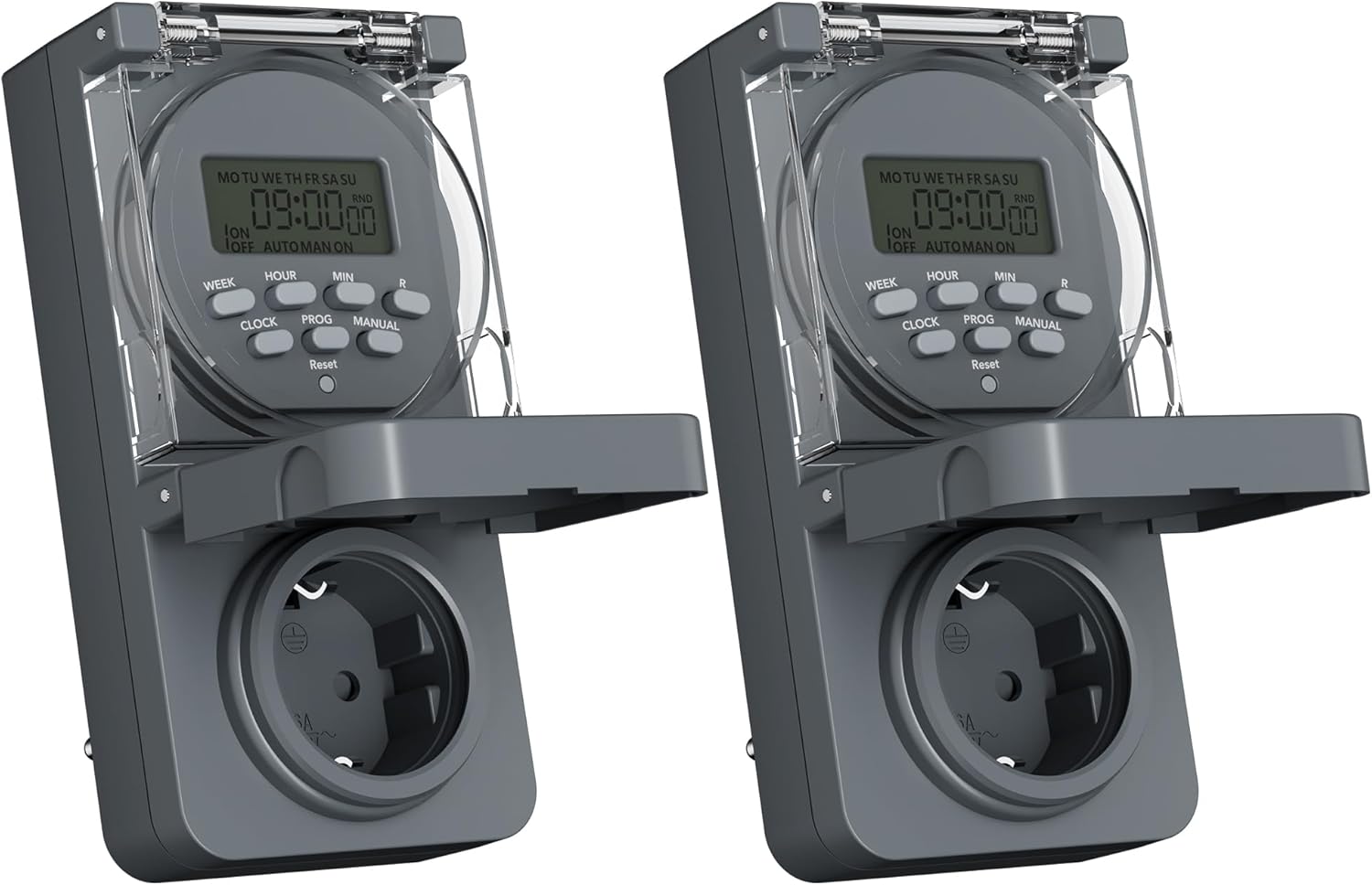
Image 1: Two HBN Digital Outdoor Timer Sockets, front view.

Image 2: Close-up of the timer's display and control buttons.
Fonksyon bouton:
- SEMÈN: Selects the day(s) of the week for programming.
- LÈ: Adjusts the hour setting.
- MIN: Adjusts the minute setting.
- LÒT: Exits programming mode and displays the current time. Used to set the current time.
- PROG: Enters and cycles through the 8 ON/OFF program settings.
- MANYÈL: Toggles between ON, AUTO, and OFF modes.
- RND (Random): Aktive oswa dezaktive fonksyon o aza a.
- Reyajiste: Clears all settings and returns the timer to factory defaults. Use a pointed object (e.g., a pen tip) to press.
5. Enstalasyon
5.1 Premye Chaje ak Reyajisteman
Before first use, or after a long period of inactivity, plug the timer into a live power outlet for at least 30 minutes to charge the internal backup battery. This ensures that settings are retained during power outages.
After charging, press the Reyajiste button using a pointed object to clear any pre-existing settings and ensure a fresh start.
5.2 Mete lè ak jou aktyèl la
- Peze epi kenbe la LÒJ bouton.
- Pandan w ap kenbe LÒJ, peze SEMÈN repeatedly to set the current day of the week (MO, TU, WE, TH, FR, SA, SU).
- Pandan w ap kenbe LÒJ, peze LÈ repeatedly to set the current hour (12-hour or 24-hour format).
- Pandan w ap kenbe LÒJ, peze MIN repeatedly to set the current minute.
- Lage a LÒJ button. The current time and day are now set.
6. Operasyon Enstriksyon
6.1 Setting ON/OFF Programs
The timer allows you to set up to 8 ON/OFF programs. Each program consists of an ON time and an OFF time, along with specific days of the week.

Imaj 3: Egzanpamples of setting ON and OFF times for different programs.
- Peze a PWOG button once. The display will show "1 ON". This is for setting the first ON time.
- Peze SEMÈN repeatedly to select the desired day(s) for this program. Options include individual days, weekdays (MO TU WE TH FR), weekends (SA SU), all days (MO TU WE TH FR SA SU), or various combinations.
- Peze LÈ pou mete lè ou vle a pou lè ON an.
- Peze MIN pou mete minit ou vle a pou lè ON an.
- Peze PWOG again. The display will show "1 OFF". This is for setting the first OFF time.
- Repeat steps 2-4 to set the day(s), hour, and minute for the OFF time. Ensure the day selection matches the ON time if you want the program to apply to the same days.
- Kontinye peze PWOG to cycle through programs 2 ON, 2 OFF, up to 8 ON, 8 OFF. Repeat the setting process for each program as needed.
- Apre ou fin mete tout pwogram ou vle yo, peze bouton an LÒJ button to exit programming mode and return to the current time display.
6.2 Random Function
The random function is designed to simulate presence by randomly turning the connected appliance ON and OFF within a specific time window, typically around your programmed ON/OFF times. This can deter potential intruders.

Image 4: The random function (RND) activated on the timer display.
- To activate the random function, press the RND button. The display will show "RND".
- Pou dezaktive, peze bouton an RND button again. "RND" will disappear from the display.
6.3 Manual Control (ON/AUTO/OFF)
You can manually override the programmed settings using the MANYÈL bouton.
- Peze MANYÈL once: The timer switches to ON mode (output is continuously ON).
- Peze MANYÈL again: The timer switches to OTO mode (follows programmed settings).
- Peze MANYÈL a third time: The timer switches to OFF mode (output is continuously OFF).
6.4 Summer/Winter Time Adjustment
To adjust for daylight saving time:
- Peze epi kenbe la LÒJ bouton.
- Pandan w ap kenbe LÒJ, peze la MANYÈL button. The display will show "+1h" for summer time or revert to normal for winter time.
7. Antretyen
7.1 Netwayaj
To clean the timer, unplug it from the power outlet. Wipe the exterior with a soft, damp twal. Pa sèvi ak pwodui netwayaj abrazif, solvan, oswa plonje aparèy la nan dlo.
7.2 Depo
When not in use for extended periods, store the timer in a cool, dry place, away from direct sunlight and extreme temperatures.
NAN. Depanaj
- Minitè a pa limen/etenn jan li te pwograme a:
- Tcheke si revèy la nan OTO mode (not ON or OFF manually).
- Verify that the programmed ON/OFF times and days are set correctly.
- Ensure the connected appliance is working and properly plugged into the timer.
- Ekspozisyon an vid:
- Asire w ke revèy la branche nan yon priz kouran ki vivan.
- The internal backup battery might be completely drained. Plug the timer in for at least 30 minutes to charge it.
- Paramèt yo pèdi apre kouran an fin koupe.tage:
- The internal backup battery may not be sufficiently charged. Ensure the timer is regularly connected to power. If settings are lost, re-enter them after charging.
- Random function not working:
- Asire w la RND function is activated (RND icon visible on display).
- The random function operates around programmed times; ensure at least one program is set.
9. Espesifikasyon

Image 5: Back of the timer showing electrical specifications.
| Karakteristik | Spesifikasyon |
|---|---|
| Modèl | CP-GOE22-1 |
| Pwovizyon pou pouvwa | 230V ~, 50Hz |
| Max chaj | 16A / 3680W |
| Klas pwoteksyon | IP44 (Prèv Splash) |
| Kantite Pwogram yo | 8 pwogram ON/OFF |
| Minimum Switching Time | 1 minit |
| Mòd kontwòl | ON, OTO, OFF |
| Fonksyon espesyal | Random function, Summer/Winter time, 24-hour mode |
| Batri sovgad | Integrated (retains settings during power outages) |
| Dimansyon (apeprè) | 5.5P x 8.5L x 12H cm |
| Pwa atik | 160 gram |
| Materyèl | Plastik |
| UPC | 810079587476 |
| Manifakti | Ergo I&E CO.,LTD |
10. Garanti ak sipò
Pou enfòmasyon sou garanti a oswa sipò teknik, tanpri gade dokiman yo te bay lè w te achte pwodwi a oswa kontakte machann ou an. Kenbe prèv acha w la pou nenpòt reklamasyon garanti.


