Pwodwi souview
The Phanteks Glacier One 360M25 G2 AIO Liquid CPU Cooler is engineered to provide high-performance cooling for modern CPUs. This all-in-one liquid cooler features a robust design with M25 G2 fans that can be interconnected for simplified cable management. Its integrated RGB lighting and fan controls are managed through a single cable, ensuring a clean and organized system build. The cooler's large copper base and fin array are designed to efficiently dissipate heat from high-end processors, even under demanding workloads. Additionally, the design prioritizes clearance for motherboard and RAM components, and includes a mesh cap cover with an integrated fan to provide supplementary cooling to surrounding VRMs.

Figure 1: Phanteks Glacier One 360M25 G2 AIO Liquid CPU Cooler, showcasing the radiator, fans, and pump block.
Karakteristik kle:
- High-performance cooling solution designed for gamers and PC enthusiasts.
- Equipped with M25 G2 fans that can interconnect into a single frame for easier cable management.
- RGB lighting and fan control managed through a single cable for a cleaner setup.
- A large copper base and fin array ensures efficient cooling for high-end CPUs.
- Maximum clearance design for compatibility with motherboard and RAM components.
- Mesh AIO cap cover with integrated fan cools surrounding VRMs and other critical parts.
- Compatible with Intel LGA 1700, 1851, 1200, 115x, 2011, 2011-3, 2066 and AMD AM4, AM5, sTRX4, TR34, SP3, sWRX8 sockets.
Enstalasyon ak Enstalasyon
Proper installation is crucial for optimal performance and longevity of your AIO liquid cooler. This section provides general guidance. Always refer to the detailed installation guide provided with your product packaging for specific, step-by-step instructions for your CPU socket type.
Konpatibilite:
The Glacier One 360M25 G2 is compatible with a wide range of CPU sockets, including:
- Sokèt Intel: LGA 115x, 1200, 1700, 1851, 2011, 2011-3, 2066
- Sokèt AMD yo: AM4, AM5, SP3, sTRX4, TR4, sWRX8
Etap Jeneral Enstalasyon:
- Prepare Mèr: Install the appropriate backplate and standoffs for your CPU socket type.
- Mount Radiator and Fans: Secure the radiator to your PC case, typically at the top or front, ensuring adequate airflow. Attach the M25 G2 fans to the radiator. The daisy-chain design allows for easy connection of multiple fans.
- Aplike keratin tèmik: Aplike yon ti kantite pat tèmik nan sant difizè chalè entegre (IHS) CPU ou a.
- Install Pump Block: Carefully place the pump block onto the CPU, aligning it with the standoffs. Secure it with the provided mounting screws, tightening them in a cross pattern for even pressure.
- Konekte kab: Connect the pump power cable to the designated header on your motherboard (usually "CPU_FAN" or "AIO_PUMP"). Connect the fan and RGB cables. The M25 G2 fans and pump RGB are controlled via a single cable for a streamlined setup.

Figure 2: Illustration of the daisy-chained unified fan design, showing how fans connect together for simplified wiring.
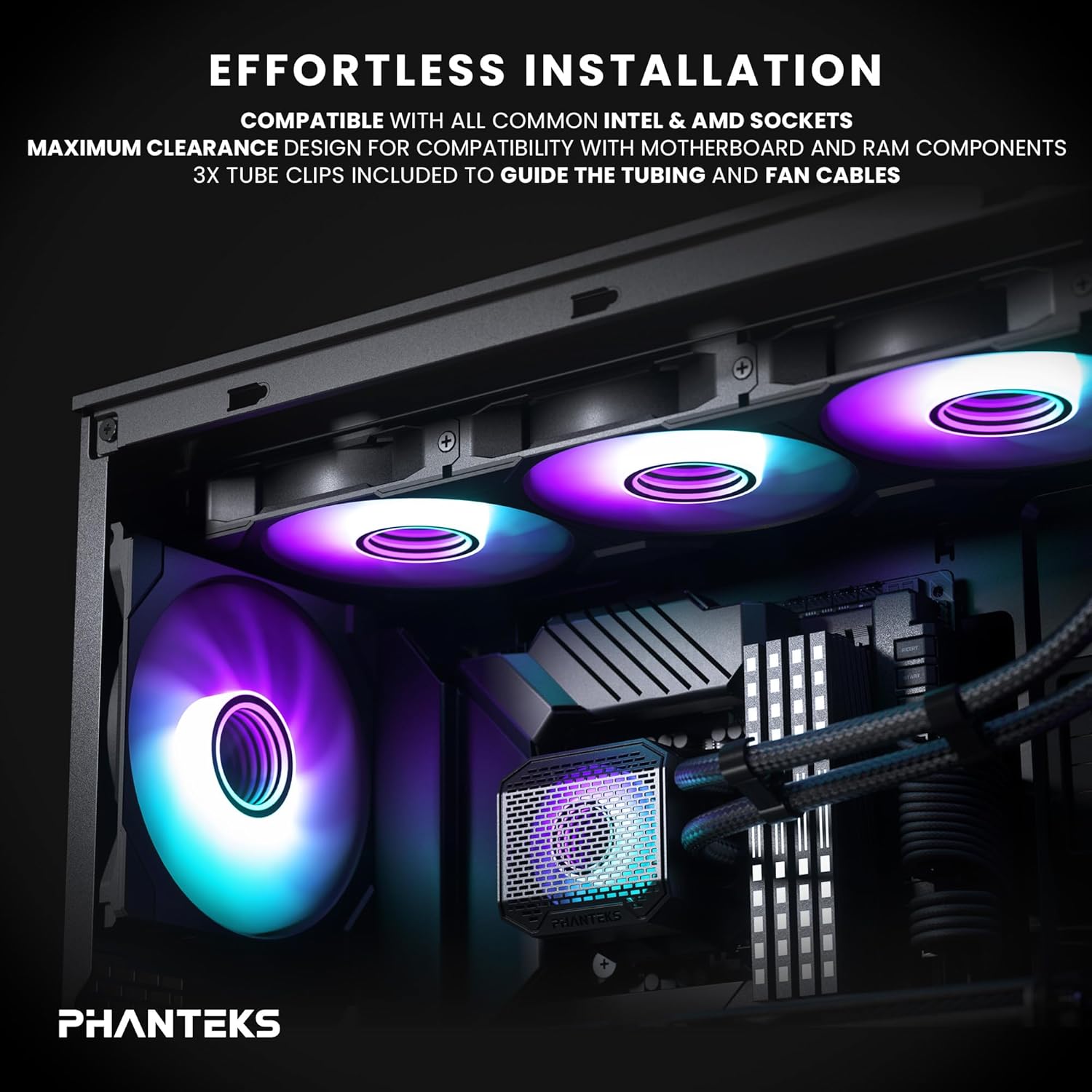
Figure 3: Depiction of the cooler installed in a PC case, highlighting maximum clearance and the use of tube clips for cable management.

Figure 4: Diagram illustrating the pump's cooling effect on the CPU and surrounding VRM components, emphasizing the integrated fan on the mesh AIO cap.
Ensure all connections are secure and tubing is not kinked. Utilize the included tube clips to guide tubing and fan cables for a tidy build.
Enstriksyon Operasyon
Once installed, the Phanteks Glacier One 360M25 G2 AIO Liquid CPU Cooler operates automatically, regulating fan speeds and pump performance based on CPU temperature to maintain optimal cooling.
Fan and RGB Control:
- The M25 G2 fans and the pump's RGB lighting are controlled through a single integrated cable.
- For advanced control over fan curves and RGB lighting effects, connect the cooler to a compatible Phanteks D-RGB controller or your motherboard's D-RGB header (if supported).
- Utilize your motherboard's BIOS/UEFI settings or a compatible software utility (e.g., Phanteks software, motherboard manufacturer's software) to customize fan speeds and lighting profiles.

Figi 5: Close-up view of the M25-120 Gen2 fans, highlighting their integrated D-RGB lighting and infinity mirror hub design.
Antretyen
Regular maintenance helps ensure the long-term performance and efficiency of your liquid cooler.
- Retire pousyè: Netwaye najwa radyatè yo ak lam vantilatè yo detanzantan pou anpeche pousyè akimile, sa ki ka anpeche sikilasyon lè a epi diminye efikasite refwadisman an. Sèvi ak lè konprese oswa yon bwòs mou.
- Tcheke tib ak koneksyon yo: Visually inspect the tubing and connections for any signs of wear, kinks, or leaks. While AIOs are sealed systems, a periodic check is recommended.
- Siveye Tanperati: Use monitoring software to keep an eye on your CPU temperatures. Significant increases in idle or load temperatures may indicate a need for further inspection or cleaning.
Do not attempt to open the sealed liquid loop or refill the coolant, as this will void the warranty and can damage the unit.
Depanaj
If you encounter issues with your Phanteks Glacier One 360M25 G2 AIO, consider the following common troubleshooting steps:
- Tanperati CPU ki wo:
- Ensure the pump is running and connected to the correct motherboard header (e.g., CPU_FAN or AIO_PUMP).
- Verify that the pump block is securely mounted to the CPU with even pressure.
- Tcheke si pat tèmik la te byen aplike epi byen.
- Ensure fans are spinning and oriented correctly for airflow (intake or exhaust, depending on case setup).
- Clean any dust buildup on the radiator fins and fans.
- Twòp bri:
- Check fan speeds in BIOS/software. Adjust fan curves to reduce noise at lower temperatures.
- Asire w pa gen okenn fil elektrik ki bloke lam vantilatè yo.
- Verify that the pump is not vibrating excessively.
- If a gurgling sound is heard, it might indicate air bubbles. Gently tilt your PC case to help move air bubbles to the radiator.
- Pwoblèm ekleraj RGB:
- Confirm all RGB cables are securely connected to the controller or motherboard header.
- Check software settings for RGB control to ensure the correct lighting mode is selected.
- Ensure the D-RGB controller (if used) is powered correctly.
- Pa gen pouvwa:
- Verify all power cables (pump, fans, RGB) are firmly connected to the motherboard and/or power supply.
- Check motherboard BIOS settings to ensure the CPU fan header is enabled and configured correctly.
If issues persist after attempting these steps, please refer to the Phanteks support websit pou plis asistans.
Espesifikasyon
| Karakteristik | Detay |
|---|---|
| Nimewo Modèl | GO360M25G2 |
| Kalite pwodwi | AIO Liquid CPU Cooler |
| Mak | Phanteks |
| Metòd refwadisman | Water, Air |
| Aparèy konpatib | Desktop, Personal Computer, Gaming |
| Nivo bri | 35.13 dB |
| Materyèl | Aluminum (AL3003), Deionized Water and Propylene Glycol mix, Copper 1100, ABS plastic, CIIR rubber with black braided sleeves |
| UPC | 886523703242 |
| Kantite Atik | 1 |
| Dimansyon pake | 18.11 x 8.5 x 5.59 pous |
| Pwa atik | 1.42 liv |
| Premye Dat ki disponib | 24 desanm 2024 |
Garanti ak sipò
For detailed warranty information regarding your Phanteks Glacier One 360M25 G2 AIO Liquid CPU Cooler, please refer to the official Phanteks websit la oswa kat garanti ki vini ak pwodwi ou a.
If you require technical assistance, have questions about installation, or need to report an issue, please visit the official Phanteks support page:


