1. Entwodiksyon
This user manual provides comprehensive instructions for the safe and effective operation of your DEPSTECH DS320 Dual Lens Borescope and DS260 Endoscope Camera. Please read this manual thoroughly before use and retain it for future reference. This bundle offers versatile inspection capabilities for various applications, from home maintenance to professional diagnostics.
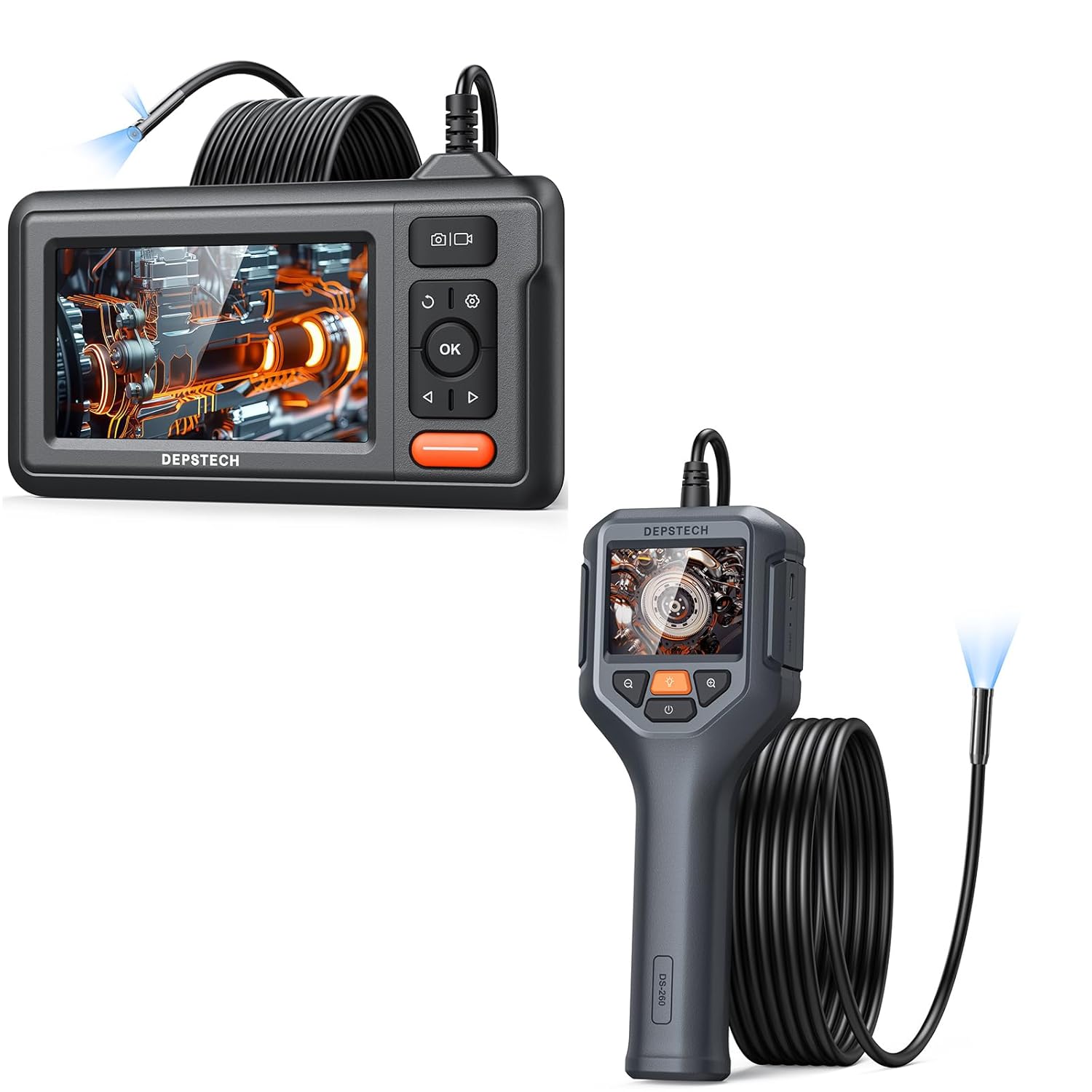
Figure 1.1: The DEPSTECH DS320 Dual Lens Borescope (top) and DS260 Endoscope Camera (bottom) included in the bundle.
2. Pake kontni
Tanpri verifye sa ki nan pake a lè w ap debale l pou asire w tout atik yo la epi yo pa domaje:
- 1 x DEPSTECH DS320 Dual Lens Borescope Unit
- 1 x DEPSTECH DS260 Endoscope Camera Unit
- 1 x USB Charging Cable (for DS320)
- 1 x USB Charging Cable (for DS260)
- 1 x manyèl itilizatè
- Accessories (e.g., hook, magnet, side mirror - specific to model, check individual product packaging)
3. Pwodwi souview
3.1 DEPSTECH DS320 Dual Lens Borescope

Figi 3.1: Devan view of the DEPSTECH DS320 Borescope, showing the 4.3-inch IPS display and control buttons.
- Ekspozisyon IPS 4.3-pous: High-definition screen for clear viewing.
- Sond Doub Lantiy: Features both a front-facing and a side-facing camera for comprehensive inspection.
- Limyè ki ap dirije reglabl: 7 lights for illumination in dark environments.
- Bouton kontwòl: Power, OK, Navigation (Up/Down/Left/Right), Photo/Video capture, Settings, Light adjustment.
- Mikwo SD kat plas: For storing captured images and videos.

Figure 3.2: Illustration of the DS320's dual lens system, showing both the front camera (A) and side camera (B) with their respective focal ranges.
3.2 DEPSTECH DS260 Endoscope Camera

Figure 3.3: The DEPSTECH DS260 Endoscope Camera, featuring an ergonomic handle and integrated display.
- Ekran IPS 2.4 pous: Compact display integrated into the handheld unit.
- Manch ergonomic: Designed for comfortable grip and ease of use.
- Single Lens Probe: Standard forward-viewing kamera.
- Limyè ki ap dirije reglabl: For optimal illumination.
- Operasyon dirèk: No Wi-Fi or app required.

Figi 3.4: Close-up view of the DS260's vivid 2.4-inch IPS screen, highlighting its display quality.
4. Enstalasyon
4.1 Chaje Aparèy la
Both the DS320 and DS260 units come with a built-in rechargeable battery. Before first use, fully charge the device.
- Connect the provided USB charging cable to the charging port on the device (DS320: side, DS260: bottom).
- Connect the other end of the USB cable to a standard 5V/1A USB power adapter (not included) or a computer USB port.
- Limyè endikatè chaj la ap limen pandan chaj la epi li ap etenn oswa chanje koulè lè li fin chaje nèt.
4.2 Inserting a Micro SD Card (DS320 Only)
The DS320 requires a Micro SD card (not included, up to 32GB recommended) to save photos and videos. The DS260 does not support external storage.
- Locate the Micro SD card slot on the side of the DS320 unit.
- Gently insert the Micro SD card with the gold contacts facing down until it clicks into place.
- Pou retire kat la, pouse kat la yon ti kras jouktan li soti.
5. Operasyon Enstriksyon
5.1 Limen/Etenyen
- Pou limen: Press and hold the Power button (usually marked with ⚡ or ⏺ symbol) for 2-3 seconds until the screen illuminates.
- Pou etenn: Peze epi kenbe bouton Power la ankò pandan 2-3 segonn jiskaske ekran an etenn.

Figure 5.1: The DS320 Borescope being held, demonstrating its readiness for immediate use without complex setup.

Figure 5.2: The DS260 Endoscope Camera being used to inspect a sink drain, highlighting its "Instant Explore" capability.
5.2 Ajiste klète LED la
Both models feature adjustable LED lights on the camera probe to illuminate dark inspection areas.
- Press the Light adjustment button (often marked with a light bulb icon 💡) repeatedly to cycle through different brightness levels or to turn the lights off.
5.3 Switching Lenses (DS320 Only)
The DS320 allows you to switch between the front and side cameras.
- Pandan w ap viv la view, press the Lens Switch button (often marked with a camera icon with arrows 📷) to toggle between the front camera, side camera, or both (if supported by the specific model firmware).
5.4 Kaptire Imaj ak Videyo
- Pou pran yon foto: Nan viv view, press the Photo/Video button (often marked with a camera icon 📷 or shutter icon) once. The screen may briefly flash to indicate a photo has been taken.
- Pou anrejistre yon videyo: Nan viv view, press and hold the Photo/Video button for 2-3 seconds. A recording indicator (e.g., red dot, timer) will appear on the screen. Press and hold the button again to stop recording.
- Nòt: Only the DS320 saves media to an SD card. The DS260 does not have recording capabilities.
5.5 Playback Mode (DS320 Only)
Review captured images and videos on the DS320.
- Soti nan ap viv la view, press the Mode button (often marked with a play icon ► or menu icon) to enter playback mode.
- Use the Up/Down navigation buttons to browse through your files.
- Peze bouton an OK pou view yon foto oswa jwe yon videyo.
- Press the Mode button again to exit playback mode and return to live view.
5.6 Zoom Function (DS260 Only)
The DS260 features a digital zoom function to magnify the live view.
- Press the Zoom button (often marked with a magnifying glass icon 🔍 or +/-) to cycle through available zoom levels (e.g., 1x, 1.5x, 2x).

Figure 5.3: Visual representation of the DS260's zoom capabilities, showing 1x, 1.5x, and 2x magnification levels for detailed inspection.
6. Antretyen
- Netwaye sond la: Apre chak itilizasyon, sitou nan anviwònman sal oswa mouye, siye sond kamera a ak lantiy la dousman ak yon twal mou.amp cloth. For stubborn grime, a small amount of rubbing alcohol can be used. Ensure the probe is dry before storage.
- Netwaye ekspozisyon an: Use a soft, lint-free cloth to clean the display screen. Avoid abrasive materials or harsh chemicals.
- Depo: Store the devices in a cool, dry place, away from direct sunlight and extreme temperatures. Keep the probe cable neatly coiled to prevent kinks or damage.
- Swen batri: Pou yon batri ki dire pi lontan, evite dechaje batri a nèt souvan. Si w ap sere l pou yon bon bout tan, chaje l a anviwon 50% chak kèk mwa.
NAN. Depanaj
| Pwoblèm | Kòz posib | Solisyon |
|---|---|---|
| Aparèy pa limen. | Batri ki ba. | Chaje aparèy la konplètman. |
| Pa gen imaj sou ekran an. | Probe not connected properly (DS320). Camera lens is dirty or blocked. | Ensure the probe is securely connected. Netwaye lantiy kamera a. |
| Imaj la twoub oswa pa klè. | Lens sal. Object is outside focal range. | Netwaye lantiy kamera a. Adjust the distance between the camera and the object. |
| Cannot save photos/videos (DS320). | Pa gen kat Micro SD ki mete oswa kat la plen/pèvèti. | Insert a Micro SD card. Format the card (via device settings) or replace it. |
| Limyè ki ap dirije yo pa travay. | Lights are turned off or at lowest setting. | Press the light adjustment button to increase brightness. |
8. Espesifikasyon
8.1 DEPSTECH DS320 Dual Lens Borescope
- Ekspozisyon: 4.3-inch Full Color IPS Screen
- Rezolisyon: 1080P (for recording)
- Kamera: Dual Lens (Front & Side)
- Limyè ki ap dirije: 7 LED reglabl
- Depo: Kat Micro SD (jiska 32GB, pa enkli)
- Batri: Rechargeable Lityòm-ion

Figure 8.1: The large 4.3-inch IPS display of the DS320, offering HD resolution and a wide 178-degree viewang ing pou vizyèl klè.
8.2 DEPSTECH DS260 Endoscope Camera
- Ekspozisyon: 2.4-pous ekran IPS
- Rezolisyon: 1080P (for live view)
- Kamera: Single Lantiy
- Limyè ki ap dirije: LED reglabl
- Depo: Pa sipòte
- Batri: Rechargeable Lityòm-ion
- Zoom: Digital Zoom (1x, 1.5x, 2x)
9. Enfòmasyon sou Sekirite
Tanpri obsève prekosyon sekirite sa yo:
- Do not use the device in environments with flammable or explosive gases.
- Do not immerse the main unit in water. The camera probe is waterproof, but the main unit is not.
- Kenbe aparèy la pa rive nan men timoun yo.
- Pa eseye demonte oswa modifye aparèy la. Sa ap anile garanti a epi li ka lakòz domaj.
- Use only the provided charging cables.
- Evite kontak dirèk ak limyè LED yo nan je yo.
- If the device malfunctions, refer to the troubleshooting section or contact customer support.
10. Garanti ak sipò
DEPSTECH products typically come with a standard manufacturer's warranty. Please refer to the warranty card included in your package or visit the official DEPSTECH websit la pou wè tèm ak kondisyon garanti detaye yo.
For technical support, troubleshooting assistance, or warranty claims, please contact DEPSTECH customer service through their official websit la oswa enfòmasyon kontak ki nan anbalaj pwodwi ou a.
Websit: www.depstech.com


