Entwodiksyon
The Kipcush K8 White Noise Machine is designed to create a calming environment for improved sleep and relaxation. It features a variety of soothing sounds, a soft night light, and customizable settings to suit individual preferences. This manual provides detailed instructions for the safe and effective use of your device.
Enfòmasyon sou Sekirite
- Do not use near water to prevent electric shock.
- Evite pale nan yon volim ki wo pou pwoteje tande.
- Pa fèt pou itilize pa timoun san sipèvizyon adilt.
- Use only with a compatible 5V power adapter and the provided USB-A to coaxial connector cable.
Kontni pake
Tanpri tcheke pake a pou atik sa yo:
- Kipcush K8 White Noise Machine
- USB-A to Coaxial Connector Cable
- Manyèl itilizatè
Nòt: A power adapter is not included and must be supplied by the user (5V recommended).
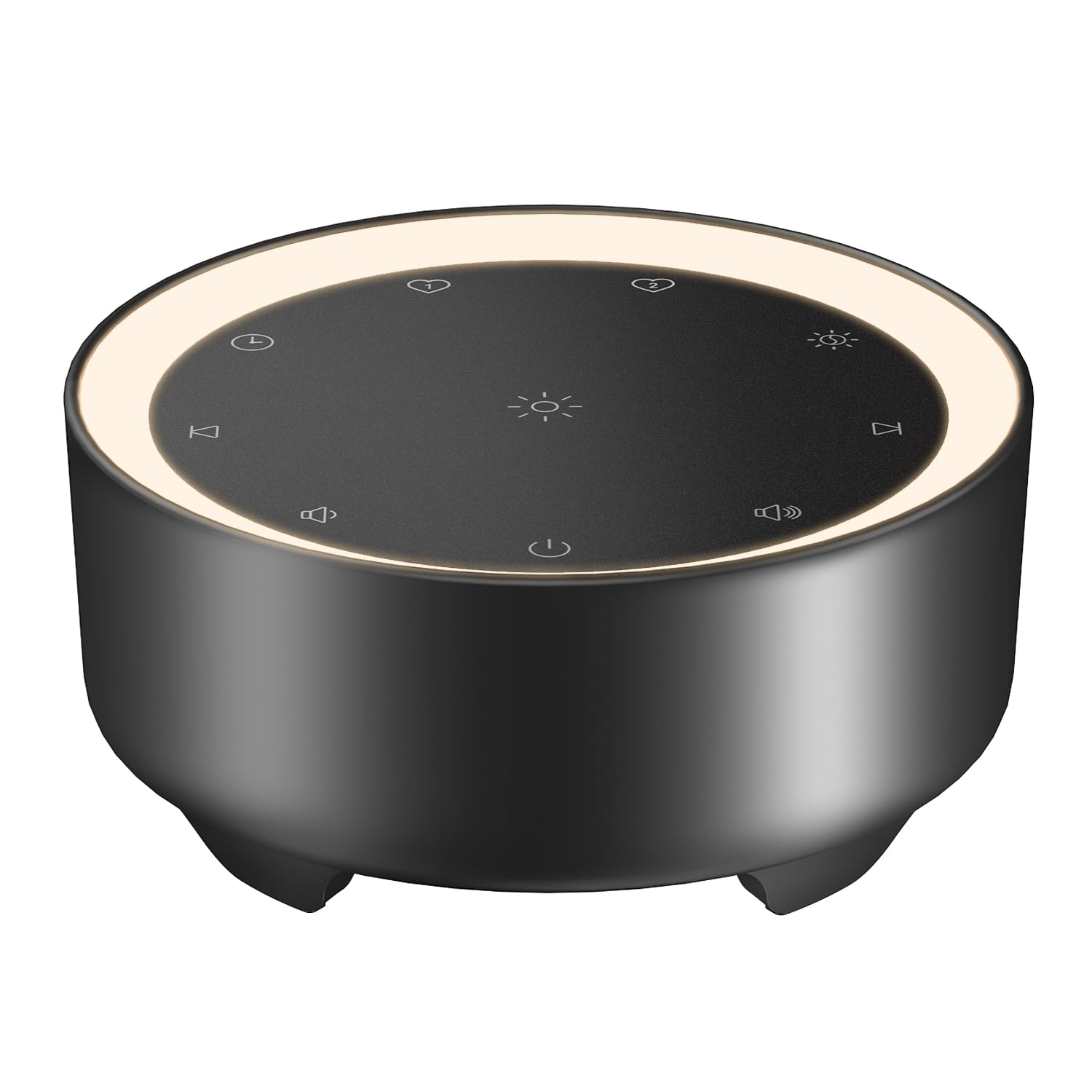
Image: Kipcush K8 White Noise Machine with its USB cable, illustrating the compact design and power connection.
Karakteristik pwodwi
- 20 Son kalme: Includes white noise, fan sounds, nature recordings, and lullabies.
- 2 Customizable Shortcuts: Save your favorite sounds for instant playback.
- Soft Glow Night Light: Three adjustable brightness levels for a calm environment.
- Plizyè Opsyon Minutè: 15, 30, 60, 90, 120 minutes, or continuous 8-hour playback.
- Fonksyon memwa: Automatically saves last sound, volume, and light settings.
- USB Powered: Flexible use with power banks, laptops, wall chargers, or car USB ports.
- Kontra enfòmèl ant ak pòtab: Small size for easy travel and placement.

Image: A visual representation of the 20 distinct sound options, including various white noises, fan sounds, nature sounds like rain and ocean, and lullabies.

Image: The device highlighting its timer functions, offering various durations from 15 minutes to 8 hours for automatic shut-off.
Enstalasyon
- Koneksyon pouvwa: Connect the provided USB-A to coaxial connector cable to the device. Plug the USB-A end into a compatible 5V power adapter (not included), power bank, laptop, or car USB port.
- Plasman: Place the device on a stable, flat surface away from water or excessive heat.
Video: An official Kipcush video demonstrating the white noise sound machine in various usage scenarios, including setup and operation.
Enstriksyon Operasyon

Imaj: Detaye view of the touch-sensitive control panel with labels for each function.
- Limen/Etenyen: Tape la Bouton pouvwa (circle with vertical line) to turn the device on or off.
- Seleksyon son: Tape la Next Track (right arrow) or Previous Track (left arrow) buttons to cycle through the 20 available sounds.
- Ajisteman Volim: Tape la Volim + (speaker with plus) or Volim - (speaker with minus) buttons to adjust the sound level.
- Kontwòl Limyè Lannwit: Tape la Limyè lannwit (sun icon) button to turn the light on/off and cycle through three brightness levels.
- Anviwònman revèy: Tape la Revèy (clock icon) button to select a desired duration (15, 30, 60, 90, 120 minutes, or 8 hours continuous play). The device will automatically turn off after the selected time.
- Customizable Shortcuts (Favorite Sounds):
- To save a favorite sound: While a sound is playing, long-press either pi renmen 1 (heart icon 1) or pi renmen 2 (heart icon 2) button until you hear a confirmation tone.
- To play a favorite sound: Tap the corresponding pi renmen 1 or pi renmen 2 button for instant playback.
- Fonksyon memwa: The device automatically remembers your last sound, volume, and light settings when powered off and will resume these settings upon restart.

Imaj: Aparèy la ap montreasing the unique Favorite Button feature for quick sound recall.
Antretyen
- Netwayaj: Siye aparèy la avèk yon twal mou epi sèk. Pa sèvi ak pwodui netwayaj likid oswa materyèl abrazif.
- Depo: Sere aparèy la nan yon kote ki fre, sèk lè li pa itilize.
- Swen kab: Avoid bending or twisting the power cable excessively to prevent damage.
Depanaj
| Pwoblèm | Kòz posib | Solisyon |
|---|---|---|
| Aparèy pa limen. | Pa gen kouran oswa koneksyon ki lach. | Ensure the USB cable is securely connected to both the device and a working 5V power source. Try a different power adapter or USB port. |
| Pa gen son. | Volim nan twò ba oswa twò ba. | Increase the volume using the Volume + button. Ensure a sound is selected. |
| Limyè lannwit lan pa mache. | Light is off or at lowest setting. | Tap the Night Light button to cycle through brightness levels or turn it on. |
| Aparèy la etenn sanzatann. | Timer activated. | Check the timer setting. If continuous play is desired, ensure the 8-hour option is selected or no timer is set. |
Espesifikasyon
- Non modèl: K8
- Mak: Kipcush
- Sous pouvwa: Corded Electric (USB-powered, 5V)
- Materyèl: Plastik
- Koulè: Nwa (dapre varyant pwodwi a)
- Dimansyon pake: 4.37 x 4.29 x 2.99 pous
- Pwa atik: 9.14 ons
- Opsyon son: 20 (Bri Blan, Vantilatè, Lanati, Berceuse)
- Opsyon revèy: 15, 30, 60, 90, 120 minutes, 8 hours continuous
- Limyè lannwit: 3 nivo klète reglabl
Garanti ak sipò
The Kipcush K8 White Noise Machine comes with a 24-mwa garanti from the date of purchase. This warranty covers manufacturing defects and ensures long-term reliability.
For professional customer support, please contact Kipcush directly through their official channels. Refer to the product packaging or the Kipcush websit pou enfòmasyon kontak.


