1. Entwodiksyon
This manual provides comprehensive instructions for the installation, operation, maintenance, and troubleshooting of your Xigmatek Bano EN44250 computer case. Please read this manual thoroughly before beginning assembly to ensure proper setup and optimal performance.
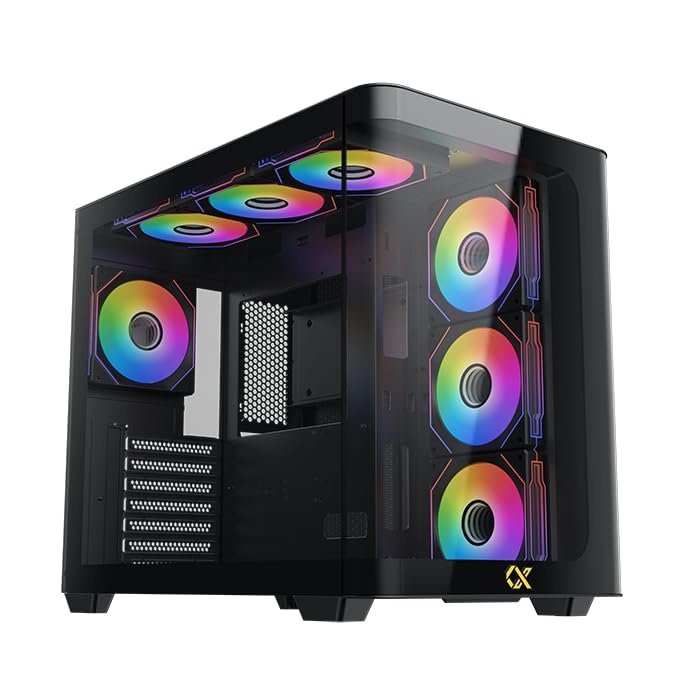
Figure 1: Xigmatek Bano EN44250 Computer Case (Exterior View)
2. Karakteristik
- Materyèl: Constructed from high-quality steel alloy for durability and long-term use.
- Sipò pou plak mèr: Compatible with E-ATX, ATX, Micro ATX, and Mini ITX motherboards.
- Sistèm refwadisman: Supports both air and liquid cooling solutions, with multiple fan and radiator mounting options.
- Kondwi Bays: Features five internal drive bays compatible with both 2.5-inch and 3.5-inch hard drives/SSDs.
- I/O Panel: Equipped with one USB 3.0 port, two USB 2.0 ports, and HD audio jacks for seamless connectivity.
- Konsepsyon: Stylish black finish with a curved tempered glass panel for showcasing internal components and superior airflow.
- Fant ekspansyon: Includes 7 expansion slots.
- PSU Mounting: Supports rear-mounted power supplies.

Figure 2: Internal Layout of the Case
3. Enstriksyon Enstalasyon
3.1 Prepare Ka a
- Unpack the case and remove all packaging materials.
- Carefully remove the tempered glass side panel by unscrewing the thumb screws. Place it on a soft, flat surface to prevent scratches.
- Identify the accessory box inside the case, which contains screws, standoffs, and cable ties.
3.2 Enstalasyon mèr
- Install the I/O shield (if not pre-installed) into the rear opening of the case.
- Align your motherboard with the pre-installed standoffs. If your motherboard form factor (E-ATX, ATX, Micro ATX, Mini ITX) requires additional standoffs, install them in the appropriate holes.
- Mete kat manman an ak anpil atansyon sou distans yo epi byen sere l ak vis yo bay yo.
3.3 Enstalasyon Power Supply Unit (PSU).
- Mount the PSU into the designated rear compartment of the case.
- Fikse PSU a ak vis nan dèyè bwat la.
- Route the necessary power cables through the cable management cutouts to the motherboard and other components.
3.4 Storage Drive Installation (2.5"/3.5" HDDs/SSDs)
- Locate the internal drive bays. The case supports five drive bays compatible with 2.5-inch and 3.5-inch drives.
- For 3.5-inch drives, slide the drive into the tool-less tray (if applicable) or secure it with screws.
- For 2.5-inch drives, secure them to the designated mounting points or adapters.
- Connect SATA data and power cables to each installed drive.
3.5 Cooling System Installation (Fans/Radiators)
The Xigmatek Bano EN44250 supports various fan and radiator configurations for optimal airflow. Refer to the diagrams below for compatible sizes and locations.

Figure 3: Fan and Radiator Mounting Options (Side View)

Figure 4: Fan and Radiator Mounting Options (Top View)
- Install case fans or liquid cooling radiators into the desired mounting positions using the appropriate screws.
- Connect fan power cables to the motherboard fan headers or a fan controller.
3.6 Koneksyon Panèl Antre/Sòti Devan an
Connect the front I/O panel cables to the corresponding headers on your motherboard. These include:
- USB 3.0 header
- Tèt USB 2.0
- HD Audio header
- Power switch, reset switch, HDD LED, and power LED headers

Figure 5: Front I/O Panel
4. Gid pou opere
Once all components are installed and connected, replace the side panel. Ensure all cables are neatly managed to avoid obstructing airflow. Power on your system using the front panel power button. Monitor temperatures and fan speeds to ensure optimal cooling performance.
5. Antretyen
Regular maintenance helps prolong the life of your computer components and ensures efficient cooling.
- Netwayaj pousyè: Netwaye filtè pousyè yo (si genyen) ak konpozan entèn yo detanzantan avèk lè konprese. Asire w ke sistèm nan etenn epi debranche anvan ou netwaye li.
- Jesyon kab: Review cable routing periodically to ensure no cables are obstructing fan blades or airflow paths.
- Netwayaj eksteryè: Siye sifas eksteryè yo ak yon mou, damp twal. Evite pwodui netwayaj abrazif oswa solvan.
NAN. Depanaj
Si ou rankontre pwoblèm pandan oswa apre asanblaj la, konsidere etap depanaj komen sa yo:
- Sistèm nan pa limen:
- Check all power connections, including the PSU to wall outlet, PSU to motherboard (24-pin and CPU 8-pin), and front panel power switch header.
- Asire w ke switch PSU a nan pozisyon 'ON'.
- Pa gen okenn rezilta ekspozisyon:
- Verify that your monitor is connected to the graphics card (not the motherboard I/O if using a dedicated GPU).
- Remete kat grafik la ak modil RAM yo.
- Pwoblèm Surchof:
- Ensure all case fans are spinning and correctly oriented for optimal airflow (intake/exhaust).
- Check CPU cooler installation and thermal paste application.
- Clean any dust buildup from fans and radiators.
- Front Panel USB/Audio Not Working:
- Verify that the front panel USB and audio headers are correctly connected to the motherboard.
7. Espesifikasyon
| Karakteristik | Detay |
|---|---|
| Manifakti | XIGMATEK co, Ltd. |
| Nimewo Modèl | EN44250 |
| Dimansyon pwodwi (L x W x H) | 45 x 53.3 x 25.8 cm |
| Pwa | 9.44 kg |
| Mèr konpatibilite | E-ATX, ATX, Mikwo ATX, Mini ITX |
| Kalite Ka | Tower |
| Koulè | Nwa |
| Materyèl | Steel alyaj |
| Power Supply Mounting | Mòn dèyè |
| Metòd refwadisman | Lè, Dlo |
| CPU Cooler Clearance | Jiska 16 cm |
| VGA Card Length Support | Jiska 41 cm |
| Sipò Longè PSU | Jiska 22 cm |
| Fant ekspansyon | 7 |
| Bay Drive Entèn | 5 (compatible with 2.5" and 3.5" drives) |
| Front I / O pò | 1x USB 3.0, 2x USB 2.0, HD Audio |
8. Garanti ak sipò
For warranty information and technical support, please refer to the official Xigmatek websit la oubyen kontakte détayan lokal ou a. Kenbe prèv acha ou pou reklamasyon garanti.
Resous sou entènèt: www.xigmatek.com


