1. Entwodiksyon
Thank you for choosing the ITAWEY MILANO-BK Wireless Tri-Mode Mouse & Pad Combo. This device offers versatile connectivity options (2 x Bluetooth 5.2 and 1 x 2.4G USB Receiver), a high-precision 3200 DPI sensor, quiet clicks, and a long-lasting rechargeable battery. This manual provides detailed instructions for setup, operation, and maintenance to ensure optimal performance.
2. Pake kontni
Tanpri verifye ke tout atik yo prezan nan pakè ou a:
- ITAWEY MILANO-BK Wireless Mouse
- Sourit Pad
- USB Nano Receiver (2.4G)
- 3.3-foot USB Charging Cable
- USB-C Cable Converter
3. Pwodwi souview
Familiarize yourself with the components of your ITAWEY wireless mouse:

Figure 3.1: Mouse Components
- Textured Precision Wheel: For smooth scrolling.
- DPI Toggle: Ajiste sansiblite kurseur la.
- Dwa bouton: Fonksyon estanda klike sou bò dwat la.
- Bouton Goch: Standard left-click function (quiet click).
- USB-C chaje pò: Pou rechaje batri entèn lan.
- Bouton Avant: Navige pi devan nan web navigatè oswa file eksploratè.
- Bouton dèyè: Navige bak nan web navigatè oswa file eksploratè.

Figure 3.2: Mouse and Mouse Pad Features
- DPI Toggle (1200/2400/3200): Allows quick adjustment of cursor speed.
- Textured Scroll Wheel: Provides tactile feedback for precise scrolling.
- Tapi sourit: Features a non-slip rubber base, smooth braided surface for accuracy, and anti-fray stitching for durability.
4. Enstalasyon
4.1. Chaje Sourit la
The mouse is powered by a built-in 500mAh rechargeable battery. Before first use, or when the battery is low, connect the mouse to a power source.
- Connect the included 3.3-foot USB charging cable to the USB-C charging port on the front of the mouse.
- Connect the other end of the charging cable to a USB-A power source (e.g., computer USB port, USB wall adapter).
- If your device only has USB-C ports, use the provided USB-C cable converter.

Figi 4.1: Chaje Sourit la

Figure 4.2: USB-C Cable Converter
A full charge takes approximately 2 hours and provides up to 21 days of use. The mouse can be used while charging.
4.2. Mòd Koneksyon
The ITAWEY mouse supports three connection modes: 2.4G USB Receiver and two independent Bluetooth 5.2 channels (BT1, BT2). This allows seamless switching between up to three devices.

Figure 4.3: Mouse, Pad, and Adapters
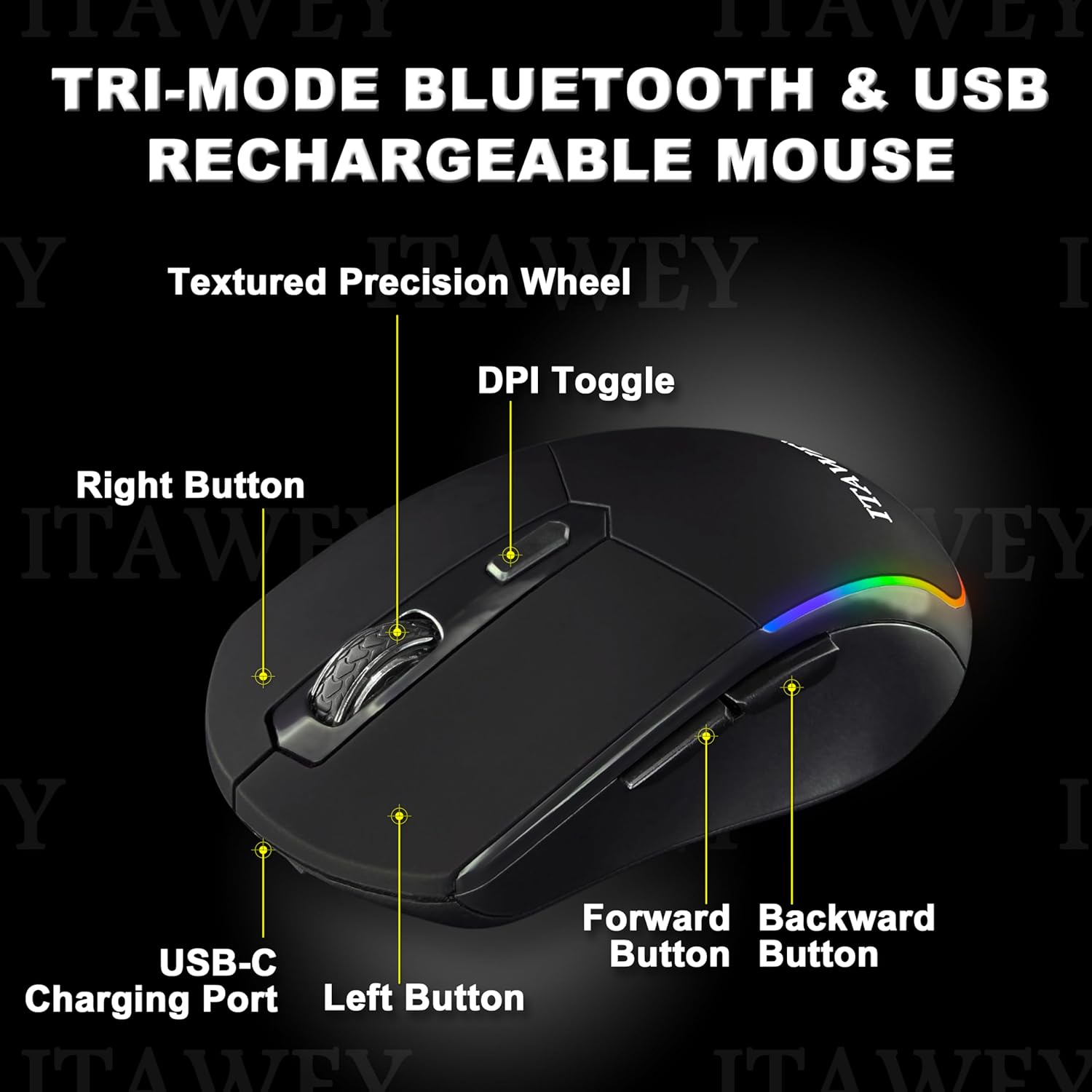
Figure 4.4: Mouse Bottom with Mode Switch
4.2.1. 2.4G USB Receiver Mode
- Locate the USB Nano Receiver stored in the compartment on the underside of the mouse.
- Insert the USB Nano Receiver into an available USB-A port on your computer or device. If your device only has USB-C ports, use the provided USB-C converter.
- Flip the ON/OFF switch on the bottom of the mouse to the 'ON' position.
- Set the MODE switch on the bottom of the mouse to 'USB'. The mouse will automatically connect.
4.2.2. Bluetooth Mode (BT1 / BT2)
- Flip the ON/OFF switch on the bottom of the mouse to the 'ON' position.
- Set the MODE switch on the bottom of the mouse to either 'BT1' or 'BT2'.
- Press and hold the MODE switch for 3-5 seconds until the LED indicator on the mouse starts flashing, indicating pairing mode.
- On your device (PC, laptop, tablet), open Bluetooth settings.
- Chèche pou new devices and select 'ITAWEY Mouse' (or similar) from the list.
- Once paired, the LED indicator will stop flashing and remain solid for a few seconds before turning off.
To switch between connected devices, simply move the MODE switch to the desired channel (USB, BT1, or BT2).

Figure 4.5: Tri-Mode Connection Example
5. Operasyon Enstriksyon
5.1. Ajisteman DPI
The mouse features a DPI button on the top to quickly adjust cursor sensitivity. Press the DPI button to cycle through the following settings:
- 1200 DPI: Sansiblite estanda pou itilizasyon jeneral.
- 2400 DPI: Increased sensitivity for faster cursor movement.
- 3200 DPI: High sensitivity for precise tasks or gaming.
5.2. Mode ekonomize enèji
To conserve battery life, the mouse automatically enters sleep mode after 8 minutes of inactivity. To wake the mouse, simply click any button.

Figure 5.1: Energy Saving Features
5.3. Klik trankil
The left and right mouse buttons are designed for quiet operation, making the mouse suitable for environments where noise reduction is important, such as libraries or late-night work sessions.
6. Antretyen
To ensure the longevity and optimal performance of your mouse and mouse pad, follow these maintenance guidelines:
- Netwaye Sourit la: Sèvi ak yon twal mou epi sèk pou siye sifas sourit la. Pou pousyè tè ki difisil pou retire, yon ti kras siye.amp cloth with mild soap can be used, but ensure no liquid enters the device.
- Netwaye Tapi Sourit la: The mouse pad is washable. Hand wash with mild soap and water, then air dry completely before use.
- Depo: When not in use for extended periods, store the mouse in a cool, dry place. Turn off the mouse to conserve battery.
- Evite kondisyon ekstrèm: Pa ekspoze sourit la nan tanperati ekstrèm, limyè solèy dirèk, oswa imidite ki wo.
NAN. Depanaj
If you encounter issues with your ITAWEY mouse, refer to the following common problems and solutions:
| Pwoblèm | Kòz posib | Solisyon |
|---|---|---|
| Sourit pa reponn | Battery low/dead, mouse turned off, incorrect mode selected, connection issue. | Charge the mouse. Ensure the mouse is turned ON. Verify the MODE switch is set correctly (USB, BT1, or BT2). For 2.4G, re-insert the USB receiver. For Bluetooth, re-pair the device. |
| Kisè a pa fiks oswa li sote | Dirty sensor, unsuitable surface, low battery. | Clean the optical sensor on the bottom of the mouse. Use the provided mouse pad or a smooth, non-reflective surface. Charge the mouse. |
| Pa ka konekte via Bluetooth | Mouse not in pairing mode, device Bluetooth off, interference. | Ensure the mouse is in BT1 or BT2 mode and held down for 3-5 seconds to enter pairing mode. Check if Bluetooth is enabled on your device. Move closer to the device. |
| Sourit la pa chaje | Faulty cable, power source issue, charging port damage. | Try a different USB cable and power source. Ensure the cable is fully inserted into the mouse's USB-C port. |
8. Espesifikasyon
| Karakteristik | Detay |
|---|---|
| Nimewo Modèl | MILANO-BK |
| Koneksyon | 2 x Bluetooth 5.2, 1 x 2.4G USB Receiver |
| Anviwònman DPI | 1200, 2400, 3200 |
| Kapasite batri | 500mAh Lithium Polymer (Rechargeable) |
| Tan pou chaje | Apeprè. 2 èdtan |
| Lavi batri | Jiska 21 jou (sou yon sèl chaj) |
| Mòd dòmi | Otomatik apre 8 minit inaktivite |
| Bouton | 6 (Agoch, Adwat, Motè woulo, DPI, Avanse, Aryè) |
| Konpatibilite | Windows (11, 10, 7, XP), MacOS, iOS, iPad, Android Tablet, Chrome OS, Ubuntu |
| Dimansyon sourit | 4.72 x 2.56 x 0.04 pous (apeprè) |
| Pwa sourit | 2.82 ons (apeprè) |
9. Garanti ak sipò
ITAWEY products are designed for reliability and performance. For warranty information or technical support, please refer to the contact details provided with your purchase or visit the official ITAWEY websit la. Tanpri konsève prèv acha ou a pou reklamasyon garanti.


