Entwodiksyon
Thank you for choosing the Porodo Lifestyle 4K Digital Camera. This camera is designed to capture your world in stunning detail, offering 4K video recording and high-resolution 50MP images. With features like 16x digital zoom, a flip flash, and a 180° rotating screen, it is ideal for vlogging, photography, and various content creation needs. This manual provides essential information on setting up, operating, and maintaining your camera to ensure optimal performance and longevity.
Enfòmasyon sou Sekirite
- Pa ekspoze kamera a nan tanperati ekstrèm, limyè solèy dirèk, oswa imidite ki wo.
- Evite lage kamera a oswa soumèt li a gwo enpak.
- Keep the camera away from water and liquids unless specifically designed for underwater use (this model is not).
- Pa eseye demonte oswa modifye kamera a. Sa ap anile garanti a.
- Use only the specified battery type and charging method.
- Kenbe soti nan atenn timoun yo.
Kontni pake
Tanpri tcheke kare a pou atik sa yo:
- Porodo Lifestyle 4K Digital Camera
- Batri rechargeable (650mAh)
- Kalite-C chaje kab
- Manyèl Itilizatè (dokiman sa a)
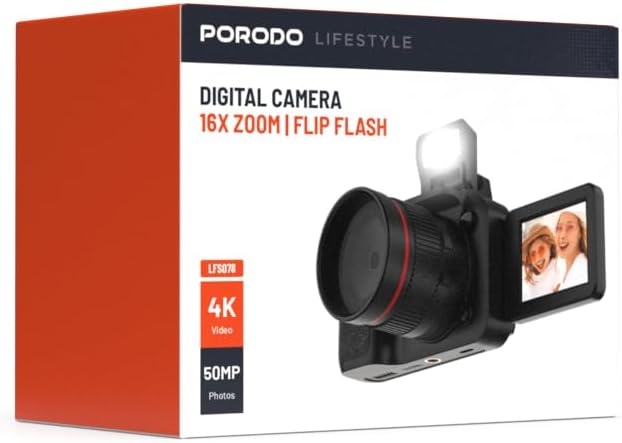
Imaj: Devan view of the Porodo Lifestyle 4K Digital Camera retail box, showing the camera and key features.

Imaj: Dèyè view of the Porodo Lifestyle 4K Digital Camera retail box, displaying product specifications and features.
Pwodwi souview
Familiarize yourself with the various parts of your Porodo Lifestyle 4K Digital Camera.

Image: The Porodo Lifestyle 4K Digital Camera shown with its 180° rotating screen flipped open and the integrated flash extended upwards.
- Lantiy: Main optical component for capturing images and videos.
- Flip Flash: Bay plis ekleraj nan kondisyon ki pa twò klere.
- 180° Rotating Screen (2.2'' Display): Pèmèt fleksibilite viewing angles, ideal for vlogging and selfies.
- Bouton pouvwa: Limen/etenn kamera a.
- Bouton vole: Pran foto oubyen kòmanse/sispann anrejistreman videyo.
- Kontwòl Zoom: Adjusts the 16x digital zoom.
- Bouton Navigasyon: For menu navigation and settings adjustment.
- Kalite-C Port: Pou chaje ak transfè done.
- Plas pou kat memwa: For inserting an SD card (not included).
Enstalasyon
1. Enstalasyon ak Chaje Batri
- Jwenn kouvèti konpatiman batri a anba kamera a.
- Glise latch la pou ouvri kouvèti a.
- Insert the provided 650mAh battery, ensuring the contacts align correctly.
- Close the battery compartment cover until it clicks securely.
- Connect the camera to a power source using the Type-C charging cable. The charging indicator will illuminate.
- Yon chaj konplè pran apeprè 2.5 èdtan. Endikatè a ap chanje oswa etenn lè chaj la fini.
2. Enstalasyon Kat Memwa
A memory card (SD card, not included) is required to store photos and videos.
- Locate the memory card slot, usually on the side or bottom of the camera.
- Insert the SD card with the metal contacts facing the correct direction (refer to the diagram near the slot if available) until it clicks into place.
- Pou retire li, pouse kat la dousman jiskaske li soti.
3. Premye Limen
- Peze epi kenbe bouton Power la pandan kèk segond jiskaske ekran an limen.
- Upon first use, you may be prompted to set the date and time. Use the navigation buttons to adjust and confirm.
Enstriksyon Operasyon
Basic Photo Mode (50MP)
- Turn on the camera. It will typically default to photo mode.
- Frame your shot using the 2.2'' display.
- Press the Shutter button halfway down to focus (if applicable).
- Press the Shutter button fully to capture a 50MP image.

Image: A person holding the Porodo Lifestyle 4K Digital Camera, demonstrating a typical usage scenario for capturing photos.

Imaj: Yon lòt view of a person holding the Porodo Lifestyle 4K Digital Camera, illustrating the camera's ergonomic design during use.
Basic Video Mode (4K)
- Switch the camera to video mode (usually via a dedicated button or menu option).
- Press the Shutter button once to start 4K video recording. A recording indicator (e.g., red dot, timer) will appear on the screen.
- Peze bouton an Panno ankò pou sispann anrejistreman.

Image: The Porodo Lifestyle 4K Digital Camera highlighting its 4K video resolution capability.
Using the 16X Digital Zoom
- While in photo or video mode, use the zoom controls (often marked with 'W' for Wide and 'T' for Telephoto) to adjust the 16x digital zoom.
- Press 'T' to zoom in and 'W' to zoom out.
Using the Flip Flash
- To activate the flash, manually flip it up from its resting position.
- The camera will automatically use the flash when needed in low-light conditions, depending on your flash settings (e.g., Auto, Fill-in, Red-eye reduction).
- To turn off the flash, gently push it back down until it locks into place.
Using the 180° Rotating Screen
- The 2.2'' display can be rotated 180 degrees.
- Flip the screen out from the side of the camera and rotate it to face forward for selfies or vlogging, or to various angles for creative shots.
- Ensure the screen is securely positioned before shooting.

Image: The Porodo Lifestyle 4K Digital Camera illustrating its 2.2-inch display and 180-degree flip screen functionality.
Lekti ak Sipresyon Files
- Enter Playback mode (usually via a dedicated button or menu option).
- Sèvi ak bouton navigasyon yo pou defile nan foto ak videyo ou yo.
- Pou efase yon file, select it and press the Delete button (often marked with a trash can icon). Confirm deletion when prompted.
Konekte ak yon òdinatè
- Etenn kamera a.
- Connect the camera to your computer using the provided Type-C cable.
- Turn on the camera. It should appear as a removable disk drive on your computer.
- You can now transfer photos and videos to your computer.
Antretyen
Netwaye kamera a
- Sèvi ak yon twal mou ki pa gen pousyè pou netwaye kò kamera a.
- For the lens and screen, use a specialized lens cleaning cloth and solution. Do not use abrasive materials.
- Avoid spraying cleaning solutions directly onto the camera. Apply to the cloth first.
Swen batri
- Recharge the battery fully before first use.
- Evite vide batri a nèt souvan pou pwolonje dire lavi li.
- If storing the camera for an extended period, charge the battery to about 50% and remove it from the camera.
Depo
- Sere kamera a nan yon kote ki fre epi sèk, lwen limyè solèy dirèk ak tanperati ekstrèm.
- Use a camera bag or case to protect it from dust and scratches.
Depanaj
| Pwoblèm | Kòz posib | Solisyon |
|---|---|---|
| Kamera a pa limen. | Battery is dead or not installed correctly. | Chaje batri a. Asire w ke batri a byen mete nan plas li epi li byen polarite. |
| Pa ka pran foto/videyo. | Kat memwa a plen, li pa mete nan plas li, oswa li pèvèti. | Insert a memory card. Delete unnecessary files. Format the card (this will erase all data). |
| Images/Videos are blurry. | Lens is dirty. Insufficient light. Camera shake. | Clean the lens. Use the flash or shoot in brighter conditions. Hold the camera steady. |
| Flash la pa fonksyone. | Flash is not flipped up. Flash setting is off. | Ensure the flash is manually flipped up. Check flash settings in the menu. |
| Kamera a bloke. | Pwoblèm lojisyèl. | Retire epi mete pil la ankò pou re-inisyalize kamera a. |
Espesifikasyon
Detailed technical specifications for the Porodo Lifestyle 4K Digital Camera:

Image: Visual representation of the camera's core capabilities: 4K video, 50MP photos, and 16x digital zoom.

Image: A detailed table outlining the technical specifications of the Porodo Lifestyle 4K Digital Camera.
- Non modèl: Porodo Lifestyle 4K Digital Camera – 50MP, 16x Zoom, Flip Flash, 180° Rotating Screen
- Nimewo Modèl Atik: 6849108448116
- Mak: Porodo
- Maksimòm WebKam Rezolisyon Imaj: 50 MP
- Rezolisyon videyo: 4K (3840x2160)
- Zoom dijital: 16X
- Zoom optik: 1.0
- Ekspozisyon: 2.2'' (180° Rotating Screen)
- Kapasite batri: 650mAh (1 P76 battery included)
- Tan travay: Jiska 3 èdtan
- Tan rechaje: Apeprè 2.5 èdtan
- Pò chaje: Kalite-C
- Teknoloji Capteur foto: CMOS
- Sipòte File Fòma: JPG (images), AVI (videos)
- Estabilizasyon imaj: Digital
- Rapò aspè: 16:9, 4:3
- Deskripsyon mesure: Tach
- Dimansyon pwodwi: 6 x 13 x 9cm; 310g
- Peyi orijin: Lachin
Garanti ak sipò
Porodo products are designed with quality and reliability in mind. For warranty information and technical support, please refer to the official Porodo websit la oubyen kontakte distribitè lokal ou a.
Sipò sou entènèt: Vizite la Porodo Store on Amazon pou enfòmasyon ak mizajou sou pwodwi yo.
Opsyon Garanti Pwolonje: Additional warranty plans may be available through authorized retailers. Please check with your point of purchase for details.


