1. Entwodiksyon
Thank you for choosing the ETURBEV TA654A External Sound Level Meter. This device is designed for accurate measurement of environmental noise levels, featuring a large display for clear readability and an alarm function for monitoring sound thresholds. This manual provides essential information for the safe and efficient operation, setup, and maintenance of your sound level meter.
2. Enfòmasyon sou Sekirite
- Li tout enstriksyon yo ak anpil atansyon anvan ou sèvi ak aparèy la.
- Pa ekspoze aparèy la nan tanperati ekstrèm, imidite, oswa limyè solèy la dirèk.
- Avoid strong vibrations or impacts to prevent damage.
- Pa eseye demonte oswa modifye aparèy la. Konfye tout antretyen bay pèsonèl kalifye.
- Kenbe aparèy la lwen dlo ak lòt likid.
- Asire bon ekipman pou pouvwa voltage is used as specified.
3. Pwodwi souview
3.1 Eleman
The ETURBEV TA654A External Sound Level Meter typically includes the following components:
- Inite Prensipal: Features a large digital display and control buttons.
- Mikwofòn: Integrated or external, for sound detection.
- External Probe (TA654A only): A 5-meter external probe for flexible measurement placement.
- Antre pouvwa: Pou konekte adaptè pouvwa a.
- Pò USB: For data output or power.
- Alarm Signal Output Interface: 3.5mm jack for connecting an external alarm device.
3.2 Karakteristik
- Large digital display for clear real-time sound level readings.
- Wall-mounted design for fixed installation.
- Environmental noise alarm function with adjustable thresholds.
- Segondè presizyon mezi.
- External 5m probe for flexible monitoring (TA654A model).
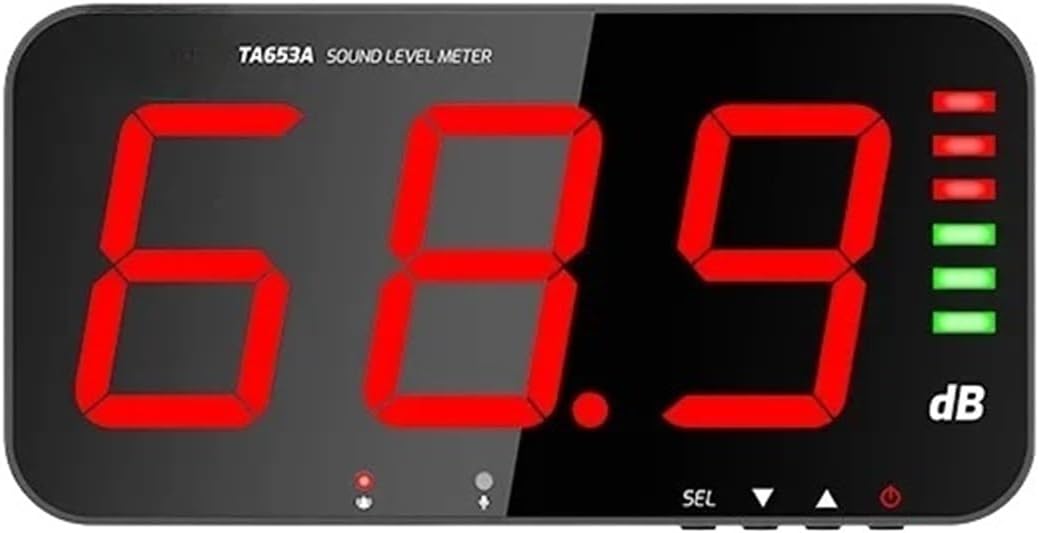
Figi 1: Devan view of the ETURBEV TA653A/TA654A Sound Level Meter, showing a large digital display indicating "68.9 dB" and LED indicators on the right side. The model "TA653A SOUND LEVEL METER" is visible at the top.
4. Enstalasyon
4.1 Debake
- Carefully remove the sound level meter and all accessories from the packaging.
- Inspect the device for any signs of damage. If damaged, do not use and contact customer support.
- Kenbe anbalaj la pou depo oswa transpò nan lavni.
4.2 Montaj
The device is designed for wall-mounting. Choose a suitable location that is stable, free from vibrations, and allows for optimal sound measurement without obstruction.
- Mark the desired mounting points on the wall using the device's mounting holes as a template.
- Fè twou ki apwopriye yo epi mete lank miray si sa nesesè.
- Secure the device to the wall using screws.
4.3 Koneksyon pouvwa
Connect the provided power adapter to the device's power input port (DCV OUT or USB, refer to the specific port on your device) and then plug it into a standard electrical outlet.
4.4 External Probe Connection (TA654A only)
For the TA654A model, connect the 5-meter external probe to the designated probe input port on the device. Ensure the connection is secure.
4.5 External Alarm Connection (Optional)
If using an external alarm, connect it to the 3.5mm alarm signal output interface on the side of the device.

Figi 2: Side view of the ETURBEV Sound Level Meter, illustrating the alarm signal output interface. It shows a 3.5mm jack connected to an external alarm device (red siren) and a USB port.
5. Operasyon Enstriksyon
5.1 Limen/Etenyen
- Pouvwa sou: Once connected to power, the device should automatically power on and display the current sound level. If not, press the power button (usually indicated by a power symbol) on the device.
- Pouvwa Off: Press and hold the power button until the display turns off, or disconnect the power supply.
5.2 Li Ekran an
The large digital display shows the real-time sound pressure level in decibels (dB). Observe the numerical value for the current noise level.
5.3 Fikse Seuil Alam yo
The device features an environmental noise alarm. Refer to the buttons on your device (e.g., "SEL", "▲", "▼" as seen in Figure 1) to navigate the menu and set the desired upper decibel limit for the alarm. When the measured sound level exceeds this threshold, the device will trigger the internal or external alarm.
- Press the "SEL" button to enter the settings menu.
- Use the "▲" and "▼" buttons to adjust the alarm threshold value.
- Press "SEL" again to confirm and exit the settings.
Note: Specific button functions may vary slightly. Consult the on-screen prompts or device markings for precise operation.
6. Antretyen
6.1 Netwayaj
- Wipe the device exterior with a soft, dry cloth.
- Pa sèvi ak pwodui netwayaj abrazif, solvan, oswa pwodui chimik ki fò.
- Keep the microphone area clean and free from dust or debris.
6.2 Depo
Lè w pa itilize aparèy la pou yon bon bout tan, sere l nan yon kote ki fre epi sèk, lwen limyè solèy dirèk ak tanperati ekstrèm.
6.3 Kalibrasyon
While the device is factory-calibrated, professional calibration may be required periodically for applications demanding high precision. Contact a certified calibration service if necessary.
NAN. Depanaj
| Pwoblèm | Kòz posib | Solisyon |
|---|---|---|
| Aparèy pa limen. | Pa gen ekipman pou kouran oswa koneksyon an defektye. | Tcheke adaptè kouran an ak koneksyon kab yo. Asire w ke priz kouran an fonksyone. |
| Incorrect or unstable readings. | Microphone obstructed or damaged; device not properly calibrated; environmental interference. | Ensure microphone is clear. Relocate the device away from strong electromagnetic fields. Consider professional calibration. |
| Alam lan pa deklanche. | Alarm threshold set too high; external alarm not connected or faulty. | Verify alarm threshold settings. Check connection and functionality of external alarm device. |
| External probe not working (TA654A). | Probe not connected securely or probe is faulty. | Ensure the external probe is firmly connected to its port. If issues persist, the probe may need replacement. |
8. Espesifikasyon
| Paramèt | Valè |
|---|---|
| Modèl | TA654A External (also applicable to TA653A for core functions) |
| Ranje Mezi | 30-130 dB |
| Rezolisyon | 0.1 dB |
| Presizyon Mezi | ± 1.5 dB |
| Tanperati Fonksyònman | 0-40 °C |
| Dimansyon Aparèy (apeprè) | 323 x 173 x 40 mm |
| Pwa Atik (apeprè) | 1.76 ons (50 gram) (Note: This weight may refer to a component or be an approximation. Actual device weight may vary.) |
| Sètifikasyon | CE |
| Manifakti | ETURBEV |
9. Garanti ak sipò
Pou enfòmasyon sou garanti a oswa sipò teknik, tanpri kontakte revantè ou a oswa manifakti a dirèkteman. Kenbe resi acha ou kòm prèv acha.
Manufacturer: ETURBEV


