Entwodiksyon
Thank you for choosing the ATTACK SHARK X66 60% Wireless Mechanical Gaming Keyboard. This keyboard is designed for optimal performance and customization, featuring a compact layout, versatile connectivity options, and dynamic RGB lighting. This manual will guide you through the setup, operation, and maintenance of your new keyboard to ensure a seamless user experience.

The ATTACK SHARK X66 keyboard, showing its compact design, coiled USB-C cable, and 2.4G wireless receiver.
Karakteristik pwodwi
- 60% Konsepsyon Konpak: Features 66 essential keys to maximize desk space while maintaining full functionality.
- CNC Metal Volume Knob: High-quality anodized metal knob for easy volume adjustment and mute function.
- Koneksyon Tri-Mòd: Supports Bluetooth 5.0, 2.4G wireless, and wired USB-C connections for versatile use across multiple devices.
- Konsepsyon ranplasabl a cho: Compatible with 3-pin or 5-pin switches, allowing for easy customization of typing feel.
- Pre-Lubricated Linear Strawberry Switches: Provides a light touch and crisp sound for a smooth typing experience.
- Gasket Structure with 5-Layer Sound Dampening: Reduces noise from key impacts, delivering a pure and pleasant typing sound.
- Kle PBT dirab: Triple-color OEM height PBT keycaps are abrasion and oil resistant, designed for long-term comfort.
- Limyè RGB vibran: 16.8 million colors with 18 dynamic lighting effects, including music-synced modes.
- 3000mAh gwo-kapasite batri: Ensures long-lasting wireless operation.
- Custom Software Support: Allows for customized key functions, macro editing, and lighting effects.
- N-Kle Rollover: Ensures accurate registration of multiple simultaneous key presses without ghosting.

Yon souview of the ATTACK SHARK X66 keyboard highlighting its mini 60% layout, 3 modes, full RGB backlight, knob design, 3000mAh battery, gasket structure, hot-swap capability, and custom driver support.

Detailed diagram illustrating the 5-layer gasket-mounted structure of the keyboard, including the upper cover, volume knob, PBT keycaps, mechanical switch, fog through positioning plate, PORON filled cotton, shaft underpad, PET singing pad, single key slotted PCB, silica gel, and bottom casing.
Kontni pake
Tanpri tcheke pake a pou atik sa yo:
- ATTACK SHARK X66 Mechanical Gaming Keyboard
- USB-C Coiled Cable
- 2.4G san fil reseptè
- Manyèl Itilizatè (dokiman sa a)
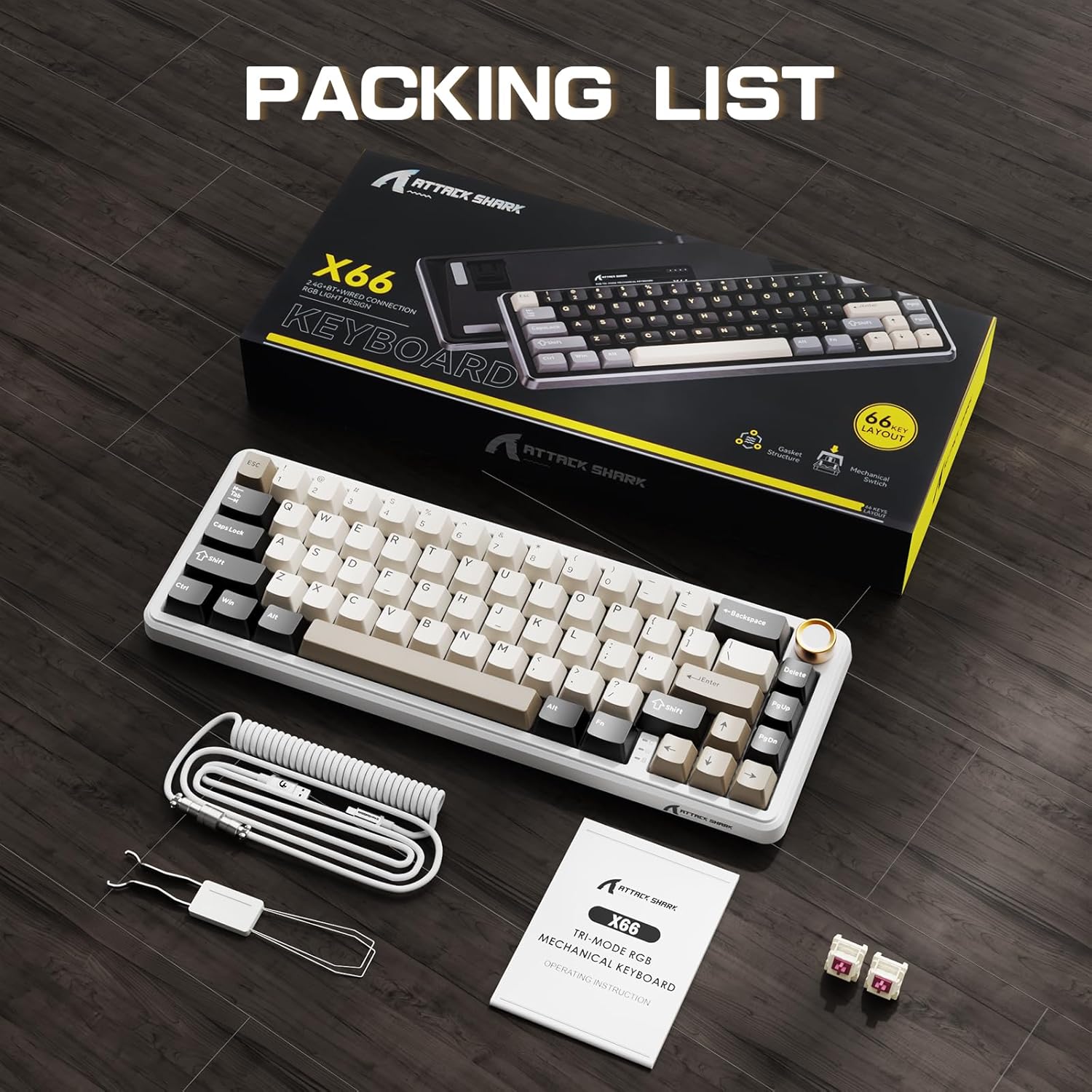
The ATTACK SHARK X66 keyboard, its packaging, coiled cable, and user manual, as found in the box.
Enstalasyon
Mòd Koneksyon
The ATTACK SHARK X66 keyboard supports three connection modes:
- 2.4G Wireless Mode: For a stable and low-latency wireless connection.
- Mòd Bluetooth: For connecting to multiple devices simultaneously.
- Mòd Filaire (USB-C): For a direct and reliable connection, also charges the keyboard.

Yon fèmen view of the keyboard's side, showing the 2.4G wireless receiver slot, USB-C port, and switches for Bluetooth (BT), 2.4G, and system compatibility (Win/Mac).
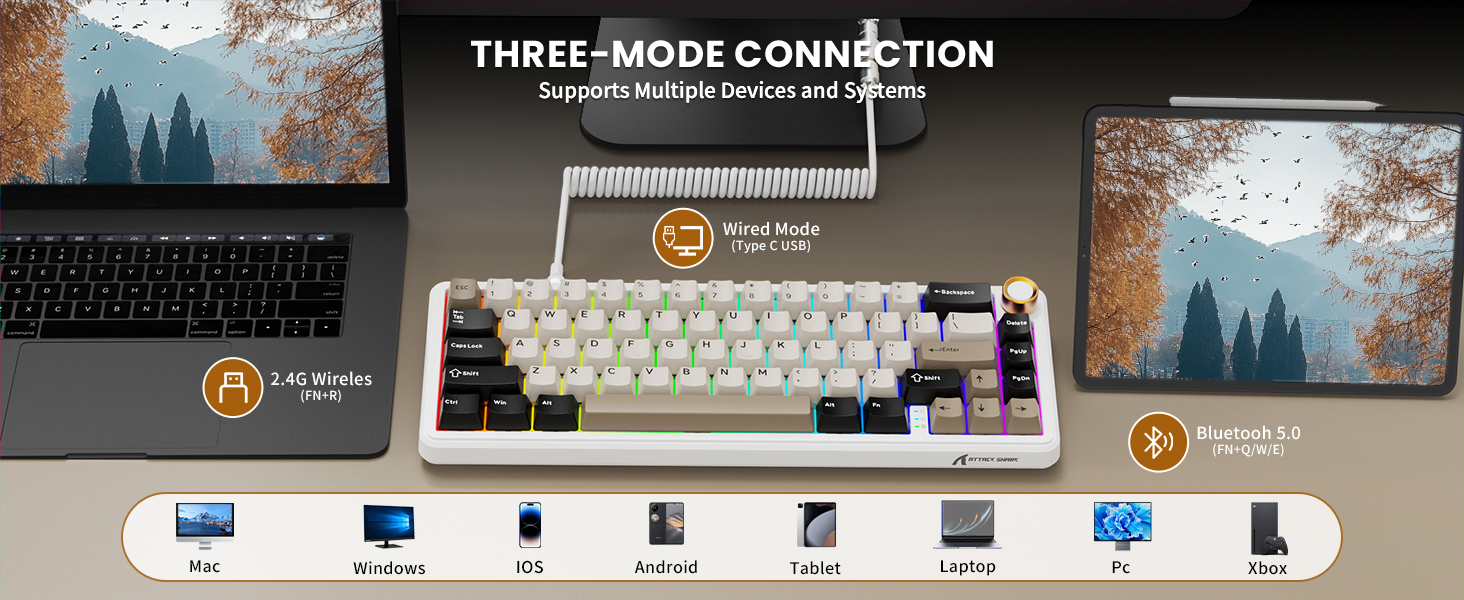
Visual representation of the three connection modes: 2.4G Wireless (FN+R), Wired (Type-C USB), and Bluetooth 5.0 (FN+Q/W/E), along with compatible devices such as Mac, Windows, iOS, Android, Tablet, Laptop, PC, and Xbox.
2.4G Wireless Koneksyon:
- Locate the 2.4G wireless receiver stored in the slot on the back of the keyboard.
- Branche reseptè 2.4G la nan yon pò USB ki disponib sou òdinatè w la.
- Switch the keyboard to 2.4G mode using the toggle switch on the side/back of the keyboard.
- Klavye a ta dwe konekte otomatikman.
Koneksyon Bluetooth:
- Switch the keyboard to Bluetooth mode using the toggle switch.
- Peze epi kenbe FN+Q, FN + W, oswa FN + E to enter pairing mode for one of the three Bluetooth channels. The indicator light will flash.
- On your device (computer, tablet, smartphone), search for Bluetooth devices and select "ATTACK SHARK X66".
- Once paired, the indicator light will become solid. You can switch between paired devices by pressing FN + Q/W/E.
Koneksyon filaire:
- Connect the provided USB-C coiled cable to the keyboard's USB-C port.
- Konekte lòt bout kab la nan yon pò USB ki disponib sou òdinatè w la.
- Klavye a pral otomatikman chanje an mòd filaire epi li pral kòmanse chaje.
Sistèm konpatibilite
The keyboard is compatible with Windows and Mac operating systems. Use the dedicated switch on the side/back of the keyboard to select the appropriate system mode for optimal key mapping.

A close-up of the keyboard's underside, showing the adjustable feet for ergonomic positioning and the system compatibility switch (Win/Mac).
Enstriksyon Operasyon
Fonksyonalite bouton volim
- Vire nan sens goch: Ogmante volim.
- Vire nan sans kontrè zegwi mont lan: Diminye volim.
- Peze desann: Aktive/dezaktive odyo a.

Yon detaye view of the high-quality CNC metal volume knob, illustrating its functions: clockwise for volume up, counter-clockwise for volume down, and pressing to mute/unmute sound.

An image highlighting the functional aluminum metal knob, detailing its press-to-mute/unmute, counter-clockwise volume down, and clockwise volume up capabilities.
Kontwòl ekleraj RGB
The keyboard features 16.8 million color RGB LEDs with 18 dynamic lighting effects. Use the following key combinations to control the backlight:
- FN + Paj Desann: Switch Backlight Effect (Cycle through 18 effects).
- FN + \|: Turn on/off Backlight.
- FN + ↑: Klate ekleraj +
- FN + ↓: Klate ekleraj-
- FN + ←: Vitès ekleraj-
- FN + →: Vitès ekleraj +
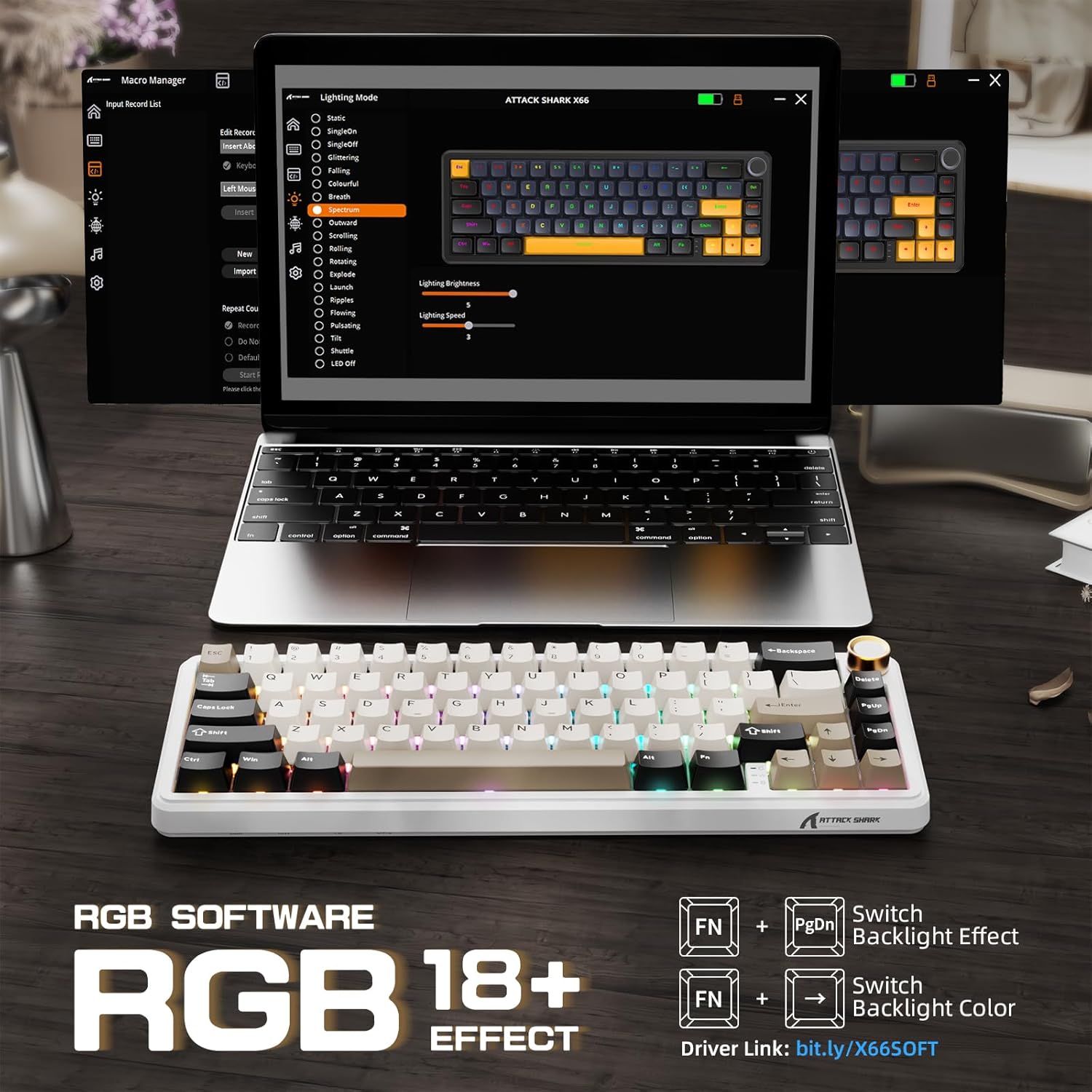
The keyboard displaying various RGB backlight effects, with instructions for controlling them using FN key combinations.

Yon imaj k ap montreasing the 16 million RGB backlight, supporting gorgeous RGB backlight and dancing with music rhythm, along with key combinations to adjust 18 backlight effects, turn on/off backlight, adjust brightness, and adjust speed.
Battery Level Check (Wireless Mode)
To check the battery level in wireless mode, press FN + BackSpace. The backlight will temporarily turn off, and the number keys 1 to 0 will light up to indicate the remaining battery percentage (e.g., 1-5 for low, 6-10 for high).

An illustration of the 3000mAh high-capacity battery and how to check its level in wireless mode by pressing FN+BackSpace, with number keys 1-10 indicating battery percentage.
Limyè Endikatè
The keyboard features smart indicator lights for various statuses:
- Endikatè Caps Lock: Indicates Caps Lock status.
- Win Lock Endikatè: Indicates Windows key lock status.
- Endikatè chaje: Montre estati chaj la.

A close-up of the keyboard's smart indicator lights, showing the Caps Lock (C), Win Lock (W), and Charging Indicator.
Lojisyèl Custom
Enhance your keyboard experience with the custom software. It allows you to:
- Customize key functions for all buttons.
- Edit and assign macros.
- Create customized lighting effects.
- Customize 16 million light colors.
- Support music rhythm lighting effects.
- Set sleep time for power saving.
The software can typically be downloaded from the official ATTACK SHARK website or via the link provided in the product packaging/description (e.g., Driver link: bit.ly/X66SOFT).

Screenshots of the custom software interface, demonstrating options for macro management, lighting mode selection, and various customization features for the keyboard.
Official product video demonstrating the features and functionality of the ATTACK SHARK X66 Keyboard, including its compact design, connectivity options, hot-swappable switches, RGB lighting, and typing experience.
Antretyen
Netwaye klavye a
- Dekonekte klavye a nan aparèy ou an anvan ou netwaye li.
- Sèvi ak yon twal mou, ki san pèl dampened with a small amount of water or a mild cleaning solution to wipe the keycaps and chassis.
- Pou pousyè ak debri ant kle yo, sèvi ak lè konprese oswa yon ti bwòs.
- Avoid using harsh chemicals or abrasive materials, as they may damage the keyboard's finish.
Hot-Swapping Switches
The hot-swappable design allows you to change switches without soldering. Use the included switch puller tool:
- Gently grip the switch with the switch puller and pull upwards to remove it.
- Aliyen broch nouvo switch 3-broch oswa 5-broch la ak twou ki sou PCB a.
- Peze nouvo switch la byen fèm nan plas li jiskaske li fè yon klik. Asire w ke ti broch yo pa pliye.

A close-up demonstrating the hot-swappable feature, showing a linear switch being removed from the keyboard, with other switches and keycaps visible.

An image illustrating the hot-swappable capability of the keyboard, compatible with both 3-pin and 5-pin mechanical switches, showing switches being inserted and removed.
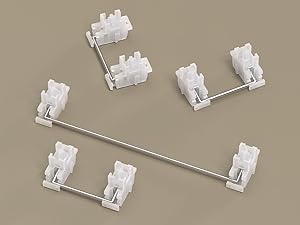
Yon fèmen view of the keyboard's stabilizers, which ensure smooth and consistent key presses for larger keys like the spacebar and shift keys.
Depanaj
- Klavye a pa reponn: Ensure the keyboard is charged. Check the connection mode (wired, 2.4G, Bluetooth) and ensure it matches your device's connection. Try restarting the keyboard or your device.
- 2.4G connection issues: Ensure the 2.4G receiver is securely plugged in. Try a different USB port. Ensure the keyboard is in 2.4G mode.
- Pwoblèm koneksyon Bluetooth: Ensure the keyboard is in Bluetooth pairing mode (indicator flashing). Delete previous pairings on your device and try re-pairing. Ensure your device's Bluetooth is enabled.
- Ekleraj RGB a pa fonksyone: Check if the backlight is turned off (FN + \|). Adjust brightness (FN + ↑/↓).
- Kle yo pa anrejistre oswa yo tape de fwa: Ensure switches are properly seated. If a specific switch is faulty, consider hot-swapping it with a new one.
- Bouton volim nan pa fonksyone: Ensure the keyboard is powered on and connected. Check for any physical obstructions.
Espesifikasyon
| Karakteristik | Deskripsyon |
|---|---|
| Modèl | X66 |
| Layout | 60% (66 Kle) |
| Koneksyon | Bluetooth 5.0, 2.4G san fil, USB-C ak fil |
| Chanjman | Pre-lubricated Linear Strawberry Switches (Hot-Swappable) |
| Keycaps | PBT Keycaps (OEM Height) |
| Estrikti | Gasket Mounted with 5-Layer Sound Dampening |
| Ekleraj | RGB (16.8 Million Colors, 18 Effects) |
| Kapasite batri | 3000mAh |
| Dimansyon | 12.7 x 4.53 x 1.37 pous (32.3 x 11.5 x 3.5 cm) |
| Pwa atik | 2.14 liv (0.97 kg) |
| Aparèy konpatib | Laptop, PC, Tablet, Smartphone, Mac |

Detailed dimensions of the 60% layout keyboard, showing its length, width, and height.
Garanti ak sipò
ATTACK SHARK products are manufactured to the highest quality standards. For warranty information, technical support, or customer service inquiries, please refer to the contact information provided on the product packaging or visit the official ATTACK SHARK websit la. Tanpri konsève prèv acha ou a pou nenpòt reklamasyon garanti.


