1. Entwodiksyon
This manual provides detailed instructions for the setup, operation, maintenance, and troubleshooting of your ATTACK SHARK X66 Gasket Wireless Mechanical Keyboard. Please read this manual thoroughly before using the product to ensure optimal performance and longevity.

Imaj: Anwo-anba view of the ATTACK SHARK X66 Gasket Wireless Mechanical Keyboard, showcasing its compact layout and keycap design.
2. Pwodwi souview
2.1 Karakteristik kle
- 60% Konsepsyon Kontra enfòmèl ant: Features 66 keys and a volume knob, optimizing desktop space while maintaining portability.
- Upgraded Gasket Mount: Incorporates 5 layers of sound insulation (PORON Sandwich Foam, Foamed IXPE Under Shaft Pads, PET Acoustic Premium Pads, Shaft Seat Sound Deadening Foam, Customized Bottom Foams) for reduced noise and a smooth typing experience.
- Triple Mode Connectivity: Supports Bluetooth, 2.4GHz wireless, and USB-C wired connections.
- Multi-Device Tasking: Three Bluetooth channels (FN+Q/FN+W/FN+E) for efficient switching between devices.
- Batri ki dire lontan: Equipped with a 3000mAh large-capacity rechargeable battery.
- Hot Swappable Switches: Full hot-swappable design compatible with 3-pin/5-pin switches, featuring pre-lubed Strawberry switches for a creamy sound and smooth keystroke.
- Dinamik RGB Backlight: Offers 9 backlight colors and 18 lighting effects with 16 million LED colors, customizable via software.
- Keycaps dirab: Features side-printed gradient PBT keycaps that are resistant to oiling, non-slip, and wear-resistant.

Imaj: Plis paseview of the X66 keyboard highlighting key features such as RGB Backlight, Triple Mode Connectivity, Hot Swappable switches, PBT Keycaps, 60% Layout, 3000mAh Battery, and Gasket Structure.
2.2 Kontni pake a
- ATTACK SHARK X66 Mechanical Keyboard
- USB-C Cable (1.5 meters)
- 2-in-1 Key Puller and Switch Puller
- Additional Strawberry Switches (2 pieces)
- Manyèl itilizatè
3. Enstalasyon
3.1 Mòd Konektivite
The X66 keyboard supports three connection modes: 2.4GHz wireless, Bluetooth, and USB-C wired.

Image: Diagram illustrating the three connectivity modes: Bluetooth 5.0, 2.4GHz Wireless with a USB dongle, and Type-C Wired connection.
- 2.4GHz Wireless Koneksyon:
- Jwenn reseptè USB 2.4GHz la.
- Ploge reseptè a nan yon pò USB ki disponib sou òdinatè w lan.
- On the keyboard, slide the mode switch to the '2.4G' position. The keyboard will automatically connect.
- Koneksyon Bluetooth:
- On the keyboard, slide the mode switch to the 'BT' position.
- Pou antre nan mòd appariement, peze epi kenbe FN+Q, FN + W, oswa FN + E for 3-5 seconds until the corresponding key's backlight flashes rapidly.
- On your device (PC, Mac, Tablet), search for Bluetooth devices and select 'ATTACK SHARK X66' to pair.
- Once paired, the key's backlight will stop flashing and remain steadily lit. You can pair up to three Bluetooth devices and switch between them using FN + Q/W/E.
- Koneksyon filaire USB-C:
- Konekte kab USB-C ki vini ak li a nan pò USB-C klavye a.
- Konekte lòt bout kab la nan yon pò USB ki disponib sou òdinatè w la.
- Klavye a pral otomatikman chanje an mòd filaire epi li pral kòmanse chaje.
3.2 Chanjman Sistèm Operasyon
The keyboard features a dedicated switch for Windows and Mac operating systems.
- Locate the 'Win/Mac' switch on the side or back of the keyboard.
- Slide the switch to the appropriate operating system setting for optimal key mapping.
4. Operasyon Enstriksyon
4.1 Fonksyonalite bouton volim lan
The aluminum CNC metal knob provides convenient control over audio.
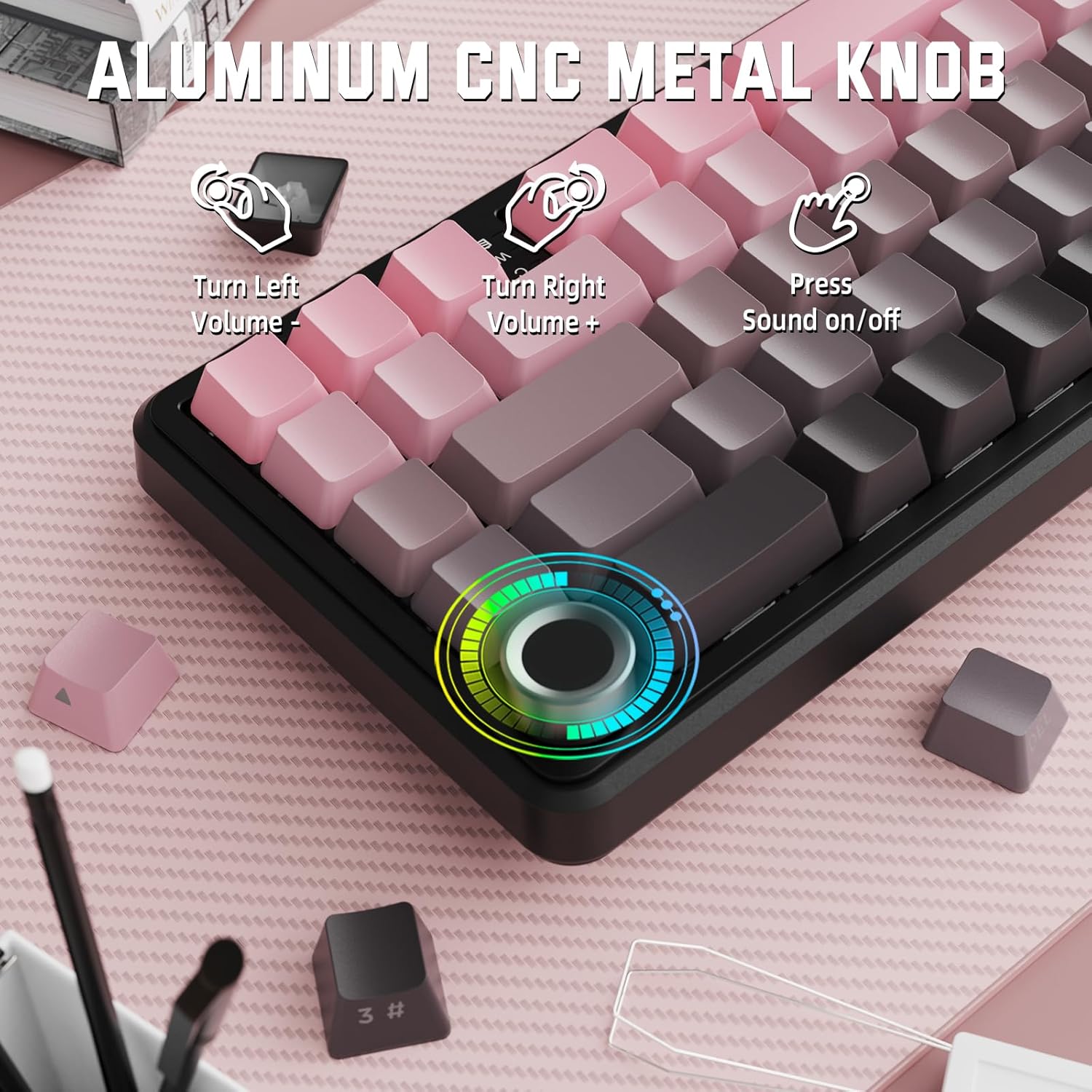
Image: Close-up of the volume knob with icons indicating its functions: Turn Left (Volume -), Turn Right (Volume +), Press (Sound on/off).
- Vire agoch: Diminye volim.
- Vire adwat: Ogmante volim.
- Peze: Aktive/dezaktive odyo a.
4.2 Function Key Combinations (FN Key)
Due to the compact 60% layout, some functions are accessed via the FN key.
| Konbinezon | Fonksyon |
|---|---|
| FN + Q/W/E | Switch between Bluetooth devices 1, 2, and 3 |
| FN + Backspace | Tcheke kapasite batri a |
| FN + 1-0 (top row) | F1-F10 functions (e.g., FN+1 for F1) |
| FN + -/= | F11/F12 functions |
| FN + \| | Efase |
| FN + P | Enprime ekran |
| FN + [ { | Lakay |
| FN + ]} | Fen |
| FN + ; : | Page Up |
| FN + ' " | Paj anba |
| FN + Arrow Keys | Navigation (e.g., FN+Up Arrow for Page Up) |
5. Personnalisation
5.1 Anviwònman ekleraj dèyè RGB
The keyboard features dynamic RGB backlighting with multiple effects and colors.

Image: Visual representation of RGB backlight controls including turning on/off, changing lighting mode, speed, direction, brightness, and color, often in combination with the FN key.
- Turn on/off Lighting / Power Saving Mode: Specific key combination (refer to keyboard legends or software).
- Mòd ekleraj: Cycle through 18 lighting effects.
- Vitès ekleraj: Ajiste vitès efè ekleraj dinamik yo.
- Direksyon ekleraj: Change the direction of certain lighting effects.
- Klète ekleraj: Ajiste entansite ekleraj dèyè a.
- Koulè ekleraj: Select from 9 preset backlight colors or customize via software.
5.2 Pwogramasyon lojisyèl
For advanced customization of RGB modes, macros, and key remapping, dedicated software is available.
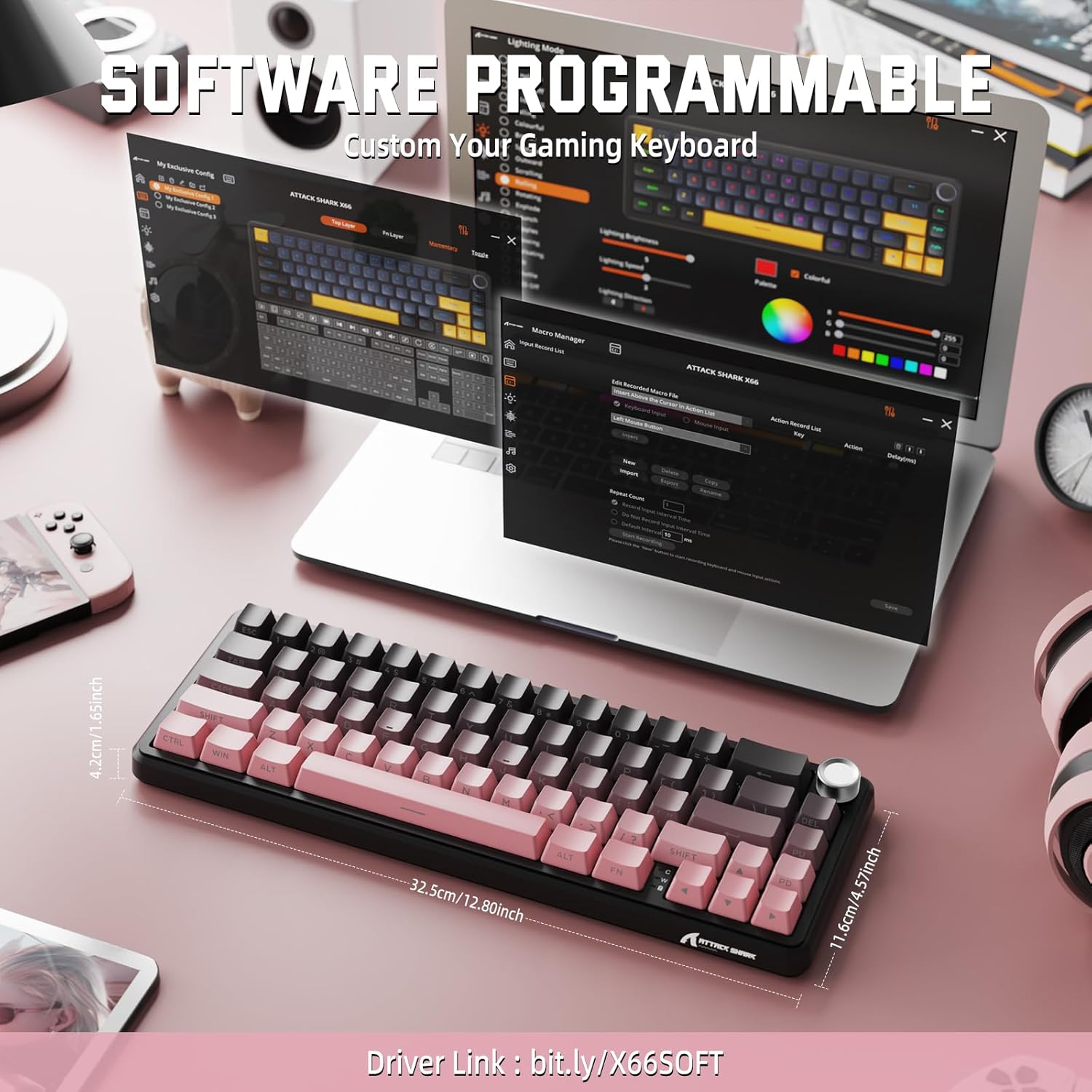
Image: Screenshot of the keyboard's software interface, showing options for custom key assignments, macro recording, and RGB lighting customization. A driver link is provided for download.
Download the official software from the manufacturer's websit. Lojisyèl la pèmèt ou:
- Customize RGB lighting effects and colors.
- Program macros for complex key sequences.
- Remap individual keys to different functions.
- Kreye epi sove plizyè pwofesyonèlfiles pou diferan aplikasyon oswa jwèt.
6. Antretyen
6.1 Netwaye klavye a
- Dekonekte klavye a nan tout sous kouran anvan ou netwaye li.
- Sèvi ak yon ti moso twal mou, ki san pèl dampRense avèk dlo oswa yon solisyon netwayaj dou pou siye bouchon kle yo ak chasi a.
- Pou pousyè ak debri ant kle yo, sèvi ak lè konprese.
- Evite itilize pwodui chimik ki fò, abrazif, oswa solvan.
6.2 Hot Swappable Switch Replacement
The keyboard's hot-swappable design allows for easy switch replacement without soldering.

Image: Illustration showing how to remove and insert mechanical switches on the X66 keyboard, highlighting compatibility with 3-pin and 5-pin switches.
- Sèvi ak zouti pou rale bouchon kle yo bay la pou retire bouchon kle ou vle a dousman.
- Use the provided switch puller to carefully grip the top and bottom clips of the switch and pull it straight up.
- Aliyen broch nouvo switch la ak twou ki sou PCB a. Asire w broch yo dwat pou evite yo pliye.
- Peze nouvo switch la dousman nan plas li jiskaske li fè yon klik byen fèm.
- Retache kouvèti kle a.
6.3 Jesyon batri
The keyboard is equipped with a 3000mAh rechargeable battery.

Image: Visual guide on how to check the battery capacity using FN + Backspace, showing different battery level indicators (30%, 50%, 100%) with corresponding key light patterns.
- Chaje: Connect the keyboard via the USB-C cable to a computer or a USB power adapter. The charging indicator will show the charging status.
- Tcheke Nivo Batri: Peze FN + Backspace to display the current battery capacity via the key backlights.
- Lavi batri: A full charge provides long-lasting usage, but actual duration varies based on RGB lighting usage and connection mode.
NAN. Depanaj
| Pwoblèm | Kòz posib | Solisyon |
|---|---|---|
| Klavye pa reponn | Low battery, incorrect connection mode, driver issue. | Charge the keyboard. Ensure the mode switch is set correctly (2.4G, BT, or Wired). Reconnect the USB receiver/cable. Re-pair Bluetooth. Try a different USB port. |
| Bluetooth koneksyon enstab | Interference, distance, low battery. | Ensure no strong interference sources nearby. Move closer to the device. Charge the keyboard. Re-pair the Bluetooth connection. |
| Koneksyon san fil 2.4GHz la pa konekte | Receiver not plugged in, incorrect mode, interference. | Ensure the 2.4GHz receiver is securely plugged in. Set the keyboard mode switch to '2.4G'. Try a different USB port for the receiver. |
| Ekleraj RGB a pa fonksyone oswa li pa bon | Lighting settings, software issue. | Check lighting control key combinations (FN + lighting keys). Ensure software is installed and updated. Reset lighting settings via software. |
| Kle yo pa anrejistre oswa yo tape de fwa | Switch ki gen pwoblèm, gen debri anba bouchon kle a. | Remove keycap and clean around the switch. If issue persists, replace the switch using the provided switch puller and spare switches. |
| Bouton volim nan pa fonksyone | Software conflict, physical obstruction. | Ensure no software is overriding media controls. Check for any physical debris around the knob. Restart the computer. |
8. Espesifikasyon
| Karakteristik | Detay |
|---|---|
| Nimewo Modèl | X66 |
| Layout | 66 Keys, 60% Compact QWERTY |
| Koneksyon | Bluetooth (5.0), 2.4GHz Wireless, USB-C Wired |
| Chanjman | Hot Swappable (3-pin/5-pin compatible), Pre-lubed Strawberry Mechanical Switches |
| Keycaps | Side-printed Gradient PBT |
| Ekleraj | RGB (16+ Million Colors, 9 preset colors, 18 effects) |
| Kapasite batri | 3000mAh |
| Aparèy konpatib | Windows, Mac OS, Laptop, PC, Tablet |
| Materyèl | Polibutilèn tereftalat, Polikarbonat |
| Pwa atik | 2 liv (apeprè 0.91 kg) |
| Dimansyon pake | 14.02 x 6.54 x 2.05 pous (apeprè 35.6 x 16.6 x 5.2 cm) |
| Manifakti | ATAK REKEN |
9. Garanti ak sipò
For warranty information and technical support, please refer to the official ATTACK SHARK websit la oubyen kontakte revandè w la. Kenbe resi acha w la pou reklamasyon garanti.
Manifakti: ATAK REKEN
Vandè: MAGIC-REFINER US
10. Videyo pwodwi
Videyo: Yon prezantasyon videyo pwodwi ofisyèlasing the features and design of the ATTACK SHARK X66 Gasket Wireless Mechanical Keyboard, including its compact size, RGB lighting, hot-swappable switches, and multi-mode connectivity. The video highlights the keyboard's aesthetic appeal and functional aspects.


