1. Entwodiksyon
This manual provides comprehensive instructions for the installation, operation, and maintenance of your ELAMOR M19 Fingerprint Keyless Entry Door Lock. Please read this manual thoroughly before installation and use to ensure proper function and safety.
2. Pwodwi Features
- Advanced Fingerprint Unlock: Equipped with biometric recognition, identifies fingerprints in 0.3 seconds and unlocks in 1 second with 99.99% accuracy.
- 3-in-1 Keyless Unlock: Supports up to 100 fingerprints and 50 PIN codes. Includes 2 backup keys for emergencies. No app or Wi-Fi is required.
- Auto Lock & One-Touch Locking: Automatically secures your door 5–30 seconds after unlocking. One-touch locking provides quick and secure closure.
- Dirab ak ki dire lontan: Constructed from robust aluminum alloy, features IP54 waterproofing, and a durable lock cylinder. Includes a low-battery LED indicator and emergency USB Type-C power supply.
- Fasil pou Enstale: Designed for quick installation in minutes with a basic screwdriver. Adjustable design fits most door frames with a center distance range of 2-3/8" (60mm) to 2-3/4" (70mm).
3. Pake kontni
Verifye ke tout konpozan yo prezan anvan ou kòmanse enstalasyon an:
- Latch x2
- Eksteryè Asanble x1
- Enteryè Asanble x1
- Mounting Plate x1
- Plak frape x1
- Kouvèti batri x1
- 3/4'' (19mm) Strike/Latch Screws x4
- 1-5/32'' (33mm) Mounting Plate Screws x2
- 3/4'' (19mm) Interior Assembly Screws x2
- Buckle box x1
- Sovgad kle x2
- Outside handle x1
- Square column transmission rod x1
- Vis bwa x4
- Plastic shell x1
- Inside handle x1
- Vis machin x1
4. Espesifikasyon
| Atribi | Valè |
|---|---|
| Mak | ELAMOR |
| Non modèl | M19 Fingerprint Keyless Entry Door Lock |
| Kalite fèmen | Klavye |
| Karakteristik espesyal | Auto-Lock |
| Materyèl | Zenk |
| Koulè | Sand Nickel |
| Dimansyon atik (L x W x H) | 7.48 x 5.51 x 7.09 pous |
| Pwa atik | 3.52 liv (1.6 kilogram) |
| Metòd kontwòl | Manyen |
| Batri obligatwa | Wi (4 pil AA, pa enkli) |
5. Gid Enstalasyon
The ELAMOR M19 lock is designed for easy installation on most standard doors. A basic screwdriver is typically the only tool required. Please refer to the included paper template for precise drilling and alignment.

Figure 5.1: Door Compatibility and Dimensions. Ensure your door meets the specified measurements for proper installation.

Figure 5.2: Easy Installation with Included Paper Template. Follow the template for accurate drilling and mounting.
The adjustable design fits door frames with a backset of 2-3/8" (60mm) to 2-3/4" (70mm) and a door thickness of 1-3/8" to 2" (35mm to 50mm).
6. Operasyon Enstriksyon
Your ELAMOR M19 lock offers multiple convenient ways to access your property.
6.1 Metòd pou debloke
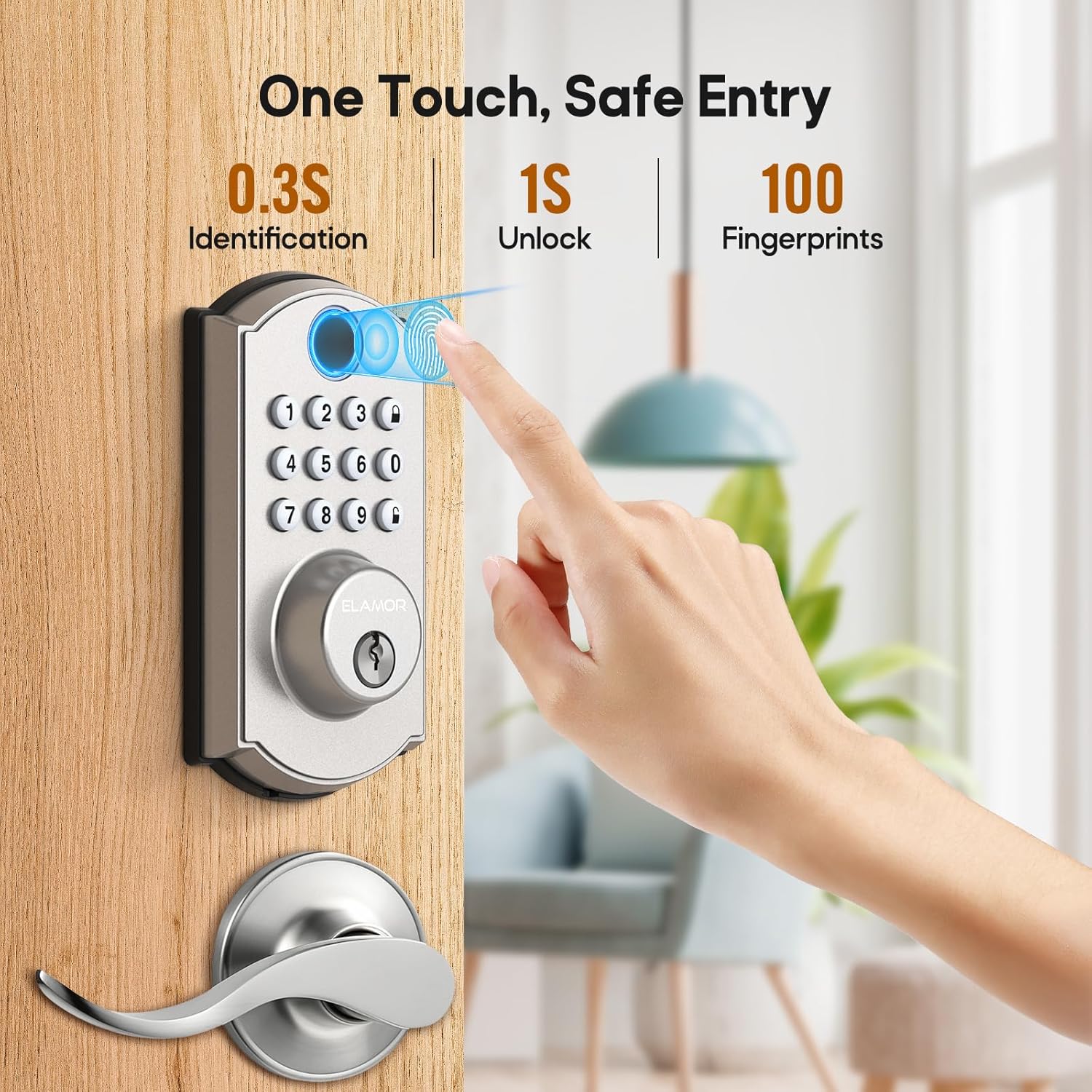
Figure 6.1: Fast Fingerprint Access. The lock identifies fingerprints in 0.3 seconds and unlocks in 1 second.

Figure 6.2: Multiple Ways to Unlock. Use fingerprint, PIN code, or the mechanical key for entry.
For a visual guide on how to use the various unlocking methods, please watch the demonstration video below:
Video 6.1: M19 Fingerprint Door Lock Handle Set Demonstration. This video illustrates the different methods for unlocking your ELAMOR M19 door lock.
For a detailed tutorial on operating the keyless entry features, refer to the following video:
Video 6.2: ELAMOR Keyless Entry Door Lock Operation Tutorial. This tutorial guides you through the steps for using the keyless entry functions of your lock.
6.2 Fonksyon Oto-Bloke
The auto-lock feature automatically secures your door after a set period, enhancing security and convenience.

Figure 6.3: Auto Lock and One-Touch Locking. The lock can be set to automatically lock after 5-30 seconds.
7. Antretyen
To ensure the longevity and optimal performance of your ELAMOR M19 lock, follow these maintenance guidelines:
- Netwayaj: Wipe the keypad and fingerprint sensor with a soft, dry cloth. Avoid abrasive cleaners or solvents.
- Ranplasman batri: The lock is powered by 4 AA batteries. Replace them when the low-battery indicator illuminates.
- Pouvwa ijans: In case of complete battery depletion, use a USB Type-C cable to provide emergency power for temporary access.

Figure 7.1: Battery and Emergency Power. The lock features a low battery alert and a USB Type-C port for emergency power.

Figure 7.2: IP54 Waterproofing. The lock is designed to withstand splashes and dust, but avoid submerging it in water.
NAN. Depanaj
If you encounter issues with your ELAMOR M19 lock, refer to the common problems and solutions below. For battery-related issues, please watch the dedicated video.
Video 8.1: ELAMOR M19 Smart Lock Battery Issue Solutions. This video provides solutions for common battery-related problems with your smart lock.
Pwoblèm komen:
- Klavye a pa reponn: Check battery levels. If batteries are low or depleted, replace them or use the emergency USB Type-C power.
- Red light on when pressing keys: This often indicates low battery. Replace the batteries.
- Lock not engaging/disengaging: Ensure the door is properly aligned and the deadbolt can extend fully. Check for any obstructions.
- Incorrect password lockout: If an incorrect password is entered multiple times, the keypad may temporarily lock. Wait for the lockout period to expire.
9. Garanti & Sipò
ELAMOR is committed to providing high-quality products and customer satisfaction. Your ELAMOR M19 Fingerprint Keyless Entry Door Lock comes with the following support:
- Repons 24 èdtan: Customer inquiries are typically responded to within 24 hours.
- Ranplasman 12 mwa: A replacement is available within 12 months of purchase for eligible issues.
- Sipò teknik pou tout lavi: Enjoy lifetime service and technical support for your product.
For further assistance, please contact ELAMOR customer service through the platform where you purchased the product.


