1. Entwodiksyon
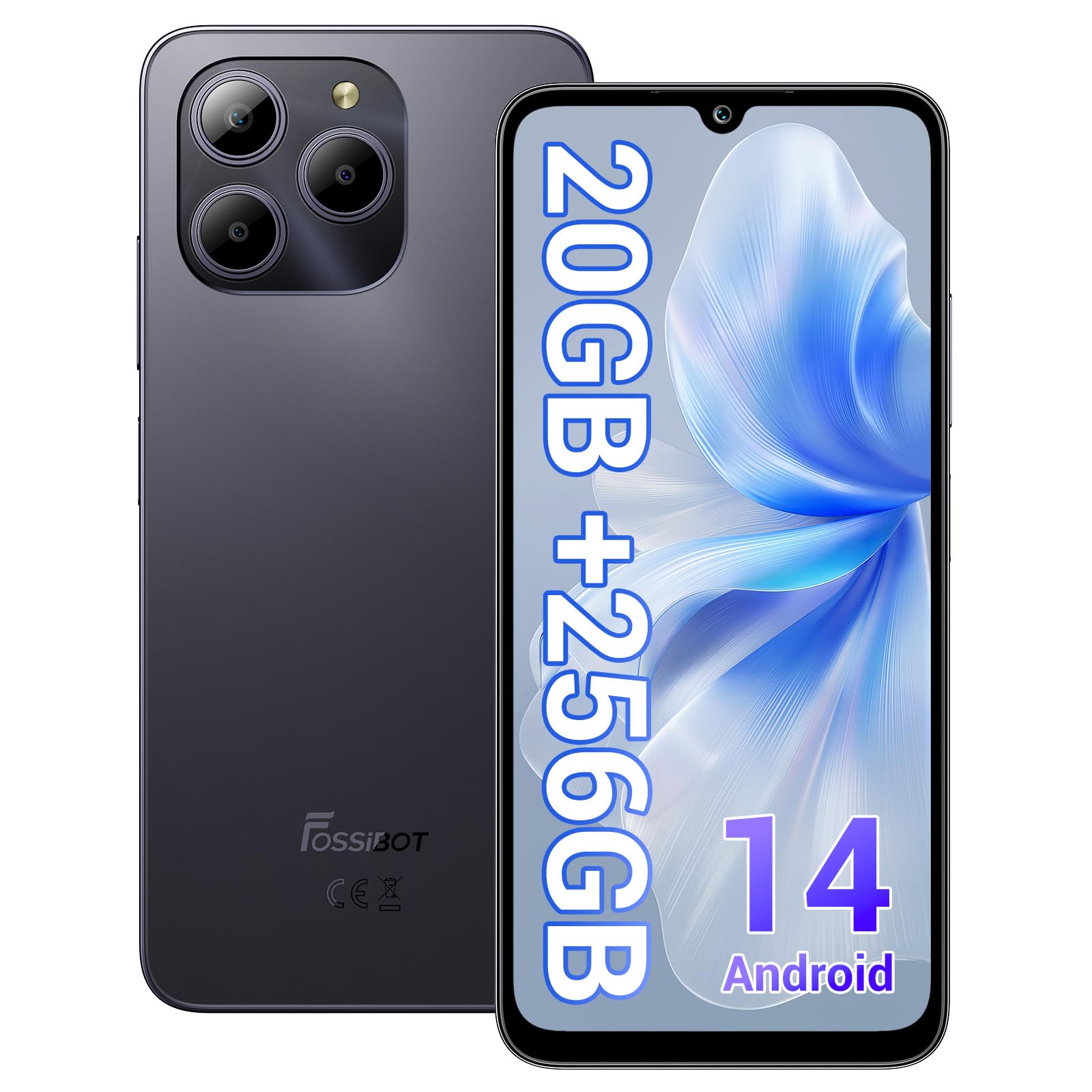
Welcome to the FOSSIBOT S2 Smartphone user manual. This guide provides essential information for setting up, operating, maintaining, and troubleshooting your new device. The FOSSIBOT S2 is an unlocked smartphone featuring Android 14, a 6.72-inch FHD+ display, a 50MP main camera, a 5000mAh battery, and advanced security features like Face ID and a fingerprint sensor.
2. Enfòmasyon sou Sekirite
- Sekirite batri: Do not attempt to replace the battery yourself. Use only FOSSIBOT-approved chargers and cables. Avoid exposing the device to extreme temperatures or direct sunlight.
- Rezistans dlo: This device is not waterproof. Avoid exposure to liquids.
- Pwoteksyon pou tande: Evite koute mizik pandan lontan ak yon volim ki wo pou anpeche domaj nan zòrèy ou.
- Sekirite Kondwi: Pa sèvi ak telefòn ou pandan w ap kondui. Toujou bay sekirite sou wout priyorite.
- Dispozisyon: Jete aparèy la ak akseswa li yo yon fason responsab dapre règleman lokal yo. Pa jete yo nan fatra kay la.
3. Pake kontni
Verifye ke tout atik yo prezan nan pake pwodwi ou a:
- FOSSIBOT S2 Smartphone
- PIN kat SIM
- Kalite-C USB kab
- 18W plato
- Manyèl itilizatè/Kat Garanti
- Ka TPU

4. Aparèy souview
Familiarize yourself with the physical components of your FOSSIBOT S2 smartphone.

- Devan: Ekran 6.72 pous FHD+, kamera devan 16MP, ekoutè.
- Dèyè: 50MP main camera, LED flash, fingerprint sensor (side-mounted).
- Kote yo: Power button, volume buttons, SIM/SD card tray, USB Type-C port, 3.5mm audio jack.
5. Enstalasyon
5.1 Mete kat SIM ak SD
- Jwenn plato kat SIM lan sou bò aparèy ou an.
- Mete zouti pou retire kat SIM lan nan ti twou ki akote plato a epi peze dousman jiskaske plato a soti.
- Place your Nano-SIM cards (up to two) and/or a microSD card (for storage expansion up to 1TB) into the designated slots on the tray. Ensure the gold contacts face downwards.
- Remete plato a nan telefòn nan ak anpil atansyon jiskaske li fè yon klik.

5.2 Limen ak Premye Konfigirasyon
- Press and hold the Power button until the FOSSIBOT logo appears.
- Swiv enstriksyon yo sou ekran an pou chwazi lang ou, konekte ak yon rezo Wi-Fi, epi konfigire kont Google ou.
- You will be guided through setting up security features such as a PIN, pattern, fingerprint, and Face ID.
6. Opere aparèy ou an
6.1 Montre
The FOSSIBOT S2 features a 6.72-inch FHD+ In-cell display with a resolution of 1080 x 2400 pixels, providing clear and vibrant visuals.

6.2 Pèfòmans
Powered by the MediaTek G85 Octa-Core processor and 20GB RAM (8GB physical + 12GB virtual), the FOSSIBOT S2 delivers smooth performance for multitasking, gaming, and streaming. It includes 256GB of internal storage, expandable up to 1TB with a TF card.

6.3 Kamera
Capture high-quality photos and videos with the 50MP AI main camera and take clear selfies with the 16MP front camera. The camera system supports various modes for different shooting scenarios.

6.4 Batri ak chaje
The FOSSIBOT S2 is equipped with a 5000mAh battery, providing extended usage time. It supports 18W fast charging via the Type-C port.
6.5 Karakteristik Sekirite Sosyal
Unlock your device securely using the side-mounted fingerprint sensor or Face ID recognition.

6.6 Koneksyon
The FOSSIBOT S2 supports dual 4G SIM cards for reliable network coverage. It also includes NFC for contactless payments and GPS/GLONASS/Galileo/Beidou for accurate navigation.

6.7 Sistèm operasyon Android 14
Experience the latest features and security enhancements with Android 14, offering improved privacy controls, smarter battery management, and a customizable user interface.

7. Antretyen
- Mizajou lojisyèl: Tcheke epi enstale mizajou sistèm yo regilyèman pou asire pèfòmans ak sekirite optimal.
- Netwayaj: Sèvi ak yon twal mou ki pa gen pousyè pou netwaye ekran an ak kò telefòn nan. Evite pwodui chimik ki agresif.
- Swen batri: To prolong battery life, avoid fully discharging the battery frequently. Charge the device before it drops below 20%.
- Jesyon Depo: Netwaye sa ki pa nesesè detanzantan fileak aplikasyon pou kenbe vitès aparèy la epi libere espas depo.
NAN. Depanaj
If you encounter issues with your FOSSIBOT S2, refer to the following common solutions:
- Aparèy pa Limen: Asire w batri a chaje. Konekte telefòn nan nan plato a pou omwen 15 minit, epi eseye limen l ankò.
- Aplikasyon k ap plante/bloke: Close background apps. Clear the cache of the problematic app or reinstall it. If the issue persists, perform a factory reset (back up data first).
- Siyal rezo pòv: Tcheke si kat SIM ou a byen antre. Asire w ou nan zòn kouvèti rezo a. Rekòmanse aparèy la.
- Batri Vide byen vit: Reduce screen brightness, disable unused features like Wi-Fi, Bluetooth, and GPS when not needed. Check battery usage in settings to identify power-hungry apps.
- Fingerprint/Face ID Not Working: Ensure your fingers are clean and dry for fingerprint recognition. For Face ID, ensure your face is well-lit and unobstructed. Re-register your fingerprint or face if necessary.
For more complex issues, please contact FOSSIBOT customer support.
9. Espesifikasyon
| Karakteristik | Spesifikasyon |
|---|---|
| Non modèl | S2 |
| Sistèm operasyon | Android 14 |
| Processeur | MediaTek Helio G85 Octa-core (2 GHz) |
| RAM | 20 GB (8GB fizik + 12GB vityèl) |
| Depo Entèn | 256 GB |
| Depo dilatabl | Jiska 1TB atravè kat TF |
| Gwosè ekspozisyon | 6.72 Inches FHD+ In-cell |
| Rezolisyon ekspozisyon | 1080 x 2400 piksèl |
| Kamera dèyè | 50MP |
| Kamera devan | 16MP |
| Kapasite batri | 5000mAh |
| Chaje | Chaje rapid 18W (Kalite-C) |
| Koneksyon | Doub SIM 4G, Wi-Fi, Bluetooth, NFC |
| Navigasyon | GPS, GLONASS, Galileo, Beidou |
| Sekirite | Capteur anprent dwèt, ID figi |
| Audio Jack | 3.5 mm |
| Dimansyon | 6.57 x 3.03 x 0.34 pous |
| Pwa | 1.04 liv |
10. Garanti ak sipò
Your FOSSIBOT S2 smartphone comes with a standard manufacturer's warranty. Please refer to the included Warranty Card in your package for specific terms and conditions, including warranty duration and coverage details.
For technical support, service inquiries, or to access additional resources, please visit the official FOSSIBOT website or contact their customer service department. Contact information can typically be found on the Warranty Card or the FOSSIBOT brand store page.
Sipò sou entènèt: Visit the FOSSIBOT Store on Amazon


