1. Entwodiksyon
The ISOtunes PRO 3.0 Bluetooth Hearing Protection Earbuds are designed to provide certified hearing protection while allowing for audio streaming and communication in noisy environments. This manual provides essential information for the proper setup, operation, and maintenance of your device.
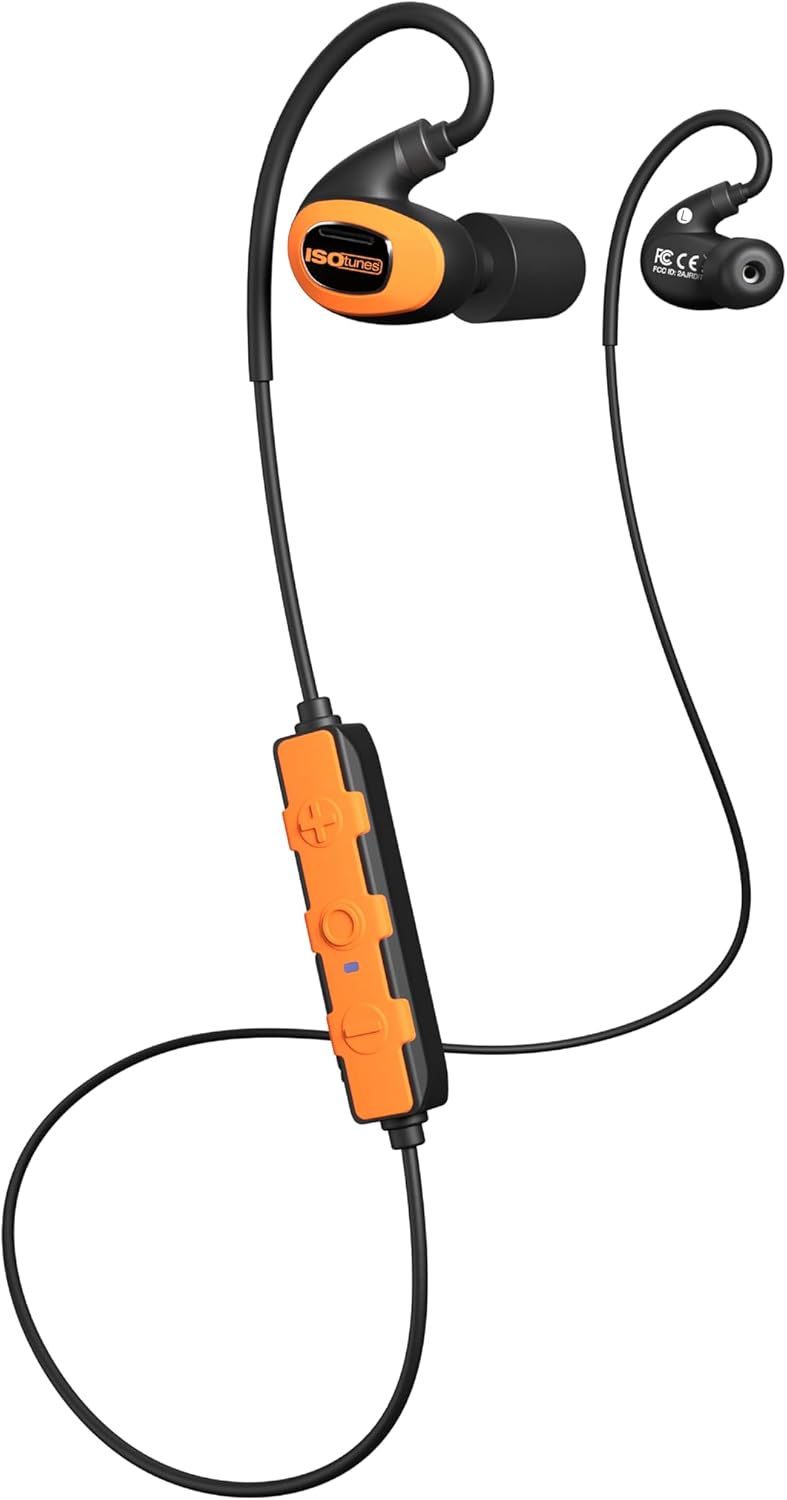
Image 1.1: ISOtunes PRO 3.0 Bluetooth Hearing Protection Earbuds, Safety Orange variant, showcasing the earbuds, inline control panel, and connecting cable.
2. Pake kontni
Verifye ke tout atik ki nan lis anba a yo enkli nan pakè ou a:
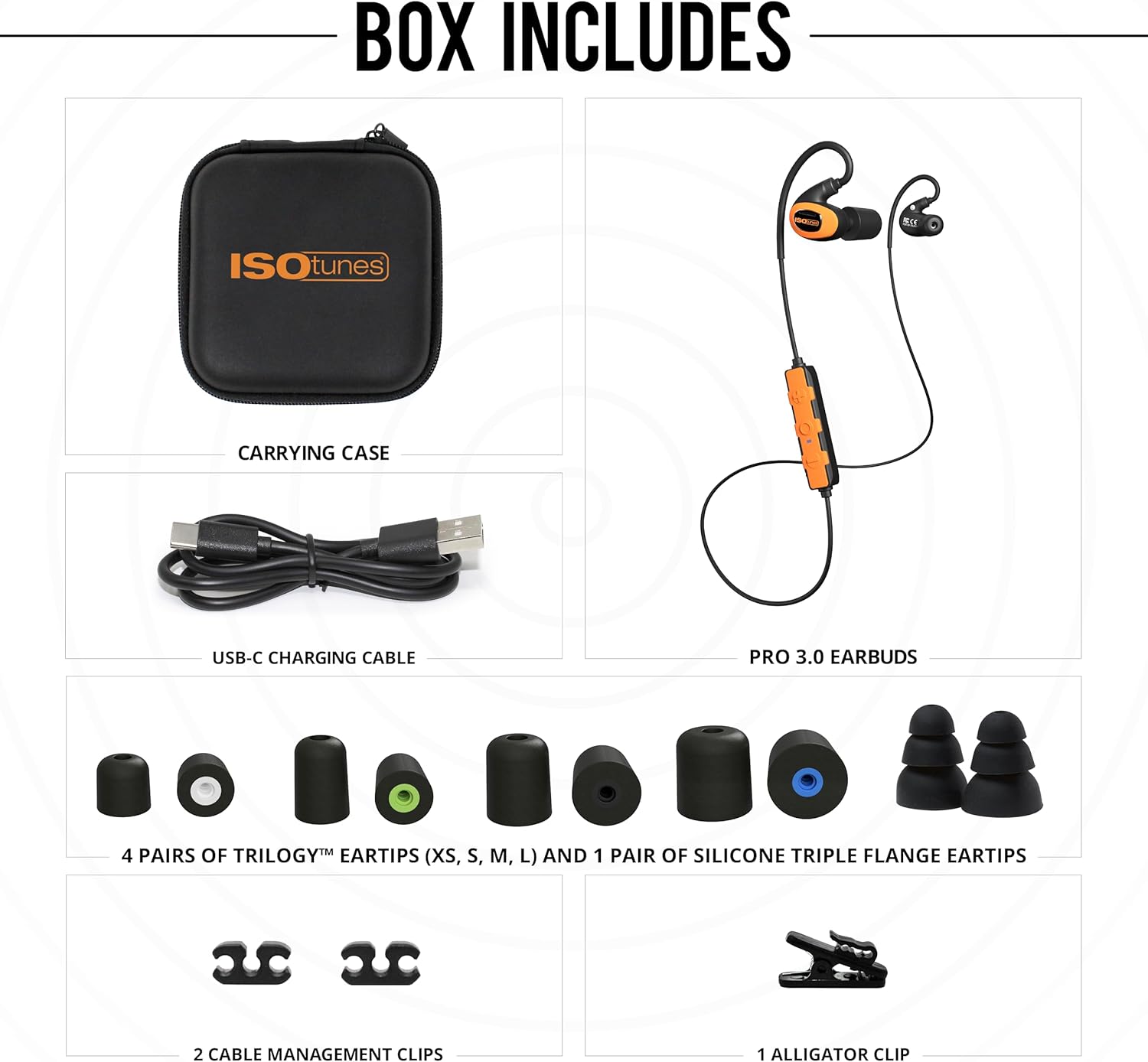
Image 2.1: Visual representation of the ISOtunes PRO 3.0 package contents, including the earbuds, carrying case, USB-C charging cable, various eartips, and cable management clips.
- ISOtunes PRO 3.0 Earbuds
- USB-C Chaje Kab
- Ka pote
- 4 Pairs of Trilogy™ Foam Eartips (XS, S, M, L)
- 1 Pair of Silicone Triple Flange Eartips
- 2 Cable Management Clips
- 1 Clip Kayiman
3. Enfòmasyon enpòtan sou sekirite
The ISOtunes PRO 3.0 earbuds are designed for hearing protection. Adhere to all safety guidelines to ensure proper function and personal safety.
- Konfòmite OSHA: These earbuds are OSHA approved and feature an ANSI-certified Noise Reduction Rating (NRR) of 27 dB. The SafeMax volume limit is set to 85dB to protect against hearing damage.
- Bon anfòm: Achieving the stated NRR requires a proper seal. Refer to the eartip selection and insertion guide for optimal fit.
- Konsyantizasyon anviwònman an: While providing hearing protection, always remain aware of your surroundings, especially in hazardous environments.

Image 3.1: A diagram illustrating the correct method for rolling and inserting foam eartips into the ear canal, alongside a chart detailing various noise levels and their potential for hearing damage.
4. Pwodwi Features
The ISOtunes PRO 3.0 offers a range of features designed for demanding work environments:

Image 4.1: A graphic summarizing the key features: OSHA compliance, Bluetooth 5.4 with LE Audio and Auracast, 27 dB NRR, IP67 dust/sweat/waterproof rating, up to 20-hour battery life, and military-spec drop test durability.
- Certified Hearing Protection: ANSI-certified 27 dB NRR and SafeMax 85dB volume limit.
- Konstriksyon dirab: IP67 dust and waterproof rating, tested to military drop & shock standards (MIL-STD 810H), aramid-reinforced cables.
- Pwolonje lavi batri: Up to 20 hours of use on a single charge, with USB-C fast charging.
- Odyo kalite siperyè: Custom-tuned full-range dynamic drivers for clear sound.
- Koneksyon avanse: Bluetooth 5.4 with Low Energy (LE) Audio and Auracast support, dual pairing, and 2-way radio compatibility.

Image 4.2: Demonstrates the versatility of the ISOtunes PRO 3.0 earbuds in different work environments such as outdoor power equipment operation, manufacturing, woodworking, and construction.
5. Gid Enstalasyon
5.1 Chaje ekoutè ou yo
Before first use, fully charge your ISOtunes PRO 3.0 earbuds.
- Locate the USB-C charging port on the inline control panel.
- Connect the provided USB-C cable to the port and the other end to a compatible USB power source.
- The LED indicator on the control panel will show charging status. A full charge takes approximately 1.5-2 hours. A 10-minute quick charge provides approximately 2 hours of listening time.
5.2 Eartip Selection and Insertion
Proper eartip selection and insertion are crucial for optimal hearing protection and sound quality.
- Chwazi bon gwosè: Experiment with the included Trilogy™ foam eartips (XS, S, M, L) and silicone triple flange eartips to find the size that provides a snug, comfortable fit and a good seal in your ear canal.
- Foam Eartip Insertion: Roll the foam eartip into a tight, creaseless cylinder. Insert the compressed eartip into your ear canal and hold it in place for 5-10 seconds while it expands to create a seal.
- Silicone Eartip Insertion: Gently push the silicone eartip into your ear canal until it forms a comfortable seal.
5.3 Bluetooth Pairing
To connect your ISOtunes PRO 3.0 to a Bluetooth-enabled device:
- Asire w ke ekoutè yo etenn.
- Press and hold the multi-function button on the control panel until the LED indicator flashes blue and red, indicating pairing mode.
- Sou aparèy ou an, aktive Bluetooth epi chèche aparèy ki disponib.
- Select "ISOtunes PRO 3.0" from the list.
- Yon fwa konekte, endikatè LED la ap flache ble detanzantan.
6. Operating Your ISOtunes PRO 3.0

Imaj 6.1: Yon imaj detaye view of the ISOtunes PRO 3.0 earbuds and the inline control panel, showing the buttons for power, volume, and multi-function.
6.1 Power On/Off
- Pouvwa sou: Press and hold the multi-function button for 3 seconds. The LED will flash blue.
- Pouvwa Off: Press and hold the multi-function button for 5 seconds. The LED will flash red and then turn off.
6.2 Jesyon Apèl
- Reponn/Fen Apèl: Peze bouton milti-fonksyon an yon fwa.
- Rejte apèl: Peze epi kenbe bouton milti-fonksyon an pou 2 segonn.
- Asistan vwa: Double-press the multi-function button to activate your device's voice assistant.
6.3 Mizik lèktur
- Jwe/Poz: Peze bouton milti-fonksyon an yon fwa.
- Pwochen Track: Press the volume up (+) button for 2 seconds.
- Track Previous: Press the volume down (-) button for 2 seconds.
6.4 Kontwòl Volim
- Ogmante Volim: Peze bouton an monte (+).
- Diminye Volim: Peze bouton volim desann (-).
6.5 Dual Pairing and 2-Way Radio Compatibility
The PRO 3.0 supports dual pairing, allowing connection to two Bluetooth devices simultaneously. It also offers compatibility with 2-way radios for enhanced communication in professional settings. Refer to your 2-way radio's manual for specific pairing instructions.
7. Swen ak Antretyen
- Netwayaj: Regularly clean eartips with a damp cloth. For foam eartips, replace them when they become dirty or lose their elasticity. The earbuds themselves can be wiped with a soft, dry cloth. Do not use harsh chemicals.
- Depo: Store the earbuds in the provided carrying case when not in use to protect them from dust, moisture, and physical damage.
- Ekspozisyon dlo: While IP67 rated, avoid prolonged submersion. Ensure the USB-C port cover is securely closed before exposure to water or dust.
NAN. Depanaj
| Pwoblèm | Kòz posib | Solisyon |
|---|---|---|
| Ekoutè yo pa soumen | Batri ki ba | Charge the earbuds using the USB-C cable. |
| Pa ka konekte ak aparèy la | Ekoutè yo pa nan mòd koneksyon; Bluetooth aparèy la etenn; Pa nan zòn nan | Ensure earbuds are in pairing mode (flashing blue/red). Turn on device Bluetooth. Move device closer to earbuds. |
| Move kalite son oswa volim ki ba | Improper eartip fit; Low battery; Source audio quality | Adjust eartips for a secure seal. Charge earbuds. Check audio source quality. |
| Koneksyon tanzantan | Interference; Out of range; Low battery | Move away from other wireless devices. Reduce distance to paired device. Charge earbuds. |
9. Espesifikasyon teknik
| Karakteristik | Spesifikasyon |
|---|---|
| Non modèl | PRO 3.0 |
| Nimewo Modèl Atik | IT-21B |
| Evalyasyon Rediksyon Bri (NRR) | 27 dB |
| SafeMax Volume Limit | 85 dB |
| Bluetooth vèsyon | 5.4 (with LE Audio & Auracast support) |
| Lavi batri | Jiska 20 èdtan |
| Tan pou chaje | Approx. 1.5-2 hours (10 min quick charge for 2 hours use) |
| Port chaje | USB-C |
| Nivo rezistans dlo | IP67 (Dust, Sweat, and Waterproof) |
| Estanda Durabilite | MIL-STD 810H (Military Drop & Shock) |
| Gamme frekans | 20 Hz - 20,000 Hz |
| Enpedans | 32 Ohm |
| Pwa atik | 8.1 ons |
| Dimansyon pwodwi | 4.75 x 4.5 x 2.25 pous |
| UPC | 850045924232 |
10. Garanti ak Sipò Kliyan
ISOtunes products are backed by a manufacturer's warranty. For specific warranty details, registration, or to contact customer support, please visit the official ISOtunes website or refer to the warranty card included in your product packaging. You may also reach out to the seller directly for assistance.


