Entwodiksyon
This manual provides detailed instructions for the installation, operation, and maintenance of your NZXT N9 Z890 ATX Gaming Motherboard. Please read this manual thoroughly before proceeding with installation to ensure proper setup and optimal performance.

Image: The NZXT N9 Z890 motherboard shown alongside its retail packaging, highlighting its sleek design and white color scheme.
The NZXT N9 Z890 is a high-performance ATX gaming motherboard designed for Intel Core Ultra (Series 2) CPUs. It features a robust power delivery system, advanced cooling solutions, and extensive connectivity options to support demanding gaming and computing tasks.
Ki sa ki nan bwat la
Verifye ke tout konpozan yo prezan anvan ou kòmanse enstalasyon an:
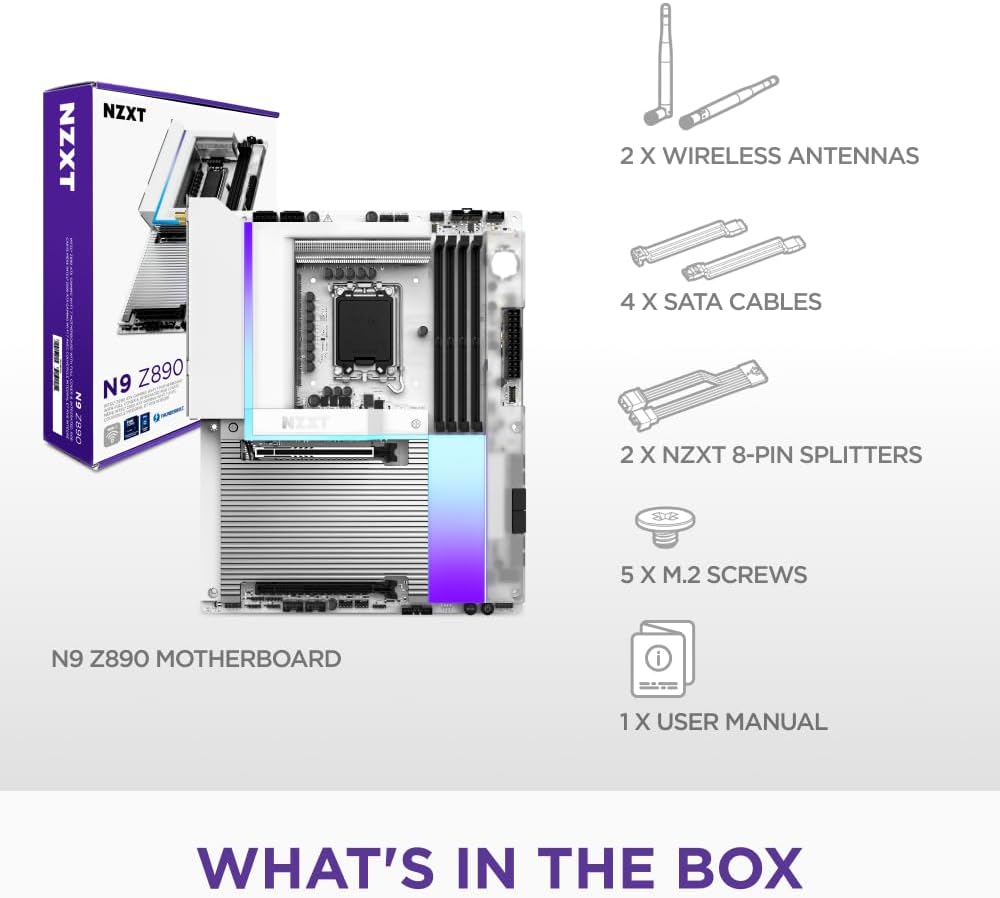
Image: A visual representation of the items included in the NZXT N9 Z890 motherboard package, including the motherboard, wireless antennas, SATA cables, NZXT 8-pin splitters, M.2 screws, and a user manual.
- Kat manman NZXT N9 Z890
- 2 x Wireless Antennas
- 4 x Kab SATA
- 2 x NZXT 8-pin Splitters
- 5 x M.2 Vis
- 1 x Manyèl Itilizatè (dokiman sa a)
Enstalasyon ak Enstalasyon
Follow these steps for proper installation of the motherboard and its components.
1. Motherboard Overview

Image: An annotated diagram of the NZXT N9 Z890 motherboard, pointing out the 20+1+1 power phases, LGA 1851 socket, 4 DDR5 DIMM slots, 5 M.2 slots (1x PCIe 5.0, 4x PCIe 4.0), and 2 expansion slots (1x PCIe 5.0 x16, 1x PCIe 4.0 x16).
- Sokèt LGA 1851: Designed for Intel Core Ultra (Series 2) processors. Features an RL-ILM design for enhanced thermal contact.
- Plas pou DDR5 DIMM: Four dual-channel slots supporting DDR5 RAM speeds of 8000+ MT/s (OC).
- Plas M.2 yo: One PCIe 5.0 M.2 2280 slot and four PCIe 4.0 M.2 2280 slots for high-speed storage.
- PCIe Expansion Slots: One PCIe 5.0 x16 slot for graphics cards and one PCIe 4.0 x16 slot for additional expansion cards.
- Livrezon pouvwa: 20+1+1 power phase design with 110A Smart Power Stages.
2. Enstalasyon Processeur
- Carefully open the LGA 1851 socket retention mechanism.
- Align the Intel Core Ultra (Series 2) processor with the socket, ensuring the notches on the CPU match the keys on the socket.
- Mete CPU a dousman nan priz la san fòse li.
- Fèmen mekanis retansyon an pou byen sekirize CPU a.
3. Enstalasyon memwa (RAM)
- Louvri klip yo nan tou de bout fant DDR5 DIMM yo.
- Aliyen modil RAM lan ak plas la, asire w ke dan ki sou modil la koresponn ak kle ki nan plas la.
- Peze byen fèm sou tou de bout modil RAM lan jiskaske klip yo kase nan plas yo.
- For dual-channel operation, refer to your motherboard manual for recommended slot configurations.
4. Storage (M.2 SSDs) Installation
- Locate the M.2 slots on the motherboard. The NZXT N9 Z890 has one PCIe 5.0 and four PCIe 4.0 M.2 slots.
- Remove the M.2 heatsink cover if present.
- Mete SSD M.2 a nan fant lan yon ti jan an pant.
- Gently push down the SSD and secure it with the provided M.2 screw.
- Reattach the M.2 heatsink cover to ensure optimal thermal performance.
5. Enstalasyon Kat Grafik (GPU)
- Locate the PCIe 5.0 x16 slot.
- Retire kouvèti plas ekspansyon ki koresponn lan nan bwat PC ou a.
- Align your graphics card with the PCIe slot and press down firmly until it is fully seated and the retention clip engages.
- Fikse kat grafik la nan bwat la avèk yon vis.
6. Enstalasyon sistèm refwadisman

Image: An annotated diagram showing the advanced thermal design of the NZXT N9 Z890 motherboard, including the VRM heatsink array with heat pipe, thermal pads, and dual PWM fans, as well as the 5 M.2 heatsinks with thermal pads. Fan and AIO headers are also indicated.
- Sistèm disipasyon chalè VRM: The motherboard features an integrated VRM heatsink array with a heat pipe, thermal pads, and dual PWM fans for efficient power delivery cooling.
- Disipateur chalè M.2: Dedicated heatsinks with thermal pads are provided for all M.2 slots to prevent thermal throttling of SSDs.
- Fan & AIO Headers: Connect your case fans and AIO liquid cooler pumps to the designated headers:
- 2 x NZXT 8-pin (PWM + RGB)
- 3 x 4-pin system fan
- 1 x CPU fan
- 1 x AIO pump
7. Konekte Periferik ak Kouran

Imaj: Yon imaj detaye view of the rear input/output (I/O) panel of the NZXT N9 Z890 motherboard, showing ports for HDMI, Thunderbolt 4, USB 3.2 Gen 2, USB 3.2 Gen 1 Type-A, USB 3.2 Gen 2x2 Type-C, 5GbE LAN, Wi-Fi 7 (Dual-Band), Optical S/PDIF Out, and Audio Jacks. Also visible are the Clear CMOS and BIOS Flashback buttons.
- Connect the 24-pin ATX power connector and the 8-pin CPU power connectors from your power supply to the motherboard.
- Connect front panel headers (power button, reset button, USB ports, audio jacks) to their respective pins on the motherboard. Refer to your PC case manual for specific pin assignments.
- Attach the included wireless antennas to the Wi-Fi 7 ports on the rear I/O panel.
- Connect your display to the graphics card or the motherboard's HDMI port (if using an integrated GPU).
- Connect USB peripherals, Ethernet cable, and audio devices to the rear I/O ports as needed.
Enstriksyon Operasyon
1. Premye Demaraj ak Konfigirasyon BIOS
- After completing all hardware installations, connect your monitor, keyboard, and mouse.
- Pouvwa sou sistèm ou an.
- Pandan pwosesis demaraj la, peze plizyè fwa bouton an DEL or F2 kle a pou antre nan zouti konfigirasyon BIOS/UEFI a.
- In the BIOS, you can configure boot order, enable XMP/EXPO for RAM, adjust fan curves, and monitor system status.
- Save changes and exit the BIOS to continue booting into your operating system installation media.
2. Koneksyon Karakteristik

Image: A graphic displaying icons for the NZXT N9 Z890 motherboard's connectivity features: Thunderbolt 4 (40 Gbps), USB 3.2 Type-C (20 Gbps), Wi-Fi 7 (320 MHz), Realtek 5Gb Ethernet, Realtek ALC 4082 Audio, and Bluetooth 5.4.
- Thunderbolt 4: Provides up to 40 Gbps data transfer speeds and supports display output.
- USB 3.2 Kalite-C: Offers up to 20 Gbps data transfer.
- Wi-Fi 7 (320 MHz): For high-speed wireless networking.
- 5GbE Ethernet: For ultra-fast wired network connections.
- Bluetooth 5.4: For connecting wireless peripherals.
- Realtek ALC 4082 Audio: High-definition audio output.
3. RGB Lighting and Customization

Image: An annotated diagram of the NZXT N9 Z890 motherboard, showcasing its RGB headers (1x NZXT RGB LED, 2x 5V ARGB LED, 2x NZXT 8-pin RGB+PWM), onboard RGB lighting powered by NZXT CAM, a full-metal cover with matching PCB, and a digital debug LED.
The NZXT N9 Z890 features onboard customizable RGB lighting and multiple RGB headers for connecting additional lighting components.
- NZXT CAM Software: Download and install the NZXT CAM software from the official NZXT website to customize RGB lighting effects, monitor system performance, and control fan speeds.
- Antèt RGB yo:
- 1 x NZXT RGB LED header
- 2 x 5V Addressable RGB (ARGB) LED headers
- 2 x NZXT 8-pin (RGB + PWM) headers
Antretyen
Antretyen regilye ede asire lonjevite ak pèfòmans optimal kat manman ou an.
- Retire pousyè: Netwaye pousyè ki sou bwat òdinatè w la ak konpozan kat manman w yo detanzantan avèk lè konprese. Asire w ke sistèm nan etenn epi debranche anvan ou netwaye li.
- Mizajou BIOS/UEFI: Check the official NZXT support website for the latest BIOS/UEFI updates. Updating the BIOS can improve compatibility, stability, and performance. Follow the instructions provided by NZXT carefully when performing updates.
- Mizajou chofè: Keep your chipset, network, audio, and other drivers updated to ensure compatibility and optimal performance with your operating system and peripherals.
Depanaj
Seksyon sa a adrese pwoblèm komen ou ka rankontre.
- Sistèm nan pa limen:
- Verifye tout kab kouran yo (ATX 24-pin, CPU 8-pin) byen konekte ak kat manman an ak ekipman pou kouran an.
- Asire w ke switch ekipman pou pouvwa a nan pozisyon ON an.
- Check front panel connections (power button) to the motherboard.
- No Display Output (No Post):
- Ensure your monitor is connected to the correct display output (graphics card or motherboard).
- Reseat your graphics card and RAM modules.
- Tcheke la Digital Debug LED on the motherboard (refer to the "Sleek & Customizable" image for location). This LED displays codes that can help identify the component causing the boot failure (e.g., CPU, RAM, GPU, Boot Device). Consult the full manual or NZXT support for specific code meanings.
- BIOS Flashback Feature:
- The NZXT N9 Z890 motherboard includes a BIOS Flashback button on the rear I/O panel (visible in the "Rear I/O" image). This feature allows you to update the BIOS without a CPU, RAM, or graphics card installed. Refer to the official NZXT website for detailed instructions on how to use the BIOS Flashback function.
- Enstabilite sistèm oswa aksidan:
- Asire w ke tout chofè yo ajou.
- Check for proper cooling of the CPU, GPU, and VRM.
- Verify RAM stability, especially if XMP/EXPO profiles are enabled. Try running with default RAM settings.
- Pwoblèm koneksyon rezo:
- For Wi-Fi, ensure antennas are securely attached.
- For Ethernet, check cable connections and router status.
- Mizajou chofè rezo yo.
Espesifikasyon
| Karakteristik | Detay |
|---|---|
| Mak | NZXT |
| Non modèl | N9-Z89XT-W1 |
| CPU Socket | LGA 1851 |
| Procesè konpatib yo | Intel Core Ultra (Series 2), Arrow Lake-S |
| Kalite Chipset | Intel Z890 |
| Teknoloji memwa RAM | DDR5 |
| Vitès memwa | 8600 MHz (Overclocked) |
| Aparèy konpatib | Odinatè pèsonèl |
| Platfòm | Windows |
| Power Phase Design | 20+1+1 with 110A Smart Power Stages |
| Ekspansyon PCIe | 1x PCIe 5.0 x16, 1x PCIe 4.0 x16 |
| M.2 Fant | 1x PCIe 5.0 x4, 4x PCIe 4.0 x4 |
| Rezo | Wi-Fi 7 (320 MHz), 5GbE Ethernet |
| Koneksyon USB | Thunderbolt 4, USB 3.2 Gen 2, USB 3.2 Gen 1, USB 3.2 Gen 2x2 Type-C |
| Odyo | Realtek ALC 4082 |
| Bluetooth | 5.4 |
| Koulè | Blan |
Garanti ak sipò
NZXT is committed to providing reliable products and excellent customer service.
- Enfòmasyon sou garanti: For detailed warranty terms and conditions, please visit the official NZXT websit la. Kenbe prèv acha ou pou reklamasyon garanti.
- Sipò teknik: If you encounter any issues not covered in this manual or require further assistance, please contact NZXT customer support. You can find support resources, FAQs, and contact information on the official NZXT websit: www.nzxt.com/support.


