1. Enfòmasyon enpòtan sou sekirite
- Pa ekspoze aparèy la anba tanperati ekstrèm oswa anba limyè solèy dirèk pou yon peryòd tan pwolonje.
- Keep the device away from water and moisture. This product is not waterproof unless specified.
- Sèvi sèlman ak kab chaje ak adaptè ki vini ak aparèy la.
- Pa eseye demonte oswa repare aparèy la tèt ou. Konsilte pèsonèl sèvis kalifye.
- Ensure the memory card is inserted correctly before operation.
- Clean lenses with a soft, lint-free cloth. Avoid abrasive materials.
2. Pwodwi souview
The OhO sunshine HD 1080p Video Recording Sunglasses are designed for capturing high-quality video and photos during various outdoor activities. They feature a built-in camera, polarized lenses with UV400 protection, and come with a 32GB memory card.
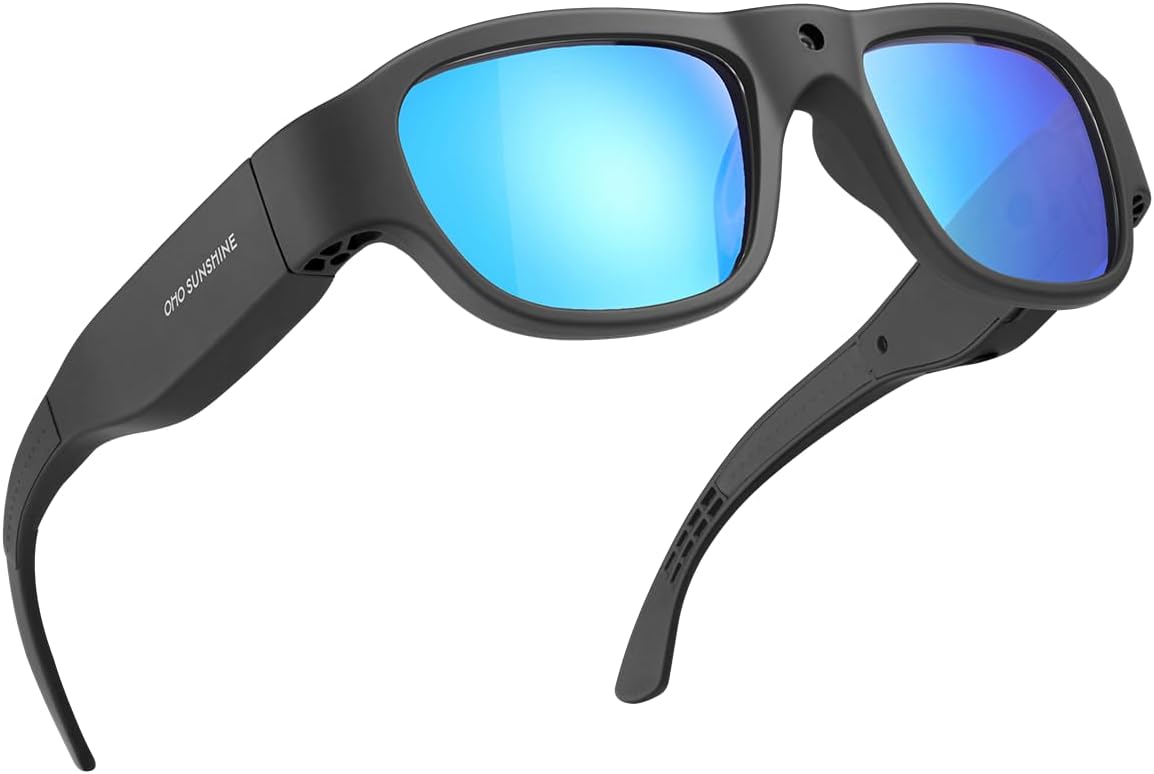
Figi 2.1: Devan view of the OhO sunshine HD 1080p Video Recording Sunglasses, showcasing the black frame and blue polarized lenses.

Figure 2.2: Key features of the camera sunglasses, including video recording, photo capture, 1080p Full HD resolution, 32GB memory, UV protection, and anti-scratch lens properties.
Kontni pake:
- OhO sunshine HD 1080p Video Recording Sunglasses
- 32GB Micro SD Kat
- USB Chaje Kab
- Netwaye twal
- Manyèl Itilizatè (dokiman sa a)
3. Konpozan ak Kontwòl

Figure 3.1: Labeled diagram of the sunglasses highlighting the Power & Record Button, Photo Button, LED Indicator, and the Built-in Camera lens.
- Power & Record Button: Used to power the device on/off and to start/stop video recording.
- bouton foto: Used to capture still images.
- Endikatè ki ap dirije: Provides status feedback (e.g., charging, recording, low battery).
- Kamera entegre: The lens for capturing video and photos.
- Pò USB: Pou chaje ak transfè done.
- Mikwo SD kat plas: Pou mete kat memwa a.

Figi 3.2: Yon gwo plan view demonstrating the location of the Video and Photo buttons on the side arm of the sunglasses.
4. Enstalasyon
4.1 Chaje batri a
Before first use, fully charge the sunglasses. Connect the provided USB charging cable to the sunglasses' USB port and the other end to a USB power source (e.g., computer, wall adapter). The LED indicator will show charging status and turn off when fully charged. A full charge provides approximately 60 minutes of recording time.
4.2 Mete Micro SD Kat la
Locate the Micro SD card slot on the sunglasses. Gently insert the included 32GB Micro SD card into the slot until it clicks into place. Ensure the card is oriented correctly. To remove, push the card in slightly until it springs out.
5. Operasyon Enstriksyon
5.1 Power On/Off
- Pou limen: Press and hold the Power & Record Button for approximately 3 seconds until the LED indicator lights up.
- Pou etenn: Press and hold the Power & Record Button for approximately 3 seconds until the LED indicator turns off.
5.2 Anrejistreman videyo
- With the device powered on, press the Power & Record Button once to start video recording. The LED indicator will flash to indicate recording is in progress.
- To stop recording, press the Power & Record Button once again. The LED indicator will stop flashing and return to standby mode.
- Videos are recorded in Ultra Full HD 1080p resolution.
5.3 Kaptire Foto
- With the device powered on, press the Photo Button once to capture a still image. The LED indicator will briefly flash to confirm the photo has been taken.
- Photos are captured at 16M pixel resolution.
5.4 Connecting to a Computer (Data Transfer)
To access recorded videos and photos, connect the sunglasses to your computer using the USB cable. The device will appear as a removable disk drive. You can then drag and drop files nan òdinatè w lan.
5.5 Videyo pwodwi yo
Videyo 5.1: Yon overview of the HD Camera glasses, highlighting their features and functionality, including Bluetooth speaker capabilities. (Duration: 0:29)
Video 5.2: A demonstration of the Full HD camera built into the sunglasses, showcasing its discreet design and recording capabilities. (Duration: 0:37)
6. Antretyen
6.1 Netwayaj
- Use the provided cleaning cloth or a soft, lint-free cloth to wipe the lenses and frame.
- Do not use chemical cleaners, alcohol, or abrasive materials, as these can damage the lenses and frame.
6.2 Swen Batri
- Pou pwolonje lavi batri a, evite dechaje batri a nèt souvan.
- Chaje aparèy la regilyèman, menm si w pa ap itilize l, pou batri a rete an bon eta.
6.3 Depo
Store the sunglasses in a cool, dry place, away from direct sunlight and extreme temperatures. Use the protective case (if included) to prevent scratches and damage.
NAN. Depanaj
| Pwoblèm | Kòz posib | Solisyon |
|---|---|---|
| Aparèy pa limen. | Low battery; Incorrect power button press. | Charge the device fully. Press and hold the Power & Record Button for 3 seconds. |
| Pa ka anrejistre videyo/pran foto. | Memory card full or not inserted correctly; Device not powered on. | Check memory card insertion and free space. Ensure device is powered on. |
| Move kalite videyo/foto. | Dirty lens; Low light conditions; Rapid movement. | Clean the camera lens. Ensure adequate lighting. Minimize sudden movements during recording. |
| Audio not recording (as per some reviews). | Potential software issue or specific model limitation. | Ensure firmware is up to date (check manufacturer's website). If issue persists, contact customer support. |
8. Espesifikasyon
| Karakteristik | Detay |
|---|---|
| Nimewo Modèl | 588F |
| Rezolisyon videyo | Ultra Full HD 1080p |
| Rezolisyon foto | 16M piksèl |
| memwa | 32GB Mikwo SD Kat (enkli) |
| Lavi batri | Approx. 60 minutes recording |
| Kalite lantiy | 100% UV400 Protection Polarized, Impact Resistant (ANSI/ISEA Z87.1-2015) |
| Pwa atik | 1.62 ons |
| Dimansyon pwodwi | 6.38 x 6.1 x 1.85 pous |
| Kalite batri | 1 batri ityòm Ion (enkli) |
| Koulè | Black Frame-blue Lens |
9. Garanti ak sipò
OhO sunshine products are manufactured to high quality standards. For warranty information, technical support, or service inquiries, please refer to the contact information provided on the product packaging or visit the official OhO sunshine websit la. Tanpri konsève prèv acha ou a pou reklamasyon garanti.
For additional support, you may visit the OhO sunshine Store on Amazon: OhO sunshine Store


