1. Entwodiksyon
Welcome to the EIGIIS K22 Smartwatch user manual. This guide provides essential information for setting up, operating, and maintaining your new smartwatch. The EIGIIS K22 is a robust military-grade smartwatch designed for active lifestyles, featuring an AMOLED HD Always On Display, Bluetooth calling, comprehensive health monitoring, and over 100 sports modes.

Image: EIGIIS K22 Smartwatch, showcasing its rugged design and vibrant display.
2. Ki sa ki nan bwat la
Tanpri verifye sa ki nan pake a lè w ap debale l:
- EIGIIS K22 Smartwatch (with 1 Watch Band)
- Chaje kab
- Manyèl Itilizatè (dokiman sa a)
3. Inisyal Enstalasyon
3.1 Chaje mont entelijan an
Before first use, fully charge your EIGIIS K22 Smartwatch. The device features a 400mAh battery that typically charges in approximately 2 hours.
- Konekte kab chaje mayetik la ak kontak chaje yo sou dèyè mont entelijan an.
- Branche bout USB kab la nan yon adaptè kouran USB estanda (5V/1A rekòmande) oubyen nan yon pò USB òdinatè.
- Ekran mont lan ap endike eta chaj la.

Image: The smartwatch displaying its charging status, indicating a 400mAh battery capacity and charging time.
3.2 Enstalasyon App
Pou debloke tout fonksyonalite mont entelijan ou an, telechaje epi enstale FitCloudPro app sou smartphone ou.
- Scan the QR code provided in the quick start guide or search for "FitCloudPro" in your smartphone's app store (Google Play Store for Android, Apple App Store for iOS).
- Install the app and grant necessary permissions for optimal performance.
3.3 Konekte ak telefòn entelijan ou
After installing the app, pair your smartwatch with your phone via Bluetooth.
- Asire w ke Bluetooth aktive sou smartphone ou.
- Louvri aplikasyon FitCloudPro a epi swiv enstriksyon ki sou ekran an pou ajoute yon nouvo aparèy.
- Select the EIGIIS K22 from the list of available devices.
- Konfime demann koneksyon an sou telefòn ou ak sou mont entelijan an.
4. Kijan pou itilize mont entelijan an
4.1 Ekspozisyon ak Navigasyon
The EIGIIS K22 features a 1.43-inch AMOLED HD Always On Display. You can navigate the watch interface using touch gestures and the physical buttons.
- Glise anlè/desann: Jwenn aksè nan paramèt rapid oswa notifikasyon.
- Glise agoch/dwat: Cycle through widgets like activity data, heart rate, weather, etc.
- Peze bouton bò a: Retounen nan ekran prensipal la oubyen ale nan meni aplikasyon an.

Image: Close-up of the 1.43-inch AMOLED display, showing a detailed watch face with time and activity data.
4.2 Apèl Bluetooth ak Notifikasyon Entelijan
The smartwatch allows you to make and receive calls directly from your wrist and receive notifications from your paired smartphone.
- Fè apèl: Use the built-in dialer or access your contacts through the watch interface.
- Resevwa apèl: Answer or reject incoming calls directly on the watch.
- Notifikasyon: Receive alerts for messages, social media, and other app notifications. Ensure notification permissions are enabled in the FitCloudPro app.

Image: The smartwatch displaying an incoming call and various app notification icons, illustrating its Bluetooth call and smart notification capabilities.
4.3 Espò mòd
The EIGIIS K22 supports over 100 sports modes to track your physical activities. Data such as calories burned, steps taken, and distance covered are recorded and synced to the FitCloudPro app.
- Access the Sports menu on your watch.
- Select your desired activity (e.g., Running, Cycling, Basketball).
- The watch will begin tracking your workout data.

Image: A user hiking while the smartwatch displays workout metrics like calories, distance, and steps, alongside icons for various sports modes.
4.4 Siveyans Sante
The smartwatch continuously monitors key health metrics.
- Batman kè: Suivi batman kè an tan reyèl.
- Tansyon: Estimates blood pressure levels.
- Oksijèn nan san (SpO2): Measures blood oxygen saturation.
- Siveyans dòmi: Analyzes sleep patterns (Awake, Light Sleep, Deep Sleep) to provide insights into sleep quality.
All health data is synced to the FitCloudPro app for detailed analysis and historical trends.
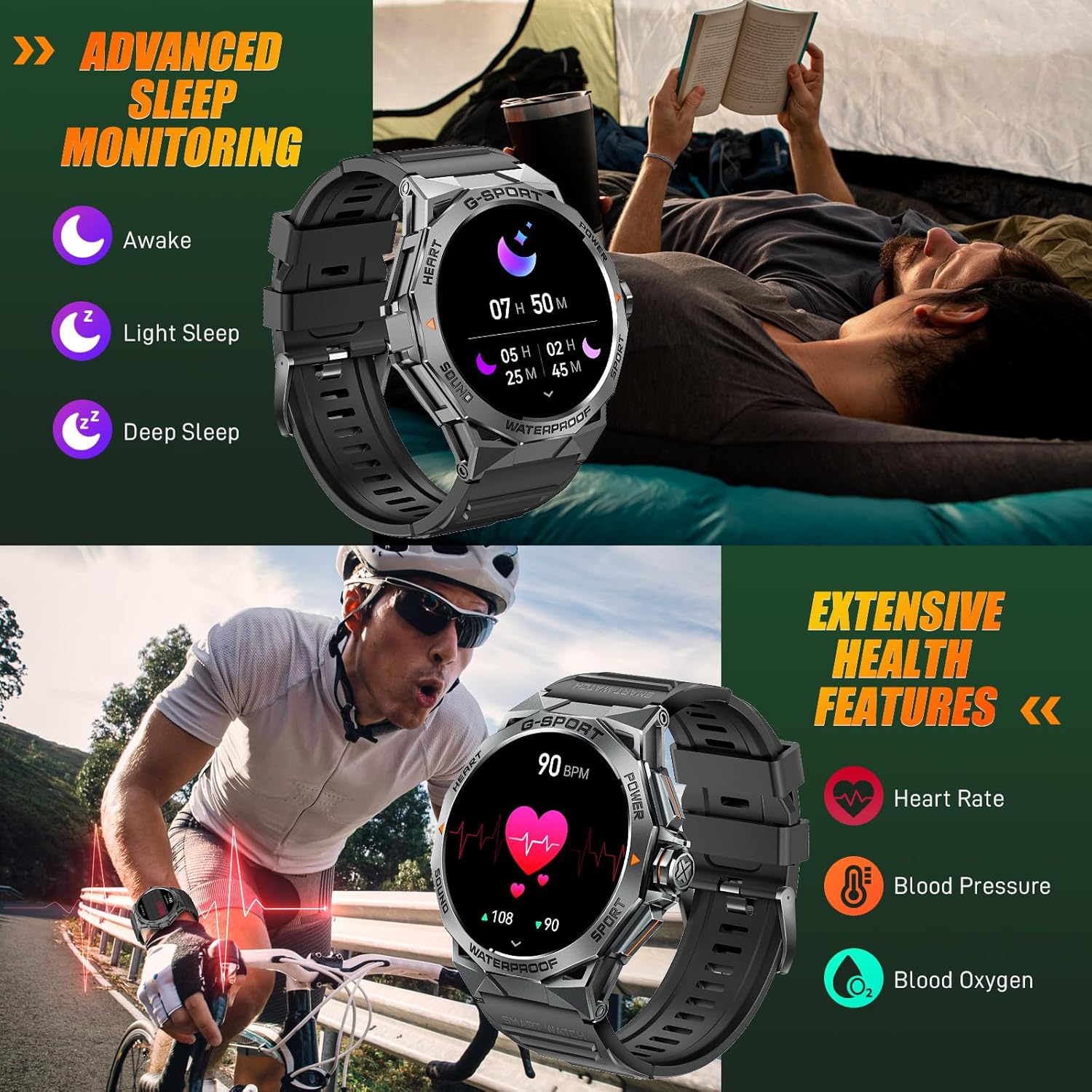
Image: The smartwatch displaying sleep data and heart rate monitoring, with icons for heart rate, blood pressure, and blood oxygen.
4.5 Lòt Fonksyonalite Entelijan
The EIGIIS K22 offers several additional features to enhance daily convenience:
- Kontwòl Mizik: Kontwole lèktur mizik sou smartphone ou.
- Kontwòl Kamera Remote: Sèvi ak mont ou kòm yon deklanchè a distans pou kamera telefòn ou an.
- Mizajou meteyo: Jwenn previzyon metewolojik an tan reyèl.
- Revèy Alam: Mete alam dirèkteman nan ponyèt ou.
- Jwenn telefòn: Jwenn telefòn entelijan ou ki pèdi a.
- Rapèl sedantèr: Resevwa alèt pou deplase apre peryòd inaktivite.
- Asistan vwa: Access your phone's voice assistant.

Image: A collage showing the smartwatch controlling music, acting as a camera remote, displaying weather, and featuring stopwatch, alarm, and 'find phone' functions.
5. Antretyen ak Swen
5.1 Rezistans dlo (IP68)
The EIGIIS K22 Smartwatch is IP68 waterproof, meaning it is resistant to dust and can withstand immersion in water up to 1.5 meters for 30 minutes. It is suitable for daily use, including washing hands and swimming.
- Avoid prolonged exposure to hot water, steam, or high-pressure water jets.
- Pa opere bouton anba dlo.
- Dry the watch thoroughly after exposure to water.

Image: A person swimming while wearing the EIGIIS K22 Smartwatch, highlighting its IP68 waterproof rating.
5.2 Optimizasyon lavi batri a
The 400mAh battery provides 4-7 days of typical usage and up to 25 days on standby. To maximize battery life:
- Adjust screen brightness to a lower setting.
- Limit the use of the Always On Display feature if extended battery life is critical.
- Dezaktive notifikasyon ki pa nesesè yo.
- Fèmen aplikasyon ki an background sou mont lan lè w pa ap itilize yo.
5.3 Netwayaj
Regularly clean your smartwatch and watch band to prevent skin irritation and maintain performance.
- Siye mont lan ak braslè a ak yon twal mou.amp twal.
- Evite itilize pwodwi chimik piman bouk oswa materyèl abrazif.
NAN. Depanaj
If you encounter issues with your EIGIIS K22 Smartwatch, refer to the following common solutions:
| Pwoblèm | Solisyon posib |
|---|---|
| Gade pa limen | Asire w ke mont lan chaje nèt. Konekte l nan plato a pou omwen 30 minit. |
| Pa ka konekte ak smartphone la | Ensure Bluetooth is enabled on your phone. Restart both the watch and phone. Make sure the FitCloudPro app has Bluetooth permissions. |
| Notifikasyon pa resevwa | Check notification settings in the FitCloudPro app and your phone's system settings. Ensure the app is running in the background. |
| Kout lavi batri | Disable the Always On Display feature. Reduce screen brightness. Limit frequent heart rate monitoring. See Section 5.2 for more tips. |
| Bluetooth audio defaults to watch speaker | This is a common behavior for smartwatches with built-in speakers. In your phone's Bluetooth settings, you may be able to disconnect the watch's audio profile while keeping the data connection. Alternatively, some apps allow you to select the audio output device. |
| Done sante ki pa egzak | Ensure the watch is worn snugly on your wrist, about one finger's width above the wrist bone. Avoid excessive movement during measurements. Note that smartwatches are not medical devices and readings are for reference only. |
7. Espesifikasyon
| Karakteristik | Detay |
|---|---|
| Nimewo Modèl | K22 |
| Ekspozisyon | 1.43 Inches AMOLED HD Always On Display |
| Kapasite batri | 400 mAh |
| Lavi batri | 4-7 days (typical use), up to 25 days (standby) |
| Tan pou chaje | Apeprè 2 èdtan |
| Rezistans dlo | IP68 |
| Koneksyon | Bluetooth |
| Sistèm operasyon | Mete OS |
| Konpatibilite | Android 4.4 ak pi wo a, iOS 8.0 ak pi wo a |
| Pwa atik | 50 gram (1.76 ons) |
| Dimansyon pwodwi | 6.69 x 4.33 x 1.18 pous |
8. Garanti ak sipò
8.1 Pwodwi Garanti
The EIGIIS K22 Smartwatch comes with a 12 mwa garanti bon jan kalite from the date of purchase. This warranty covers manufacturing defects and issues arising from normal use. It does not cover damage caused by misuse, accidents, unauthorized modifications, or failure to follow instructions.
8.2 Sipò pou Kliyan
For any questions, technical assistance, or warranty claims, please contact EIGIIS customer support through the following channels:
- Refer to the contact information provided with your product packaging.
- Visit the official EIGIIS websit pou resous sipò.
- Contact the seller directly through the platform where you purchased the product.
Please have your purchase receipt and product model number (K22) ready when contacting support.


