1. Entwodiksyon
This manual provides essential information for the safe and efficient operation of your THOMSON 55QG7C14 55-inch QLED Pro 144Hz Google Smart TV. Please read this manual thoroughly before using the product and retain it for future reference. This television combines QLED technology with 4K Ultra HD resolution, a 144Hz refresh rate, and the Google TV platform for an enhanced vieweksperyans nan.
2. Enfòmasyon sou Sekirite
Obsève prekosyon sekirite sa yo pou anpeche domaj epi asire operasyon an san danje:
- Pwovizyon pou pouvwa: Konekte televizyon an sèlman nan yon priz kouran AC ki gen volim ki kòrèk la.tage jan sa endike sou etikèt pwodwi a.
- Vantilasyon: Asire w ke gen ase vantilasyon toutotou televizyon an. Pa bloke ouvèti vantilasyon yo.
- Dlo ak imidite: Pa ekspoze televizyon an anba lapli oswa imidite. Pa mete objè ki plen likid, tankou vaz, sou televizyon an.
- Netwayaj: Debranche televizyon an anvan ou netwaye li. Sèvi ak yon twal mou epi sèk. Pa sèvi ak pwodui netwayaj likid oswa ayewosòl.
- Plasman: Mete televizyon an sou yon sifas ki estab e plat. Evite mete l anba limyè solèy dirèk oswa toupre sous chalè.
- Timoun: Supervise children to ensure they do not climb on the TV or stand.
- Sèvis: Pa eseye fè reparasyon televizyon an tèt ou. Konfye tout reparasyon bay pèsonèl sèvis kalifye.
3. Pake kontni
Verifye ke tout atik yo prezan nan pakè a:
- THOMSON 55QG7C14 55-inch QLED Pro 144Hz Google Smart TV
- Remote Control (with backlight)
- Pouvwa kab
- Central Stand and Screws
- Gid Quick Start
- Kat Garanti
4. Fizik Plis paseview
The THOMSON 55QG7C14 features a sleek design with narrow bezels and a central swivel stand for flexible viewang ing.
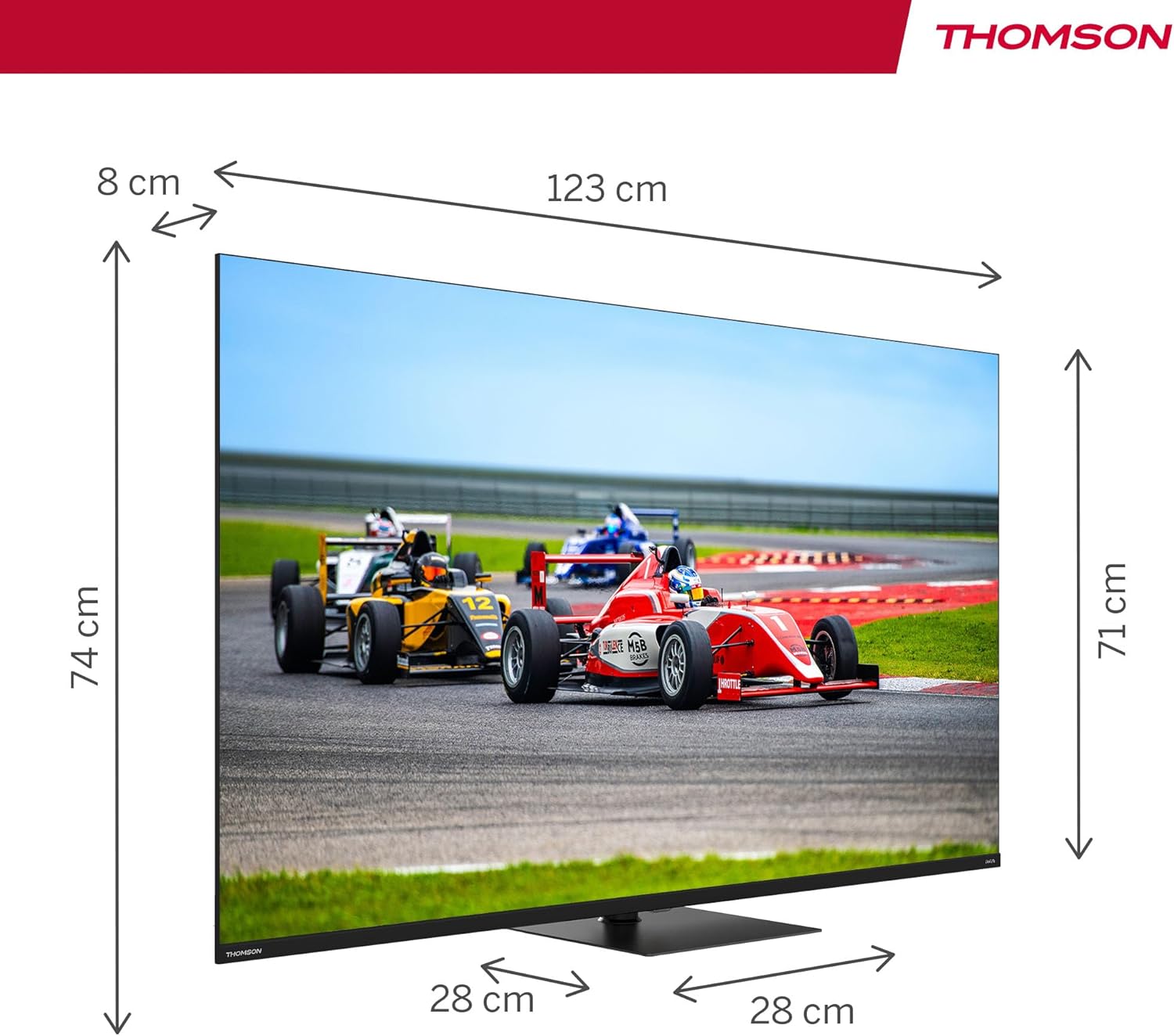
Imaj 4.1: Devan view of the THOMSON 55QG7C14 TV, showcasing its narrow bezels and central stand.

Imaj 4.2: Diagram illustrating the dimensions of the 55-inch THOMSON TV, including width, height, and depth.

Imaj 4.3: Visual representation of the TV's swivel stand, allowing for adjustable viewang ing.
5. Enstalasyon
5.1. Kanpe Asanble
- Mete televizyon an fas anba sou yon sifas ki plat e mou pou evite domaje ekran an.
- Attach the central stand to the designated slots on the bottom of the TV.
- Secure the stand using the provided screws. Ensure the stand is firmly attached before proceeding.
5.2. Koneksyon
Connect your external devices to the TV using the appropriate ports. Refer to the diagram below for port locations.

Imaj 5.1: Detailed diagram of the TV's rear panel, highlighting all available connection ports.
- HDMI (x4): Connect Blu-ray players, game consoles, and other HDMI-enabled devices. HDMI 2.1 with eARC is supported.
- USB (x3): Connect USB storage devices for media playback. One USB 3.0 port is available.
- LAN: Konekte yon kab Ethernet pou yon koneksyon entènèt filaire.
- AV NAN: Konekte ansyen aparèy yo lè l sèvi avèk kab videyo konpoze ak kab odyo stereo.
- Digital Optical Out: Konekte ak yon sistèm odyo ekstèn pou son dijital.
- Plas CI+: Insert a Conditional Access Module (CAM) for encrypted digital TV services.
- Antenna/Satellite Inputs: Connect your terrestrial antenna (DVB-T2/C) or satellite dish (DVB-S2).
6. Inisyal Enstalasyon
After connecting all necessary cables and powering on the TV for the first time, you will be guided through the initial setup process:
- Seleksyon Lang: Chwazi lang ou prefere.
- Rezo Koneksyon: Konekte ak rezo Wi-Fi ou a oubyen sèvi ak yon koneksyon Ethernet filaire.
- Koneksyon kont Google: Konekte ak kont Google ou pou jwenn aksè a fonksyonalite, aplikasyon ak rekòmandasyon pèsonalize Google TV yo.
- Chèn Scan: The TV will scan for available channels via your antenna or satellite connection.
- Anviwònman konfidansyalite: Review epi ajiste paramèt konfidansyalite yo jan ou vle.
7. Opere televizyon ou
7.1. Entèfas Google TV
Your THOMSON TV runs on Google TV, which organizes content from your various streaming services and apps into a unified interface. You can create multiple user profiles for personalized recommendations.

Imaj 7.1: The Google TV home screen, displaying content from various streaming applications and options for user profiles.
7.2. Kontwòl Remote
The ergonomic remote control features backlighting for easy use in low-light conditions and dedicated buttons for popular streaming services. It also includes a microphone for voice commands.

Imaj 7.2: The TV's remote control, highlighting its backlit buttons and integrated microphone for voice commands.
7.3. Kontwòl Vwa ak Asistan Google la
Press the Google Assistant button on your remote and speak into the microphone to control your TV, search for content, get recommendations, and manage smart home devices.
7.4. Chromecast entegre
Wirelessly cast movies, music, and videos from compatible devices (smartphones, tablets, computers) directly to your TV screen.
7.5. Amelyorasyon Imaj ak Son
- Teknoloji QLED: Quantum Dot technology delivers vibrant and realistic colors with balanced brightness and striking contrasts.
- Rezolisyon 4K UHD: Enjoy crystal-clear images with four times the detail of Full HD.
- Pousantaj rafrechisman 144Hz: Experience smoother motion, especially beneficial for fast-paced content and gaming.
- Vizyon Dolby ak HDR10: Enhanced brightness, contrast, and color accuracy for a more immersive visual experience.
- Dolby Atmos & Dolby Audio: Dynamic, room-filling sound for an immersive audio experience.

Imaj 7.3: Visual comparison demonstrating the difference in motion clarity between a 60Hz and a 144Hz refresh rate display.

Imaj 7.4: Representation of the Dolby Atmos audio experience, showing sound moving in three-dimensional space around viewèr.
8. Antretyen
Bon antretyen asire televizyon ou an ap dire pi lontan.
- Netwayaj ekran: Siye ekran an dousman avèk yon twal mou ki pa gen pousyè. Pou mak ki difisil pou retire, siye l yon ti kras.ampRense twal la avèk dlo oswa yon pwodui netwayaj ekran espesyalize (aplike l sou twal la, pa dirèkteman sou ekran an).
- Netwayaj kabinè: Siye kabinè televizyon an ak yon twal mou epi sèk.
- Retire pousyè: Use a soft brush or vacuum cleaner with a brush attachment to remove dust from ventilation openings.
- Kòd pouvwa: Tcheke kòd kouran an regilyèman pou wè si li domaje. Si li domaje, kontakte pèsonèl sèvis la.
NAN. Depanaj
Si w rankontre pwoblèm ak televizyon w lan, gade pwoblèm ak solisyon komen sa yo:
| Pwoblèm | Solisyon posib |
|---|---|
| Pa gen pouvwa | Check if the power cord is securely plugged into the TV and the wall outlet. Press the power button on the remote or TV. |
| Pa gen imaj, men gen son | Asire w ou chwazi bon sous done a. Tcheke koneksyon kab yo ak aparèy ekstèn yo. |
| Pa gen son, men imaj la la | Check the volume level. Ensure mute is not activated. Check audio cable connections. If using external audio, ensure it is powered on and correctly configured. |
| Remote kontwòl pa travay | Ranplase pil yo. Asire w pa gen okenn obstak ant telekòmand lan ak detèktè IR televizyon an. |
| Pwoblèm koneksyon rezo | Restart your router/modem. Check Wi-Fi password. Try a wired Ethernet connection if Wi-Fi fails. |
| Pwoblèm kalite imaj (pa egzanp, imaj twoub, defòme) | Check the source resolution. Adjust picture settings (brightness, contrast, sharpness). Ensure the input cable is not damaged. |
Si pwoblèm nan pèsiste apre ou fin eseye solisyon sa yo, kontakte sèvis kliyan.
10. Espesifikasyon
Key technical specifications for the THOMSON 55QG7C14 TV:
- Nimewo Modèl: 55QG7C14
- Gwosè ekran: 55 pous (139 cm)
- Teknoloji ekspozisyon: QLED
- Rezolisyon: 3840 x 2160 piksèl (4K UHD)
- Pousantaj rafrechisman: 144 Hz
- Sipò HDR: HDR10, Dolby Vision
- Teknoloji odyo: Dolby Audio, Dolby Atmos
- Sistèm operasyon: Google Smart TV
- Koneksyon: Wi-Fi, Bluetooth 5.1, 4x HDMI (HDMI 2.1 with eARC), 3x USB (1x USB 3.0), LAN, AV In, Digital Optical Out, CI+
- Tuner: Triple-Tuner (DVB-T2/C/S2)
- Dimansyon (L x W x H): 123 cm x 8 cm x 74 cm (ak sipò a)
- Pwa: 12.4 kg
- Klas efikasite enèji: F

Imaj 10.1: The EU energy efficiency label for the THOMSON 55QG7C14 television.
11. Garanti ak sipò
Your THOMSON 55QG7C14 TV comes with a Garanti manifakti 3 zan, ensuring reliability and peace of mind. For warranty claims, technical assistance, or further support, please contact your retailer or the official THOMSON customer service. Refer to the warranty card included in your package for detailed terms and conditions.


