Entwodiksyon
The ACASIS Thunderbolt 4 Dock is a versatile 11-in-1 docking station designed to expand the connectivity of your laptop or compatible device. It offers high-speed data transfer, multiple display outputs, and power delivery, enhancing your productivity and connectivity options.

Imaj: Devan ak dèyè views of the ACASIS Thunderbolt 4 Dock, highlighting its various ports.
Karakteristik kle
- Konektivite 11 an 1: Includes Thunderbolt 4, DisplayPort, USB-C, and USB-A ports.
- Transfè Done gwo vitès: Up to 40Gbps via Thunderbolt 4 ports.
- Livrezon pouvwa: Up to 100W PD for laptop charging.
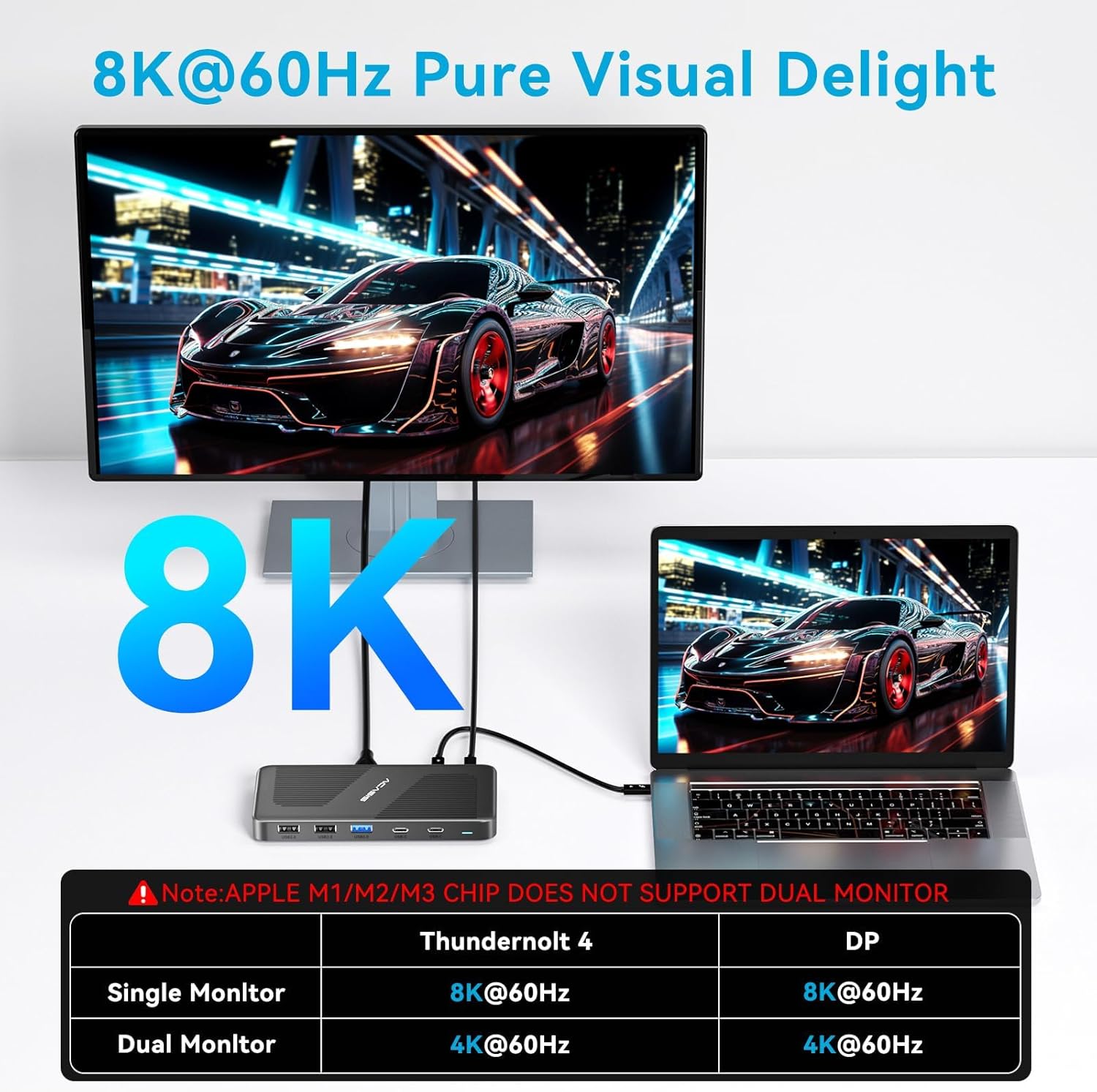
- Ekspozisyon Sòti: Supports single 8K@60Hz or dual 4K@60Hz displays.
- Lajè konpatibilite: Works with Thunderbolt 4, Thunderbolt 3, USB4, and USB-C computers (Windows, macOS, Chrome OS).

Image: Detailed diagram illustrating the 11-in-1 features and port layout of the ACASIS USB4 Dock.
Kontni pake
Verifye ke tout atik yo prezan nan pakè ou a:
- ACASIS Thunderbolt 4 Dock
- Power Adapter (65W standard)
- Thunderbolt 4 Cable (1.7ft)
- Manyèl itilizatè
Video: Unboxing and initial setup of the ACASIS Thunderbolt 4 Dock, showing included accessories.
Gid Enstalasyon
Follow these steps to set up your ACASIS Thunderbolt 4 Dock:
- Konekte pouvwa: Plug the included power adapter into the "PD IN" port on the dock and then into a wall outlet.
- Konekte ak aparèy lame a: Use the provided Thunderbolt 4 cable to connect your laptop's Thunderbolt 4/USB4/USB-C port to one of the 40Gbps input ports on the dock.
- Konekte Ekran yo:
- For DisplayPort (DP) connection: Connect your monitor using a DP cable to the DP port on the dock.
- For Thunderbolt 4 display: Connect a compatible monitor to one of the 40Gbps output ports using a Thunderbolt 4 cable.
- Konekte periferik: Plug your USB devices (keyboard, mouse, external drives) into the available USB-A and USB-C ports.
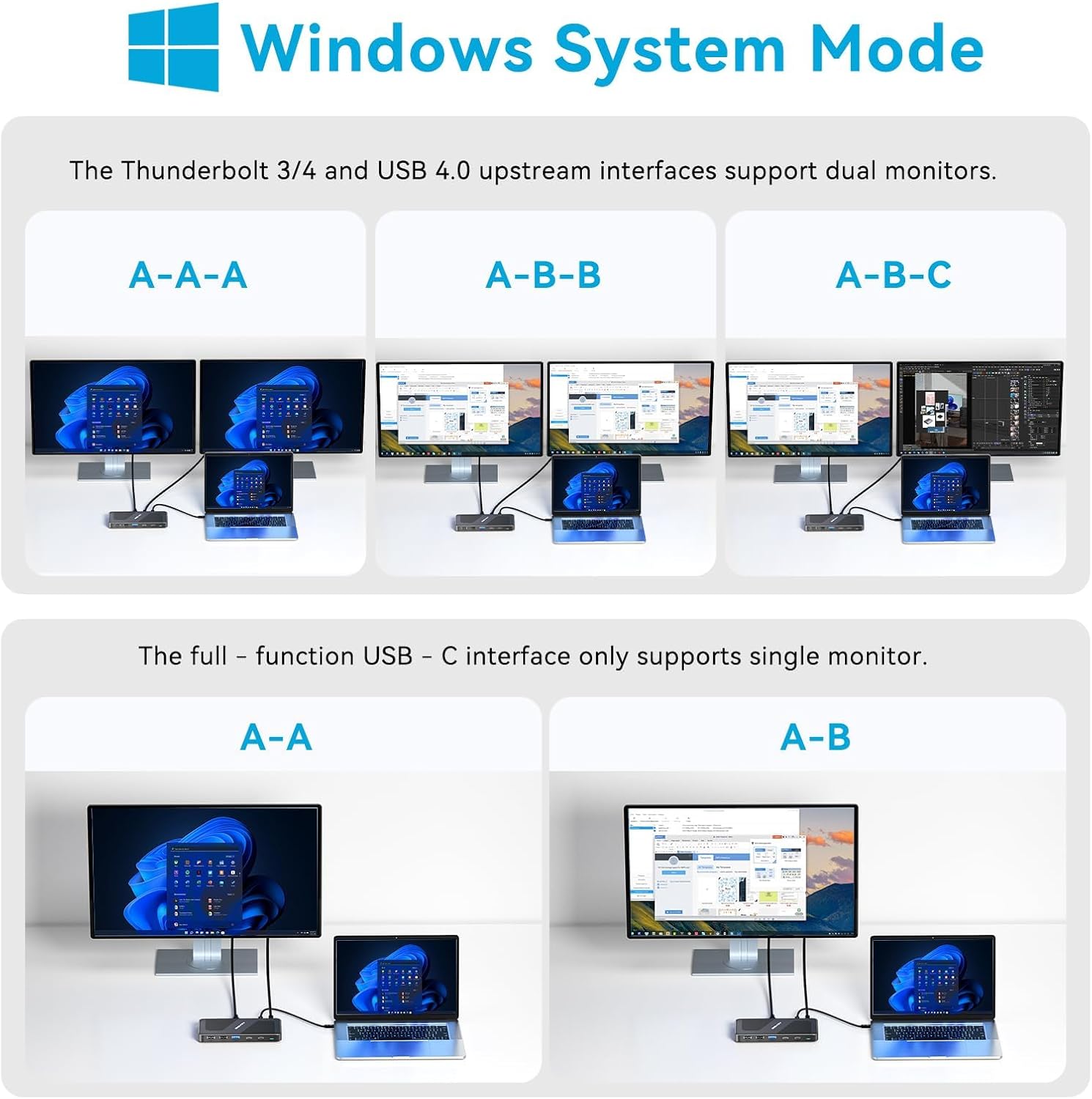
Image: A setup showing the ACASIS Thunderbolt 4 Dock connected to a laptop and two external monitors, demonstrating a typical multi-display configuration.
Enstriksyon Operasyon
Montre Konfigirasyon
The dock supports various display configurations depending on your operating system and host device capabilities.
Windows System Mode
For Windows systems, the Thunderbolt 3/4 and USB 4.0 upstream interfaces support dual monitors. A full-function USB-C interface only supports a single monitor.

Image: Visual guide for Windows users showing single, mirror, and extended display modes with the dock.
macOS System Mode
Intel Mac OS/Mac OS M1/M2/M3 Pro, Max, and above support dual monitors. Please note that Mac OS with M1/M2/M3 processors only supports a single monitor.

Image: Visual guide for macOS users showing single, mirror, and extended display modes with the dock, including M1/M2/M3 chip limitations.
Transfè Done
The Thunderbolt 4 ports provide up to 40Gbps data transfer speeds, ideal for large file transfers and high-bandwidth peripherals.
Imaj: Gwo plan view of the dock's ports, emphasizing the 40Gbps data transfer capability.
Livrezon pouvwa
The dock supports up to 100W Power Delivery (PD) to charge your connected laptop. It can also provide 15W output to power a portable monitor or charge a phone simultaneously.

Image: Diagram illustrating the power delivery capabilities, showing 100W input, 65W output to a laptop, and 15W output to a phone or portable monitor.
Antretyen ak Swen
To ensure the longevity and optimal performance of your ACASIS Thunderbolt 4 Dock, please follow these care guidelines:
- Keep the dock in a dry, well-ventilated area away from direct sunlight.
- Evite ekspoze aparèy la nan tanperati ekstrèm, imidite, oswa sibstans koroziv.
- Clean the exterior with a soft, dry, lint-free cloth. Do not use liquid cleaners, aerosols, or abrasive materials.
- Ensure all cables are connected securely and without excessive strain to prevent damage to ports.
- Disconnect the dock from power and your devices when not in use for extended periods.
Depanaj
If you encounter issues with your ACASIS Thunderbolt 4 Dock, refer to the following common problems and solutions:
| Pwoblèm | Solisyon posib |
|---|---|
| Pa gen pwodiksyon ekspozisyon | Ensure all display cables are securely connected. Verify your laptop's display settings. Check compatibility for dual monitors, especially with Apple M1/M2/M3 chips (only single monitor supported). Try updating your graphics drivers. |
| Laptop not charging or charging fluctuates | Confirm the power adapter is correctly connected to the dock and a working power outlet. Ensure your laptop supports PD via its USB-C/Thunderbolt port. Note that the standard 65W power supply may not be sufficient for laptops requiring higher wattage (e.g., 95W). Use a higher wattage power adapter if your laptop requires more than 65W. |
| Aparèy USB yo pa rekonèt | Try connecting the device to a different USB port on the dock. Ensure the device drivers are up to date on your computer. Restart your computer and the dock. Check if the device requires external power. |
| Dock gets hot | It is normal for the dock to generate some heat during operation, especially under heavy load. Ensure adequate ventilation around the device. If it becomes excessively hot or malfunctions, disconnect it and contact support. |
Espesifikasyon
- Modèl: DS-9003-NEW
- Mak: ACASIS
- Koneksyon: 11-in-1 (2x 40Gbps Thunderbolt 4, 1x DP 8K 60HZ, 1x PD 100W, 2x USB C 3.0 (5Gbps), 1x USB A 3.0, 4x USB A 2.0)
- Livrezon pouvwa: Up to 100W (input), 65W (output to laptop), 15W (output to device)
- Sipò pou ekspozisyon: Single 8K@60Hz or Dual 4K@60Hz (Windows); Dual 4K@60Hz (Intel Mac); Single 4K@60Hz (Apple M1/M2/M3)
- Vitès transfè done: Up to 40Gbps (Thunderbolt 4 ports)
- Dimansyon: 5.71 x 3.98 x 1.46 pous
- Pwa: 8.8 ons
- Konpatibilite: Thunderbolt 4, Thunderbolt 3, USB4, USB-C computers (Windows, macOS, Chrome OS)
Garanti ak sipò
ACASIS products come with a standard warranty. For detailed warranty information, please refer to the warranty card included in your package or visit the official ACASIS websit.
For technical support, troubleshooting assistance, or any inquiries regarding your ACASIS Thunderbolt 4 Dock, please contact ACASIS customer service:
- Imèl: support@acasis.com
- Sipò sou entènèt: 7x24 hours online service

Image: ACASIS company logo.


