1. Entwodiksyon
The LOFREE Zero ARTZ is a 75% mechanical keyboard designed for versatile use across multiple operating systems. It features a unique terrazzo-inspired design, hot-swappable linear switches, and multiple connection options for enhanced productivity and user experience.
2. Pake kontni
Verifye ke tout atik yo prezan nan pakè ou a:
- LOFREE Zero ARTZ Mechanical Keyboard
- Marble Palm Rest
- USB-C pou USB-A kab
- Netwayaj Bwòs
- Manyèl Itilizatè (dokiman sa a)
- Kat Garanti

Image: Included accessories with the keyboard.
3. Enstalasyon
3.1. Power On/Off & Connection Mode Selection
Locate the switches on the back edge of the keyboard:
- Pouvwa switch: Slide the switch to turn the keyboard ON or OFF.
- OS Switch: Select between "Win/And" (Windows/Android) or "Mac/iOS" (Mac/iOS) to optimize key functions for your operating system.
- Chanjman mòd koneksyon: Choose your preferred connection method:
- WLS (Wireless/Bluetooth): Pou koneksyon Bluetooth.
- CAB (Cable): For wired USB-C connection.
- OFF: Turns off the keyboard.
Image: Close-up of the USB-C port, OS switch, and connection mode switch.
3.2. Connecting via Bluetooth (WLS Mode)
- Ensure the keyboard is ON and the Connection Mode Switch is set to "WLS".
- On your device (computer, tablet, smartphone), enable Bluetooth.
- Chèche pou available Bluetooth devices and select "LOFREE Zero ARTZ" (or similar name).
- Swiv nenpòt envit ki sou ekran pou konplete pwosesis kouple a.
3.3. Connecting via USB-C Cable (CAB Mode)
- Konekte yon bout kab USB-C ki vini ak li a nan pò USB-C klavye a.
- Connect the other end (USB-A) to an available USB port on your computer.
- Ensure the Connection Mode Switch is set to "CAB". The keyboard will automatically connect.
4. Operasyon Enstriksyon
4.1. Backlighting Effects
The keyboard features customizable backlighting:
- Change Light Effect: Peze Fn + Flèch moute to cycle through 7 distinct lighting effects.
- Ajiste klète: Peze Fn + Flèch Goch or Fn + flèch dwat to adjust between 4 brightness levels.
- Adjust Blink Frequency: Peze Fn + Flèch desann to change between 4 blink frequencies for dynamic effects.
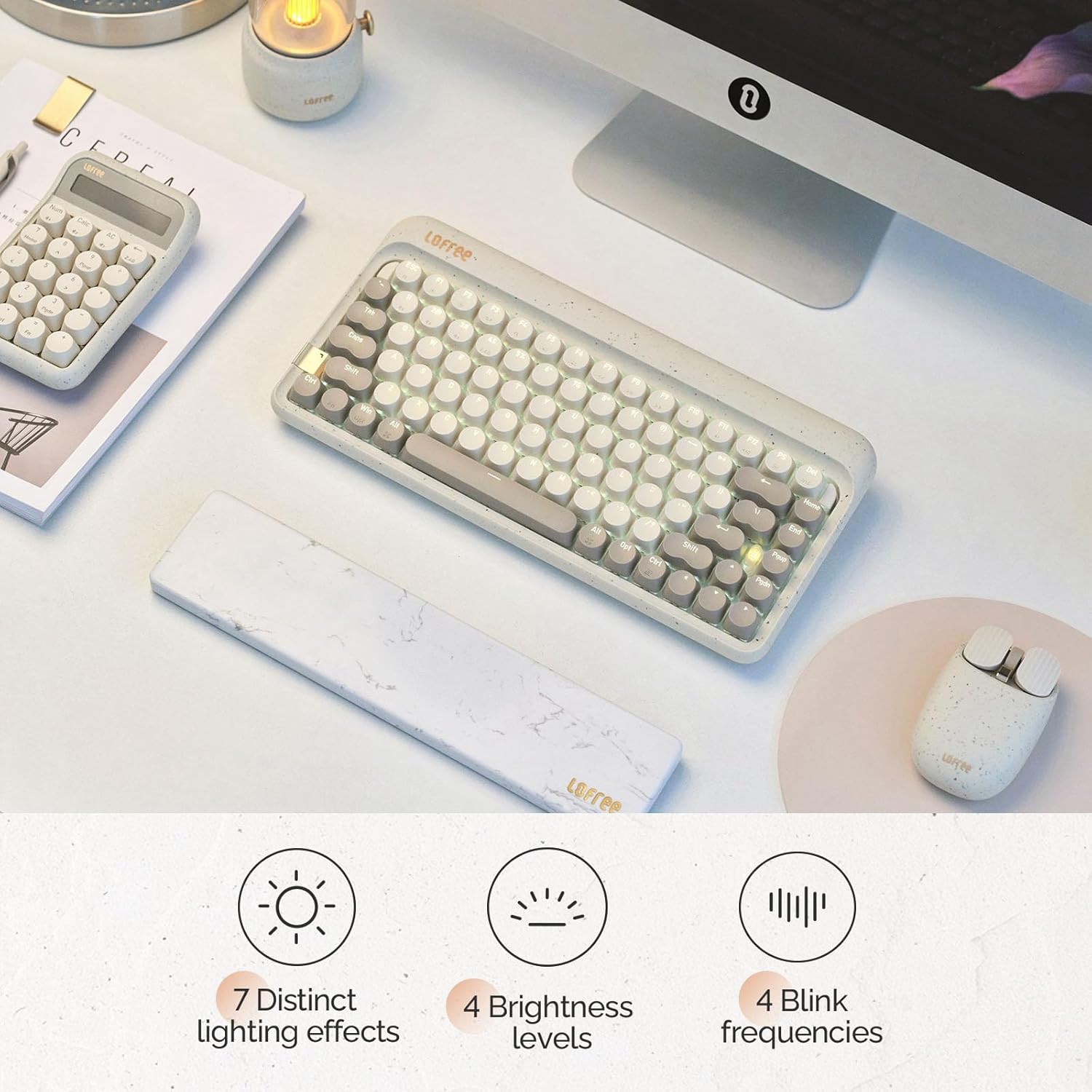
Image: The keyboard displaying its various backlighting options.
4.2. Marble Palm Rest
The included Marble Palm Rest provides ergonomic support and features a natural marble texture. It is equipped with non-slip mats for stability during use.

Image: The marble palm rest showing its non-slip mats.

Image: Close-up of the marble palm rest highlighting its natural texture.
4.3. Switch ki ka ranplase a cho
The LOFREE Zero ARTZ keyboard features hot-swappable switches, allowing users to easily change switches without soldering. This enables customization of typing feel and sound.
Video: Demonstrates the hot-swappable feature of the keyboard, showing how switches can be easily removed and replaced.
Videyo: Yon ti prezantasyonview montreasing the hot-swappable switches and customizable keycaps.
5. Antretyen
To keep your keyboard in optimal condition:
- Use the provided cleaning brush to remove dust and debris from between the keycaps regularly.
- For deeper cleaning, carefully remove keycaps using a keycap puller (not included) and clean the switches and plate.
- Avoid exposing the keyboard to liquids or extreme temperatures.
NAN. Depanaj
- Klavye a pa reponn:
- Ensure the keyboard is powered ON.
- Check the connection mode (WLS/CAB) and ensure it matches your connection type.
- For Bluetooth, try re-pairing the device.
- For wired, try a different USB port or cable.
- Limyè dèyè a pa fonksyone:
- Asire w klavye a chaje.
- Try adjusting brightness levels using Fn + Flèch agoch/adwat.
- Kle yo pa anrejistre:
- Ensure the OS switch is set correctly for your operating system.
- If a specific key is not working, it might be a faulty switch. Utilize the hot-swappable feature to replace it.
7. Espesifikasyon
| Karakteristik | Detay |
|---|---|
| Mak | LOFREE |
| Modèl | Zero ARTZ |
| Kalite klavye | 75% mekanik |
| Chanje Kalite | Linear (Hot-swappable) |
| Koneksyon | Bluetooth, Wired (USB-C) |
| Aparèy konpatib | Android, Laptop, Mac, PC, Smartphone, Tablet |
| Sistèm operasyon yo | MacOS, iOS, Windows, Android |
| Sous pouvwa | Batri Powered |
| Karakteristik espesyal | Ergonomic Marble Palm Rest |
8. Garanti & Sipò
Your LOFREE Zero ARTZ Mechanical Keyboard comes with a manufacturer's warranty. Please refer to the included Warranty Card for details regarding coverage, terms, and conditions.
For technical support or customer service, please visit the official LOFREE website or contact their customer support channels as listed on the product packaging or warranty card.