1. Entwodiksyon
Thank you for choosing the Dystler Vanity Makeup Desk. This manual provides detailed instructions for assembly, operation, maintenance, and troubleshooting to ensure you get the most out of your new vanity. Please read this manual thoroughly before assembly and use, and retain it for future reference.
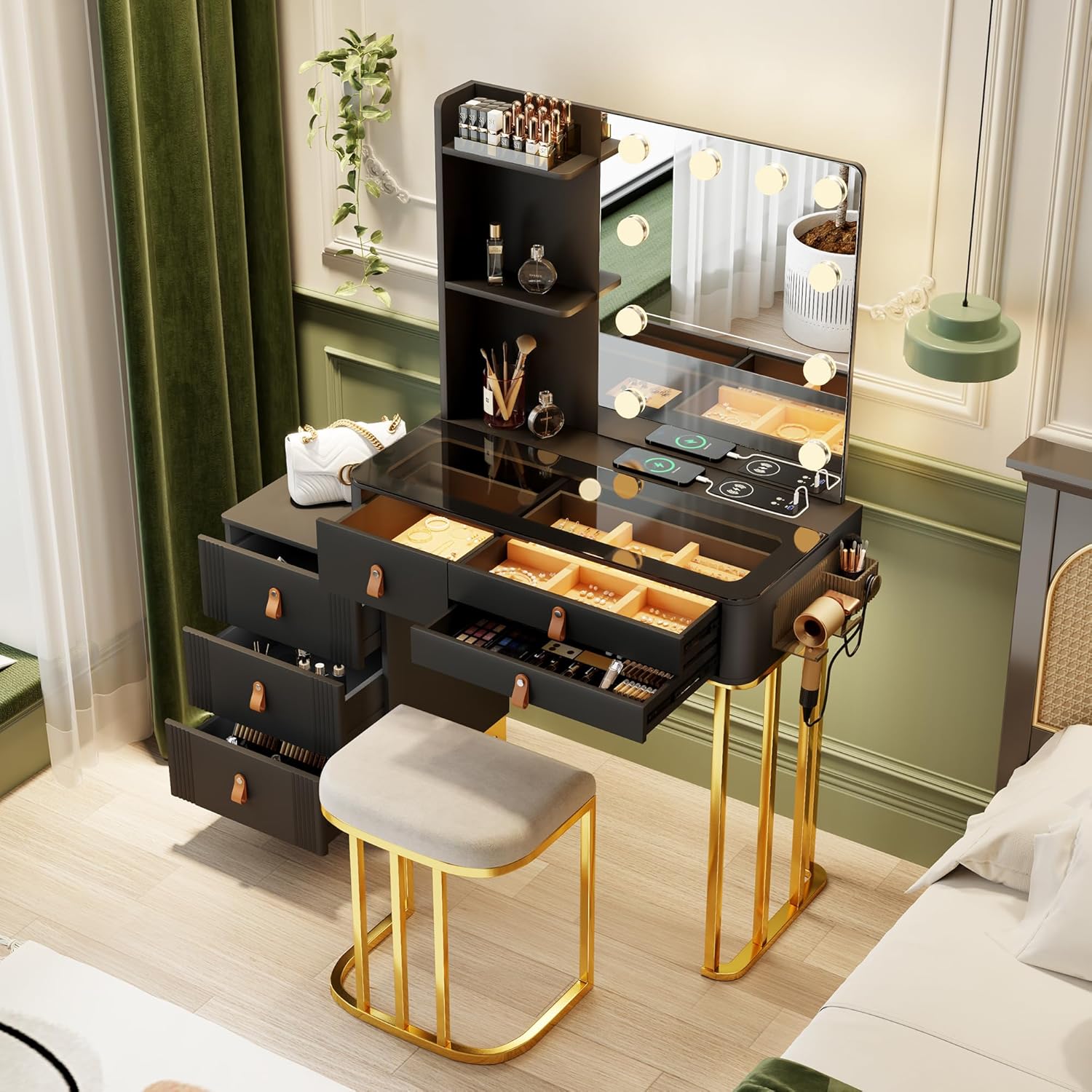
Image 1.1: Fully assembled Dystler Vanity Makeup Desk in a room setting, showcasing its sleek black design, illuminated mirror, and storage features.
2. Enfòmasyon sou Sekirite
Tanpri obsève prekosyon sekirite sa yo pou evite blesi oswa domaj nan pwodwi a:
- Asire w tout pyès yo la epi yo pa domaje anvan w asanble l. Pa kontinye ak asanblaj la si gen pyès ki manke oswa ki kase.
- Assemble the vanity on a soft, clean surface to prevent scratches.
- Pa sere vis yo twòp pandan asanblaj la pou evite domaje materyèl la.
- Kenbe ti pyès ak materyèl anbalaj lwen timoun ak bèt kay.
- Do not place excessively heavy items on the vanity or in the drawers.
- Avoid direct contact of liquids with electrical components (lights, charging station).
- For stability, ensure the vanity is placed on a flat, level surface.
3. Pake kontni
Tanpri verifye ke tout konpozan ki nan lis anba a yo enkli nan pake ou a:
- Vanity Desk Frame (Engineered Wood)
- Mirror with Integrated LED Lights
- Stool (if included in your model)
- Drawers and Jewelry Cabinets
- Tempered Glass Desktop
- Assembly Hardware (screws, connectors, tools)
- Power Adapter for Lights and Charging Station
- Manyèl Enstriksyon
4. Enstalasyon ak Asanble
Follow these step-by-step instructions for proper assembly. It is recommended to have two people for certain steps.
- Depake epi idantifye pyès yo: Carefully remove all components from the packaging. Lay them out on a soft, clean surface to prevent scratches. Refer to the included parts list to identify each piece.
- Rasanble ankadreman baz la: Connect the main desk frame components using the provided hardware. Ensure all connections are secure but do not fully tighten until the entire frame is assembled.
- Install Drawers and Cabinets: Insert the drawer slides into the designated slots on the desk frame. Assemble the drawers and slide them into place. The storage cabinet can be installed on either the left or right side of the main desk, depending on your preference.
- Tache glas la: Securely attach the mirror unit to the main desk frame. Ensure the mirror is stable and properly aligned.
- Place the Tempered Glass Top: Carefully place the tempered glass desktop onto the vanity. This provides a durable and scratch-resistant surface.
- Konekte pouvwa: Plug the power adapter into the designated port on the vanity and then into a wall outlet.
- Sere final la: Once all components are in place and aligned, carefully tighten all screws and fasteners to ensure the vanity is stable and secure.

Image 4.1: The Dystler Vanity Makeup Desk showing the reversible storage cabinet, which can be positioned on either the left or right side of the main desk.
5. Operasyon Enstriksyon
5.1. Hollywood Lighting System
The vanity is equipped with 10 dimmable LED bulbs offering three light modes for optimal makeup application.
- Limen/Etenyen: Locate the touch switch on the mirror. Tap once to turn the lights on or off.
- Chanje mòd koulè: With the lights on, tap the touch switch repeatedly to cycle through the three color modes: Warm Light, Natural Light, and Cold Light.
- Ajiste klète: To dim or brighten the lights, press and hold the touch switch. The brightness will adjust smoothly from 0% to 100%. Release when the desired brightness is achieved.

Image 5.1: Visual representation of the three lighting modes (Cold, Natural, Warm) and the brightness adjustment feature of the vanity mirror.
5.2. Smart Human Sensor Lighting
The vanity mirror features motion-activated LED lights for hands-free convenience.
- Aktivasyon otomatik: The lights will automatically turn on when you approach the vanity (within approximately 2 meters) and turn off when you leave.
- Ekonomize enèji: This feature ensures lights are only active when needed, conserving energy.
5.3. Wireless Charging & USB/Type-C Ports
The vanity includes a built-in wireless charging pad and USB/Type-C ports for convenient device charging.
- Chaje san fil: Place your Qi-compatible device directly on the wireless charging pad located on the glass desktop. Ensure the device is centered for optimal charging.
- USB & Type-C Ports: Use the integrated USB and Type-C ports to charge other electronic devices with appropriate cables.

Image 5.2: Close-up of the vanity's smart module, highlighting the wireless charging pad and the USB and Type-C charging ports.
5.4. Smart Storage & Organization
The vanity features multiple storage options to keep your items organized and dust-free.
- Tiwa: Utilize the four large drawers for makeup, skincare products, and other accessories.
- Jewelry Cabinets: The two dedicated jewelry cabinets are designed to hold and protect your jewelry.
- Anti-Scratch Lining: The interior lining of the drawers and cabinets helps protect your items from scratches.

Image 5.3: The vanity's visibility drawers and specialized jewelry organizers, designed for easy storage and retrieval of items.
6. Antretyen
To keep your Dystler Vanity Makeup Desk in optimal condition, follow these maintenance guidelines:
- Netwaye sifas la: Wipe the tempered glass desktop and engineered wood surfaces with a soft, damp twal. Evite pwodui netwayaj abrazif oswa pwodui chimik ki ka domaje fini an.
- Swen Miwa: Clean the mirror with a glass cleaner and a lint-free cloth. Do not spray cleaner directly onto the mirror, especially near the light bulbs or electrical components.
- Antretyen tiwa: Tcheke glisad tiwa yo detanzantan pou wè si yo fonksyone byen. Si yo vin rèd, ou ka aplike yon ti kantite lubrifyan silikon.
- Eleman elektrik: Ensure all electrical connections are secure. Do not attempt to repair or modify the lighting or charging systems yourself. Contact customer support if issues arise.
NAN. Depanaj
If you encounter any issues with your vanity, refer to the following common problems and solutions:
| Pwoblèm | Kòz posib | Solisyon |
|---|---|---|
| Limyè yo pa limen. | Power adapter not connected; loose connection; faulty bulb. | Check if the power adapter is securely plugged into the vanity and the wall outlet. Ensure the touch switch is activated. If a bulb is faulty, contact customer support for replacement. |
| Chaje san fil la pa fonksyone. | Device not Qi-compatible; device not properly aligned; foreign objects on pad. | Ensure your device supports Qi wireless charging. Reposition the device on the charging pad to ensure proper alignment. Remove any metal objects or thick cases from the charging area. |
| Tiwa yo rèd oswa difisil pou ouvri/fèmen. | Overloaded drawer; debris in slides; misaligned slides. | Reduce the weight in the drawer. Check for and remove any debris in the drawer slides. If slides are misaligned, gently adjust them or re-assemble the drawer. |
| Vanite santi l enstab. | Planche inegal; pyès asanblaj ki lach. | Ensure the vanity is on a flat, level surface. Check and tighten all assembly screws and fasteners. |
If the problem persists after trying these solutions, please contact Dystler customer support.
8. Espesifikasyon

Image 8.1: Detailed product information graphic, including key dimensions and material highlights.
| Karakteristik | Detay |
|---|---|
| Mak | Dystler |
| Nimewo Modèl | LY-85016 |
| Dimansyon pwodwi | 15.75"D x 31.5"W x 54"H |
| Pwa atik | 100.3 liv |
| Materyèl ankadreman | Enjenieri bwa |
| Mèb fini | Toughened Glass Tabletop |
| Ekleraj | 10 Dimmable LED Bulbs (Warm/White/Natural modes) |
| Chaje Karakteristik | Wireless Charger, USB Port, Type-C Port |
| Karakteristik espesyal | Smart Human Sensor Lighting, Reversible Storage Cabinet |
| Asanble obligatwa | Wi |
| UPC | 730177568873 |
9. Garanti ak sipò
Dystler provides customer support for any issues or inquiries regarding your vanity makeup desk.
- Garanti: Tanpri gade dokiman acha ou a pou plis detay sou garanti a.
- Sipò Kliyan: For assistance with assembly, missing parts, or troubleshooting, please click the "contact seller" option on the platform where you purchased the product.
- Retounen: Pwodui sa a kalifye pou retounen fasil nan 30 jou.


