1. Entwodiksyon
Mèsi pou acha aasing the MISTRAL Horizon Twilight MHV7123DR-TL 7-inch DC High Velocity Fan. This manual provides essential information for the safe operation, installation, and maintenance of your fan. Please read it thoroughly before use and retain it for future reference.

Imaj 1.1: Devan view of the MISTRAL Horizon Twilight MHV7123DR-TL fan, showcasing its compact design and the fan head with the Mistral logo. A remote control is visible to the right of the fan.
2. Enstriksyon Sekirite
Pou diminye risk dife, chòk elektrik, oswa blesi, toujou swiv prekosyon sekirite debaz sa yo:
- Asire ekipman pou pouvwa a voltage koresponn ak etikèt klasman ki sou vantilatè a.
- Pa sèvi ak vantilatè a si kòd la oswa ploge a domaje. Si li domaje, kontakte pèsonèl sèvis ki kalifye.
- Keep fingers and other objects away from the fan blades and moving parts during operation.
- Pa sèvi ak fanatik la nan mouye oswa damp kote, tankou twalèt oswa zòn lesiv.
- Debranche vantilatè a nan priz kouran an anvan ou netwaye li oswa fè nenpòt antretyen.
- Aparèy sa a pa fèt pou itilize pa moun (ki gen ladan timoun) ki gen kapasite fizik, sansoryèl oswa mantal redwi, oswa ki pa gen eksperyans ak konesans, sof si yo te ba yo sipèvizyon oswa enstriksyon konsènan itilizasyon aparèy la pa yon moun ki responsab sekirite yo.
- Timoun yo ta dwe sipèvize pou asire ke yo pa jwe ak aparèy la.
3. Pake kontni
Verifye ke tout atik yo prezan nan pakè a:
- MISTRAL Horizon Twilight MHV7123DR-TL Fan Unit
- Kontwòl Remote
- Manyèl Itilizatè (dokiman sa a)
4. Pwodwi souview
Familiarize yourself with the components of your fan:
4.1 Fan Unit
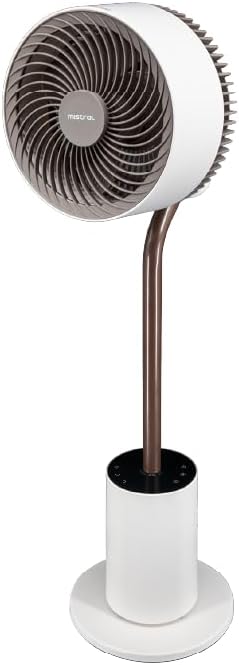
Imaj 4.1: Devan detaye view of the fan, highlighting the fan head, stand, and control base. This image provides a clear perspective of the fan's overall structure.
- Tèt vantilatè: Contains the fan blades and motor.
- Front Guard: Protective cover for the fan blades.
- Rear Guard: Back cover of the fan head, housing the atmosphere light.
- Kanpe: Connects the fan head to the base.
- Control Base: Houses the control panel and power input.
- Kòd pouvwa: Pou konekte ak yon priz elektrik.
4.2 Kontwòl Remote
The remote control allows convenient operation of all fan functions from a distance. (Refer to Image 1.1 for a visual of the remote control.)
- Bouton pouvwa: Limen/Etenn vantilatè a.
- Bouton vitès: Adjusts fan speed (1-12 speeds + Booster).
- bouton mòd: Cycles through Normal, Natural, Sleeping, and ECO modes.
- Bouton osilasyon: Activates/deactivates 3D oscillation (horizontal and vertical).
- Bouton revèy: Li fikse revèy fonksyònman an (jiska 12 èdtan).
- Limyè bouton: Controls the atmosphere light (On/Off, brightness adjustment).
- Indicating Lights Off Button: Turns off the control panel's indicator lights.
5. Enstalasyon
The MISTRAL Horizon Twilight fan typically comes pre-assembled. Follow these steps for initial setup:
- Debake: Retire vantilatè a ak tout akseswa yo nan anbalaj la avèk prekosyon.
- Plasman: Place the fan on a stable, flat surface. Ensure there is adequate space around the fan for proper air circulation and oscillation.
- Koneksyon pouvwa: Mete ploge kouran an nan yon priz elektrik ki apwopriye.
- Batri Remote Control: Open the battery compartment on the remote control and insert the required batteries (not included, typically AAA). Ensure correct polarity.
6. Operasyon Enstriksyon
Operate your fan using either the control panel on the base or the remote control.
6.1 Power On/Off
- Peze a Pouvwa button on the control panel or remote control to turn the fan On or Off.
6.2 Kontwòl vitès
- Peze a Vitès button to cycle through 12 fan speed settings.
- A Booster Speed setting is also available for maximum airflow.
6.3 mòd
Peze a Mode bouton pou chwazi nan mòd fonksyònman sa yo:
- Mòd nòmal: Bay yon koule lè konstan nan vitès ki chwazi a.
- Mòd natirèl: Simile yon briz natirèl lè li varye vitès vantilatè a tanzantan.
- Mòd dòmi: Operates at a lower, quieter speed, gradually decreasing over time for comfortable sleep.
- Mòd ECO: Adjusts fan speed automatically based on ambient temperature to optimize energy consumption.
6.4 3D Oscillation
The fan features 3D oscillation for wider air distribution.
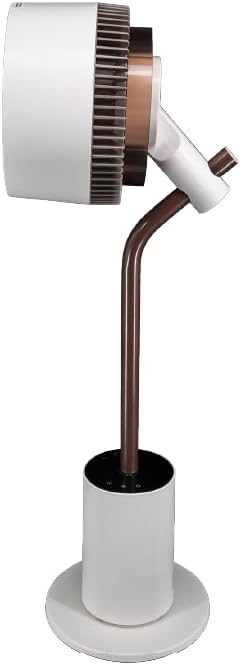
Imaj 6.4: Side view of the fan, illustrating its ability to tilt vertically, which is part of its 3D oscillation feature. The fan head is angled upwards.
- Peze a Osilasyon button to activate or deactivate the oscillation function.
- Osilasyon orizontal: Left and Right movement at 30°, 60°, 90°, or 120° angles.
- Osilasyon vètikal: Up and Down movement at 50° or 90° angles.
- The fan can oscillate both horizontally and vertically simultaneously for 3D airflow.
6.5 Fonksyon revèy
- Peze a Revèy button to set the fan to automatically turn off after a specified period.
- The timer can be set for up to 12 hours. Each press typically increases the timer by 1 hour.
6.6 difize arom
The fan includes an aroma diffuser feature for a pleasant environment.
- Locate the aroma diffuser compartment (usually at the back of the fan head or base).
- Open the compartment and add a few drops of your preferred essential oil onto the provided pad (if applicable).
- Close the compartment. The fan's airflow will gently diffuse the aroma.
6.7 Inner Mood Lighting
The fan features an atmosphere light on the back of the rear guard.

Imaj 6.7: The MISTRAL fan with its inner mood lighting activated, casting a warm glow from behind the fan head. This demonstrates the adjustable atmosphere light feature.
- Peze a Limyè button on the remote control to turn the mood light On/Off.
- Peze a Limyè button repeatedly to cycle through 3 adjustable brightness levels.
6.8 Indicating Lights Off Function
- Peze a Indicating Lights Off button on the remote control to turn off the control panel's indicator lights, which can be useful in dark environments like a bedroom.
7. Antretyen
Regular cleaning and maintenance will ensure optimal performance and extend the lifespan of your fan.
- Netwaye eksteryè a: Siye sifas ekstèn vantilatè a ak yon twal mou, damp twal. Pa sèvi ak pwodui netwayaj abrazif oswa solvang.
- Netwayaj lam vantilatè yo: Unplug the fan before attempting to clean the blades. If accessible, gently wipe the blades with a soft cloth to remove dust. Do not immerse the fan in water.
- Aroma Diffuser Pad: If using an aroma diffuser, regularly clean or replace the aroma pad to prevent residue buildup.
- Depo: When not in use for extended periods, unplug the fan, clean it, and store it in a cool, dry place, preferably in its original packaging.
NAN. Depanaj
Si ou rankontre pwoblèm ak vantilatè ou a, gade pwoblèm ak solisyon komen sa yo:
| Pwoblèm | Kòz posib | Solisyon |
|---|---|---|
| Vantilatè a pa limen. | No power supply; Power button not pressed; Remote control batteries depleted. | Check power cord connection and wall outlet; Press the Power button; Replace remote control batteries. |
| Flux lè fèb. | Low speed setting; Fan blades are dirty. | Increase fan speed; Clean fan blades (refer to Maintenance section). |
| Vantilatè a fè yon bri dwòl. | Obstruction near blades; Fan not on a stable surface. | Unplug and check for obstructions; Place fan on a flat, stable surface. |
| Remote kontwòl pa travay. | Batteries depleted or incorrectly inserted; Obstruction between remote and fan. | Ranplase pil yo, asire polarite kòrèk la; Asire w ke liy vizyon an klè ak reseptè vantilatè a. |
9. Espesifikasyon
| Karakteristik | Detay |
|---|---|
| Modèl | MHV7123DR-TL |
| Kalite fanatik | 7-inch DC High Velocity Fan |
| Kalite motè | Brushless DC motè |
| Vitès | 12 Speeds + Booster Speed |
| Mòd | Normal, Natural, Sleeping, ECO |
| Osilasyon | 3D Oscillation (Left/Right: 30°, 60°, 90°, 120°; Up/Down: 50°, 90°) |
| Revèy | 12 èdtan |
| Karakteristik espesyal | Aroma Diffuser, Inner Mood Lighting (3 adjustable brightness), Indicating Lights Off Function, Remote Control |
| Sous pouvwa | Fil elektrik |
| Dimansyon pwodwi | 25D x 25W x 90H santimèt |
| Faktè fòm | Stand / Floor Fan |
10. Garanti ak sipò
MISTRAL products are manufactured to high-quality standards. For warranty information, please refer to the warranty card included with your purchase or visit the official MISTRAL website. For technical support or service inquiries, please contact MISTRAL customer service.
Tanpri kenbe prèv ou achte pou reklamasyon garanti.


