1. Entwodiksyon
This user manual provides detailed instructions for the setup, operation, and maintenance of your Thomson 50-inch 4K Ultra HD Smart Android TV (Model: 50UA5S13W). Please read this manual thoroughly before using the television to ensure proper and safe operation. Keep this manual for future reference.

Imaj: Devan view of the Thomson 50-inch 4K Ultra HD Smart Android TV, showcasing its slim bezels and white finish.
2. Enfòmasyon enpòtan sou sekirite
Always adhere to the following safety precautions to prevent electric shock, fire, damage to the device, or personal injury.
- Pa ekspoze televizyon an ak lapli oswa imidite.
- Pa ouvri televizyon an.asing; konfye tout antretyen bay pèsonèl kalifye.
- Asire bon vantilasyon; pa bouche ouvèti vantilasyon yo.
- Pwoteje kòd kouran an pou yo pa mache sou oswa kwense.
- Dekonekte televizyon an pandan tanpèt zèklè oswa lè ou pa itilize li pou yon bon bout tan.
- Kenbe televizyon an lwen sous chalè ak limyè solèy dirèk.
- Sèvi ak sèlman atachman/akseswa manifakti a espesifye.
3. Pake kontni
Anvan ou kontinye ak enstalasyon an, tanpri verifye si tout atik ki nan lis anba a yo enkli nan pake ou a:
- Thomson 50-inch 4K Ultra HD Smart Android TV
- Remote Control (with backlit buttons)
- Batri pou kontwòl Remote
- Sipò pou televizyon (2 moso)
- Vis pou kanpe televizyon
- Kòd pouvwa
- Gid Quick Start
- Manyèl Itilizatè (dokiman sa a)
4. Enstalasyon
4.1 Enstalasyon Fizik
You can either place the TV on a flat surface using the provided stands or mount it on a wall (wall mount not included).
Atache Sipò yo:
- Mete televizyon an fas anba ak anpil atansyon sou yon sifas mou epi pwòp pou evite domaje ekran an.
- Aliyen chak sipò ak twou vis ki koresponn yo anba televizyon an.
- Fikse sipò yo avèk vis yo bay yo.
Montaj mi:
This TV supports VESA 200x200 wall mounts. Please refer to the wall mount's instructions for proper installation. Ensure the wall can support the weight of the TV (approximately 12.22 kg).

Imaj: Devan view of the Thomson TV, illustrating its dimensions: 112 cm width, 69 cm height, and 8 cm depth.

Imaj: Bò kote view of the Thomson TV, showing its slim profile.
4.2 Konekte periferik
Konekte aparèy ekstèn ou yo nan pò ki apwopriye yo sou panèl dèyè televizyon an.
- HDMI (4x HDMI 2.0): Pou konekte lektè Blu-ray, konsola jwèt, dekodeur, elatriye.
- USB (2x USB 2.0): Pou konekte aparèy depo USB pou li medya oswa pou mizajou lojisyèl.
- LAN: Pou koneksyon entènèt filaire.
- Audio Out (Digital Optical): Pou konekte ak ba son oswa sistèm sinema lakay.
- Satelit (DVB-S2): Pou koneksyon antèn satelit.
- Antenna (DVB-T2/C): Pou koneksyon antèn terès oswa kab.
- Antre AV: Pou konekte ansyen aparèy ki gen sòti videyo/odyo konpoze.
- Entèfas Komen (CI+): For inserting a CAM module and smart card for encrypted channels.

Imaj: Dèyè view of the Thomson TV, detailing the various input and output ports including HDMI, USB, LAN, Audio Out, Satellite, Antenna, AV In, and Common Interface.
4.3 Premye Enstalasyon ak Koneksyon Rezo a
After connecting the power cord and turning on the TV, you will be guided through the initial setup process.
- Pouvwa sou: Plug in the power cord and press the power button on the remote control or TV.
- Seleksyon Lang: Chwazi lang ou prefere.
- Rezo Koneksyon: Connect to your Wi-Fi network or use a wired LAN connection. This is essential for Smart TV features.
- Konfigirasyon kont Google: Sign in with your Google account to access the Google Play Store, Google Assistant, and other Android TV features.
- Chèn Scan: The TV will guide you through scanning for available channels via the Triple-Tuner (DVB-S2, DVB-T2, or DVB-C).
5. Operating Your Thomson Smart Android TV
5.1 Android TV Interface and Streaming
Your Thomson TV runs on Android TV, providing access to a vast library of content and applications. The home screen offers personalized recommendations and quick access to your favorite streaming services like Netflix, Prime Video, YouTube, and Disney+.

Image: The Android TV home screen, displaying popular streaming applications and content recommendations.
5.2 Asistan Google
The integrated Google Assistant allows you to control your TV and smart home devices using voice commands. Simply press the Google Assistant button on your remote and speak your command.
- "Play [Movie Title] on Netflix."
- "Open YouTube."
- "Ki jan tan an ye?" or "Ki jan tan an ye?"
- "Dim the lights." (Requires compatible smart home devices)

Image: A user interacting with the TV using Google Assistant voice commands via the remote control.
5.3 Chromecast bati-an
With Chromecast built-in, you can easily cast movies, shows, photos, and more from your compatible smartphone, tablet, or laptop directly to your TV screen.

Image: Illustration of Google Cast functionality, demonstrating how content can be streamed wirelessly from various smart devices to the Thomson TV.
5.4 Audio and Visual Enhancements (Dolby Atmos & Dolby Vision)
Experience immersive sound and stunning visuals with Dolby Atmos and Dolby Vision technologies.
- Dolby Atmos: Creates a multi-dimensional sound experience, making audio flow around you. (Compatible sound device needed)
- Dolby Vision: Delivers incredible brightness, contrast, and color, bringing entertainment to life.

Image: An illustration depicting the immersive, multi-dimensional sound experience provided by Dolby Atmos, with sound waves emanating from the TV and surrounding viewèr.

Image: A side-by-side comparison illustrating the enhanced visual quality of Dolby Vision 4K UHD compared to standard SDR, highlighting improved brightness, contrast, and color.
5.5 Karakteristik Kontwòl Remote
The included remote control is designed for ease of use, featuring backlit buttons for visibility in low light and a dedicated favorites button.

Image: The Thomson TV remote control, showcasing its ergonomic design, a dedicated button for favorite apps, backlit buttons for use in the dark, and integrated voice control functionality.
6. Antretyen
Bon antretyen asire televizyon ou an ap dire pi lontan.
- Netwaye ekran an: Gently wipe the screen with a soft, lint-free cloth. For stubborn marks, use a specialized screen cleaner applied to the cloth, not directly to the screen.
- Netwayaj C aasing: Sèvi ak yon twal mou epi sèk pou siye televizyon an.asing. Pa sèvi ak pwodui netwayaj abrazif oswa solvan.
- Vantilasyon: Asire w ouvèti vantilasyon yo pa bloke pa pousyè oswa objè.
- Pouvwa Off: Always unplug the TV from the power outlet before cleaning or when not in use for extended periods.
NAN. Depanaj
Men kèk solisyon pou pwoblèm komen ou ka rankontre:
| Pwoblèm | Kòz posib | Solisyon |
|---|---|---|
| Pa gen pouvwa | Kòd kouran an pa konekte; pa gen kouran nan priz la. | Tcheke koneksyon kòd kouran an; teste priz la ak yon lòt aparèy. |
| Pa gen imaj/son | Sous antre ki pa kòrèk; koneksyon kab ki lach. | Select correct input source; check all cable connections. |
| Remote Control pa travay | Pil mouri; gen blokaj ant telekòmand lan ak televizyon an. | Ranplase pil yo; retire tout obstak. |
| Pa ka konekte ak Wi-Fi | Modpas ki pa kòrèk; pwoblèm routeur; televizyon an twò lwen routeur la. | Verify password; restart router; move TV closer or use wired connection. |
| Apps Crashing/Slow Performance | Twòp aplikasyon k ap kouri; espas depo ki ba; pwoblèm lojisyèl. | Close unused apps; clear cache; restart TV; check for software updates. |
8. Espesifikasyon teknik
| Karakteristik | Spesifikasyon |
|---|---|
| Nimewo Modèl | 50UA5S13W |
| Gwosè ekran | 50 pous (126 cm) |
| Teknoloji ekspozisyon | UHD (A+ Panel Quality) |
| Rezolisyon | 3840 x 2160 (4K Ultra HD) |
| Rafrechisman pousantaj | 60 Hz |
| Sistèm operasyon | Android TV |
| Koneksyon | Wi-Fi, Bluetooth, 4x HDMI 2.0, 2x USB 2.0, LAN, Digital Optical Audio Out, AV In, CI+ |
| Tuner | Triple-Tuner (DVB-S2, DVB-T2, DVB-C) |
| Teknoloji Audio | Dolby Digital, Dolby Atmos (compatible sound device needed) |
| Teknoloji Videyo | Dolby Vision, 4K UHD |
| Dimansyon (W x H x P) | 112 x 69 x 8 cm (san kanpe) |
| Pwa | 12.22 kg |
| Klas efikasite enèji (SDR) | E (53 kWh/1000h) |
| Klas efikasite enèji (HDR) | E (54 kWh/1000h) |
| VESA miray mòn | 200x200 (not included) |

Image: Official product data sheet for the Thomson 50UA5S13W television, detailing technical specifications and energy consumption.
Pou plis detay, al gade nan Baz Done Pwodwi EPREL.
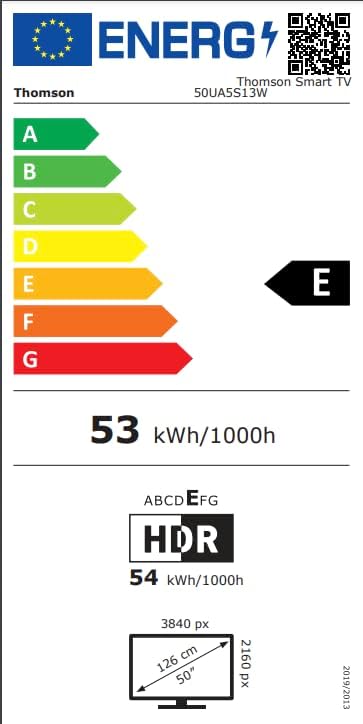
Image: Energy efficiency label for the Thomson 50UA5S13W TV, showing its 'E' rating for both SDR and HDR content.
9. Garanti ak sipò
Thomson offers a 3-ane garanti on your television, ensuring peace of mind and reliable performance. For technical support, service, or warranty claims, please contact the manufacturer's authorized service center or refer to the contact information provided in your product documentation.
Manifakti: THOMSON (StreamView GmbH)
Websit: www.streamview.com
Imèl: kontak@difizyonview.com
Telefòn: +4318900066
Adrès: Franz-Josefs-Kai 1, 1010 Vyèn, Otrich


