Entwodiksyon
Accsoon Cine aView Master 4K is a state-of-the-art wireless video transmission system designed for professional video production. It offers 4K UHD video transmission, tri-band connectivity (2.4GHz, 5GHz, and 6GHz), and ultra-low latency for reliable and high-quality monitoring and streaming. This manual provides detailed instructions for setting up, operating, and maintaining your CineView Mèt 4K sistèm.

Image: The Accsoon CineView Master 4K transmitter and receiver units, showcasing their compact design and multiple antennas.
Ki sa ki nan bwat la
Verifye ke tout atik ki nan lis anba a yo enkli nan pakè ou a:
- Accsoon CineView Master 4K Transmitter (x1)
- Accsoon CineView Master 4K Receiver (x1)
- Adaptè soulye frèt (x2)
- Kab USB-C pou USB-C (x1)
- USB-C to Lightning Cable (x1)
- L-shape Wrench (x1)
- Manyèl itilizatè (x1)
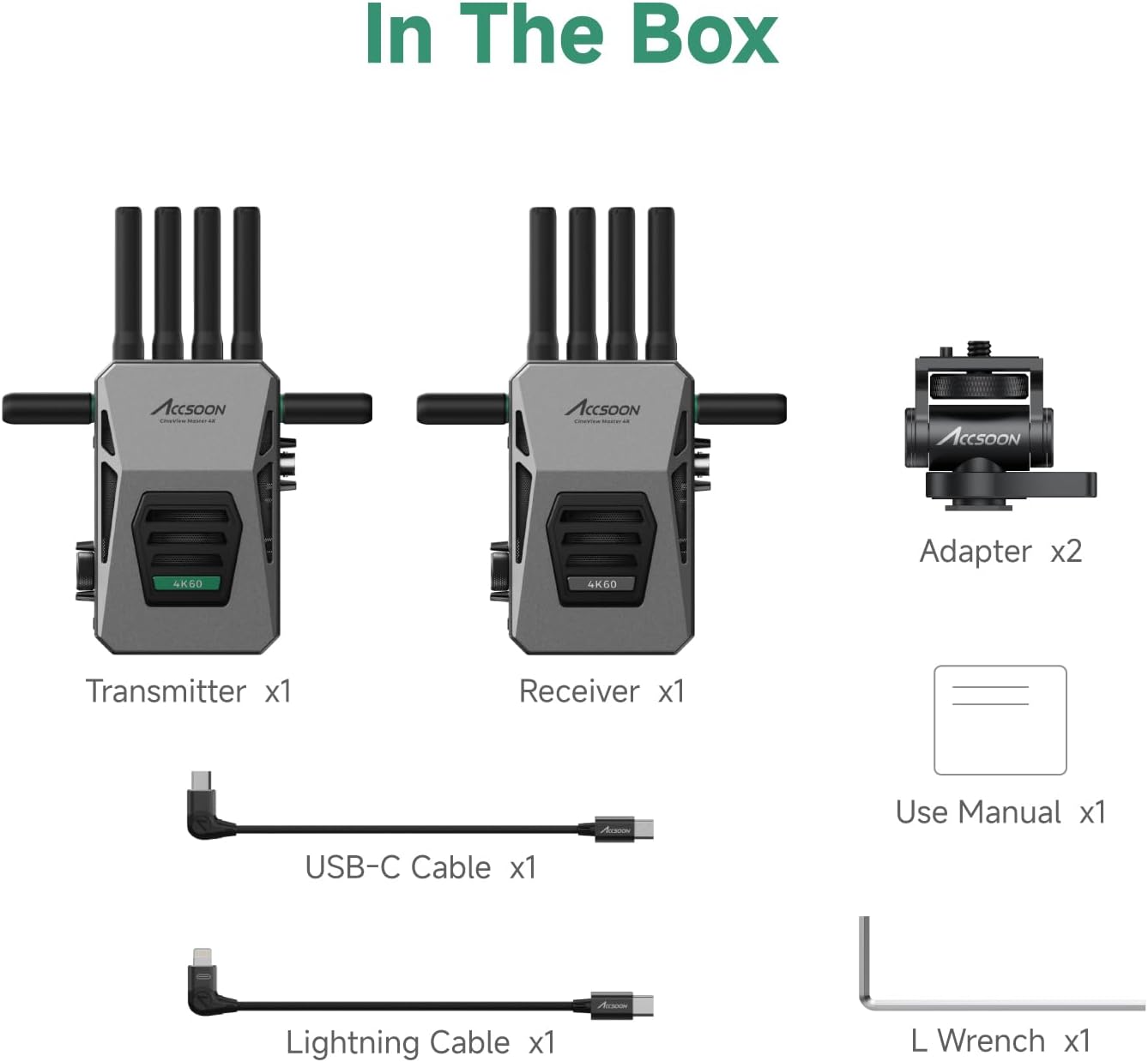
Image: A visual representation of all components included in the Accsoon CineView Master 4K package, laid out clearly.
Enstalasyon
1. Alimente sistèm nan
Cine aView Master 4K units offer flexible power options:
- NP-F Battery: Compatible with NP-F970/750/550 series batteries (not included). Attach the battery to the designated slot on the rear of the unit.
- DC Antre: Use a 12V 2A DC power adapter (not included) connected to the DC input port.
- V-Mount Battery: Compatible with Accsoon V-lock battery adapter (not included) for extended power.

Image: An illustration detailing the various power input methods for the CineView Master 4K, including NP-F batteries, DC input, and V-mount battery compatibility.
2. Konekte Aparèy
The system supports various input and output configurations:
- HDMI Antre / Sòti: Connect your camera's HDMI output to the transmitter's HDMI input. Connect the receiver's HDMI output to your monitor. Supports up to 4K60 (3840x2160) video formats.
- 3G SDI: Both transmitter and receiver feature 3G SDI ports for professional camera and monitoring setups.
- Wired iOS Connection: The transmitter can connect directly to compatible iOS devices (iPhone 12 or later, various iPad Pro/Air/mini models) via a USB-C cable for wired monitoring with no latency.

Imaj: Yon imaj detaye view of the video transmission interfaces on both the transmitter and receiver units, highlighting HDMI, SDI, and USB-C ports.
Opere sistèm lan
1. Tri-band Transmission
Cine aView Master 4K utilizes 2.4GHz, 5GHz, and 6GHz frequencies for enhanced stability and performance. The system intelligently adjusts data across these bands to ensure robust connections, faster pairing, and lower latency.

Image: The Accsoon CineView Master 4K system with icons indicating its key features: 4K60 resolution, Tri-Band (2.4GHz+5GHz+6GHz), <25ms latency, and 8202ft/2.5km range.

Image: A visual representation of the cutting-edge wireless technology, illustrating how 2.4GHz, 5GHz, and 6GHz frequencies are integrated for faster connections and lower latency.
2. Kapasite siveyans
The Master 4K system allows simultaneous monitoring on up to five devices:
- 1 Wired Connection: Connect the transmitter to an iOS device (iPhone/iPad) via USB-C for direct, low-latency monitoring.
- 4 Wireless Connections: Wirelessly connect to CineView Master 4K receivers, iOS devices, or Android devices.

Image: A flow chart illustrating how one CineView Master 4K transmitter can connect to up to five devices simultaneously, including wired iOS and multiple wireless receivers or mobile devices.
3. Accsoon SEE App
The Accsoon SEE app provides professional monitoring features for your iOS/Android devices, including:
- Live streaming and recording
- Focus peaking, pinch-to-magnify, image-flip
- Waveforms, audio level meters, false color
- Grids, screenshots, desqueeze

Image: Screenshots of the Accsoon SEE app interface displayed on a tablet and a smartphone, showcasing various monitoring tools and controls.
4. Kontwòl fanatik
Cine aView Master 4K features flexible fan control to manage device temperature in various scenarios:
- Mòd Kanpe: Automatically adjusts fan speed.
- Mòd trankil: Diminye vitès vantilatè a pou yon operasyon ki pi silansye.
- Off: Turns off the fan (use with caution in hot environments).

Image: A visual guide to the flexible fan control settings on the CineView Master 4K, showing 'Stand mode', 'Quiet mode', and 'Off' options with corresponding usage scenarios.
Antretyen
- Kenbe inite yo pwòp epi san pousyè. Sèvi ak yon twal mou epi sèk pou netwaye.
- Evite ekspoze aparèy yo nan tanperati ekstrèm, imidite, oswa limyè solèy dirèk.
- Ensure proper ventilation, especially when operating for extended periods.
- Store the system in a protective case when not in use to prevent damage.
Depanaj
| Pwoblèm | Kòz posib | Solisyon |
|---|---|---|
| Pa gen siyal videyo | Incorrect cable connection; Low battery; Out of range | Check HDMI/SDI cables; Recharge/replace battery; Move transmitter and receiver closer |
| Video stuttering/lag | Interference; Too many connected devices; Weak signal | Change wireless channel; Reduce number of monitoring devices; Ensure clear line of sight |
| Aplikasyon an pa konekte | Bluetooth/Wi-Fi off; App not updated; Device incompatibility | Enable wireless connections on device; Update Accsoon SEE app; Verify device compatibility |
| Surchof inite a | Poor ventilation; Fan off/low speed | Ensure adequate airflow; Adjust fan mode to 'Stand' or higher speed |
Espesifikasyon
- Modèl: CineView Mèt 4K
- Transmisyon videyo: 4K60/1080p60 HDMI Transmitter Receiver
- Gwoup frekans: 2.4GHz, 5GHz, 6GHz (Tri-Band)
- Ranje transmisyon: Jiska 8202 pye (2.5km)
- Latansi: 25 ms
- Siveyans: 1 Wired iOS + 4 Wireless iOS/Android/Receiver
- Opsyon pouvwa: NP-F Battery, DC Input (12V 2A), V-Mount Battery (via adapter)
- Dimansyon: 9.84 x 6.3 x 2.36 pous (Pakè)
- Pwa: 2.86 liv (Atik)
- Manifakti: Aksoon
Garanti ak sipò
Accsoon products are designed for reliability and performance. For specific warranty details, please refer to the warranty card included with your product or visit the official Accsoon website. For technical support, troubleshooting assistance, or service inquiries, please contact Accsoon customer support through their official channels.
No official seller videos were found for embedding in this manual.


