1. Entwodiksyon
Thank you for choosing the Mesqool CR1025 Clock Radio. This device combines an alarm clock, Bluetooth speaker, FM radio, night light, and phone charger into one compact unit. This manual provides detailed instructions for setup, operation, and maintenance to ensure optimal performance and user experience.

Figure 1: Mesqool CR1025 Clock Radio
2. Pwodwi souview
2.1 Karakteristik kle
- Konsepsyon multifonksyonèl: Alarm Clock, Bluetooth Speaker, FM Radio, Night Light, and Phone Charger.
- Bluetooth 5.0: For stable and quick wireless audio streaming.
- Radyo FM: 87.5MHz-108.0MHz frequency range with 20 preset stations.
- Klate reglabl: 5 levels for the LED display.
- Volim reglabl: 16 levels (45dB to 116dB).
- Revèy dòmi: Allows automatic shutdown of audio playback.
- Fonksyon Snooze: 9-minute delay for alarms.
- Batri Backup: Retains time and alarm settings during power outages.
- Doub pò USB chaje: Type-C and USB-A for device charging.
- Fòma tan: 12-hour and 24-hour display options.
- Lè varè (DST): Quick adjustment feature.

Figi 2: Fonksyonalite 5 an 1
2.2 Kontni pake a
- Mesqool CR1025 Clock Radio
- Adaptè pouvwa
- USB kab
- CR2032 Lithium Battery (pre-installed or separate for backup)
- Manyèl Itilizatè (dokiman sa a)

Figi 3: Sa ki pakè
3. Kontwòl ak Ekspozisyon
Familiarize yourself with the buttons and ports on your Mesqool CR1025 Clock Radio.
3.1 Kontwòl Panèl Anlè a
- Sleep Timer Knob: Rotate to set sleep timer duration. Press to confirm.
- Bouton Alam: Press to set or activate/deactivate alarms.
- Time/12/24 Button: Press to set time. Hold to switch between 12/24-hour format.
- Dimmer/DST Button: Press to adjust display brightness. Hold to activate/deactivate Daylight Saving Time.
- Bouton SNOOZE/LIMYÈ: Press to snooze alarm or turn night light on/off.
- Preset/Pair Button: Press to cycle through FM presets. Hold to enter Bluetooth pairing mode.
- Play/Mode Button: Press to play/pause in Bluetooth mode. Hold to switch between FM/Bluetooth modes.
- Power/Scan Knob: Rotate to adjust volume. Press to power on/off. Hold to auto-scan FM stations.
3.2 Pò Panèl Dèyè
- DC IN: Pò D 'pouvwa.
- USB-A Sòti: Pou chaje aparèy ekstèn yo.
- Kalite-C Sòti: Pou chaje aparèy ekstèn yo.
4. Enstalasyon
4.1 Koneksyon pouvwa
- Connect the power adapter to the DC IN port on the back of the clock radio.
- Branche adaptè kouran an nan yon priz miray estanda. Ekran an ap limen.

Figi 4: Koneksyon pouvwa
4.2 Batri Rezèv
The CR2032 battery provides backup for time and alarm settings during a power outage. The display will not show time, and alarms will not sound until power is restored.
- Ensure the battery insulator tab is removed if the battery was pre-installed.
- If replacing, open the battery compartment on the bottom and insert a new CR2032 battery with the correct polarity.
4.3 Mete tan an
- Peze epi kenbe la Time/12/24 bouton an jiskaske chif èdtan yo ap flache.
- Vire a Pouvwa/Eskane bouton pou ajiste lè a.
- Peze a Time/12/24 button again to confirm the hour, and the minute digits will flash.
- Vire a Pouvwa/Eskane bouton pou ajiste minit yo.
- Peze a Time/12/24 button to save the time setting.
4.4 Fòma 12/24 èdtan
Pou chanje ant fòma 12 èdtan ak 24 èdtan, peze bouton an Time/12/24 button briefly while the time is displayed.

Figure 5: 12H/24H and DST Display
4.5 Lè Ete (DST)
To activate or deactivate DST, press and hold the Dimmer/DST button. The 'DST' indicator will appear or disappear on the display.
5. Operasyon Enstriksyon
5.1 Mete alam la
- Peze epi kenbe la Alam bouton an jiskaske chif lè alam lan ap flache.
- Vire a Pouvwa/Eskane knob to adjust the alarm hour.
- Peze a Alam button again to confirm the hour, and the minute digits will flash.
- Vire a Pouvwa/Eskane knob to adjust the alarm minutes.
- Peze a Alam bouton pou sove lè alam lan.
- Pou aktive/dezaktive alam lan, peze bouton an Alam Peze bouton an yon ti moman. Yon ikòn alam ap parèt/disparèt sou ekran an.
5.2 Repete Fonksyon
Lè alam la son, peze la SNOOZE / limyè button to activate the 9-minute snooze function. The alarm will sound again after 9 minutes. This can be repeated up to 9 times. To stop the alarm completely, press the Alam bouton.

Figure 6: Snooze Function
5.3 Operasyon Radyo FM
- Peze a Play/Mode bouton an pou chanje nan mòd Radyo FM.
- Oto-Eskane: Peze epi kenbe la Pouvwa/Eskane knob to automatically scan and save available FM stations (up to 20 presets).
- Manyèl akor: Briefly rotate the Pouvwa/Eskane bouton an pou ajiste frekans lan avèk presizyon.
- Chwazi Prereglaj: Peze a Preset/Pair bouton pou chanje estasyon ki anrejistre yo.
- Ajisteman Volim: Vire a Pouvwa/Eskane knob to adjust the volume (16 levels).

Figure 7: FM Radio Features
5.4 Operasyon Oratè Bluetooth la
- Peze a Play/Mode button to switch to Bluetooth mode. The 'BT' icon will flash on the display.
- On your mobile device, enable Bluetooth and search for 'CR1025'.
- Select 'CR1025' to pair. Once connected, the 'BT' icon will stop flashing.
- Jwe odyo nan aparèy ou an. Sèvi ak Play/Mode bouton pou jwe / pran yon poz.
- Ajisteman Volim: Vire a Pouvwa/Eskane bouton pou ajiste volim la.

Figi 8: Koneksyon Bluetooth 5.0
5.5 Operasyon Limyè Lannwit
Peze a SNOOZE / limyè button to turn the night light on or off. The night light provides a soft, warm glow.

Figure 9: Warm Night Light
5.6 Ajisteman klète ekspozisyon
Peze a Dimmer/DST button repeatedly to cycle through 5 levels of display brightness, from off to brightest.
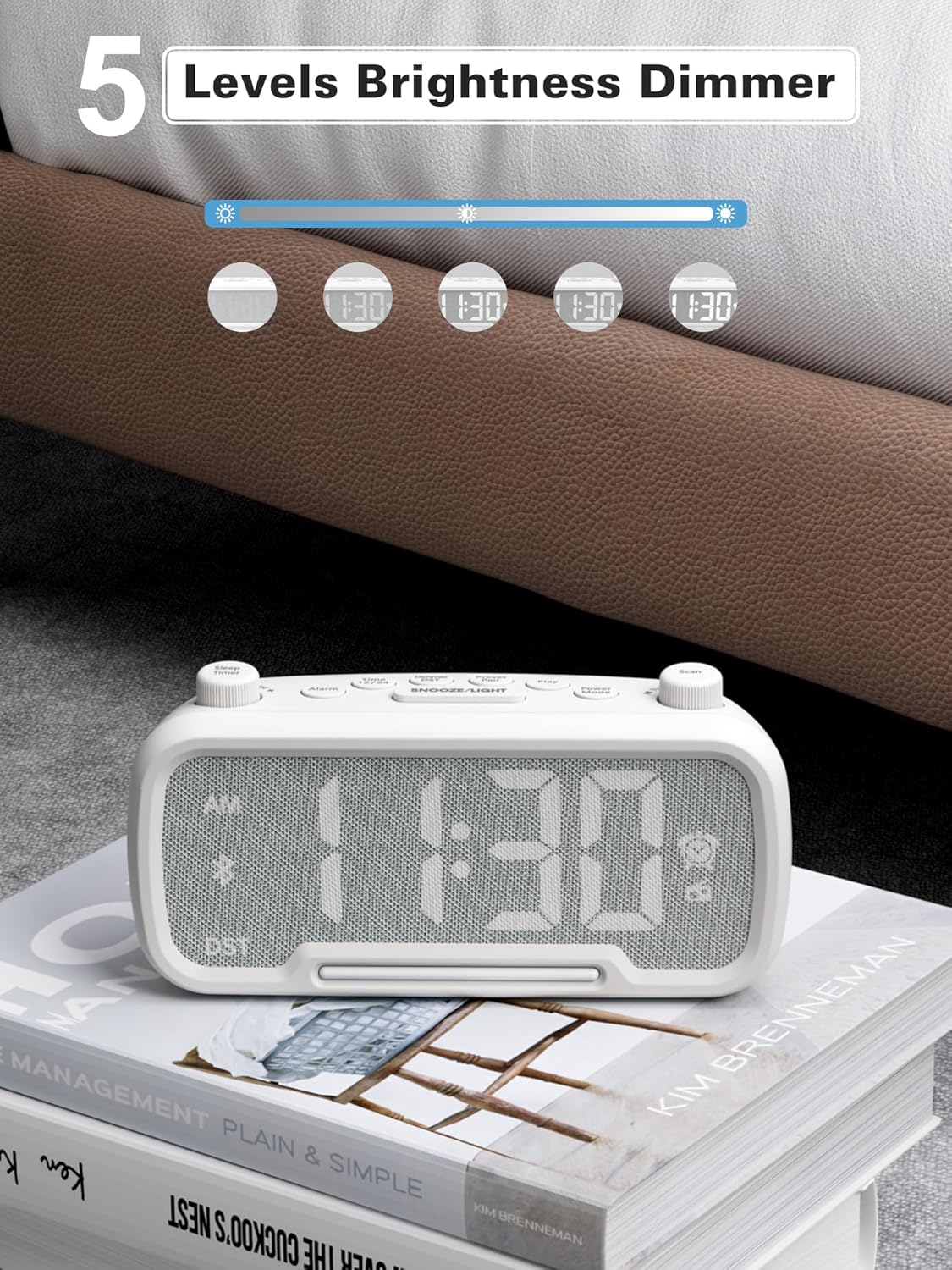
Figure 10: 5 Levels Brightness Dimmer
5.7 Revèy dòmi
The sleep timer allows you to set a duration after which the radio or Bluetooth audio will automatically turn off.
- While playing FM radio or Bluetooth audio, rotate the Revèy dòmi knob to select the desired sleep duration (e.g., 15, 30, 60, 90 minutes).
- The display will show the remaining sleep time. The audio will turn off automatically when the timer expires.
5.8 Chaje telefòn
The clock radio features two USB charging ports (Type-C and USB-A) for convenient charging of your mobile devices.
- Connect your device's charging cable to either the USB-A or Type-C port on the back of the clock radio.
- Connect the other end of the cable to your mobile device. Charging will begin automatically.

Figi 11: Pò chaje doub USB
6. Antretyen
- Netwaye aparèy la avèk yon twal mou epi sèk. Pa sèvi ak pwodui netwayaj abrazif oswa solvan.
- Kenbe aparèy la lwen limyè solèy dirèk, sous chalè, ak imidite.
- Asire bon vantilasyon alantou inite a.
- Si w pa pral itilize aparèy la pou yon bon bout tan, debranche li nan priz kouran an.
NAN. Depanaj
| Pwoblèm | Kòz posib | Solisyon |
|---|---|---|
| Pa gen kouran/Ekspozisyon etenn | Adaptè kouran an pa konekte oswa li gen pwoblèm. | Ensure power adapter is securely plugged into the unit and wall outlet. Check outlet functionality. |
| Alam pa sonnen | Alam lan pa aktive oswa li pa byen configuré. | Verify alarm time is set and the alarm icon is visible on the display. Check alarm volume. |
| Move resepsyon radyo FM | Siyal fèb oswa entèferans. | Adjust the unit's position. Try auto-scanning again. |
| Bluetooth pa asosye | Aparèy la pa nan mòd koneksyon oswa li twò lwen. | Ensure the clock radio is in Bluetooth mode (BT icon flashing). Move device closer. Forget device on phone and re-pair. |
| USB chaje pa travay | Cable faulty or device incompatible. | Try a different USB cable. Ensure the clock radio is powered on. |
8. Espesifikasyon
- Modèl: CR1025
- Antre pouvwa: AC 100-240V, 50/60Hz
- Batri Backup: 1 x CR2032 (enkli)
- Frekans FM: 87.5 - 108.0 MHz
- Bluetooth vèsyon: 5.0
- Sòti USB: USB-A, Type-C (Charging only)
- Ekspozisyon klète: 5 nivo
- Nivo volim: 16 levels (45dB - 116dB)
- Dimansyon: 5.9 x 3.81 x 8.4 cm (2.32 x 1.5 x 3.31 pous)
- Pwa: 216 g (0.48 lbs)
Figi 12: Dimansyon pwodwi a
9. Garanti ak sipò
Mesqool products are designed and manufactured to the highest quality standards. For warranty information, technical support, or customer service inquiries, please refer to the contact information provided on the product packaging or visit the official Mesqool websit.
Websit: Mesqool Official Store


