1. Entwodiksyon
This manual provides instructions for the safe and effective use of your NIDAGE 2-Way Articulating Borescope. This industrial endoscope is designed for detailed visual inspection in confined or hard-to-reach areas, such as engine cylinders, pipes, and machinery. Please read this manual thoroughly before operation and retain it for future reference.
Karakteristik kle:
- Two-Way 210° Articulating Probe: Allows precise navigation and inspection from multiple angles without rotating the entire cable.
- 4.3-inch IPS Super HD Screen: Provides clear, vibrant, and detailed visuals of the inspection area.
- 0.24-inch (6.2mm) Tiny Endoscope Camera: Enables access to very narrow spaces.
- Limyè ki ap dirije reglabl: Six integrated LED lights offer adjustable brightness for optimal illumination in dark environments.
- Sond ki enpèmeyab IP67: Ensures durability and functionality in wet conditions and oil applications.
- Photo and Video Function: Capture images and record videos of inspections for documentation and analysis.
- Konsepsyon ergonomique: Priz konfòtab pou itilizasyon pwolonje.
2. Pake kontni
Verifye ke tout atik ki nan lis anba a yo prezan nan pakè ou a:
- NIDAGE 2-Way Articulating Borescope (Main Unit with Probe)
- USB Kalite-C Chaje Kab
- Manyèl itilizatè
- Kat memwa 32GB (pre-enstale oswa enkli separeman)
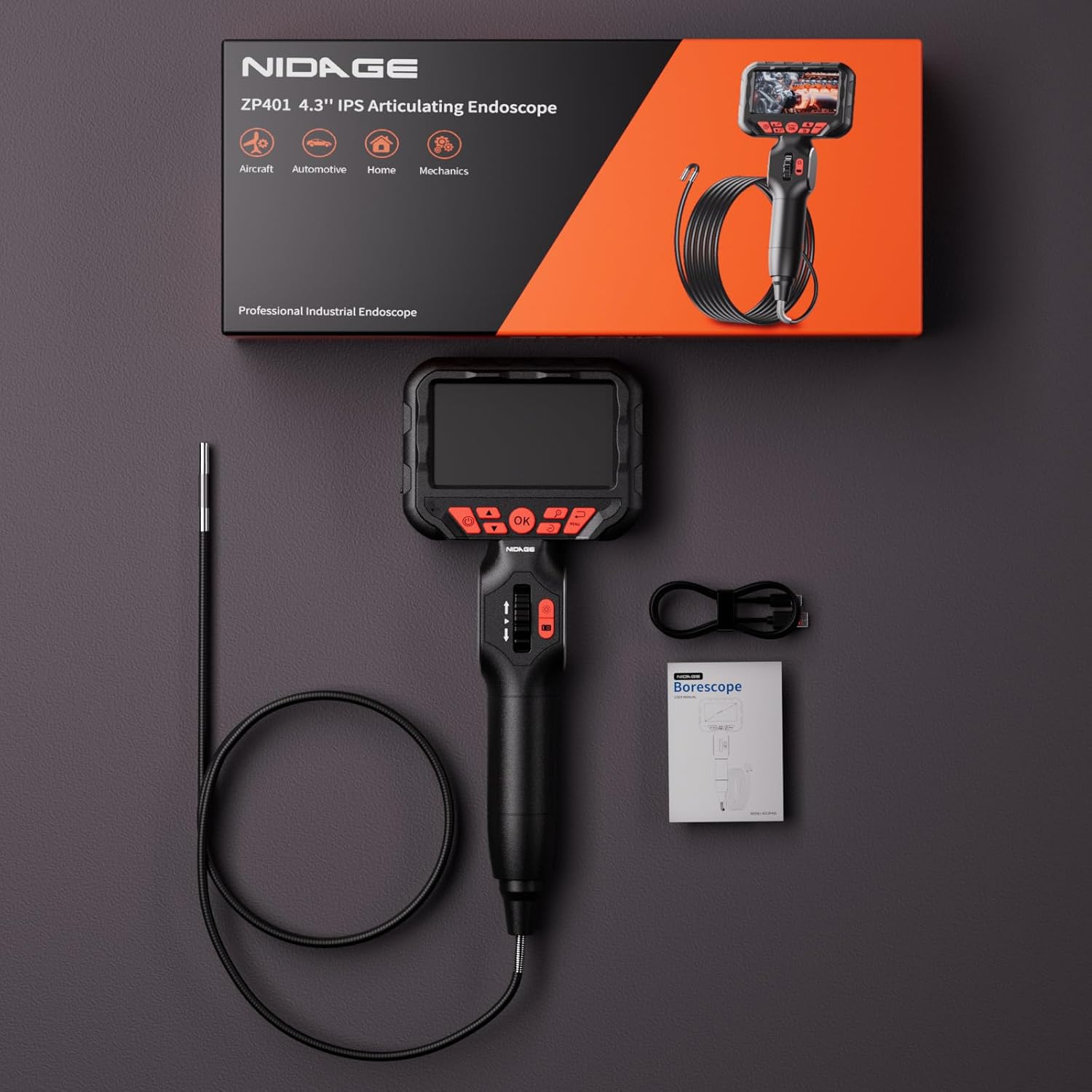
Image: Package contents of the NIDAGE borescope.
3. Pwodwi souview
Familiarize yourself with the components and controls of your borescope.

Image: The NIDAGE 2-Way Articulating Borescope main unit.

Image: Labeled diagram of the borescope controls.
Fonksyon kontwòl:
- Bouton pouvwa: Peze epi kenbe pou vire aparèy la sou / sou.
- OK bouton: Confirm selections or capture photos/videos.
- Bouton monte / desann: Navige nan meni yo oubyen ajiste paramèt yo.
- Rou kontwòl: Manipulate the articulation of the probe tip.
- Return/Menu Button: Access the main menu or go back.
- LEDs Adjustment Button: Cycle through LED brightness levels.
- Take Photo/Video Button: Short press to take a photo, long press to start/stop video recording.
- Bouton Zoom: Adjust digital zoom level.
- Bouton wotasyon 180°: Rotate the image on the screen.
4. Enstalasyon
4.1 Chaje Aparèy la
Before first use, fully charge the borescope. Use the provided USB Type-C cable to connect the device to a compatible USB power source (e.g., computer, wall adapter).
- Limyè endikatè chaj la ap limen pandan chaj la.
- Yon chaj konplè anjeneral pran plizyè èdtan.

Image: Charging the borescope via Type-C USB.
4.2 Mete kat memwa a
The borescope comes with a 32GB memory card for storing images and videos. Ensure it is properly inserted before use.
- Locate the memory card slot on the device.
- Insert the memory card with the contacts facing down until it clicks into place.

Image: Inserting the 32GB memory card.
5. Operasyon Enstriksyon
5.1 Power On/Off
- To power on, press and hold the Power Button until the screen illuminates.
- Pou etenn li, peze epi kenbe bouton Pouvwa a jiskaske ekran an etenn.
5.2 Articulating the Probe
The borescope features a two-way articulating probe for flexible inspection.
- Sèvi ak la Kontwòl rou on the handle to bend the probe tip left or right.
- The probe can articulate up to 210 degrees in each direction.
- Avoid forcing the probe beyond its articulation limits.

Image: Two-way articulation of the borescope probe.
5.3 Ajiste klète LED la
Peze a LEDs Adjustment Button to cycle through different brightness levels for the probe's integrated lights. This helps optimize visibility in various lighting conditions.

Image: IP67 waterproof probe with adjustable LED lights.
5.4 Pran Foto ak Videyo
The borescope allows you to capture still images and record video footage of your inspections.
- Pou pran yon foto: Peze a Take Photo/Video Button once. A camera icon or flash may appear on the screen to confirm capture.
- Pou anrejistre yon videyo: Peze epi kenbe la Take Photo/Video Button. A recording indicator (e.g., red dot, timer) will appear. Press and hold again to stop recording.
- Captured media is saved to the inserted 32GB memory card.

Image: Photo and video capture functions on the borescope display.
5.5 Using the 4.3-inch IPS Screen
The high-definition IPS screen provides a clear view nan zòn enspeksyon an.
- The screen offers wide viewang yo ak repwodiksyon koulè egzat.
- Sèvi ak la Bouton Zoom to digitally magnify the image.
- Peze a 180° Rotation Button to flip the image orientation if needed.

Image: The 4.3-inch IPS screen for clear visualization.
6. Antretyen
6.1 Cleaning the Probe and Unit
- After each use, especially in dirty or oily environments, gently wipe the probe with a soft, damp twal.
- For stubborn grime, a mild detergent can be used, ensuring no liquid enters the main unit.
- Pa sèvi ak pwodui netwayaj abrazif oswa solvang.
- Wipe the main unit with a dry, soft cloth.
6.2 Depo
- Store the borescope in a cool, dry place, away from direct sunlight and extreme temperatures.
- Ensure the probe is coiled loosely and not sharply bent to prevent damage.
- If storing for extended periods, ensure the battery is partially charged (around 50%) to prolong battery life.
6.3 Pwoteksyon kont tanperati ki wo
The borescope is equipped with high-temperature protection. If the probe's temperature exceeds 85°C, the video signal will automatically disconnect to prevent damage. Allow the probe to cool down before resuming operation.
NAN. Depanaj
- Aparèy la pa limen: Ensure the battery is fully charged. If the issue persists, try charging with a different USB port or cable.
- Pa gen imaj sou ekran an: Check if the probe is securely connected. Ensure the device is powered on.
- Imaj la twoub: Adjust the focus distance by moving the probe closer or further from the object. Ensure the camera lens is clean.
- Probe articulation is stiff or unresponsive: Do not force the articulation. Check for any obstructions around the probe tip.
- Cannot save photos/videos: Ensure the memory card is properly inserted and has sufficient free space. The card may need to be formatted (refer to device settings).
- Device overheats: If the device becomes excessively hot, power it off immediately and allow it to cool down. Avoid prolonged use in high-temperature environments.
8. Espesifikasyon
| Karakteristik | Spesifikasyon |
|---|---|
| Modèl | Two-Way Articulating Borescope (B0DHRPXGRL) |
| Dyamèt sonde | 0.24 pous (6.2 mm) |
| Longè sonde | 5.3 pye (1.6 mèt) |
| Ang Atikilasyon | 2-Way, 210° (each direction) |
| Gwosè ekran | 4.3 pous IPS |
| Rezolisyon Capture Videyo | 1080p |
| Ranje Konsantrasyon Makro | 3-10 cm (1.18-3.94 pous) |
| Dirije Limyè | 6 LED reglabl |
| Evalyasyon ki enpèmeyab | IP67 (sond sèlman) |
| Batri | 1 Yon batri (enkli) |
| Depo | 32GB Memory Card (included) |
| Port chaje | USB Kalite-C |
9. Garanti ak sipò
9.1 Enfòmasyon sou Garanti
NIDAGE products are manufactured to high-quality standards. This product is covered by a limited warranty against defects in materials and workmanship from the date of purchase. Please refer to the warranty card included in your package or contact customer support for specific warranty terms and conditions.
9.2 Sipò pou Kliyan
If you encounter any issues or have questions regarding your NIDAGE 2-Way Articulating Borescope, please contact NIDAGE customer support. Contact details can typically be found on the product packaging, the official NIDAGE websit la, oubyen atravè platfòm acha ou a.
When contacting support, please provide your product model (B0DHRPXGRL) and a detailed description of the issue.


