1. Entwodiksyon
This manual provides essential instructions for the safe operation, assembly, and maintenance of your Genesis Designs Smart Full Body Massage Chair, model GM1-W. Please read this manual thoroughly before using the product to ensure proper function and to prevent injury or damage.
The Genesis Designs GM1-W massage chair features 2D SL-track rollers, voice activation, a tablet remote control, 12 auto pre-programmed modes, and 6 massage techniques. It includes a zero-gravity function, built-in Bluetooth speakers, and a USB charging port. Airbag massage is provided for the shoulders, arms, waist, legs, and feet, along with a heated lumbar function and foot rollers.
2. Enfòmasyon enpòtan sou sekirite
WARNING: To reduce the risk of electric shock, burns, fire, or injury, always follow these basic precautions:
- Read all instructions before using the massage chair.
- Pa sèvi ak atachman manifakti a pa rekòmande.
- Debranche nan priz lè w pa itilize, anvan w mete oswa retire pati yo, epi anvan w netwaye.
- Fè yon sipèvizyon sere lè pwodui sa a itilize, sou oswa tou pre timoun, enfim, oswa moun andikape.
- Pa opere anba yon dra oswa zòrye. Twòp chofaj ka rive epi lakòz dife, chòk elektrik, oswa blesi nan moun.
- Pa janm opere pwodui sa a si li gen yon kòd oswa ploge domaje, si li pa fonksyone byen, si li te tonbe oswa domaje, oswa si li tonbe nan dlo.
- Kenbe kòd la lwen sifas ki chofe.
- Pa sèvi ak deyò.
- Pa opere kote yo ap itilize pwodwi aerosol (espre) oswa kote yo administre oksijèn.
- Pou dekonekte, vire tout kontwòl nan pozisyon an OFF, Lè sa a, retire ploge nan priz.
- Aparèy sa a fèt pou itilize nan kay la sèlman.
- Konsilte yon doktè anvan ou itilize li si ou gen nenpòt pwoblèm medikal, si ou ansent, oswa si ou gen yon pacemaker.
3. Pake kontni
Verifye ke tout konpozan yo prezan nan anbalaj la:
- Genesis Designs GM1-W Massage Chair (Main Unit)
- Tablet Remote Control
- Kòd pouvwa
- Manyèl Itilizatè (dokiman sa a)

Figi 3.1: "In The Box" diagram illustrating the main chair unit, the tablet remote control, and the power cord.
4. Enstalasyon ak Asanble
The Genesis Designs GM1-W massage chair typically arrives partially assembled. Follow these steps for final assembly and placement.
4.1 Debalaj ak plasman
- Carefully remove all packaging materials. It is recommended to retain packaging for future transport or service.
- Position the chair in a suitable location. Ensure there is enough space around the chair for full recline, especially for the zero-gravity function. The chair requires approximately 66.33 inches in length when fully reclined.
- Ensure the chair is placed on a level surface.

Figi 4.1: Front-bò view of the Genesis Designs GM1-W massage chair.

Figi 4.2: Side view of the Genesis Designs GM1-W massage chair, illustrating its profile.
4.2 Konekte pouvwa
- Locate the power input port on the back or bottom of the chair.
- Connect the power cord securely to the chair.
- Ploge lòt pwent fil kouran an nan yon priz elektrik ki chita.
5. Operasyon Enstriksyon
Your Genesis Designs GM1-W massage chair offers various functions for a personalized massage experience.
5.1 Kontwòl souview
The chair can be controlled via the handheld tablet remote or the quick-start buttons on the right armrest.

Figi 5.1: Handheld tablet remote control interface.

Figi 5.2: Quick-start control panel on the right armrest.
5.2 Starting a Massage
- Sit comfortably in the chair.
- Press the Power button on the tablet remote or the quick-start panel.
- Chwazi youn nan la 12 auto pre-programmed modes or choose from 6 massage techniques using the tablet remote.
5.3 Karakteristik ak Fonksyon Prensipal yo
- 2D SL-Track Rollers: The massage rollers follow the natural curve of your spine, extending from your neck to your thighs, providing a comprehensive massage.
- Zero Gravity Function: Activate zero gravity mode to recline the chair to a position that elevates your legs above your heart, reducing pressure on your spine and enhancing relaxation. The chair offers multiple recline levels.

Figi 5.3: Illustration of the chair's zero gravity recline positions.
- Aktivasyon vwa: Use voice commands to control various functions of the massage chair. Refer to the tablet remote interface for specific voice commands.
- Airbag Massage: Airbags located in the shoulders, arms, waist, legs, and feet inflate and deflate to provide compression massage. Adjust intensity via the tablet remote.
- Heated Lumbar Function: Activate the heating function for the lower back to soothe muscles and enhance relaxation.
- Foot Massage: The legrest can extend up to 6.25 inches to accommodate different user heights. Foot rollers provide a targeted massage to the soles of your feet.
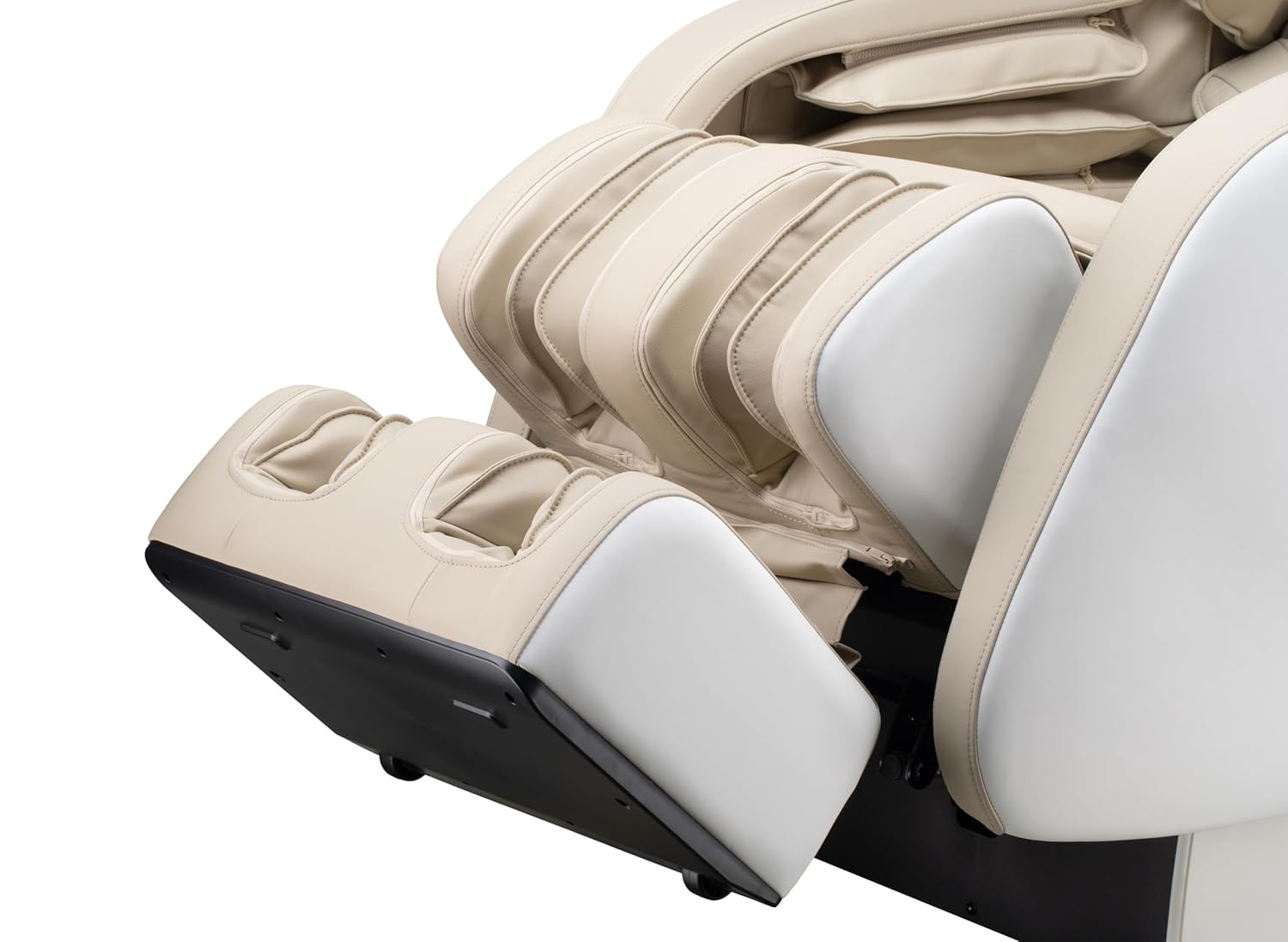
Figi 5.4: Detail of the footrest with integrated foot rollers.
- Oratè Bluetooth: Connect your personal device via Bluetooth to enjoy audio during your massage.
- Pèmèt Bluetooth sou aparèy ou an.
- Chèche pou "Genesis Massage Chair" or similar on your device's Bluetooth settings.
- Pè epi konekte.
- USB chaje Port: A convenient USB port is available for charging your mobile devices.

Figi 5.5: Plis paseview of main features and their locations on the chair.
6. Antretyen ak Swen
Bon antretyen asire lonjevite ak pèfòmans optimal chèz masaj ou a.
6.1 Netwayaj
- Eksteryè: Siye pwòp ak yon mou, damp cloth. Do not use abrasive cleaners, solvents, or harsh chemicals, as these may damage the upholstery.
- Enteryè: Periodically vacuum any dust or debris from crevices.
- Asire w ke chèz la debranche anvan ou netwaye li.
6.2 Depo
If storing the chair for an extended period, unplug it and cover it to protect from dust and moisture. Store in a cool, dry place.
NAN. Depanaj
If you encounter issues with your massage chair, refer to the following common problems and solutions:
| Pwoblèm | Kòz posib | Solisyon |
|---|---|---|
| Chèz la pa limen. | Power cord not securely plugged in. No power from outlet. | Check power cord connection to chair and outlet. Test outlet with another device. |
| Woulo masaj yo pa ap deplase. | Chair is in standby mode. Program not selected. | Ensure chair is powered on. Select an auto program or manual massage technique. |
| Bluetooth pa konekte. | Bluetooth on device is off. Chair's Bluetooth is off or not discoverable. | Ensure Bluetooth is enabled on your device. Check tablet remote for Bluetooth activation. Try restarting both devices. |
| Voice activation not responding. | Microphone obstructed. Incorrect commands. | Ensure no obstructions near the microphone. Speak clearly and use the specified voice commands. |
| Bwi etranj pandan operasyon an. | Normal operational sounds. Loose component. | Some motor and airbag sounds are normal. If noise is excessive or new, discontinue use and contact customer support. |
If the problem persists after attempting these solutions, please contact Genesis Designs customer support for assistance.
8. Espesifikasyon
| Karakteristik | Detay |
|---|---|
| Nimewo Modèl | GM1-W |
| Mak | Jenèz Designs |
| Pist Masaj | 2D SL-Track |
| Dimansyon vètikal (L x W x H) | 57.67 x 29.72 x 44.33 pous |
| Zero Gravity Dimensions (L x W x H) | 66.33 x 29.72 x 38.77 pous |
| Pwa pwodwi | 165 liv |
| Lajè chèz | 21 pous |
| Legrest Extension | Jiska 6.25 pous |
| Pwogram masaj | 12 Auto Modes, 6 Manual Techniques |
| Karakteristik espesyal | Voice Activation, Bluetooth Speakers, USB Charging, Heated Lumbar, Foot Rollers |
| Sètifikasyon | ETL sètifye |
| UPC / GTIN | 811691028064 |

Figi 8.1: Dimensional diagram of the massage chair.
9. Garanti ak Sipò Kliyan
For warranty information, please refer to the documentation included with your purchase or contact Genesis Designs customer support directly. Keep your proof of purchase for warranty claims.
If you require technical assistance, have questions about operation, or need to report a problem, please contact Genesis Designs customer support through their official websit la oswa enfòmasyon kontak yo bay ak pwodwi ou a.


