1. Pwodwi souview
The ErGear Height Adjustable Desk is an electric standing desk designed for computer workplaces, offering excellent stability and ergonomic flexibility. It features a sturdy steel frame with aviation lifting column connections, ensuring a firm foundation even at full height. The desk includes a memory function for convenient height adjustments and comes with a practical storage bag.

Image 1.1: The ErGear Height Adjustable Desk in a typical office setup, showcasing its sleek design and ample workspace for multiple monitors and accessories.
2. Enfòmasyon sou Sekirite
Avètisman Sekirite Enpòtan: Pou asire yon operasyon an sekirite epi pou evite domaj, tanpri swiv direktiv sa yo:
- Pa depase kapasite pwa maksimòm lan 80 kg (176 lbs) on the desk surface. Overloading can lead to instability and potential damage to the lifting mechanism.
- Kenbe timoun ak bèt kay lwen biwo a pandan w ap opere pou evite aksidan.
- Ensure there are no obstructions in the desk's path when adjusting height. Check for cables, chairs, or other objects that could be pinched or damaged.
- Pa chita oswa kanpe sou biwo a.
- Unplug the desk from the power outlet before cleaning or performing any maintenance.
- If the desk malfunctions or makes unusual noises, discontinue use immediately and consult the troubleshooting section or contact customer support.

Image 2.1: Illustration demonstrating the desk's robust 80KG load capacity, emphasizing the importance of not exceeding this limit for safe and reliable performance.
3. Pake kontni
Before assembly, please verify that all components listed below are present and undamaged. If any parts are missing or damaged, contact customer support.
- Desktop Surface (1)
- Lifting Columns/Legs (2)
- Feet/Bases (2)
- Panèl kontwòl (1)
- Bwat kontwòl (1)
- Power Adapter & Cable (1)
- Sak Depo (1)
- Hardware Kit (Screws, Allen wrenches, Cable ties)
- Manyèl Enstriksyon (Dokiman sa a)
4. Enstalasyon ak Asanble
Assembly typically requires two people. Follow these general steps. Refer to the included assembly diagram for detailed instructions specific to your model.
- Prepare espas travay: Clear a large, flat area for assembly. Lay down a blanket or cardboard to protect the desktop surface from scratches.
- Attach Lifting Columns to Desktop: Carefully place the desktop upside down. Attach the lifting columns to the pre-drilled holes on the underside of the desktop using the provided screws.
- Mete pye yo nan kolòn leve yo: Secure the feet/bases to the bottom of the lifting columns.
- Install Control Box and Control Panel: Mount the control box to the designated area under the desktop. Connect the control panel to the control box, and then connect the lifting columns to the control box. Ensure all cables are securely connected and routed neatly.
- Install Storage Bag: Attach the storage bag to the side of the desk as desired, typically using hooks or clips provided.
- Konekte pouvwa: Plug the power adapter into the control box and then into a wall outlet.
- Initial Calibration (if required): Some models may require an initial calibration. Refer to the specific assembly diagram for your model for details on how to perform this. Typically, this involves pressing and holding the "Down" button until the desk reaches its lowest point and slightly retracts.

Imaj 4.1: Gwo plan view of the desk's side storage pockets, demonstrating their capacity for organizing various office supplies and documents. These pockets are typically attached during assembly.
5. Operasyon Enstriksyon
5.1. Ajisteman Wotè
The ErGear Height Adjustable Desk features an electric lifting system for smooth and precise height adjustments.
- To Raise the Desk: Peze epi kenbe la "Anlè" arrow button (▲) on the control panel. The desk will move upwards. Release the button when the desired height is reached.
- To Lower the Desk: Peze epi kenbe la "Desann" arrow button (▼) on the control panel. The desk will move downwards. Release the button when the desired height is reached.
5.2. Fonksyon memwa
The desk's memory function allows you to save and recall preferred sitting and standing heights.
- To Save a Height Setting:
- Ajiste biwo a nan wotè ou vle a avèk bouton Monte/Desann yo.
- Peze a "M" (Memory) button. The display may flash or show "S-".
- Within a few seconds, press one of the numbered preset buttons (1, 2, 3, oswa 4) to save the current height to that position. The display will confirm the save (e.g., "S-1").
- To Recall a Saved Height:
- Simply press the corresponding numbered preset button (1, 2, 3, oswa 4Biwo a ap deplase otomatikman nan wotè ki anrejistre a.

Image 5.1: Visual representation of the desk's adjustable height range, illustrating movement from a minimum of 71cm to a maximum of 119cm, allowing users to set ideal sit or stand positions.
6. Antretyen
Regular maintenance helps ensure the longevity and smooth operation of your ErGear desk.
- Netwayaj: Wipe the desktop surface and legs with a soft, damp twal. Evite pwodui chimik ki agresif oswa pwodui netwayaj abrazif ki ka domaje fini an.
- Jesyon kab: Periodically check and organize cables to prevent tangling or interference with the lifting mechanism. Use the provided cable ties if necessary.
- Enspeksyon: Regularly inspect all screws and connections to ensure they are tight. Retighten if necessary.
- Distribisyon pwa: Distribute weight evenly on the desktop to prevent strain on the lifting mechanism.
NAN. Depanaj
If you encounter issues with your ErGear desk, refer to the following common troubleshooting steps:
| Pwoblèm | Kòz posib | Solisyon |
|---|---|---|
| Biwo a pa deplase. | Power cable disconnected; Overload; Motor protection activated. | Check power connections. Reduce weight on desk. Unplug for 20 minutes, then plug back in. |
| Biwo a ap deplase yon fason inegal oswa li fè yon bri dwòl. | Loose connections; Obstruction; Uneven weight distribution. | Check all screws and connections. Remove any obstructions. Redistribute weight evenly. |
| Error code displayed (e.g., E01, E02). | Specific malfunction or sensor issue. | Refer to the specific error code in your detailed assembly manual or contact customer support. Often, a power cycle (unplug, wait 20s, plug in) can resolve temporary errors. |
| Fonksyon memwa a pa mache. | Pwosedi pou sove ki pa kòrèk. | Ensure you press "M" then the preset number within the specified time. Repeat the saving process. |
Si pwoblèm nan pèsiste apre ou fin eseye solisyon sa yo, tanpri kontakte sèvis kliyan ErGear.
8. Espesifikasyon
| Karakteristik | Detay |
|---|---|
| Mak | ErGear |
| Nimewo Modèl | 7B-N1-UK |
| Dimansyon pwodwi | 120 cm (Width) x 60 cm (Depth) x 70-119 cm (Height) |
| Pwa | 17.86 kg |
| Materyèl | Vè apeze, asye alyaj |
| Koulè | Nwa |
| Kapasite chaj maksimòm | 80 kg (176 liv) |
| Karakteristik espesyal | Adjustable height, Memory function |
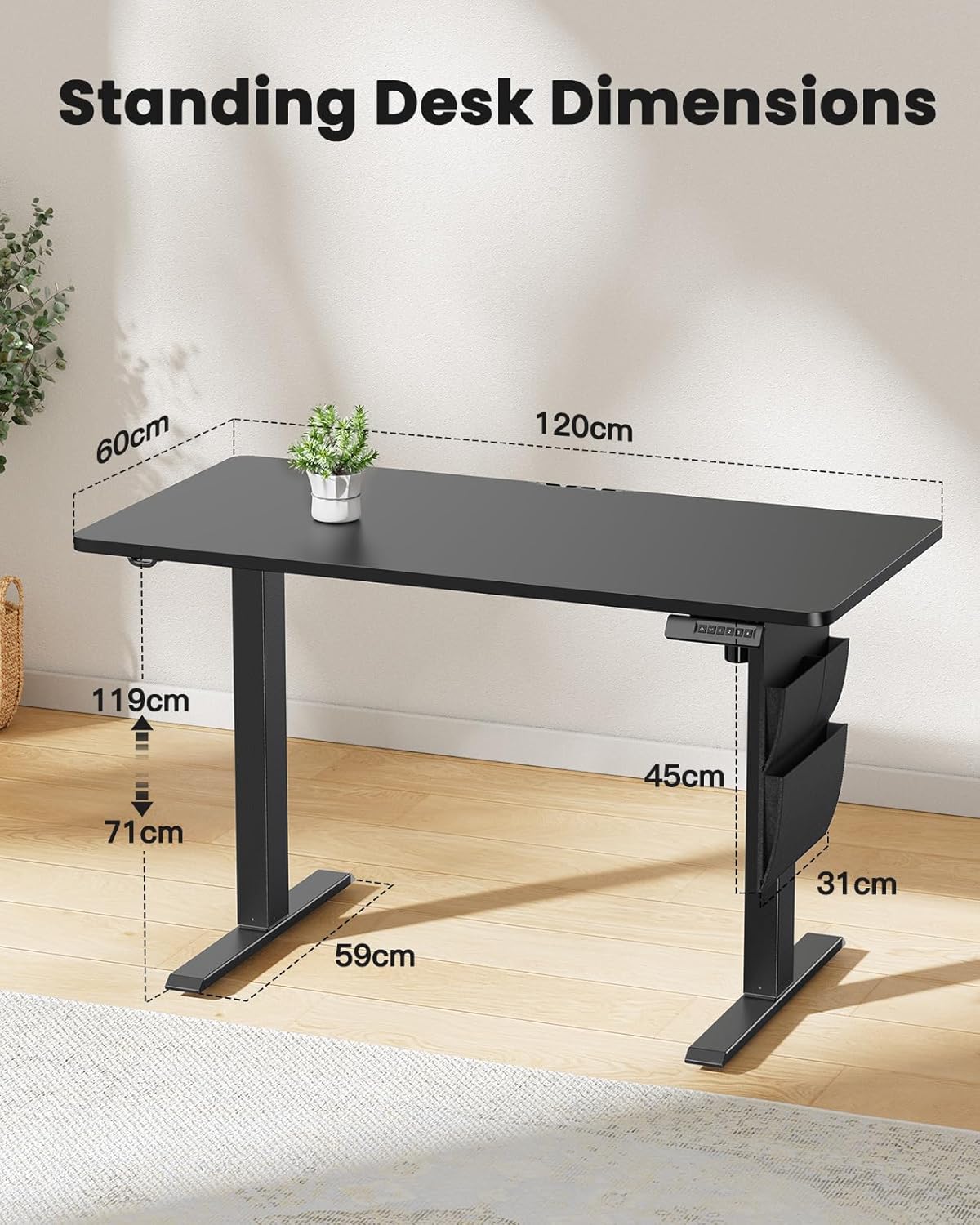
Image 8.1: Detailed diagram illustrating the key dimensions of the ErGear standing desk, including desktop width (120cm), depth (60cm), and height range (71cm to 119cm).
9. Garanti ak sipò
ErGear products are designed for durability and performance. For any questions, technical assistance, or warranty claims, please contact ErGear customer support.
- Règleman retounen: This product is eligible for a refund or replacement within 30 days of purchase, as per standard policy.
- Enfòmasyon pou kontakte: Please refer to the contact details provided on the ErGear official website or your purchase documentation for the most up-to-date support channels.


