1. Entwodiksyon
The Darmoshark M3Pro is a high-performance wireless gaming mouse designed for versatility and precision. It features a tri-mode connection, allowing seamless switching between 2.4G wireless, Bluetooth, and wired USB-C modes. Equipped with the PAW3395 optical sensor and a lightweight ergonomic design, the M3Pro is engineered to enhance your gaming and productivity experience across various platforms.
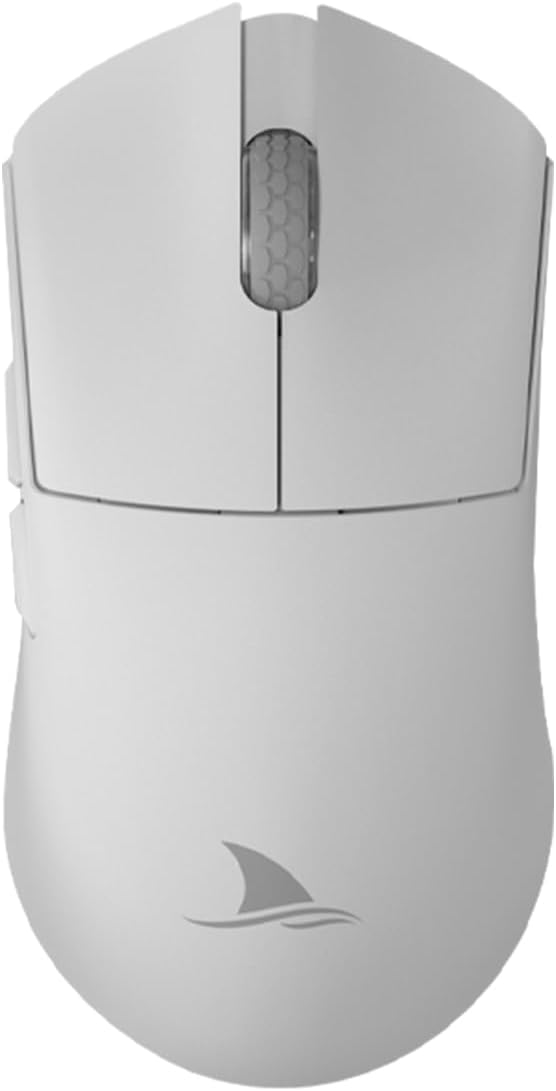
Imaj 1: Anlè view of the Darmoshark M3Pro Wireless Gaming Mouse.
2. Pwodwi Features
- Koneksyon Tri-Mòd: Supports 2.4G wireless, Bluetooth 5.0, and wired USB-C connections for maximum flexibility across multiple devices.
- Capteur pèfòmans segondè: Integrates the PAW3395 optical sensor, offering up to 26000 DPI, 650 IPS tracking speed, 1000Hz polling rate, and 50G acceleration for precise and responsive tracking.
- Konsepsyon ki lejè: Weighs approximately 55g with dimensions of 129.5 x 66.2 x 39.6 mm, providing comfort during extended use and quick maneuverability.
- Switch dirab: Features TTC Dustproof Gold Microswitches for crisp clicks and a responsive feel.
- Rou defile presizyon: Equipped with TTC Golden Wheel Encoders for accurate and smooth scrolling.
- Bouton pwogramasyon: 8 customizable buttons allow for personalized macros and functions via dedicated software.
- Long lavi batri: Built-in 500mAh lithium-ion battery provides approximately 280 hours of interval use (8 hours/day office calculation) or 140 hours of continuous use in 2.4G 1KHz return rate mode.
- Pousantaj biwo vòt segondè: Supports up to 4KHz return rate for ultra-low latency.

Image 2: Lightweight design and dimensions of the M3Pro mouse.

Image 3: Illustration of TTC Dustproof Gold Micromotion switches.
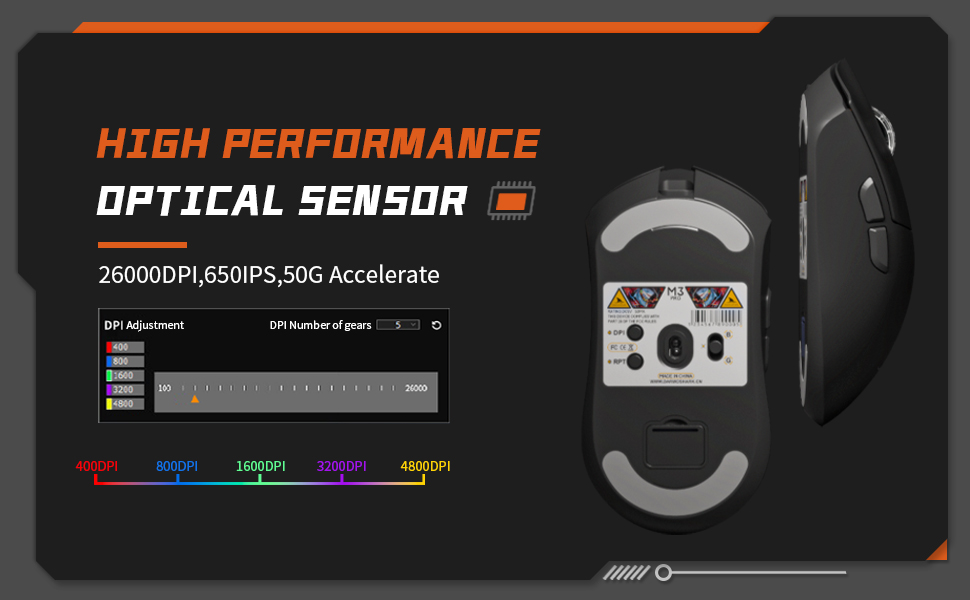
Image 4: Battery life information for the M3Pro mouse.
3. Enstalasyon
3.1 Chaje Sourit la
Before first use, it is recommended to fully charge the mouse. Connect the included USB-C cable to the mouse and to a USB power source (e.g., computer USB port, USB wall adapter). The mouse's indicator light will show charging status.

Image 5: M3Pro mouse connected for charging via USB-C.
3.2 Konekte Sourit la
The M3Pro supports three connection modes:
- 2.4G Wireless Mode:
- Locate the 2.4G USB receiver stored in the compartment at the bottom of the mouse.
- Ploge reseptè USB a nan yon pò USB ki disponib sou òdinatè w lan.
- Switch the mode selector switch on the bottom of the mouse to the '2.4G' position. The mouse should connect automatically.
- Mòd Bluetooth:
- Switch the mode selector switch on the bottom of the mouse to the 'Bluetooth' position.
- Sou òdinatè w la oswa aparèy ou an, aktive Bluetooth epi chèche nouvo aparèy.
- Select "Darmoshark M3Pro" from the list of available devices to pair.
- Branche Mode:
- Connect the USB-C cable to the mouse and the other end to a USB port on your computer.
- Sourit la ap chanje otomatikman nan mòd filaire epi li pral kòmanse chaje.

Image 6: Tri-mode connection options for the M3Pro mouse.
3.3 Enstalasyon lojisyèl
To customize DPI settings, button functions, and macro settings, download the official Darmoshark M3Pro software from the official Darmoshark websit la. Swiv enstriksyon ki sou ekran an pou enstalasyon an.

Image 7: Software interface for DPI adjustment and customization.
4. Operasyon Enstriksyon
4.1 DPI Ajisteman
The M3Pro mouse features a dedicated DPI adjustment button, typically located on the bottom of the mouse or programmable via software. Press this button to cycle through preset DPI levels. The software allows for fine-tuning and custom DPI profiles.
4.2 Bouton pwogramasyon
The 8 programmable buttons can be configured using the Darmoshark M3Pro software. This includes remapping functions, assigning macros, and setting up specific commands for different applications or games.
4.3 Chanje mòd
Use the physical switch on the bottom of the mouse to select between 2.4G wireless, Bluetooth, and wired modes. Ensure the correct mode is selected for your desired connection type.
4.4 Endikatè estati batri
The mouse may feature an indicator light (often on the scroll wheel or near the DPI button) that changes color or blinks to indicate battery level or charging status. Refer to the software for more detailed battery information.
5. Antretyen
5.1 Netwayaj
To maintain optimal performance, regularly clean your mouse. Use a soft, dry cloth to wipe the surface. For stubborn dirt, a slightly damp Ou ka itilize yon twal ki gen savon dou, pou asire pa gen likid ki antre nan sourit la. Evite pwodui chimik ki agresif oswa materyèl abrazif.
5.2 Grip Stickers and Mouse Feet
The M3Pro includes optional grip stickers for enhanced handling. While effective, these stickers may show discoloration with prolonged use. The mouse also comes with extra bottom feet, which can be replaced if the original feet wear out, ensuring smooth gliding performance.
NAN. Depanaj
- Sourit la pa reponn: Ensure the mouse is charged and the correct connection mode (2.4G, Bluetooth, or Wired) is selected. Check USB receiver connection for 2.4G mode or Bluetooth pairing for Bluetooth mode.
- Lag oswa Dekoneksyon: For wireless modes, ensure the mouse is within range of the receiver/device and there are no strong interferences (e.g., other wireless devices). Try connecting via wired mode to rule out wireless issues.
- DPI/Button issues: Verify settings in the Darmoshark M3Pro software. Ensure the software is up-to-date.
- Cursor erratic movement: Clean the optical sensor at the bottom of the mouse. Ensure you are using the mouse on a suitable surface (e.g., a mouse pad).
7. Espesifikasyon
| Karakteristik | Spesifikasyon |
|---|---|
| Mak | Darmoshark |
| Modèl | M3Pro |
| Koneksyon | Tri-Mode (2.4G Wireless, Bluetooth, USB-C Wired) |
| Capteur | Capteur optik PAW3395 |
| DPI Rezolisyon | Jiska 26000 DPI |
| Tracking vitès | 650 ONSÈY |
| Akselerasyon | 50G |
| Pousantaj biwo vòt | Up to 4KHz (2.4G mode) |
| Bouton | 8 Bouton pwogramasyon |
| Chanjman | TTC Dustproof Gold Microswitches |
| Ankode | TTC Golden Wheel Encoder |
| Pwa | Apeprè. 55g |
| Dimansyon | 129.5 x 66.2 x 39.6 mm |
| Kapasite batri | 500mAh Lityòm Ion |
| OS konpatib | Linux, Windows 7, Windows XP (ak vèsyon ki pi resan yo) |
| Oryantasyon men | Dwa |

Image 8: Product parameter diagram with button layout and dimensions.
8. Videyo pwodwi ofisyèl la
Videyo 1: Yon overview of the Darmoshark M3Pro Wireless Gaming Mouse, highlighting its features and performance in a gaming context.
9. Garanti ak sipò
For warranty information and technical support, please refer to the documentation included with your product or visit the official Darmoshark website. You may also contact customer support via the hotline: 4008-860-368.


