1. Entwodiksyon
This manual provides detailed instructions for the ACASIS 7-in-1 USB C Hub Multiport Adapter, Model DS-9901-SD. This device expands the connectivity of your USB-C enabled laptop or computer, offering a range of ports for data transfer, video output, and power delivery. Please read this manual thoroughly before using the product to ensure proper operation and longevity.

Image 1: The ACASIS 7-in-1 USB C Hub Multiport Adapter, showcasing konsepsyon kontra enfòmèl ant li yo ak plizyè pò yo.
2. Karakteristik kle
- Konektivite 7 an 1: Integrates 2 USB-C 3.1 (10Gbps), 1 USB-A 3.1 (10Gbps), 1 HDMI 2.0 (4K@60Hz), 1 SD card reader, 1 TF card reader, and 1 PD 100W charging port.
- Transfè Done gwo vitès: USB 3.1 ports support data transfer speeds up to 10Gbps for efficient file jesyon.
- Sòti HDMI 4K a 60Hz: Konekte ak ekran ekstèn pou yon pwodiksyon videyo ki gen gwo rezolisyon.
- Power Delivery 100W: Supports up to 100W power input for charging your host device (up to 90W output) while using other hub functions.
- Dual Card Reader: Simultaneously read and write data from SD and TF cards.
- Lajè konpatibilite: Compatible with various USB-C devices and operating systems including Windows, macOS, Linux, and Vista.
3. Pwodwi souview
The ACASIS USB C Hub features a compact design with clearly labeled ports for easy identification and use. Below is a diagram illustrating the various interfaces:

Image 2: Diagram showing the layout of the 7-in-1 USB C Hub, including HDMI 2.0, TF 3.0, SD 3.0, USB-A 3.1 (10Gbps), two USB-C 3.1 (10Gbps), and PD 3.0 (100W Max) ports.
- HDMI 2.0 pò: Supports video output up to 4K resolution at 60Hz.
- Plas kat TF 3.0: For TransFlash (microSD) memory cards.
- SD 3.0 Card Slot: For Secure Digital memory cards.
- Pò USB-A 3.1: For connecting USB-A devices, offering 10Gbps data transfer.
- USB-C 3.1 Ports (x2): For connecting USB-C devices, offering 10Gbps data transfer.
- PD 100W Port: USB-C port dedicated to power input for charging the host device. This port does not support data transfer.
4. Enstriksyon Enstalasyon
- Konekte Hub la ak aparèy ou an: Plug the integrated USB-C cable of the ACASIS hub into an available USB-C port on your laptop, MacBook, Mac mini, or other compatible host device.
- Koneksyon pouvwa (opsyonèl): If your host device requires charging or if you are connecting power-intensive peripherals, connect a USB-C power adapter (up to 100W) to the PD 100W port on the hub.
- Konekte periferik: Connect your desired devices (e.g., external monitor, USB drives, SD/TF cards) to the corresponding ports on the hub.
Watch this video for a visual guide on connecting the hub and its various functions:
Videyo 1: Yon overview of the ACASIS USB C Hub, demonstrating its various ports, connection to a laptop, and showcasing its 4K@60Hz HDMI output, 10Gbps data transfer, and 100W power delivery capabilities.
5. Operasyon Enstriksyon
5.1. HDMI Sorti Videyo
Connect an HDMI cable from the hub's HDMI 2.0 port to your external monitor, TV, or projector. The hub supports resolutions up to 4K at 60Hz, providing a clear and smooth visual experience. Ensure your display device is set to the correct input source.

Image 3: A laptop connected to a large external monitor, displaying a 4K@60Hz image, facilitated by the ACASIS USB C Hub.
5.2. Transfè Done Gwo Vitès
Utilize the USB-A 3.1 and two USB-C 3.1 ports for connecting external hard drives, SSDs, USB flash drives, or other data storage devices. These ports support data transfer speeds of up to 10Gbps, allowing for rapid copying of large files.
5.3. Chaje ak livrezon pouvwa (PD)
The dedicated PD 100W USB-C port allows you to charge your host device while simultaneously using other hub functions. Connect your original power adapter to this port. The hub can deliver up to 90W of power to your laptop. Note that this port is for power input only and does not support data transfer.

Image 4: A laptop connected to the ACASIS USB C Hub, which is then connected to a wall adapter, illustrating 100W Power Delivery charging.
5.4. Lektè kat SD/TF
Insert your SD or TF (microSD) memory cards into the respective slots. The hub supports simultaneous reading and writing from both card types, with read/write speeds up to 80MB/s. This is ideal for transferring photos and videos from cameras or other devices.
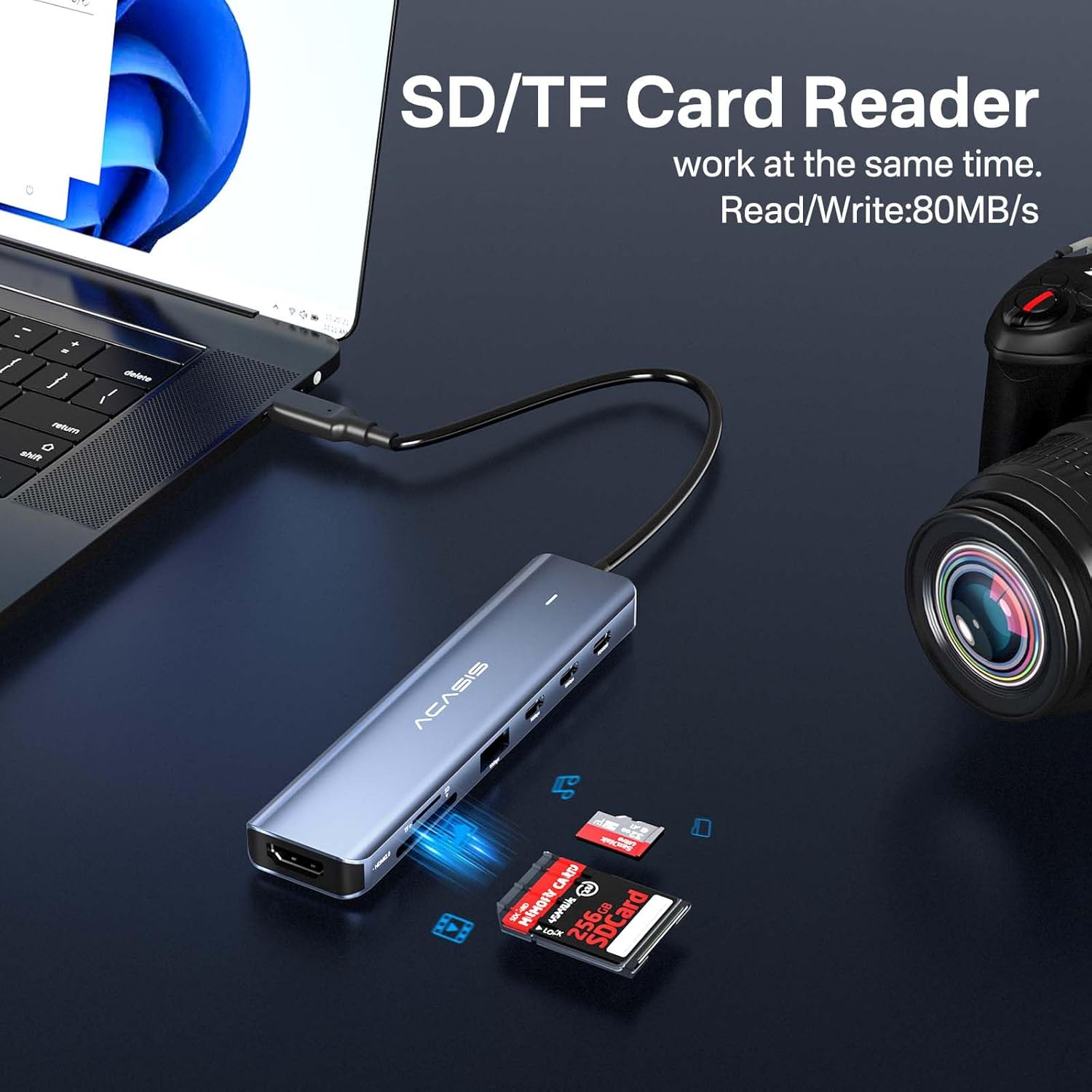
Image 5: The ACASIS USB C Hub with an SD card and a TF card inserted into their respective slots, indicating simultaneous read/write capability.
6. Konpatibilite
The ACASIS USB C Hub is designed for broad compatibility with various USB-C host devices and operating systems. It is a plug-and-play device, requiring no additional drivers for most functions.

Image 6: A visual representation of the ACASIS USB C Hub's wide compatibility with various USB-C host devices like MacBooks, iPads, Steam Deck, Nintendo Switch, ROG Ally, PS5, Samsung S22, iPhone 15, and operating systems including Windows, macOS, iPadOS, Linux, and Android.
- Aparèy konpatib: Laptops, MacBooks, Mac mini, iPads, Steam Deck, Nintendo Switch, ROG Ally, PS5, Samsung S22, iPhone 15, and other devices with a full-featured USB-C port.
- Sistèm operasyon ki sipòte: Windows, macOS, iPadOS, Linux, Android.
7. Espesifikasyon teknik
| Karakteristik | Spesifikasyon |
|---|---|
| Nimewo Modèl | DS-9901-SD |
| Dimansyon pwodwi | 5.24 x 1.22 x 0.61 pous |
| Pwa atik | 2.4 ons |
| Antre Connector | USB-C (Tip-C) |
| Entèfas Sòti | 1x HDMI 2.0 (4K a 60Hz) 2x USB-C 3.1 (10Gbps) 1x USB-A 3.1 (10Gbps) 1x Lektè Kat SD 3.0 1x TF 3.0 Card Reader 1x PD 100W (Charging Only) |
| Livrezon pouvwa | Up to 100W input (90W output) |
| Vitès Transfè Done | 10Gbps (USB 3.1 ports) |
| Card Reader Speed | Up to 80MB/s (SD/TF) |
| Materyèl | Aliminyòm alyaj |
| Koulè | Ble |
NAN. Depanaj
- Pa gen okenn sòti ekspozisyon atravè HDMI:
- Asire w pò USB-C aparèy lame w la sipòte pwodiksyon videyo (DisplayPort Alternate Mode).
- Check all cable connections (USB-C from hub to device, HDMI from hub to display).
- Verify the external display is set to the correct HDMI input.
- Try a different HDMI cable or monitor to rule out compatibility issues.
- Vitès transfè done ki ba:
- Ensure the connected device (e.g., external SSD) supports USB 3.1 (10Gbps) speeds. Older USB 2.0 or 3.0 devices will operate at their respective maximum speeds.
- Evite konekte plizyè aparèy ki gen gwo Pleasant an menm tan si w ap fè eksperyans ralentisman.
- Ensure your host device's USB-C port supports USB 3.1 Gen 2 for optimal performance.
- Host Device Not Charging via PD Port:
- Confirm your power adapter is connected to the PD 100W port on the hub.
- Asire w adaptè kouran ou a bay ase dlotage (e.g., 65W, 90W, 100W) for your host device.
- Verifye ke aparèy lame ou a sipòte USB-C Power Delivery.
- The PD port is for power input only; it does not support data transfer.
- Kat SD/TF pa detekte:
- Asire w ke kat la byen antre nan fant ki apwopriye a epi byen.
- Check if the card is damaged or corrupted. Try another card if possible.
- Ensure your operating system has the necessary drivers (usually built-in).
9. Swen ak Antretyen
- Keep the hub away from water, moisture, and extreme temperatures.
- Evite lage mwaye a oswa soumèt li a gwo enpak.
- Clean the hub with a soft, dry cloth. Do not use liquid cleaners or aerosols.
- When not in use, store the hub in a cool, dry place.
10. Garanti ak sipò
ACASIS is committed to providing high-quality products and customer satisfaction. For any product-related inquiries, technical support, or warranty claims, please contact ACASIS customer service.
Sipò Imèl: support@acasis.com
Please refer to the official ACASIS websit la oswa anbalaj pwodwi a pou jwenn enfòmasyon ki pi ajou sou garanti a.


