1. Entwodiksyon
Thank you for choosing Lepro E1 AI Permanent Outdoor Lights. This manual provides essential information for the safe and efficient installation, operation, and maintenance of your new lighting system. These smart RGB+IC lights offer advanced features including individual bulb control, tunable white light, AI-generated lighting effects, and smart home integration with Alexa and Google Assistant.

Image: Lepro E1 AI Permanent Outdoor Lights product packaging and an example of the lights installed on a house.
2. Enfòmasyon sou Sekirite
Tanpri li tout enstriksyon sekirite yo ak anpil atansyon anvan enstalasyon ak itilizasyon. Si ou pa swiv enstriksyon sa yo, ou ka pran chòk elektrik, pran dife oswa pran lòt danje.
- Ensure the power adapter is plugged into an outlet with an enclosed electrical box for outdoor use, as the adapter plug itself is not waterproof.
- The light kits, in-line controller, wires, and connections are waterproof (IP65 rated).
- Pa eseye modifye oswa repare pwodwi a. Konfye tout antretyen bay pèsonèl kalifye.
- Kenbe pwodwi a lwen flanm dife oswa sous chalè ekstrèm.
- Ensure all connections are secure and properly aligned to prevent poor contact.

Image: Components of the lighting system, highlighting their IP65 waterproof rating for outdoor use.
3. Pake kontni
Verifye ke tout atik ki nan lis anba a yo enkli nan pakè ou a:
- 4 × 7.6M/25FT LED permanent light strings (15 LED nodes per string, 60 LED nodes in total)
- 1 × 3M/10FT extension cable
- 1 × 1.5M/5FT extension cable
- 1 × in-line controller
- 1 × power adapter (Input: 100-240V AC, Output: 29V DC)
- 70 × 3M double-sided tape (each LED node has 3M tape on the back; an extra 10 pieces of 3M tape are included in the package)
- 60 × screws and 60 × plastic expansion anchors

Imaj: Reprezantasyon vizyèl tout konpozan ki enkli nan pake pwodwi a.
4. Enstalasyon
Follow these steps to set up your Lepro E1 AI Permanent Outdoor Lights.
4.1. Preparasyon Anvan Asanblaj la
- Telechaje aplikasyon Lepro a nan App Store oubyen Google Play.
- Anrejistre yon nouvo kont nan aplikasyon an.
- Turn on your phone's Bluetooth and connect to your 2.4 GHz Wi-Fi network. (Note: 5 GHz Wi-Fi is not supported).
4.2. Assembling and Testing the Lights
Align connectors correctly, push firmly, and tighten to avoid poor contact. Each length (50ft/100ft/150ft kits) comes with a unique power supply and controller, so they cannot be mixed.
The extension cord can be added between the controller and the light string, or between two strings of lights.

Image: Step-by-step visual guide for assembling and installing the lights.
- Assemble all strands and test the Wi-Fi/Bluetooth connection before installation.
- Plug the power adapter into an outdoor outlet with an enclosed electrical box. A flashing white light indicates the connected length is being detected.
- If adding additional strings, detect the length by re-plugging the power or through the app settings. A flashing blue light indicates the app is pairing.
4.3. Adding Lights to the Lepro App
Once connected, add the E1 lights to your Lepro APP. The app will auto-search for available devices.
Video: Detailed instructions on how to download the Lepro app, register an account, and navigate the app for setup and control.
4.4. Enstalasyon Fizik
- Adjust the lights' distance from the wall (2-4 inches recommended) for the best scalloped pattern.
- Use a cardboard template to ensure all light nodes are evenly spaced from the wall.
- Clean the ceiling surface with alcohol before applying adhesive.
- Use the double-sided tape for initial placement.
- Secure with screws and plastic expansion anchors for a permanent installation.
5. Operasyon Enstriksyon
Your Lepro E1 lights offer a variety of control options and lighting effects.
5.1. App Control Overview
The Lepro app is your primary interface for controlling the lights. It offers extensive features for customization and smart control.

Imaj: Plis paseview of the Lepro app interface for smart control.
5.2. AI Generated Lighting (LightGPM 2.0)
Lepro LightGPM is an AI model that generates lighting effects based on your prompts. Simply type or speak your activity or mood into the app, and it will suggest ideal lighting effects.

Image: How the AI voice control works to generate lighting effects.
Video: Demonstrates various AI-generated lighting effects and how they can be applied to a house.
5.3. Tunable White Light (2200K-6500K)
The lights feature dedicated white LEDs, allowing you to choose any shade of white light, from warm white (2200K) for accent lighting to daylight white (6500K) for security. Each white LED is individually addressable.

Image: Comparison of warm white and daylight white light settings on a house.
5.4. RGB+IC (Independent Control) LEDs
You can set each bulb to a specific color individually, creating a myriad of dynamic lighting effects. The app allows for detailed customization of colors and patterns.
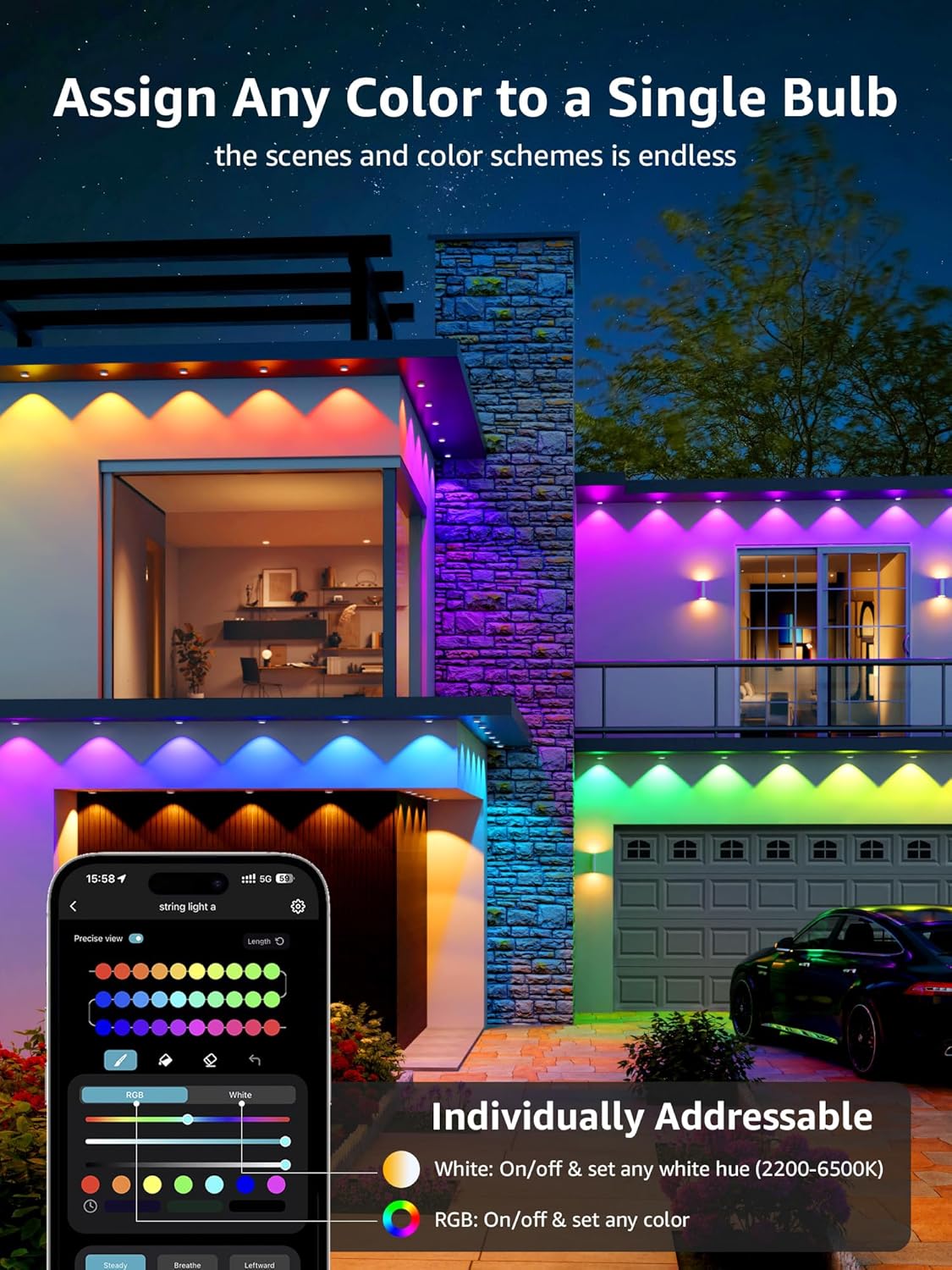
Image: App interface demonstrating individual color assignment to each light puck.
5.5. Entegrasyon Kay Entelijan
The lights can be controlled with voice commands through Alexa or Google Assistant. Ensure the light is connected to Wi-Fi through the Lepro app for this functionality.

Image: Steps to integrate your Lepro lights with Alexa or Google Home.
6. Antretyen
Proper maintenance ensures the longevity and optimal performance of your lights.
- Netwayaj: Gently wipe the light pucks and cables with a soft, damp twal. Evite itilize pwodui chimik piman bouk oswa pwodui netwayaj abrazif.
- Enpèmeyab: While the lights and in-line controller are IP65 waterproof, the power adapter plug is not. Always ensure it is protected within an enclosed electrical box when used outdoors.
- Enspeksyon: Periodically inspect cables and connections for any signs of wear, damage, or loose connections. Address any issues promptly.
NAN. Depanaj
If you encounter issues with your Lepro E1 lights, refer to the following common solutions:
7.1. Lights Not Responding / Disconnection
- Tcheke pouvwa: Asire w adaptè pouvwa a byen konekte nan yon priz k ap travay.
- Koneksyon Wi-Fi/Bluetooth: Verify your phone's Bluetooth is on and connected to a 2.4 GHz Wi-Fi network. Ensure the lights are within range of your Wi-Fi router.
- Estati aplikasyon: Check the Lepro app to see if the device is online. If not, try refreshing the app or re-pairing the device.
- Koneksyon kab: Ensure all light string connections are firm and properly aligned.
7.2. Reyajiste Aparèy la
If the lights are unresponsive or you need to re-pair them, you can perform a factory reset:
- Press and hold the button on the in-line controller for 5 seconds.
- A flashing blue light indicates a successful reset. The device is now ready for re-pairing.
8. Espesifikasyon
| Karakteristik | Spesifikasyon |
|---|---|
| Mak | Lepro |
| Modèl | E1-60 |
| Gwosè | 100 FT |
| Kalite sous limyè | dirije |
| Kantite sous limyè | 60 |
| Koulè limyè | Tunable White (2200K-6500K), Multicolor (RGB+IC) |
| Klète | 2400 Lumen |
| Wattage | 36 wat |
| Voltage | 29 Vòlt (DC) |
| Metòd kontwòl | Kontwòl aplikasyon, Kontwòl vwa (Alexa, Asistan Google) |
| Pwotokòl Koneksyon | Bluetooth, Wi-Fi (2.4 GHz) |
| Itilizasyon Andedan kay la / Deyò | Deyò |
| Nivo rezistans dlo | Waterproof (IP65 for lights/controller) |
| Mwayèn lavi | 15000 èdtan |
| Materyèl | Polikarbonat |
| Pwa atik | 4.41 liv |
9. Garanti ak sipò
For warranty information and technical support, please visit the official Lepro websit la oubyen kontakte sèvis kliyan yo. Kenbe resi acha w la pou reklamasyon garanti.