Entwodiksyon
Welcome to the user manual for your LTC Nimbleback NB981 95% Wireless Mechanical Keyboard. This manual provides detailed instructions for setting up, operating, maintaining, and troubleshooting your new keyboard.
The NB981 keyboard offers versatile connectivity options (2.4GHz, Bluetooth, USB-C wired), a comfortable typing experience with its 3-layer silicone dampening, and extensive customization through hot-swappable switches and dynamic RGB lighting.
Kontni pake
Tanpri verifye ke tout atik yo prezan nan pakè ou a:
- LTC Nimbleback NB981 Wireless Mechanical Keyboard
- USB-C pou USB-A kab
- Keycap Puller
- Switch Puller (often combined with keycap puller)
- Switch rezèv
- Manyèl itilizatè
Unboxing Videyo
This video demonstrates the unboxing process and shows the contents typically included with the LTC Nimbleback NB981 keyboard.
Pwodwi souview
The LTC Nimbleback NB981 is a high-performance mechanical keyboard designed for both gaming and everyday use. It features a 95% layout, combining functionality with a compact design.
Karakteristik kle
- Flexible Tri-Mode Connectivity: Bluetooth, wired, and 2.4GHz options.
- Excellent Silicone Sound Dampening: Triple-layer silicone structure for reduced hollow sounds and quiet typing.
- Customizable Hot-Swap Design: Supports most 3-pin and 5-pin MX-style switches without soldering.
- Powerful Software Support: Key remapping, macro assignments, and personalized lighting effects for Windows, Android, iOS, and macOS.
- Dynamic RGB Illumination: 18 vibrant backlight modes with adjustable speed and brightness.
- Long-lasting 4000mAh Battery: Extended usage with battery status monitoring (FN+backspace).
Keyboard Layout and Components
Refer to the images below for a visual guide to the keyboard's layout and internal structure.
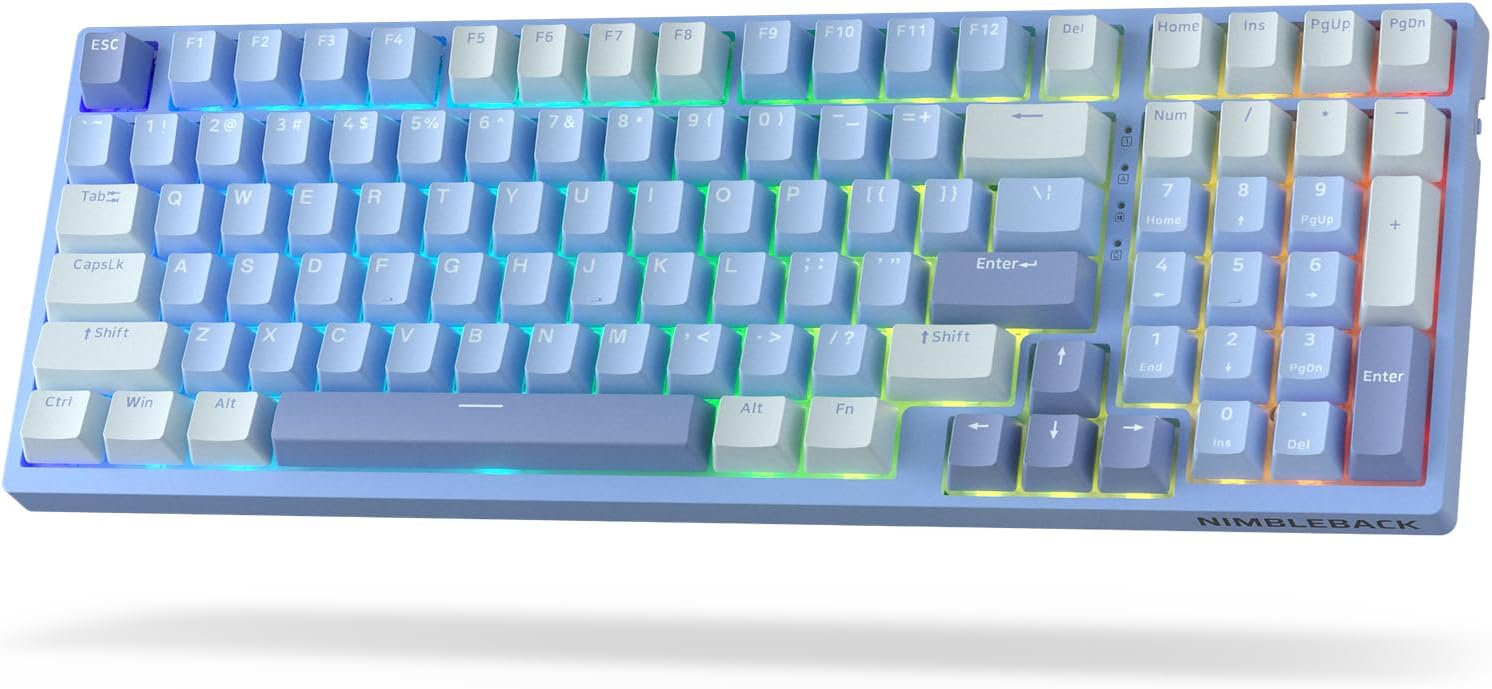
Imaj: Anwo-anba view of the LTC Nimbleback NB981 keyboard in Sky Blue, showcasing its 95% layout with RGB backlighting.

Image: Diagram highlighting key features of the NB981 keyboard, including 3-layer silicone padding, 98-key layout, tri-mode connection, 4000mAh battery, hot-swap PCB, PBT keycaps, dynamic RGB, and software support.
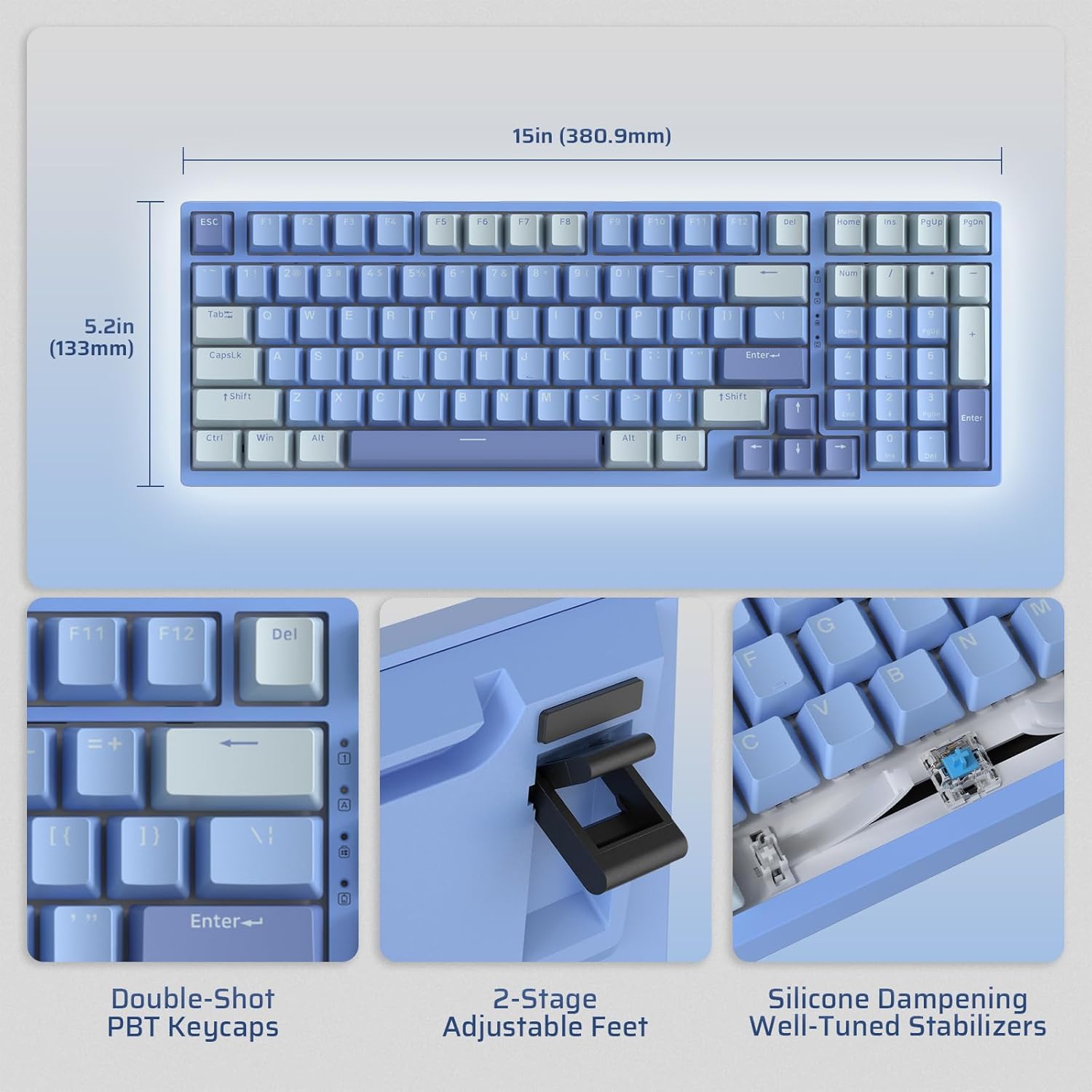
Image: Illustrates the dimensions of the keyboard (15 inches / 380.9mm length, 5.2 inches / 133mm width), double-shot PBT keycaps, 2-stage adjustable feet, and silicone dampening with well-tuned stabilizers.
Enstalasyon
Before first use, it is recommended to fully charge the keyboard using the provided USB-C cable.
Premye Koneksyon
The keyboard supports three connection modes: 2.4GHz wireless, Bluetooth, and USB-C wired.

Image: Visual representation of the tri-mode connectivity options: Bluetooth 5.0 (up to 3 devices), 2.4GHz fast-response wireless, and USB-C stable wired mode.
Mòd Koneksyon
2.4GHz Wireless Mode
- Locate the 2.4GHz USB dongle, typically stored in a compartment on the back of the keyboard.
- Branche kle a nan yon pò USB-A ki disponib sou òdinatè w la.
- Turn on the keyboard using the ON/OFF switch located on the side.
- The keyboard should automatically connect. If not, press Fn + 4 pou 3 segonn pou kòmanse appariement.
Bluetooth mòd
- Limen klavye a lè l sèvi avèk switch ON/OFF.
- Peze Fn + 1, Fn + 2, oswa Fn + 3 to select a Bluetooth channel. The corresponding key will flash rapidly, indicating pairing mode.
- On your device (computer, tablet, smartphone), enable Bluetooth and search for "LTC NB981".
- Select the keyboard to pair. The key will stop flashing once connected.
- You can store up to three Bluetooth devices.
Mòd filaire USB-C
- Konekte kab USB-C ki vini ak li a nan pò USB-C klavye a.
- Connect the other end of the cable (USB-A) to your computer's USB port.
- Klavye a pral otomatikman chanje an mòd filaire epi li pral kòmanse chaje.
Enstriksyon Operasyon
Kontwòl ekleraj
The NB981 features dynamic RGB illumination with 18 modes.
- Fn + |: Backlight On/Off
- Fn + ↑: Backlight Modes Switch (Cycle through 18 modes)
- Fn + ↓: Backlight Colors Switch (Change color in static modes)
- Fn + ←: Backlight Speed -
- Fn + →: Vitès ekleraj +
- Fn + F5: Backlight Brightness -
- Fn + F6: Backlight Brightness +
To restore factory settings for backlight, long press Fn + Espas.
Multimedia Keys (Windows System)
Sèvi ak la Fn key in combination with the F-keys for multimedia functions:
- Fn + F1: Display Brightness -
- Fn + F2: Display Brightness +
- Fn + F3: Back to Desktop
- Fn + F4: Mission Control
- Fn + F7: Last Song
- Fn + F8: jwe/poz
- Fn + F9: Pwochen chante
- Fn + F10: bèbè
- Fn + F11: Volume -
- Fn + F12: Volim +
Sipò lojisyèl
The keyboard supports powerful software for full customization. This software allows for key remapping, macro assignments, and advanced lighting effects.
The software is compatible with Windows (7, 8, 10, 11), Android, iOS, and macOS. Please visit the official LTC website for software download and detailed instructions.

Image: Screenshot of the LTC keyboard customization software, showing options for key remapping, macro creation, and RGB lighting control.
Hot-Swap Switch Replacement
The NB981 features a hot-swappable PCB, allowing you to change switches without soldering.
- Use the provided switch puller tool to gently remove the desired switch.
- Align the pins of the new 3-pin or 5-pin MX-style switch with the holes on the PCB.
- Press the new switch firmly into place until it clicks. Ensure the pins are straight to avoid bending.

Imaj: Detaye view of the hot-swap PCB, illustrating pre-lubed linear switches, hot-swap sockets, and well-lubed stabilizers.
Son Profile
The keyboard's 3-layer silicone dampening structure significantly minimizes hollow sounds and cavity noise, providing a smooth and quiet typing experience.
This video provides a sound test of the LTC Nimbleback NB981 keyboard, demonstrating its typing acoustics with the integrated sound dampening.
Antretyen
- Netwayaj: Use a soft, dry cloth to wipe the keyboard surface. For deeper cleaning, use the keycap puller to remove keycaps and clean dust or debris with compressed air or a small brush.
- Swen batri: To prolong battery life, avoid fully discharging the keyboard frequently. Charge it when the battery indicator (FN+backspace) shows low power.
- Depo: Sere klavye a nan yon kote ki fre epi sèk, lwen limyè solèy dirèk ak tanperati ekstrèm.
Depanaj
Klavye a pa reponn:
- Ensure the keyboard is turned ON.
- Check the battery level (FN+backspace). Recharge if low.
- For wired mode, ensure the USB-C cable is securely connected to both the keyboard and the computer. Try a different USB port.
- For 2.4GHz mode, ensure the dongle is properly inserted and try re-pairing (Fn + 4 pou 3 segonn).
- For Bluetooth mode, ensure Bluetooth is enabled on your device and try re-pairing (Fn + 1/2/3 pou 3 segonn).
- Eseye rekòmanse òdinatè w lan.
Kle yo pa anrejistre oswa yo tape de fwa:
- This could indicate a faulty switch. Use the switch puller to replace the affected switch with a spare one.
- Asire w switch la byen chita nan PCB a.
Pwoblèm limyè dèyè:
- Ensure backlight is turned on (Fn + |).
- Ajiste klète (Fn+F5/F6).
- Cycle through modes (Fn + ↑) oubyen koulè (Fn + ↓).
- Reset backlight to factory settings (Long press Fn + Espas).
Koneksyon Bluetooth la pa estab:
- Asire w pa gen okenn lòt aparèy ki lakòz entèferans.
- Deplase klavye a pi pre aparèy ou an.
- Try forgetting the device on your computer's Bluetooth settings and re-pairing.
Espesifikasyon
| Karakteristik | Detay |
|---|---|
| Mak | LTC |
| Modèl | NB981 |
| Koneksyon | Bluetooth, RF (2.4GHz), USB-C |
| Kalite klavye | Mekanik |
| Kantite kle | 98 |
| Ekleraj | RGB |
| Kapasite batri | 4000mAh |
| Pwa atik | 3.3 liv |
| Dimansyon pake | 16.45 x 6.93 x 2.01 pous |
| Aparèy konpatib | PC (Windows, Android, iOS, macOS via software) |
| Karakteristik espesyal | Backlit, Hotkeys and Media Keys, Programmable Keys, Hot-Swappable |
| Peyi orijin | Lachin |
Ki sa ki nan bwat la
- Keycap Puller
- USB kab
Garanti ak sipò
For warranty information and technical support, please refer to the official LTC websit la oubyen kontakte sèvis kliyan yo. Kenbe resi acha w la pou reklamasyon garanti.
Vizite la LTC Official Store pou plis pwodwi ak sipò.


