1. Pwodwi souview
The OBDSTAR iScan BRP is a professional, portable diagnostic tablet specifically designed for BRP (Can-am) systems. It offers comprehensive diagnostic capabilities for motorcycles, snowmobiles, ATVs, and UTVs. Featuring a 5.0-inch capacitive touchscreen and running on Android 5.1.1, this tool provides an intuitive and efficient diagnostic experience.

Figure 1.1: The OBDSTAR iScan BRP Diagnostic Tool, showcasing its user interface and robust design.
Karakteristik kle:
- Professional Diagnostics: Tailored for BRP systems, offering superb performance.
- Fonksyon avanse: Supports automatic scanning, VIN recognition, control module programming/coding, ECU setting, instrument coding, TPMS, maintenance light reset, CO/idle speed/A/F value adjustment, ABS control unit setting, EOL mode, transmission memory reset, and clear computer memory.
- Entèfas itilizatè-zanmitay: Equipped with Android 5.1.1 operating system and a simple, intuitive menu guide for quick operation.
- Real-Time Data Monitoring: Records and plays back data streams to quickly and accurately locate sensor and component faults.
- Sipò pou plizyè lang: Available in English, Spanish, Portuguese, French, German, Italian, Polish, Russian, Turkish, Indonesian, Farsi, Thai, Vietnamese.
- Koneksyon: Wi-Fi for one-click software updates and remote assistance.
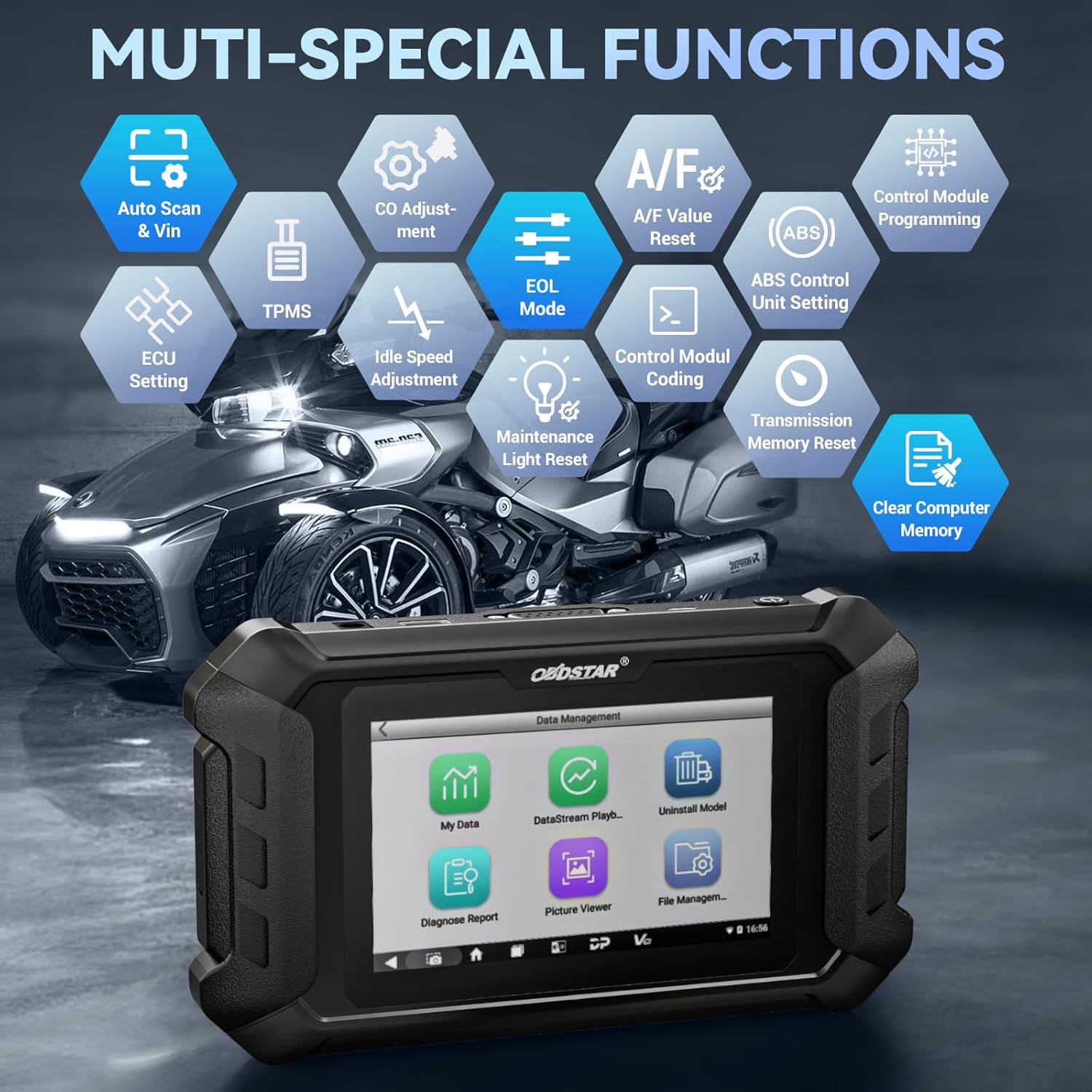
Figi 1.2: Plis paseview of the multi-special functions supported by the OBDSTAR iScan BRP, including Auto Scan & VIN, ECU Setting, TPMS, A/F Value Reset, and more.
2. Pake kontni
Lè w ap ouvri pake a, tanpri verifye si tout atik sa yo ladan l epi yo an bon eta:
- Main Tablet (OBDSTAR iScan BRP Diagnostic Tool)
- 12V2A plato
- Main kab
- BRP Cable
- Manyèl itilizatè

Figure 2.1: All components included in the OBDSTAR iScan BRP package: Main Tablet, 12V2A Charger, Main Cable, BRP Cable, and User Manual.
3. Gid Enstalasyon
3.1 Premye Limen ak Konfigirasyon
- Chaje aparèy la: Connect the 12V2A charger to the diagnostic tool and a power outlet. Ensure the device is fully charged before first use.
- Pouvwa sou: Peze epi kenbe bouton pouvwa a ki sitiye sou kote tablèt la jiskaske ekran an limen.
- Seleksyon Lang: Upon first boot, you will be prompted to select your preferred language. Choose English or another supported language from the list.
- Koneksyon Wi-Fi: Navigate to the system settings and connect to a stable Wi-Fi network. This is crucial for software updates and remote assistance.
- Mizajou lojisyèl: After connecting to Wi-Fi, it is recommended to perform a one-click software update to ensure you have the latest diagnostic software and vehicle coverage.
4. Operasyon Enstriksyon
4.1 Konekte ak yon machin
- Locate Diagnostic Port: Identify the diagnostic port on your BRP vehicle (motorcycle, snowmobile, ATV, or UTV). Refer to your vehicle's service manual for the exact location.
- Konekte kab: Use the appropriate Main Cable and BRP Cable to connect the diagnostic tool to the vehicle's diagnostic port. Ensure connections are secure.
- Limen ignisyon an: Turn the vehicle's ignition to the 'ON' position (do not start the engine unless instructed by the diagnostic procedure).
4.2 Fè dyagnostik
- Select 'MOTO Diag': From the main menu of the diagnostic tool, tap on the 'MOTO Diag' icon to enter the motorcycle diagnostic interface.
- Seleksyon machin: Select the correct vehicle brand (BRP) and model from the list.
- Automatic VIN Recognition: The tool supports automatic VIN recognition. If prompted, allow the tool to read the VIN for faster vehicle identification.
- Eskane Sistèm: Initiate an automatic system scan to identify all available control modules and detect any diagnostic trouble codes (DTCs).
- Fonksyon dyagnostik:
- Li Kòd: View current, pending, and historic diagnostic trouble codes.
- Kòd Klè: Erase diagnostic trouble codes from the vehicle's ECU.
- Done kouran: Monitor real-time data parameters from various sensors and components. Data can be displayed in text, waveform, or instrument diagram formats.
- Active Test (Motion Test): Perform specific tests on actuators and components to verify their functionality.
- Fonksyon espesyal: Access advanced functions such as ECU setting, instrument coding, TPMS reset, maintenance light reset, CO adjustment, idle speed adjustment, A/F value reset, ABS control unit setting, EOL mode, transmission memory reset, and clear computer memory.
- Save and Print Reports: After diagnosis, you can save diagnostic reports and, if connected to a compatible printer, print them for record-keeping.

Figure 4.1: The diagnostic tool's interface highlighting features like Auto VIN & Scan, One Click Upgrade, Professional Tech Support, and Live Data monitoring.

Figure 4.2: The Auto VIN & Scan feature streamlines vehicle identification for efficient diagnostics.

Figure 4.3: The Data Play Back function allows for review of recorded real-time data, aiding in fault analysis.
5. Antretyen
5.1 Mizajou lojisyèl
Regular software updates are essential to ensure your diagnostic tool has the latest vehicle coverage, bug fixes, and new features. Connect the device to a Wi-Fi network and use the 'Upgrade' function on the main menu for one-click updates.
5.2 Netwayaj ak Depo
- Siye aparèy la ak yon mou, damp twal. Pa sèvi ak pwodui netwayaj abrazif oswa solvang.
- Store the tool in a cool, dry place, away from direct sunlight and extreme temperatures.
- Keep cables neatly coiled to prevent damage.
NAN. Depanaj
| Pwoblèm | Kòz posib | Solisyon |
|---|---|---|
| Aparèy pa limen. | Low battery; faulty charger/cable; device malfunction. | Charge the device for at least 30 minutes. Try a different charger/cable. If problem persists, contact support. |
| Pa ka konekte ak machin nan. | Incorrect cable connection; vehicle ignition off; incompatible vehicle model; damaged diagnostic port. | Ensure cables are securely connected. Turn vehicle ignition ON. Verify vehicle compatibility. Check vehicle's diagnostic port for damage. |
| Mizajou lojisyèl la echwe. | Koneksyon Wi-Fi enstab; espas depo ensifizan; pwoblèm sèvè. | Ensure strong Wi-Fi signal. Check available storage space. Try updating again later. |
| Ekran an pa reponn. | Pwoblèm lojisyèl; domaj fizik. | Restart the device. If problem persists, contact support. |
7. Espesifikasyon
- Modèl: SP540
- Sistèm operasyon: Android 5.1.1
- Processeur: RK3128 Quad-core
- Ekspozisyon: 5.0-pous Kapasitif Touch Screen
- Koneksyon: Wi-Fi
- Batri: 1 batri ityòm Polymère (enkli)
- Pwa atik: Apeprè 2.55 liv
- Dimansyon pake: Apeprè 12.91 x 9.29 x 2.76 pous
- Peyi orijin: Lachin
- Lang ki sipòte: EN, ES, PT, FR, DE, IT, PL, RU, TR, ID, FA, TH, VN

Figure 7.1: Hardware highlights of the OBDSTAR iScan BRP, including Wi-Fi, Android 5.1.1, 5.0 Inch Touch Screen, RK3128 Quad-core Processor, and Intuitive Menu Guidance.
8. Sipò ak Garanti
8.1 Sipò teknik
OBDSTAR provides technical support for the iScan BRP diagnostic tool. You can utilize the one-click remote help function on the device to receive assistance from OBDSTAR technical staff.
8.2 Règleman pou retounen
This product is eligible for a 30-day refund/replacement return policy from the date of purchase. Please refer to your retailer's specific return terms and conditions for detailed information.


